TL;DR: On-premise ADM software ranges from agentless dependency mapping tools to full observability platforms. Best for: Faddom (agentless mapping), Device42 (CMDB integration), Dynatrace (observability), and AppDynamics (transaction tracing).
What Is Application Dependency Mapping Software?
Application dependency mapping (ADM) software identifies and visualizes relationships between applications, servers, databases, and other IT components within an infrastructure. It helps organizations understand dependencies, detect performance bottlenecks, and manage changes.
ADM solutions are critical for IT operations, troubleshooting, and cloud migration planning. By automating dependency discovery, they reduce manual effort and improve visibility across complex environments. Demand for these tools continues to rise as IT environments grow more distributed, and industry research projects steady, multi-year growth for the discovery and dependency mapping market.
As IT estates grow more distributed, demand for on-premise ADM is climbing, and the broader discovery and dependency mapping market is expanding steadily as organizations seek greater visibility and control. At the same time, AI and automation are reshaping how these tools discover, correlate, and analyze dependencies, adding predictive and root-cause capabilities on top of traditional mapping.
Editor’s note: Updated the article to add recent market research, a new section on AI and automation in dependency mapping, and refreshed technical detail as of 2026.
This is part of a series of articles about application mapping
On-Premise ADM Software At a Glance
The table below summarizes the key differences between these on-premise application dependency mapping software options. We explore each tool in more detail in the sections that follow.
|
Category |
Solution |
Best For |
Key Strengths |
Things to Consider |
|
Agentless Discovery and Dependency Mapping |
Faddom |
Agentless passive dependency mapping for on-premises, cloud, and hybrid environments |
Agentless real-time discovery, automatic business application grouping, AI-driven correlation |
Learning curve for the full feature set; reporting and export could be more polished; licensing scales with monitored servers |
|
Agentless Discovery and Dependency Mapping |
Device42 |
Agentless CMDB-integrated dependency mapping via native protocols |
Application Groups from communication patterns, Business Services modeling, Visio-compatible diagrams and REST APIs |
Manual, effort-intensive upgrades; setup and discovery configuration overhead; bulk operations and licensing can be confusing |
|
Agentless Discovery and Dependency Mapping |
JDisc Discovery |
Agentless multi-platform network inventory with add-on dependency mapping |
Broad OS and cloud discovery, Dependency Mapping Add-On with port and process detail, secure PostgreSQL storage with AES-128 encryption |
Clumsy install and update process; Windows-based server requirement; interface feels dated, and complex multi-LAN environments need extra configuration |
|
Application Monitoring and Observability |
SolarWinds Server & Application Monitor |
Application dependency mapping tied to broader server and application performance monitoring |
Dual polling methods (Application Dependency and Connection Quality), interactive dependency maps, alerting on dependency issues |
Complexity and learning curve; custom alerting and reporting effort; licensing and monitoring depth can be confusing |
|
Application Monitoring and Observability |
Dynatrace |
AI-driven full-stack observability with automated Smartscape topology mapping |
Single-agent auto-discovery, real-time Smartscape topology graph, AI-driven anomaly detection and root-cause analysis |
Steep learning curve; premium and hard-to-predict pricing; self-managed overhead and occasional documentation gaps |
|
Application Monitoring and Observability |
AppDynamics |
Agent-based APM with auto-discovered flow maps and business transaction tracing |
Auto-discovery flow maps, transaction tracing with anomaly detection, on-premises and SaaS deployment options |
Setup and learning curve; dense interface; cost can be a barrier for smaller teams |
Components of On-Premise ADM Software
Agent-Based vs. Agentless Discovery
On-premise ADM software can use either agent-based or agentless discovery to collect dependency data:
- Agent-based discovery: This method installs lightweight agents on servers or applications. Agents provide real-time insights by monitoring network traffic, system calls, and application logs. However, they require installation and maintenance, which can add overhead.
- Agentless discovery: This method gathers data remotely using APIs, network sniffing, or log analysis. It minimizes infrastructure impact and simplifies deployment but may lack deep visibility into application behavior.
Data Collection Mechanisms
ADM software relies on multiple data collection techniques to map dependencies:
- Network traffic analysis: Captures communication between systems to infer relationships. Useful for identifying real-time dependencies but may require deep packet inspection.
- Log and event monitoring: Analyzes logs from applications, servers, and network devices to detect interactions and dependency patterns.
- API and configuration data: Retrieves information from application interfaces, system configurations, and management consoles. Helps understand static dependencies without monitoring live traffic.
- Service discovery protocols: Uses protocols like SNMP, WMI, and SSH to gather details about connected systems and services.
A well-designed ADM solution combines these mechanisms to provide accurate and real-time dependency maps. Increasingly, these tools apply AI to automatically correlate logs, metrics, and traces, helping teams surface dependencies and anomalies at a scale that is difficult to process manually.
Integration with CMDB
A configuration management database (CMDB) stores IT assets and their relationships. Integrating ADM software with a CMDB improves IT service management (ITSM) by keeping dependency maps up to date.
ADM tools populate the CMDB with discovered relationships, improving incident resolution, change management, and impact analysis. They also help organizations maintain compliance by providing an accurate record of IT dependencies. AI-assisted discovery and change detection are increasingly used to keep these relationships accurate as environments evolve, reducing the manual effort of maintaining an up-to-date CMDB.
Key integration features include:
- Automated discovery sync: Ensures that the CMDB reflects real-time dependencies.
- Change tracking: Detects modifications in application architecture and updates the CMDB accordingly.
- Visualization and reporting: Helps IT teams analyze and act on dependency data efficiently.
Security and Data Privacy in On-Premise Deployments
On-premise ADM solutions must address security and data privacy concerns to protect sensitive infrastructure information.
Key considerations include:
- Access control: Role-based access ensures that only authorized users can view or modify dependency data.
- Data encryption: Encrypting data at rest and in transit prevents unauthorized access.
- Network segmentation: Limiting ADM traffic to isolated networks reduces exposure to threats.
- Compliance adherence: Organizations must align ADM deployments with regulatory standards like GDPR, HIPAA, or ISO 27001.
- AI and telemetry data governance: When AI is applied to dependency and telemetry data, controlling sensitive information is critical, as security and data leakage rank among the top concerns; keeping AI processing within the on-premise environment helps mitigate this risk.
AI and Automation in On-Premise Dependency Mapping
Artificial intelligence is quickly becoming a core part of how dependency mapping and observability tools work, not just an add-on feature. Industry surveys show that a large majority of organizations now use some form of generative AI for observability, and adoption is expected to become nearly universal within a couple of years. This shift is driven by the sheer scale of telemetry that modern IT environments generate, which is difficult for teams to correlate manually.
In practice, AI is applied to the highest-value tasks around dependency data: automatically correlating logs, metrics, and traces during incidents, performing root-cause analysis across dependencies and historical patterns, and surfacing anomalies that were not being actively monitored. For on-premise ADM, this means faster identification of how a change or failure in one component propagates across dependent applications and services.
Automation is also moving beyond detection toward action, with tools increasingly able to suggest fixes or trigger predefined runbooks. Alongside this, agentic AI is emerging as an early but growing capability, with a meaningful share of organizations already experimenting with it for operational workflows.
These capabilities come with governance considerations. Because telemetry and dependency data often contain sensitive infrastructure information, security and data leakage rank among the top concerns when applying AI to observability. For on-premise deployments in particular, keeping AI processing and data within the organization’s own environment is an important safeguard.
6 Notable On-Premise ADM Software
Agentless Discovery and Dependency Mapping Tools
1. Faddom

Faddom is an agentless application dependency mapping platform built for on-premises, cloud, and hybrid environments. Instead of installing agents, it works from a copy of network traffic to passively discover servers, applications, and the connections between them, and then groups those components into business applications automatically. Deployment is designed to take under 60 minutes and requires no agents, no server credentials, and no firewall changes, and the platform can run offline so that data stays inside the environment. The maps update continuously in real time, and Faddom applies AI-driven correlation to turn raw network data into application and dependency context. It is used across migration planning, change management, IT audit and compliance, cost optimization, and security and cybersecurity visibility.

Key features include:
- Agentless, passive discovery: Faddom builds its maps from a copy of network traffic rather than by installing agents or using server credentials. Because nothing runs on the monitored servers and no firewall changes are needed, the method does not affect performance, and it can operate offline with all data remaining inside the organization’s environment.
- Real-time dependency mapping: The platform continuously discovers components and the connections between them, visualizing applications, servers, ports, protocols, and traffic flows on interactive maps. These maps update around the clock, so the view reflects the current state of the environment as it changes rather than a point-in-time snapshot.
- Automatic business application grouping: Faddom classifies discovered servers and components and organizes them into logical business applications. This automatic grouping lets teams view an application together with all the infrastructure it depends on, without manually assembling the map.
- Change tracking and impact analysis: The system records infrastructure and application changes over time and surfaces them for review. This supports root-cause analysis and change management, and helps teams understand upstream and downstream impact before they make a change.
- Security and compliance visibility: Faddom highlights items such as external or unexpected connections, shadow IT, and expiring SSL/TLS certificates, and helps build an auditable inventory and dependency record. This information supports governance work and security reviews alongside its mapping function.
- Hybrid and multi-cloud coverage: Multiple data sources across on-premises and cloud environments, including virtualization platforms, can be connected into a single view. Adding a data source brings new environments into the same map, giving teams one consolidated picture of a hybrid estate.
Limitations (as reported by users on G2):
- Learning curve for the full feature set: Some users note that Faddom’s terminology and breadth of features take time to learn, and that getting full value is an ongoing effort rather than a set-and-forget exercise. They generally point to onboarding and responsive support as helping shorten the ramp-up period.
- Reporting and export refinement: A few users would like more polished reporting and export options, such as richer executive-style dashboards and a larger working area when exporting certain lists.
- Licensing as environments grow: Some users mention that licensing can become more involved as the number of monitored servers increases, so larger deployments may need to plan their tiers accordingly.
2. Device42

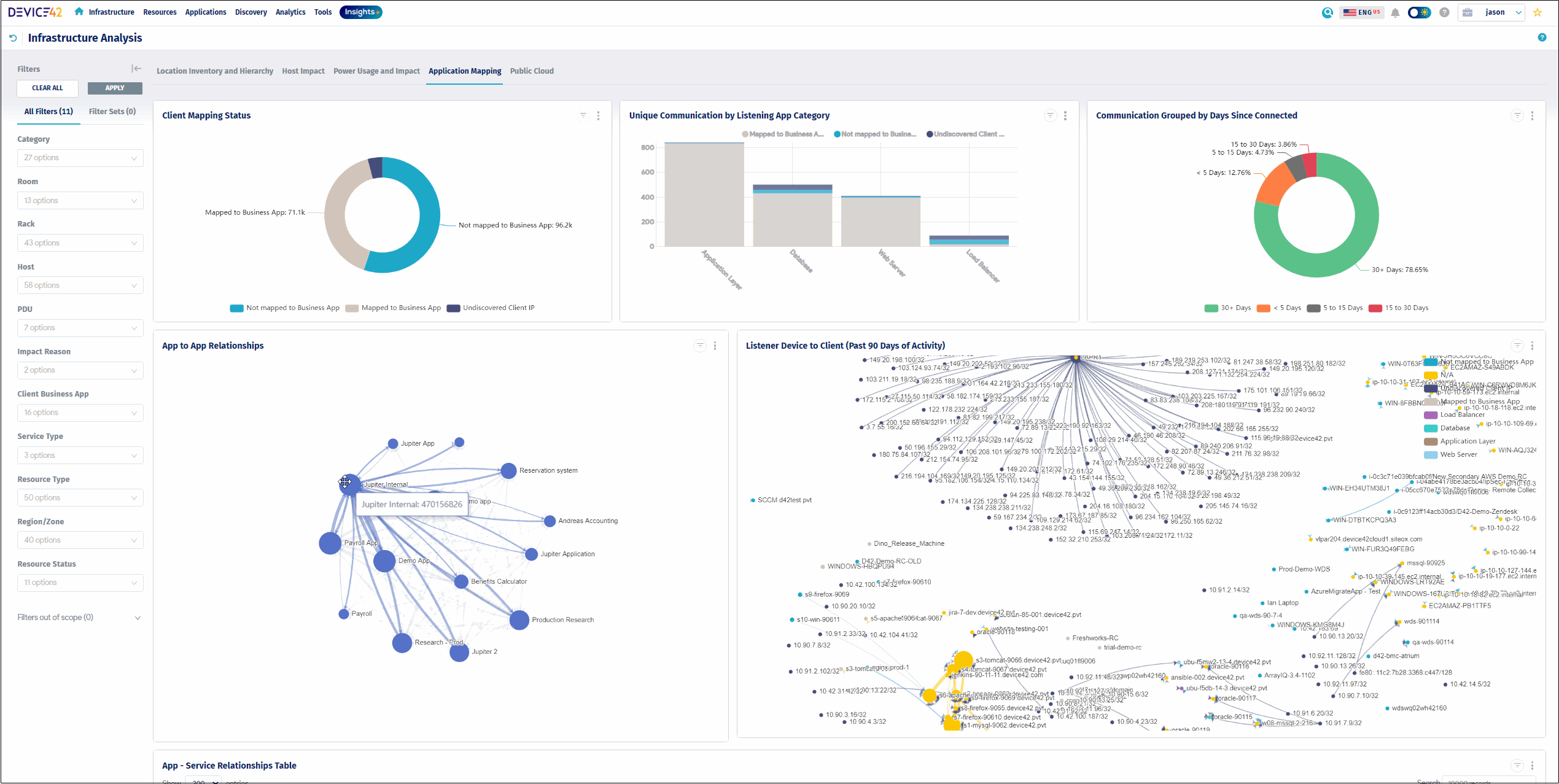
Device42 is an agentless discovery and dependency mapping solution that maps how applications, services, and devices connect across on-premises, cloud, and hybrid environments. Delivered as a virtual appliance, it discovers hardware, software, and application dependencies using native Windows (WMI) and Linux (SSH) protocols and SNMP for network hardware, and can extend coverage to machines it cannot reach directly by using NetFlow data. It groups discovered workloads into Application Groups based on real communication patterns and rolls them up into Business Services that represent how components combine to deliver an application. The discovered data feeds a CMDB and supports incident response, change management, modernization, and compliance documentation. Device42 is now part of Freshworks but continues to be offered under its own name.

Source: Device42
Key features include:
- Agentless discovery via native protocols: Device42 collects service and application dependency data through Windows WMI, Linux SSH, and SNMP for network hardware, without installing agents on monitored systems. For machines that cannot be accessed directly, it can construct dependency views from NetFlow data.
- Application Groups from communication patterns: The platform automatically groups assets into Application Groups based on observed communication patterns, using Calculation Rules and Logic Templates that define starting points and how discovery traverses the network. Teams can set an application’s starting point, such as a host or database, and let Device42 find the related resources.
- Business Services modeling: Discovered components can be assembled into Business Services that show how devices and resources combine to deliver an application. Users can add or remove devices, define their connections, customize the layout, and attach metadata such as application type, owners, SLAs, and disaster-recovery details.
- Automated service impact discovery: Device42 identifies active services and the ports they use and produces impact charts and impact lists that reveal upstream and downstream relationships. These views are used to understand the consequences of a device or service failing and to approach asset retirement or consolidation more safely.
- Visualizations, reporting, and APIs: The platform generates dependency charts and diagrams (which are Visio-compatible) along with list views of services and their remote dependencies. Data can be reported in formats such as Excel and CSV or accessed through REST APIs, including for building move groups during migrations.
- CMDB and ITSM use: Discovered relationships keep a CMDB continuously updated to serve as a single source of truth, supporting incident response, change management, audits, and documentation for compliance frameworks such as ISO 27001, SOC 2, and HIPAA.
Limitations (as reported by users on PeerSpot):
- Manual, effort-intensive upgrades: Users report that product upgrades are largely manual and can require significant effort, in some cases involving building a new virtual appliance to move to a newer version.
- Setup and discovery configuration overhead: Initial setup and scanning configuration can be time-consuming in larger environments, particularly where different credentials are needed to configure multiple discovery jobs.
- Bulk operations and dashboard refinement: Some users find bulk operations such as deleting assets in volume time-consuming and would like more accurate dashboard widgets and faster dependency mapping; a few also note the licensing model can be confusing.
3. JDisc Discovery

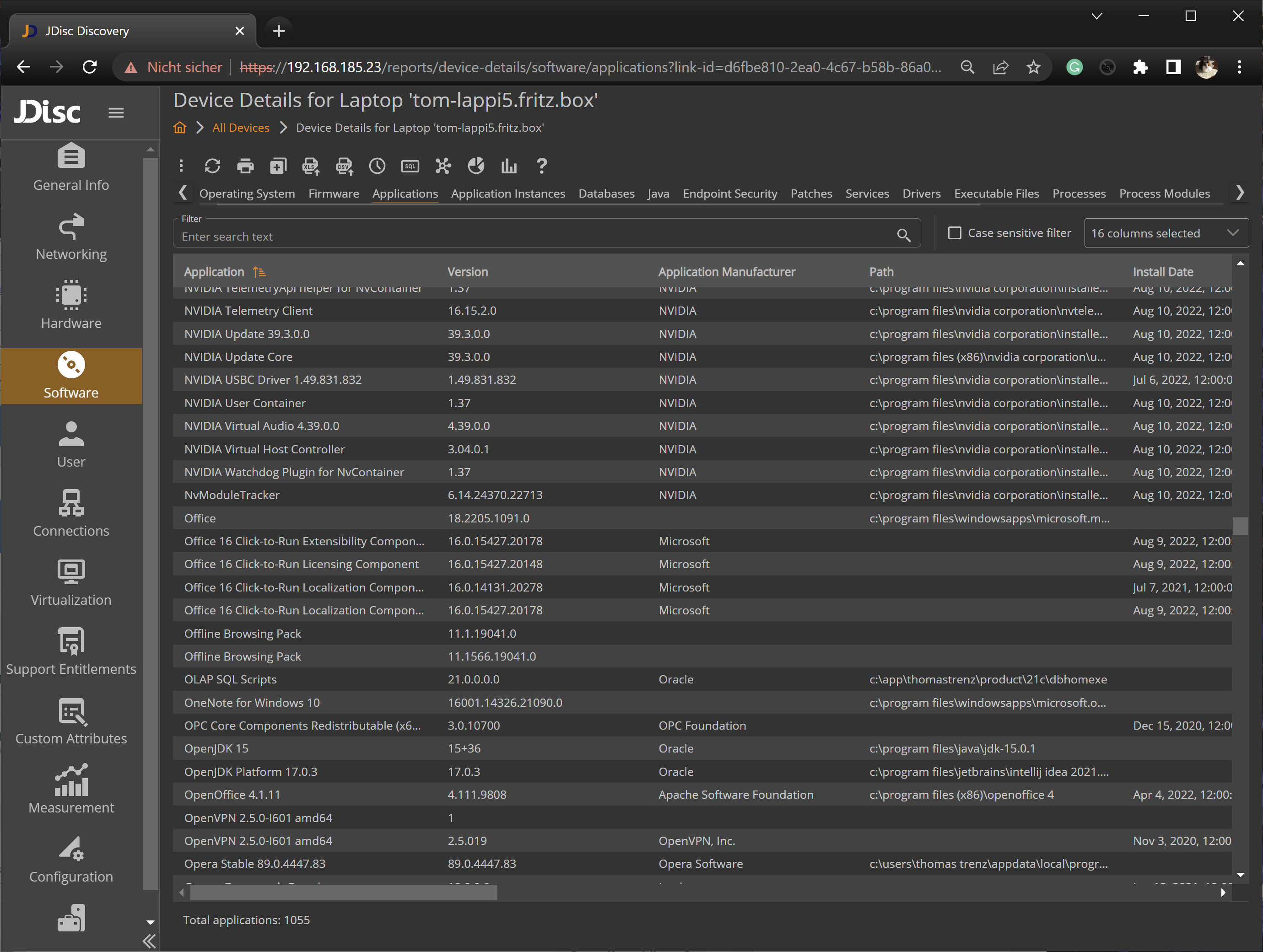
JDisc Discovery is an agentless network inventory and IT documentation tool that scans heterogeneous networks without proprietary agents. It identifies devices across Windows, Linux, macOS, Unix (AIX, Solaris, HP-UX), and FreeBSD, along with SNMP-based hardware and major cloud environments, and documents hardware, software, IP networks, Windows domains, and Active Directory. Its optional Dependency Mapping Add-On detects TCP/IP connections and open TCP and UDP ports between devices and displays them as graphical dependency maps. Collected data and credentials are stored in a secured PostgreSQL database, and the tool integrates with CMDB and ITSM systems. JDisc Discovery is licensed by device types and operating systems, with perpetual, annual subscription, or project license options.

Source: JDisc
Key features include:
- Agentless, multi-platform discovery: JDisc Discovery scans networks without proprietary agents and identifies all major operating systems (Windows from NT 4.0, IBM AIX, Solaris, HP-UX, Linux, macOS, and FreeBSD), many SNMP devices such as switches, routers, and printers, and major cloud environments including Azure, AWS, Google Cloud, Cisco Meraki, and Hetzner. It also integrates with Active Directory and maps discovered devices to their AD objects.
- Dependency Mapping Add-On: This add-on finds TCP connections between devices, detects open TCP and UDP ports, identifies the processes listening on a port, and collects SSL certificates for SSL ports. Connections are shown as graphical dependency maps that support manual editing, device-type and port filters to hide irrelevant items, and an adjustable hop limit to widen or narrow the view.
- Virtualization and cluster mapping: The tool identifies many virtualization technologies and assigns discovered virtual machines to their physical hosts. For technologies such as Microsoft Hyper-V, VMware, XenServer, and oVirt, it also detects cluster membership for high-availability clusters.
- Software and database discovery: JDisc Discovery detects applications installed on Windows, Unix, Linux, and macOS systems and identifies many database installations (including Oracle, IBM DB2, Sybase, PostgreSQL, and SQL Server) with instance details such as name and port. It also collects detailed operating-system information and can detect pending patches for installed software.
- Custom reports and attributes: A custom report generator lets users build reports by selecting fields and defining simple or complex conditions. Custom attributes capture data that cannot be discovered automatically, such as a room number, and can be populated through collection scripts or imported from CSV files.
- Open architecture and secure storage: Data collection can be extended with custom scripts and binaries, and an API plus out-of-the-box CMDB integrations make the data available to other systems. Discovered data and access credentials are stored in a secured PostgreSQL database with credentials encrypted using AES-128, and communication between the discovery server and the UI is encrypted over SSL/HTTPS.
Limitations (as reported by users on Capterra):
- Installation and update process: Users describe the install and update process as clumsy; the Windows- and .NET-based server/client software can require what amounts to a full reinstall even for minor build updates, which makes keeping multiple installations on the latest build harder.
- Windows-based server requirement: Because the discovery server runs on Windows, organizations that standardize on Linux can find the deployment model less convenient.
- Interface and scope: Some users feel the interface is functional rather than modern (a new web interface has been awaited) and note that the product is intentionally focused on inventory and discovery; complex environments with multiple LANs and VPN connections may need extra configuration to discover everything.
Application Monitoring and Observability Platforms
4. SolarWinds Server & Application Monitor

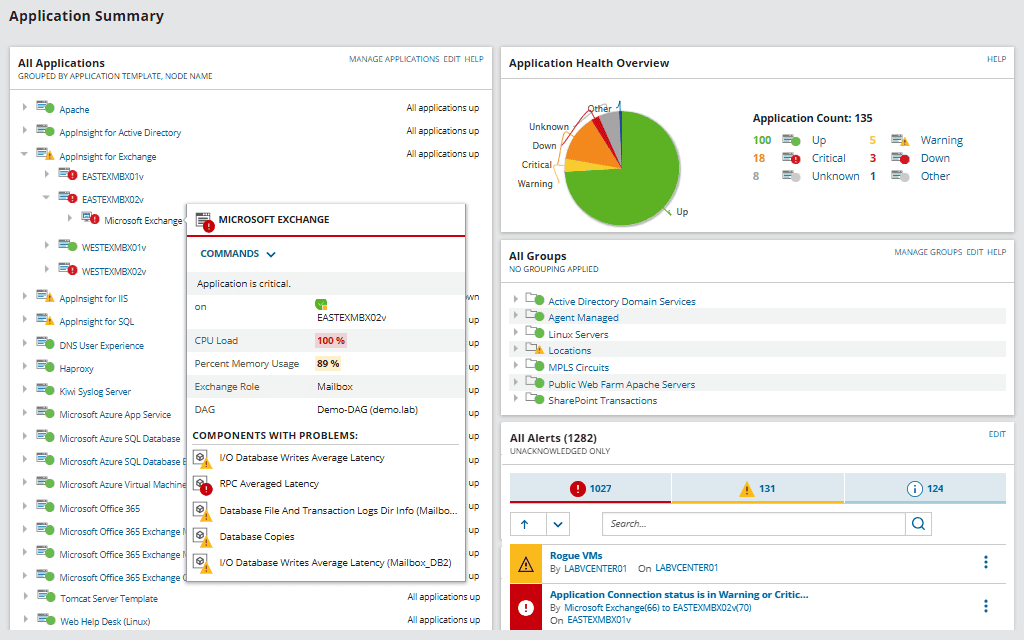
SolarWinds Server & Application Monitor (SAM) is a server and application monitoring product, part of the SolarWinds Platform, that includes application discovery and dependency mapping alongside performance monitoring. It polls dependencies and builds interactive maps showing how applications connect to the servers and services they rely on, including incoming ports, services, latency, packet loss, and TCP data. SAM uses two polling methods — Application Dependency polling and Connection Quality polling — to assemble those maps, and it lets teams set thresholds and alerts on dependency issues. Beyond dependencies, it monitors overall server and application health, which helps correlate performance problems with the underlying infrastructure. SAM can monitor public, private, and hybrid environments from a single web console.

Source: SolarWinds
Key features include:
- Application discovery and dependency polling: SAM discovers and monitors connections between applications and their server-based components, including application-to-application, application-to-node, and node-to-application relationships. Application Dependency polling maps these interactions so teams can see which nodes and services an application depends on.
- Connection quality monitoring: Connection Quality polling tracks TCP data traveling from client nodes to target nodes and can act as a packet sniffer, allowing a dependency map to distinguish between latency and packet loss. A Connection Details view shows application processes, process status, latency, packet loss, and port data for each connection.
- Interactive dependency maps: Users can create and configure interactive maps of applications and the servers they depend on, adjusting colors and labels to keep an in-context view of issues. The maps help locate where a performance bottleneck sits and speed up troubleshooting across multi-tier applications.
- Alerting on dependency issues: SAM lets teams set custom warning and critical thresholds for conditions such as network latency, packet loss, and TCP connection problems. When an alert triggers, the relevant map provides contextual, real-time information about the applications relying on the affected services and servers.
- Server and application health monitoring: Beyond dependencies, SAM monitors overall server and application performance — including uptime, hardware health, and resource utilization — across more than 200 application types. This helps determine whether an issue originates from a node, the network, or the application itself.
- Hybrid coverage and platform integration: SAM monitors public, private, and hybrid environments and is part of the SolarWinds Platform, so it can be extended with additional SolarWinds modules. It includes interactive visual mapping (AppStack) to view the environment end-to-end when identifying root cause.
Limitations (as reported by users on TrustRadius):
- Complexity and learning curve: Users describe SAM as feature-rich but heavy, with a learning curve, and note that it can feel like more than is needed for smaller environments.
- Custom alerting and reporting effort: Configuring custom SNMP alerts is described as onerous, the logic in custom alerts can be hard to follow, and some users find custom reporting difficult to use.
- Licensing and monitoring depth: A few users find the licensing model confusing at times and note that monitoring of certain application specifics can require additional configuration, with some interface navigation interruptions during use.
5. Dynatrace

Dynatrace provides application topology discovery and application mapping as part of its observability platform. After a single agent (OneAgent) is installed, it auto-discovers the components and dependencies of the technology stack — applications, services, processes, hosts, networks, and infrastructure — usually within minutes, and represents them in its Smartscape dependency graph. Smartscape is a real-time topology that updates automatically as the environment changes, and it can span multicloud and on-premises environments in a single view. Dynatrace also learns normal performance baselines and uses its AI engine to detect anomalies and perform root-cause analysis. It supports a broad range of technologies, including AWS, Azure, Google Cloud, Kubernetes, Docker, Java, .NET, Linux, Windows, and mainframe platforms.

Source: Dynatrace

Key features include:
- Agent-based auto-discovery: Dynatrace discovers all components and dependencies of the technology stack end-to-end after a single agent is installed, with no manual configuration. It detects causal dependencies between websites, applications, services, processes, hosts, networks, and infrastructure.
- Smartscape topology visualization: Smartscape presents a real-time, interactive dependency graph that shows full-stack vertical dependencies and horizontal call relationships. It updates automatically as the environment changes, offers domain-specific views for clouds, Kubernetes, and services, and surfaces upstream and downstream dependencies as well as ownership.
- AI-driven analysis and baselining: The platform automatically learns normal performance for metrics such as response time and resource health, identifies anomalies, and uses its AI engine to perform root-cause analysis. This is intended to reduce the manual correlation involved in diagnosing problems.
- Broad technology coverage: Dynatrace supports a wide range of platforms — including AWS, Azure, Google Cloud, Kubernetes, OpenShift, Docker, Java, .NET, Node.js, PHP, databases, Linux, Windows, and IBM z/OS — so the topology can extend across diverse stacks.
- Continuous change detection: Dynatrace recognizes changes to the environment on the fly and maintains an up-to-date blueprint of the application architecture, so the dependency map reflects the current state without manual upkeep or tagging.
- Multicloud and on-premises scope: Smartscape can represent topologies across multicloud and on-premises environments in one view, and Dynatrace offers a self-managed (on-premises) deployment in addition to SaaS for organizations that need to host it themselves.
Limitations (as reported by users on G2):
- Steep learning curve and complexity: Users frequently describe Dynatrace as powerful but complex, with an extensive feature set and a steep learning curve that requires significant training and time to navigate dashboards, configure alerts, and use its query language.
- Premium pricing and cost predictability: Many users find Dynatrace expensive, especially for smaller teams, and note that its consumption-based pricing can make costs harder to predict in larger deployments.
- Self-managed overhead and interface changes: Users note that the self-managed, on-premises option carries meaningful infrastructure and operational overhead, that initial configuration and tuning take effort, and that UI changes and occasional documentation gaps can slow troubleshooting.
6. AppDynamics

AppDynamics (now Splunk AppDynamics, part of Cisco) is an application performance monitoring platform that auto-discovers application topology and dependencies and visualizes them as flow maps. Data collection is agent-based: agents instrument application code and report to a Controller that processes and visualizes the data. The platform auto-discovers the flow of traffic requests and dynamically builds a topology map that shows tiers, nodes, message queues, and databases, along with the business transactions that flow through them. It also provides transaction tracing, anomaly detection, root-cause diagnostics, and full-stack analytics. AppDynamics can be deployed as SaaS or self-hosted on-premises through AppDynamics On-Premises or the Virtual Appliance, for organizations that need to keep monitoring data on-site.
Key features include:
- Auto-discovery and flow maps: AppDynamics auto-discovers the flow of all traffic requests and dynamically builds a topology map of the application ecosystem. Flow maps show the tiers, nodes, message queues, and databases in the environment and the business transactions flowing through them, with flow lines colored relative to performance baselines.
- Agent-and-Controller architecture: Data collection begins with agents that instrument application code, runtime, and behavior across the environment and a Controller that receives the data, visualizes performance, and sends instructions back to the agents. Agents are available for languages including Java, .NET, Node.js, PHP, Python, Go, and C++.
- Transaction tracing and business transaction monitoring: The platform traces the logical flow of a request, such as an “add to cart” action, across the environment to pinpoint where issues occur. It also monitors business transactions — the chains of services that fulfill user-initiated actions like logins and checkouts.
- Anomaly detection and root-cause diagnostics: AppDynamics baselines performance and alerts on deviations, and its diagnostics are intended to help teams prioritize and resolve the most problematic transactions while reducing mean time to resolution.
- End-user and full-stack visibility: Digital experience monitoring follows users across web, mobile, and synthetic transactions, while Experience Journey Mapping shows how users move through an application. Custom dashboards (Dash Studio) and full-stack analytics bring transaction and end-user data together, with ThousandEyes network intelligence available.
- On-premises and SaaS deployment: AppDynamics can run as SaaS or be self-hosted on-premises through AppDynamics On-Premises or the Virtual Appliance, allowing organizations to keep monitoring data on-site for data-residency, compliance, or security reasons.
Limitations (as reported by users on G2):
- Initial setup and learning curve: Users report that configuring AppDynamics at the outset can be difficult and often requires training before its features can be used fully.
- Dense interface: The interface presents a large number of data points, and some users find it hard to navigate the dashboard or locate a specific option.
- Cost and fit for smaller teams: Users note that the platform’s pricing can be a barrier for smaller organizations, and some mention occasional delays in support response.
Conclusion
On-premise application dependency mapping plays a vital role in managing complex IT environments, especially when visibility, compliance, and operational control are priorities. The most effective solutions provide agentless, passive discovery with real-time mapping, offering fast deployment and minimal system impact.
Key features like automated application grouping, continuous change tracking, and integration with CMDB and ITSM tools enhance decision-making for various use cases, including migration planning, incident response, and security audits. Tools with these capabilities provide greater accuracy, reduce overhead costs, and deliver faster results, making them an ideal choice for organizations seeking clarity and control over their hybrid infrastructure.