
What Is Nutanix Flow?
Nutanix Flow (now consisting of Flow Virtual Networking and Flow Network Security) is a software-defined networking and security solution native to the Nutanix Cloud Platform. It abstracts networking and microsegmentation from physical hardware, protecting virtual machines (VMs) and applications across on-premises and hybrid cloud environments.
Nutanix Flow is divided into two primary capabilities:
-
- Flow Network Security (FNS): Provides application-centric microsegmentation and distributed firewalling to prevent lateral movement of threats and ransomware. It relies on plain-language, logical grouping of VMs (using categories) rather than IP addresses or VLANs, meaning security policies follow workloads dynamically.
-
- Flow Virtual Networking (FVN): Delivers overlay networking capabilities, allowing administrators to create software-defined Virtual Private Clouds (VPCs), subnets, routing, and VPNs across edge, on-premise, and public cloud sites without complex physical network changes.
Flow integrates seamlessly with Nutanix Prism Central, providing a centralized interface for managing and orchestrating network security policies, network overlays, and automation workflows. The solution is designed to address modern data center requirements, offering scalable and simplified network security for both traditional and cloud-native workloads
Table of Contents
ToggleKey Nutanix Flow Features
Application-Centric Microsegmentation
Nutanix Flow’s microsegmentation capability allows organizations to isolate workloads at the application level, enforcing granular security policies between virtual machines (VMs) and applications. This approach ensures that only authorized traffic is allowed between specific application components, reducing the risk of lateral movement within the data center. Administrators can define policies based on application identity, tags, or other contextual attributes, enabling a security posture that adapts as applications scale or change.
By focusing on application-centric policies rather than static network constructs like VLANs or subnets, Nutanix Flow simplifies the process of segmenting and securing workloads. This supports zero-trust security models, where trust boundaries are enforced at the smallest logical unit. The result is improved threat containment and incident response, without the complexity of managing traditional firewall rules or network ACLs.
Related content: Read our guide to network microsegmentation in data centers
Virtual Private Clouds and Overlay Networking
Nutanix Flow enables the creation of virtual private clouds (VPCs) within the Nutanix environment using overlay networking technologies. These VPCs allow organizations to logically separate workloads and applications, regardless of the underlying physical network topology. Overlay networks use tunneling protocols to encapsulate traffic, enabling network segmentation that is decoupled from physical switches and routers.
This overlay approach allows administrators to provision isolated environments with their own IP address spaces and security policies. It also supports hybrid and multi-cloud strategies by extending network topologies across on-premises and cloud infrastructure. Nutanix Flow’s overlay networking capabilities reduce operational complexity for new projects and initiatives.
Multi-Tenant Network Isolation
Nutanix Flow supports multi-tenancy, providing network isolation for environments where multiple users or business units share the same infrastructure. Each tenant can have its own dedicated VPC, with separate network policies, security rules, and address spaces. This ensures that traffic and resources are separated, preventing accidental or malicious access between tenants.
Network isolation is important for service providers, managed hosting environments, and enterprises running multiple business applications on shared clusters. Nutanix Flow’s multi-tenant capabilities help organizations maintain compliance with regulatory requirements and internal security policies. It also allows administrators to delegate network control and monitoring responsibilities to different tenant owners or teams, reducing the risk of misconfiguration.
Automated Network Provisioning
Nutanix Flow automates the creation, configuration, and management of network resources. Using policy-driven templates and orchestration workflows, administrators can deploy network topologies and security policies without manual intervention. This reduces configuration errors and shortens the time required to roll out new applications or services.
Automation extends to policy enforcement, where changes to virtual machine placements or application structures automatically trigger updates to network segmentation and security rules. This ensures that the network remains consistent with organizational intent, even as workloads scale or migrate across the environment. Nutanix Flow’s automation capabilities allow IT staff to focus on higher-value activities.
Centralized Management Through Prism Central
All Nutanix Flow capabilities are managed through Prism Central, Nutanix’s unified management plane. This interface provides a single point of control for deploying, monitoring, and updating network security policies, overlays, and segmentation rules across the Nutanix environment. Administrators benefit from consistent workflows, real-time visibility, and simplified troubleshooting.
Prism Central also offers analytics and reporting for network traffic, policy compliance, and security events. This visibility helps organizations identify risks, audit changes, and demonstrate compliance with industry standards. By consolidating network management with the broader Nutanix infrastructure stack, Flow integrates network security with compute, storage, and virtualization operations.
Nutanix Flow Main Capabilities
Flow Network Security (FNS)
Flow Network Security (FNS) provides software-defined firewalls that protect applications and data across multicloud environments without requiring dedicated security hardware. Instead of relying on network topology, it uses application-centric policies that reflect application intent, making security policies easier to manage. Granular traffic controls limit communication between applications, while dynamic policy enforcement ensures protections remain in place as workloads move across the environment.
FNS provides visibility into traffic flows down to the port level:
-
- This visibility supports least-privilege access policies, validation of application behavior, and identification of unexpected communication patterns that may indicate security issues.
-
- A centralized dashboard provides policy-driven visibility into application communications and overall security posture.
The platform strengthens endpoint and workload protection by combining identity-based access controls with microsegmentation. Directory-based user identities can control access to workloads and data, while microsegmentation limits the spread of malware and ransomware by restricting lateral movement. This approach removes dependence on static network constructs that are difficult to maintain in environments where workloads frequently move.
FNS also supports compliance by enabling organizations to segment applications and data without redesigning the physical network. Features such as ring fencing, standardized policy deployment, and audit reporting help organizations enforce security controls and produce audit evidence with less manual effort. Network-level segmentation can be enforced using ports and protocols, with optional Layer 7 inspection available through partner integrations.
Flow Virtual Networking (FVN)
Flow Virtual Networking (FVN) is Nutanix’s software-defined networking (SDN) solution for creating and managing virtual private clouds (VPCs) across on-premises and public cloud environments. It brings cloud-style networking to Nutanix infrastructure by allowing organizations to build isolated virtual networks in software, without redesigning existing networks or relying on dedicated hardware segmentation. FVN:
-
- Provides consistent APIs and management workflows across environments.
-
- Supports networks that span multiple clusters.
-
- Can coexist with existing VLANs, including one-click migration from VLAN-based networks to VPCs.
A core capability of FVN is VPC networking, which gives administrators control over IP address ranges, subnets, routing, and gateways. Organizations can create isolated network environments with overlapping IP address spaces for different tenants, making it suitable for multi-tenant deployments. Self-service provisioning enables teams to deploy new VPCs on demand, while a centralized dashboard simplifies management.
FVN automates connectivity between VPCs running in local data centers, disaster recovery sites, and public cloud environments. Integration with Nutanix Cloud Clusters (NC2) provides native networking between on-premises infrastructure and public clouds such as AWS and Azure, allowing organizations to establish secure connections between distributed environments without extensive manual configuration.
The platform also includes network policy and connectivity services that support hybrid networking:
-
- Administrators can configure stateless access control policies to manage traffic between workloads, subnets, and external networks, and integrate partner security services such as next-generation firewalls, intrusion detection systems, and web application firewalls.
-
- Built-in NAT and VPN capabilities enable communication between private and public cloud networks and allow multi-tenant VPCs with overlapping IP addresses to communicate without address conflicts.

Lanir specializes in founding new tech companies for Enterprise Software: Assemble and nurture a great team, Early stage funding to growth late stage, One design partner to hundreds of enterprise customers, MVP to Enterprise grade product, Low level kernel engineering to AI/ML and BigData, One advisory board to a long list of shareholders and board members of the worlds largest VCs
Tips from the Expert
In my experience, here are tips that can help you better deploy and operate Nutanix Flow in production environments:
-
Model application dependencies before enforcing policies:
Build a dependency map using Flow’s visibility features over several business cycles (daily, weekly, month-end). Many applications communicate only during backups, reporting, or maintenance windows, and enforcing policies too early often breaks these infrequent but critical workflows. -
Treat categories as long-term governance objects:
Avoid creating categories for individual applications or projects. Instead, define categories around stable business attributes such as environment, application tier, data classification, and ownership. This keeps security policies reusable as workloads are replaced or scaled. -
Create reusable security policy patterns:
Rather than writing policies per application, develop standard templates (e.g., three-tier web app, SQL cluster, Kubernetes worker, management server). New applications can inherit proven policies with minimal customization, significantly reducing operational effort. -
Separate connectivity ownership from security ownership:
Let network teams manage VPCs, routing, NAT, and VPNs, while security teams own microsegmentation policies. Mixing both responsibilities in the same change process often slows deployments and increases the likelihood of configuration errors.
-
Leave room for operational traffic:
During segmentation projects, infrastructure services are frequently overlooked. Ensure monitoring agents, backup software, patch management, identity services, NTP, DNS, logging, hypervisor management, and certificate services are explicitly allowed before tightening application traffic.
Nutanix Flow Use Cases
1. Virtual Desktop Infrastructure Security
Nutanix Flow supports securing virtual desktop infrastructure (VDI) deployments, where large numbers of user desktops are hosted in the data center. By applying microsegmentation policies, organizations can restrict communication between desktops, preventing the spread of malware or unauthorized lateral movement. Flow also enables enforcement of security policies based on user roles or desktop groups, ensuring that only approved access is allowed to sensitive resources.
The centralized management capabilities of Nutanix Flow allow IT teams to monitor and update security policies across VDI instances. This reduces the risk of misconfiguration and supports compliance with organizational standards. Organizations can provide scalable desktop environments while protecting data and applications from internal and external threats.
2. Ransomware and Lateral Movement Mitigation
Ransomware attacks often rely on lateral movement to spread across a network. Nutanix Flow’s microsegmentation capabilities help contain ransomware outbreaks by limiting east-west traffic and enforcing strict communication policies between workloads. By segmenting applications and servers, Flow reduces the attack surface and prevents malicious code from moving within the data center.
Nutanix Flow also provides visibility into network traffic patterns and potential anomalies, supporting the detection of suspicious behavior. Integration with security analytics tools allows organizations to automate response actions, such as isolating infected workloads or blocking unauthorized connections. These features support defenses against modern cyber threats and reduce the impact of security incidents.
3. Multi-Tenant Cloud Environments
Service providers and enterprises with multi-tenant cloud environments use Nutanix Flow’s network isolation features. Each tenant can be assigned a dedicated virtual network with custom security and routing policies, ensuring separation of resources and traffic. This isolation supports regulatory requirements, protection of sensitive data, and predictable performance for each customer or business unit.
Nutanix Flow provides centralized control and automation for network provisioning and policy enforcement. Administrators can delegate management responsibilities to tenant owners, reducing operational overhead and risk of errors. The result is a cloud platform that supports diverse workloads and customer needs without sacrificing security or compliance.
4. Hybrid Cloud Migration
Organizations moving workloads between on-premises data centers and public cloud platforms face challenges in maintaining consistent network security and connectivity. Nutanix Flow’s overlay networking and automation features support hybrid cloud migration by enabling extension of virtual networks across environments. Workloads can retain their security policies and network identities as they move, reducing migration complexity and risk.
Flow also supports automated network provisioning and segmentation, ensuring that workloads are protected throughout the migration process. Integration with hybrid cloud management tools allows organizations to orchestrate and monitor migrations from a single interface. This supports cloud adoption while maintaining control over network security and compliance.
Nutanix Flow Challenges and Limitations
Although Nutanix Flow simplifies network security and virtual networking within Nutanix environments, deployment still requires planning. Organizations should evaluate platform compatibility, licensing, infrastructure capacity, policy design, and integration requirements before adopting Flow across production workloads:
- Dependence on the Nutanix AHV ecosystem: Flow Virtual Networking is primarily designed for clusters running the Nutanix AHV hypervisor. Organizations operating VMware, Hyper-V, or mixed-hypervisor environments may not receive the same networking capabilities across every workload, potentially requiring separate security and networking tools outside AHV.
- Prism Central and network controller requirements: Flow relies on Prism Central and its network controller services for centralized management and orchestration. Supported Prism Central sizing and configuration requirements must be met; for example, Flow Virtual Networking is not supported on X-Small Prism Central deployments, while some other configurations require the network controller to be enabled separately.
- Version and compatibility dependencies: Flow components must align with supported versions of AOS, AHV, Prism Central, and the network controller. Upgrades or migrations may require updating several interdependent components in a defined order, increasing testing and change management requirements.
- Additional licensing costs: Advanced Flow security capabilities require appropriate licensing after the evaluation period. Organizations must account for these costs when comparing Flow with built-in network controls or third-party firewalls, particularly when deploying across many clusters.
- Resource and connectivity overhead: Flow services consume resources within the Nutanix environment and require reliable communication between AHV hosts and Prism Central. Firewall ports, controller capacity, gateway appliances, and Prism Central availability must be considered during infrastructure sizing and network design.
- Policy design can become complex at scale: Application-centric microsegmentation reduces dependence on IP-based firewall rules, but organizations must accurately classify workloads, define application dependencies, and manage categories or tags. Poorly planned policies can block legitimate application traffic or leave unnecessary communication paths open.
- Visibility is not a substitute for full security monitoring: Flow provides workload communication and policy visibility, but it does not replace endpoint detection, SIEM, network detection, vulnerability management, or incident response platforms. Organizations typically need to integrate Flow into a broader security architecture.
- Advanced inspection may require partner products: Native distributed firewalling focuses on segmentation and traffic enforcement. Requirements such as next-generation firewalling, intrusion prevention, web application protection, or deeper Layer 7 inspection may depend on integrated third-party security services.
- Migration from legacy configurations requires planning: Moving from VLAN-based networking or legacy Flow Network Security policies to newer VPC and FNS Next-Gen models may involve compatibility checks, policy conversion, controller upgrades, and staged testing. Some policy types or operational data may not migrate or synchronize automatically.
- Disaster recovery synchronization has limitations: In some multi–Prism Central or legacy Flow configurations, native synchronization of policies, policy hit logs, and visualization data may be limited. Organizations may need additional scripts, procedures, or duplicated configuration to maintain consistent policies across recovery sites.
- VPC design constraints must be considered: Certain virtual networking objects have configuration limits, such as restrictions on the number and type of external subnets attached to a VPC. Overlapping address spaces, NAT design, routing, gateway placement, and transit connectivity must be planned carefully.
- Operational skills are still required: Although Prism Central simplifies administration, teams need knowledge of overlay networking, routing, NAT, VPNs, microsegmentation, application dependencies, and zero-trust policy design. Organizations without these skills may face a learning curve during initial deployment and troubleshooting.
Related content: Read our article about Nutanix products and alternatives
Building an Accurate Microsegmentation Plan with Faddom
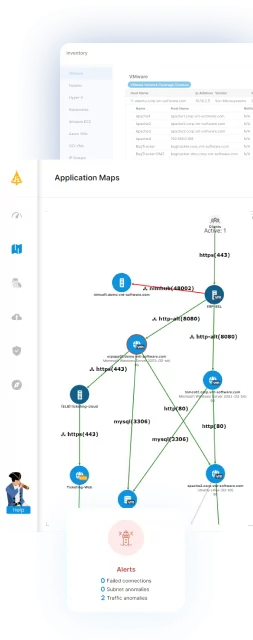
Nutanix Flow enforces policies based on how your applications actually communicate, but you can only write those policies correctly if you know what is talking to what. Faddom is agentless microsegmentation and lightweight NDR software that maps your entire on-premises and cloud IT environment, including business applications and their dependencies, in as little as 60 minutes. It gives security and infrastructure teams the visibility needed to define segments, validate assumptions, and avoid breaking legitimate traffic when policies are enforced.
Key capabilities of Faddom:
- East-west traffic mapping: Maps all east-west traffic so you know exactly what communication is required between servers before you restrict it.
- Subnet-level dependency discovery: Surfaces dependencies between different subnets, exposing the cross-segment communication paths that policy design has to account for.
- Segment group building: Lets you build groups of segments with rules that allow them to communicate, turning raw traffic data into a workable segmentation model.
- Segmentation planning: Helps you plan how to group workloads and define what communication will be required between those groups.
- Fast time to first map: Delivers your first maps within one hour of deploying Faddom in your environment, so segmentation projects start with current data rather than stale documentation.
- Completely passive deployment: Lightweight and fully passive — no agents, no credentials, and no firewall changes, with the ability to run offline.
- Plans for organizations of any size: Available to IT consultants, small businesses, and large enterprises alike.
You can’t protect what you can’t see. Learn how Faddom makes microsegmentation planning simple and map your entire hybrid IT environment in under an hour.