
TL;DR: Disaster recovery software spans dependency mapping and backup or replication platforms. Best for: Faddom (agentless mapping), Veeam (recovery orchestration), HPE Zerto (continuous data protection), and Rubrik (ransomware recovery).
What Is Disaster Recovery Software?
Disaster recovery software helps organizations restore critical systems and data after events like hardware failures, cyberattacks, natural disasters, or accidental data deletion. Its main goal is to ensure business continuity by minimizing downtime and data loss.
With the increasing dependency on digital infrastructure, disaster recovery solutions are essential parts of modern IT strategies for organizations of all sizes. Unlike basic backup tools, disaster recovery software typically automates failover processes, orchestrates system restorations, and ensures rapid resumption of operations.
These solutions may include features for continuous data protection, virtual machine recovery, and integration with cloud infrastructure. The combination of automation, orchestration, and backup capabilities differentiates disaster recovery platforms from standard backup solutions.
Disaster Recovery Software At a Glance
The table below summarizes the key differences between these disaster recovery software tools. We explore each tool in more detail in the sections that follow.
|
Category |
Solution |
Best For |
Key Strengths |
Things to Consider |
|
Application Dependency Mapping for DR Planning |
Faddom |
Agentless dependency mapping to prioritize DR recovery order |
Agentless passive discovery, hybrid environment mapping, recovery prioritization based on dependencies |
Initial deployment can take longer than planned in proof of concepts; some setup documentation could be clearer; best paired with a broader CMDB or AIOps tool |
|
Application Dependency Mapping for DR Planning |
Device42 |
CMDB-integrated dependency mapping for DR impact assessment |
Business Services modeling with DR metadata, Application Groups from communication patterns, impact charts and lists for blast radius |
Setup and learning curve for smaller teams; manual upgrades and bulk operations; limited Kubernetes scalability |
|
Application Dependency Mapping for DR Planning |
BMC Helix Discovery |
Enterprise-grade service modeling for DR and multi-cloud visibility |
Agentless continuous discovery, blueprint-based service modeling, multi-cloud visibility with security and compliance detection |
High cost (bundles from $50,000); stability and scalability concerns at scale; client-side discovery less developed |
|
Backup, Replication, and Recovery |
Veeam |
Policy-driven recovery orchestration with clean-room validation |
Policy-driven runbooks with app-centric dependency modeling, clean room malware scanning before promotion, automated DR drills with documentation |
Orchestration gated to the Premium edition with complex pricing; layered components can feel overwhelming; strongest support on established hypervisors |
|
Backup, Replication, and Recovery |
HPE Zerto |
Continuous data protection with near-zero RPO and RTO |
Journal-based continuous replication, real-time ransomware encryption detection, workload mobility across on-premises and cloud |
High entry cost with complex per-VM licensing; support familiarity has varied post-acquisition; less developed application-aware backup |
|
Backup, Replication, and Recovery |
Commvault |
Automated cyber and disaster recovery across hybrid and multi-cloud |
Sub-minute RPO replication to recovery sites, validated recovery testing in isolated environments, auto-scaling for mass recovery |
Learning curve from breadth of features; complex management console; positioned as a costly enterprise solution |
|
Backup, Replication, and Recovery |
Rubrik |
Clean-state cyber recovery after ransomware |
Recovery orchestration with predictable timelines, isolated recovery simulation and testing, air-gapped immutable backups with clean point identification |
Can be expensive, especially for smaller organizations; pricing and licensing transparency needs study; setup can take time in complex environments |
|
Backup, Replication, and Recovery |
Druva |
Fully SaaS cloud DR with no secondary site to manage |
One-click DR for on-premises VMs to AWS, VMware and AWS failover and failback in minutes, automated DR testing with immutable backups |
Costly add-on features for some workloads; performance depends on network bandwidth; initial configuration can be complex |
|
Backup, Replication, and Recovery |
Arcserve |
Unified backup and DR across physical, virtual, cloud, and hyperconverged environments |
Instant VM and bare-metal recovery, AI-enabled anomaly detection during backup, cloud-agnostic deployment |
Inconsistent support and documentation gaps; slow backup and recovery speeds reported; platform support lag for newer Linux kernels and applications |
|
Backup, Replication, and Recovery |
Acronis |
Integrated backup, cybersecurity, and DR from one platform |
Cloud failover within minutes, predefined DR runbooks, integrated EDR/XDR for clean recovery points |
Premium pricing that’s complex to navigate; slow support responsiveness; configuration complexity for access control and setup |
What Can Disaster Recovery Software Protect?
Physical Servers
Disaster recovery software protects physical servers by backing up operating systems, applications, configurations, and data, allowing organizations to restore entire systems after hardware failures, ransomware attacks, or site outages. Many platforms support bare-metal recovery, enabling servers to be rebuilt on new hardware without requiring a complete manual reinstallation.
Examples:
- Windows Server
- Linux servers
- Database servers
- File servers
- Domain controllers
Virtual Machines
Virtual machines are a primary focus of modern disaster recovery platforms because they can be replicated, failed over, and restored with minimal downtime. Disaster recovery software automates VM replication, recovery orchestration, and failback across data centers or cloud environments while preserving application consistency.
Examples:
- VMware vSphere virtual machines
- Microsoft Hyper-V virtual machines
- Nutanix AHV workloads
- Oracle VM environments
- Virtual desktop infrastructure (VDI)
Cloud Workloads
Disaster recovery solutions protect cloud-native workloads by replicating data across regions or cloud providers and automating recovery when cloud services become unavailable. Many platforms support hybrid recovery strategies that allow workloads to move between on-premises infrastructure and public cloud environments as business requirements change.
Examples:
- Amazon EC2 instances
- Azure Virtual Machines
- Google Compute Engine instances
- Cloud storage volumes
- Managed cloud databases
Containers and Kubernetes Environments
As organizations adopt containerized applications, disaster recovery software has expanded to protect Kubernetes clusters and container workloads. These platforms back up application state, persistent volumes, cluster configurations, and namespaces, enabling rapid recovery of cloud-native applications after infrastructure failures or accidental changes.
Examples:
- Kubernetes clusters
- Docker containers
- OpenShift environments
- Persistent volumes
- Container registries
Business-Critical Applications
Beyond protecting infrastructure, disaster recovery software safeguards the applications that support core business operations. Recovery platforms coordinate application dependencies, databases, and supporting services to ensure applications become operational in the correct sequence and meet recovery objectives after a disruption.
Examples:
- Microsoft Exchange
- Microsoft SQL Server
- Oracle Database
- SAP ERP
- Microsoft Active Directory
Key Components of a Disaster Recovery Software Stack
Orchestration and Automation
Orchestration and automation in disaster recovery remove manual intervention from complex recovery processes, significantly reducing the risk of human error during critical incidents. These features automate workflows such as system failover, VM recovery, network configuration, and application mapping. By embedding runbooks or scripts directly into the software, organizations can respond to disasters consistently and predictably, regardless of pressure or personnel availability.
Automation further benefits testing and validation, which are vital for disaster recovery readiness. Regular, automated drills can simulate disaster scenarios, ensuring that procedures work as expected and that recovery time objectives (RTOs) are met. This approach also accelerates response times by codifying best practices into repeatable actions.
Backup and Replication Engines
Backup and replication engines are the backbone of any disaster recovery strategy. Backup engines create point-in-time copies of critical data at regular intervals, allowing organizations to restore systems to a known-good state following a disruptive event. These backups may reside on-premises, offsite, or in the cloud, providing redundancy in case a primary site becomes compromised.
Replication engines take data protection a step further by continuously or periodically synchronizing real-time data to secondary sites, often with minimal lag. This means recovery points are more current, enabling organizations to resume operations with almost no data loss.
Failover and Failback Capabilities
Failover capabilities enable the swift transfer of workloads and services from a primary to a secondary infrastructure when the original environment becomes unavailable. This process needs to be fast to minimize business disruption and meet strict recovery time objectives. Most modern disaster recovery solutions provide automated failover for critical applications.
Failback is equally important. Once the primary systems or data centers are restored, organizations must safely transition operations back from the recovery site. This process involves synchronizing changes made during the failover period, ensuring no data is lost or overwritten.
Monitoring and Alerting Systems
Monitoring and alerting systems provide continuous oversight of the disaster recovery environment, notifying IT teams instantly of anomalies, failures, or risks. Dashboards, health checks, and real-time metrics ensure visibility into backup success rates, replication status, and potential bottlenecks. Automated alerts enable teams to react quickly, reducing the time required to identify and respond to incidents.
Recovery platforms offer customizable thresholds and integrated escalation policies. This granularity ensures the right personnel are contacted at every incident severity level. Proactive monitoring extends to infrastructure, network, and application health, creating a holistic safety net that improves system reliability and disaster readiness.
Compliance and Audit Readiness
Compliance and audit readiness functions embedded in disaster recovery software help organizations align with regulatory mandates such as GDPR, HIPAA, or SOX. These features generate detailed logs documenting backup and recovery actions, user access, and data movement. Audit trails strengthen accountability and enable IT teams to prove compliance quickly during inspections or reviews.
Regular reporting, policy management, and automated checks help organizations continuously validate their disaster recovery posture. Some platforms allow for the simulation or testing of compliance scenarios, ensuring controls remain effective as infrastructure or regulations change. Integrated compliance tools reduce manual documentation efforts and lower the risk of costly fines.
Notable Disaster Recovery Software
How we selected these tools: We shortlisted disaster recovery software based on the role each plays in a DR stack, spanning agentless application dependency mapping for planning, and backup, replication, and recovery platforms for execution, weighing discovery method, RPO and RTO capabilities, and ransomware-recovery readiness.
Application Dependency Mapping for Disaster Recovery Planning
A reliable disaster recovery plan depends on knowing exactly how systems, applications, and services connect, so teams can decide what to protect and in what order to restore. The tools in this category discover and map those dependencies, providing the visibility needed before any backup or failover is configured.
1. Faddom

Faddom is an agentless application dependency mapping platform that maps an organization’s entire on-premises and cloud environment, along with its business applications, often in as little as 60 minutes. In a disaster recovery and business continuity context, it gives teams a current picture of which servers, applications, and services depend on one another so they can decide what to back up and in what order to restore. It builds and continuously updates visual maps without installing agents, using credentials, or requiring firewall changes, and it can operate offline. Teams use these maps to confirm that no unwanted dependencies exist between backup and live sites, to understand what needs to move, and to analyze the impact of a server on both production and backup environments. This visibility supports building and maintaining the accurate asset inventory that a DR/BC plan is built on.

Key features include:
- Agentless, passive discovery: Faddom maps servers, applications, and dependencies across hybrid on-premises and cloud environments without deploying agents, supplying credentials, or making firewall changes. The collection method is passive and can run offline, which keeps the footprint and risk of discovery low. First maps typically appear within an hour of deployment.
- Hybrid environment mapping: The platform discovers and visualizes the full hybrid estate, including on-premises servers, cloud instances, and the business applications running on them. This produces a single inventory of assets and their relationships that teams use as the starting point for a DR plan. It spans both production and backup environments.
- Recovery prioritization: By exposing how systems and their dependencies connect, Faddom helps teams rank the relative importance of each system and determine the order in which to back up and bring systems back online. This supports defining recovery sequences that account for upstream and downstream relationships. It reduces the chance of restoring systems out of order.
- Backup planning support: Teams use the maps to plan what to back up and how, confirm that no dependencies exist between backup and live sites, and identify which servers require a backup. This lowers the risk of overlooking a critical dependency when production goes down. The maps show the impact of a server on both live and backup environments.
- Continuously updated visualization: Faddom maintains dynamic, around-the-clock maps that reflect ongoing changes in the environment, helping keep a DR plan current rather than relying on static documentation. The visual model makes it easier to trace what is upstream and downstream of a given component. Updated maps also support troubleshooting and change planning as the environment evolves.
Limitations (as reported by users on G2):
- Initial deployment timelines: Some users report that standing up the platform during a proof of concept took longer than planned, with setup steps that extended their evaluation window.
- Documentation clarity: A few reviewers found certain setup documentation, such as cloud deployment templates, complex or inconsistent in places and needed support to resolve it.
- Complementary scope: Because the platform focuses on agentless, traffic-based dependency mapping, some users note it works best alongside broader CMDB or AIOps tooling rather than replacing it.
2. Device42

Device42, a Freshworks company, is a discovery and dependency mapping platform that automatically inventories IT assets and maps how applications, services, and devices connect across on-premises, cloud, and hybrid environments. For disaster recovery planning, its dependency data shows upstream and downstream relationships so teams can assess the full scope of an incident and plan recovery accordingly. It groups assets into application views based on real communication patterns and can store DR-relevant metadata against business services. The platform combines auto-discovery, a CMDB, and application mapping in a single product. It is also used for migration, incident response, change management, and compliance documentation.
Key features include:
- Business services modeling: Device42 Business Services give a visual representation of how components, devices, and resources combine to form critical applications. Teams can build services manually or from an application group and attach metadata such as application type, owners, SLAs, and DR details. Charts can be customized, enriched with Device42 data, and exported.
- Application groups: The platform automatically maps the environment by grouping assets based on real communication patterns, with calculation rules that define membership using criteria such as service type, server inclusion, and start or end points. Teams can set a starting point such as a host or database and let Device42 discover related resources. A timeline view tracks how groups change over time.
- Automated service discovery: Device42 analyzes services, ports, and connections to identify inter-service dependencies across on-premises, cloud, and hybrid systems. It distinguishes meaningful communication patterns from noise and can show dependencies for a specific machine, including remote dependencies. This data is gathered without configuring span ports.
- Impact charts and lists: Auto-generated impact charts illustrate service connections and potential ripple effects, while impact lists show which services and organizational groups a given device affects. These views help teams understand how a change or disruption to one device propagates across the environment. They support assessing the blast radius of an incident before acting.
- Continuous documentation and compliance: The platform keeps dependency documentation current automatically, which supports demonstrating system relationships for audits such as ISO 27001, SOC 2, and HIPAA. By visualizing relationships across applications, services, and devices, it maintains up-to-date records for governance. This reduces manual documentation effort.
Limitations (as reported by users on G2):
- Setup and learning curve: Reviewers note the platform can feel complex to set up and navigate initially, particularly for smaller teams.
- Manual operations: Some tasks, such as bulk asset deletion and version upgrades that require building a new VM, are described as manual and time-consuming.
- Dependency mapping and dashboards: A number of users would like faster dependency mapping and more accurate dashboard widgets.
- Container scalability: Kubernetes coverage is described as limited, especially at high node counts.
- Reporting and documentation: Reporting depth and documentation currency are cited as areas for improvement.
3. BMC Helix Discovery

BMC Helix Discovery is an agentless discovery and dependency mapping solution that inventories hardware, software, and service dependencies across on-premises and multi-cloud environments. It builds dynamic application and service models that disaster recovery and operations teams can use to understand how infrastructure supports business services. The product is available as SaaS or on-premises and continuously scans the environment to keep data current without manual updates. It feeds topology data into the broader BMC Helix platform and can publish to a CMDB. Teams use it for service awareness, multi-cloud visibility, security and compliance, and enterprise asset management.
Key features include:
- Agentless continuous discovery: BMC Helix Discovery automatically discovers assets and maps relationships across cloud and on-premises environments, keeping data current without manual updates. Each scan collects information and dependencies for software, hardware, network, storage, and cloud services. This provides the context needed to build an application map from any starting point.
- Blueprint-based service modeling: The solution uses a library of service modeling blueprints and Start Anywhere Application Modeling to visualize the infrastructure that supports specific business needs. This lets teams begin mapping from any point in an application’s architecture. The result is a dynamic model of how components support each business service.
- Real-time service awareness: By connecting service models, topology, and telemetry, the product helps pinpoint root causes and visualize related impacts. It merges real-time context with historical performance trends to support proactive alerting and recommended actions. This ties dependency data to operational decision-making.
- Multi-cloud visibility: Discovery maps assets and dependencies across data center, public cloud, and private cloud environments in a single view, using APIs and agentless protocols. This addresses gaps in visibility that affect migration planning, capacity, security, and service availability. It reduces the effort of managing resources across diverse cloud providers.
- Security, compliance, and blind spot detection: Detailed asset data helps identify risks and undocumented assets, dependencies, and relationships, and supports regulatory compliance with automated, up-to-date inventories. The product also discovers and manages SSL/TLS certificates across the infrastructure. Data reconciliation unifies information from multiple topology sources for a consistent view.
Limitations (as reported by users on PeerSpot):
- Cost and licensing: Users point to high pricing, with bundles starting at $50,000, and limited licensing flexibility.
- Stability and scalability: Reviewers report room for improvement in stability and in scaling for large or cloud-heavy environments.
- Configuration effort: Some note that database configuration is not available out of the box and that specific devices may require custom discovery patterns.
- Discovery scope: Client-side discovery, such as desktops and printers, and storage virtualization classification are described as less developed than data center discovery.
- Integration and interface: Integration with other tools and the user interface are cited as areas that could improve.
Backup, Replication, and Recovery Platforms
These platforms protect data and workloads and bring them back after a disruption. They combine backup, replication, orchestrated failover, and, increasingly, clean recovery features designed to recover from ransomware as well as conventional outages.
4. Veeam

Veeam Recovery Orchestrator is the orchestration and compliance component of the Veeam Data Platform, built on Veeam Backup & Replication and Veeam ONE. It automates disaster recovery using policy-driven runbooks that test, document, and execute recovery in a defined order across on-premises environments and Microsoft Azure. The product focuses on producing clean, auditable recoveries by validating restore points before workloads return to production. It generates recovery documentation automatically and runs non-disruptive recovery tests to validate RPO and RTO targets. Recovery orchestration is included in the Premium edition of the platform.

Source: Veeam

Key features include:
- Policy-driven runbooks: Veeam Recovery Orchestrator replaces manual steps with repeatable runbooks that automate testing, approvals, and documentation so workloads recover in the correct order. Plans can be launched from a browser to recover applications or entire sites. Application-centric runbooks model dependencies across databases, services, and VMs with built-in checks and post-recovery validation.
- Clean room orchestration: The product can recover workloads into an isolated clean room and continuously scan them with YARA rules and malware checks to identify the last known good restore point before redeploying. A Threat Center view highlights risky workloads and confirms clean restore points before promoting them back to production. This is intended to reduce the risk of reinfection during recovery.
- Automated testing and DR drills: Teams can run scheduled or on-demand non-disruptive recovery tests to validate RPO and RTO, capture results, and address gaps before an incident. Readiness checks verify that backup data, connectivity, and dependencies are recoverable and turn failed checks into trackable actions. These drills support recovery readiness without affecting production.
- Dynamic documentation and compliance: Recovery runbooks and evidence are generated automatically, capturing results, approvals, and timing for security and compliance reviews. This documentation is kept current as plans change, reducing manual effort. It provides auditors with evidence of tested recovery procedures.
- Cloud and storage recovery options: The product supports orchestrated recovery to Microsoft Azure and restores from Veeam Data Cloud Vault and S3-compatible repositories across AWS, Wasabi, or on-premises S3, keeping data immutable until it is confirmed clean. Planned failover supports step-by-step site switches for maintenance or migration. APIs and custom scripts allow integration with existing processes.
Limitations (as reported by users on G2):
- Edition and pricing complexity: Orchestration is gated to the top Premium edition, and the multi-tier pricing with separate feature costs can be complex to navigate.
- Layered components: The platform combines Backup & Replication, Veeam ONE, and other pieces, which some users find overwhelming, particularly during upgrades.
- Platform coverage: Feature support is strongest on established hypervisors, and some users note gaps for certain alternative platforms.
5. HPE Zerto

HPE Zerto Software is a disaster recovery, cyber resilience, and workload mobility solution built on continuous data protection (CDP) technology. It uses journal-based, near-continuous replication to keep recovery points current, reducing data loss to seconds and downtime to minutes for both planned and unplanned disruptions. The product supports native virtualization platforms and public clouds and is deployed through virtual appliances that handle replication. It includes real-time encryption detection and immutable data copies for ransomware scenarios, along with non-disruptive recovery testing. Management is handled from a single interface with dashboards and alerts.

Source: Zerto

Key features include:
- Continuous data protection: HPE Zerto continuously replicates data changes at the block level and maintains a journal of changes, enabling recovery to points in time seconds before a disruption. This produces near-zero RPOs and RTOs measured in minutes. Recovery can span files, applications, or entire sites.
- Ransomware detection and recovery: The software includes real-time encryption detection through its encryption analyzer and maintains immutable data copies, allowing recovery to a clean point just before an attack. It supports non-disruptive testing along with reporting and analytics. This is intended to enable recovery without paying a ransom or enduring long outages.
- Failover and recovery automation: Automation and orchestration handle failover, failover testing, and recovery, reducing manual steps during an incident. Non-disruptive testing lets teams validate DR plans without affecting production systems. Out-of-the-box test documentation supports compliance requirements.
- Workload mobility and migration: HPE Zerto replicates and migrates workloads between on-premises platforms and public clouds, supporting mobility without platform vendor lock-in. It supports VMware, Microsoft Hyper-V, Microsoft Azure, AWS, and HPE environments. The same technology can be used for migration and disaster recovery.
- Appliance-based deployment and management: Deployment involves configuring a virtual appliance in the virtualization or cloud infrastructure, which then deploys additional appliances for replication. Management is performed from a single interface, with dashboards and alerts for monitoring. HPE Zerto is also offered as in-cloud software for AWS and Azure.
Limitations (as reported by users on PeerSpot):
- Entry cost and licensing: Per-VM licensing and initial scoping can make the cost of entry high and the licensing process complex.
- Support after acquisition: Some users report that first-line technical support became less familiar with the product following the HPE acquisition.
- Reporting flexibility: Reviewers would like more configurable reporting and additional data points.
- Backup breadth: As a replication- and DR-first product, application-aware backup for certain workloads is less developed than in dedicated backup tools.
6. Commvault

Commvault Cloud provides automated cyber and disaster recovery across on-premises, hybrid, and multi-cloud environments from a single platform. Its Auto Recovery capability replicates backups and snapshots from production to recovery sites and orchestrates failover with validation at each stage. The platform emphasizes recovering clean data by validating recovery points and recovering workloads in isolated environments for testing. It supports hot and warm site recovery models and auto-scaling for mass recovery. Recovery workflows can integrate forensic tools and SOAR systems through scripts and APIs.

Source: Commvault

Key features include:
- Replication to recovery sites: Commvault Cloud achieves sub-minute RPOs using continuous and periodic replication of backups and snapshots from production to recovery sites. It supports near-zero RTOs with hot site recovery and lower-cost warm site recovery. Storage integrations include IntelliSnap and NAS.
- Recovery validation: The platform validates recovery through orchestrated application recovery testing and built-in periodic recovery point validation that detects anomalies and threats. Test recovery orchestration supports custom pre- and post-scripts, including extending malware scans with third-party tools. Validation runs at each stage of the recovery process.
- Isolated testing: Teams can recover workloads in isolated environments to test and validate recovery capabilities without affecting production. Secure analysis uses pre- and post-script functionality and API support to integrate custom forensics tools and SOAR systems. This supports readiness testing and post-incident analysis.
- Recovery at scale: Infrastructure auto-scaling enables mass recovery of applications without compromising RTO, and one-click recovery executes after validating workload health. Mission-critical applications can be recovered within seconds while non-critical workloads are optimized for cost. Automated VM power-down and other controls manage recovery costs.
- Recovery across environments: The platform protects, recovers, and migrates data and workloads across on-premises, hybrid, and multi-cloud environments through a single interface. Workloads can be recovered from validated and sanitized recovery points. The platform is delivered as Commvault Cloud, powered by Metallic AI.
Limitations (as reported by users on G2):
- Learning curve: The breadth of features and configuration options makes initial setup and advanced use complex, especially for newer users.
- Interface complexity: Some users find the management console complex, which can complicate troubleshooting.
- Performance in some cases: Slower backup and restore speeds are reported in certain workloads.
- Cost: The platform is positioned as a costly enterprise solution.
- Self-service diagnostics: Reviewers would like a stronger knowledge base and error reporting to reduce reliance on support.
7. Rubrik

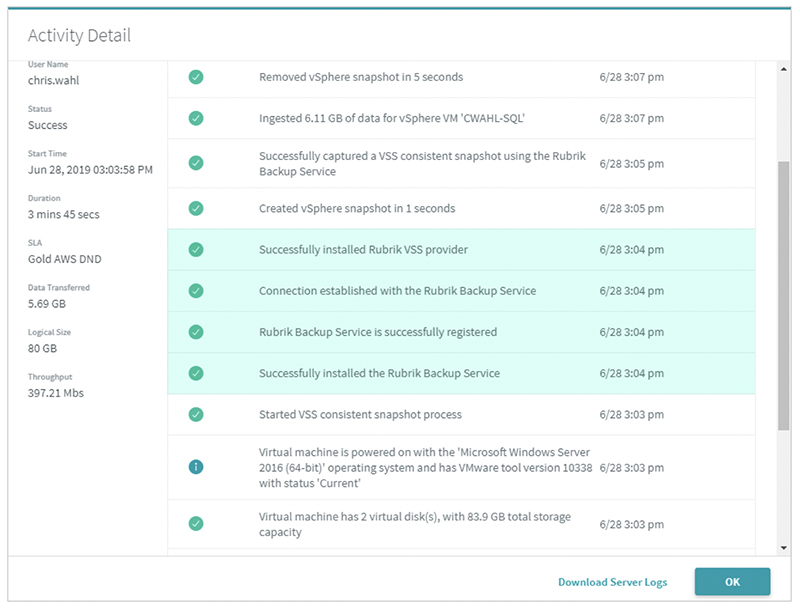
Rubrik Cyber Recovery is part of Rubrik Security Cloud and focuses on recovering data and applications to a clean state after ransomware or other disruptions. It uses recovery plans with defined processes and predictable timelines to orchestrate recovery, and it relies on air-gapped, immutable backups to protect recovery points. The product lets teams test and validate recovery plans in isolated environments and isolate infected snapshots to avoid reintroducing malware. It supports file-level, object-level, application-level, and system-wide restores at scale. It also provides tools for tracking recovery progress and conducting forensic investigation.

Source: Rubrik
Key features include:
- Recovery orchestration: Rubrik orchestrates recovery of data and applications using recovery plans that have defined processes and predictable timelines. Guided workflows support file-level, object-level, application-level, or system-wide restores, from a few infected files to thousands of VMs. Recovery can proceed without dependence on specialized cybersecurity skills or specific personnel.
- Recovery simulation: Teams can create, test, and validate cyber recovery plans in isolated environments to improve readiness and incident response. This addresses untested recovery plans that can otherwise lead to data loss and prolonged downtime. Simulations run without affecting production.
- Threat containment: The product isolates infected snapshots to reduce the risk of reintroducing malware into the environment during recovery. This helps teams recover data rather than malware. It works alongside Rubrik’s threat analytics and ransomware investigation.
- Clean point identification: Rubrik uses insight into the point and scope of an attack to identify a clean recovery point, reducing time spent searching for a usable restore point. This is intended to make recovery decisions faster during an incident. Recovery targets a clean state.
- Immutable backups and forensics: Air-gapped, immutable backups protect recovery points from alteration, supported by the Preemptive Recovery Engine. Teams can track recovery progress, measure execution time, generate compliance reports, and conduct post-attack forensic investigations in isolated environments. This supports root cause analysis and post-incident review.
Limitations (as reported by users on G2):
- Cost: Reviewers note the product can be expensive, particularly for smaller organizations.
- Pricing transparency: Licensing and pricing structures are described as unclear and requiring study.
- Reporting customization: Some users want more flexible, role-based reporting that does not require manual filtering.
- Setup time: Initial setup and integration can take time in larger or more complex environments.
8. Druva

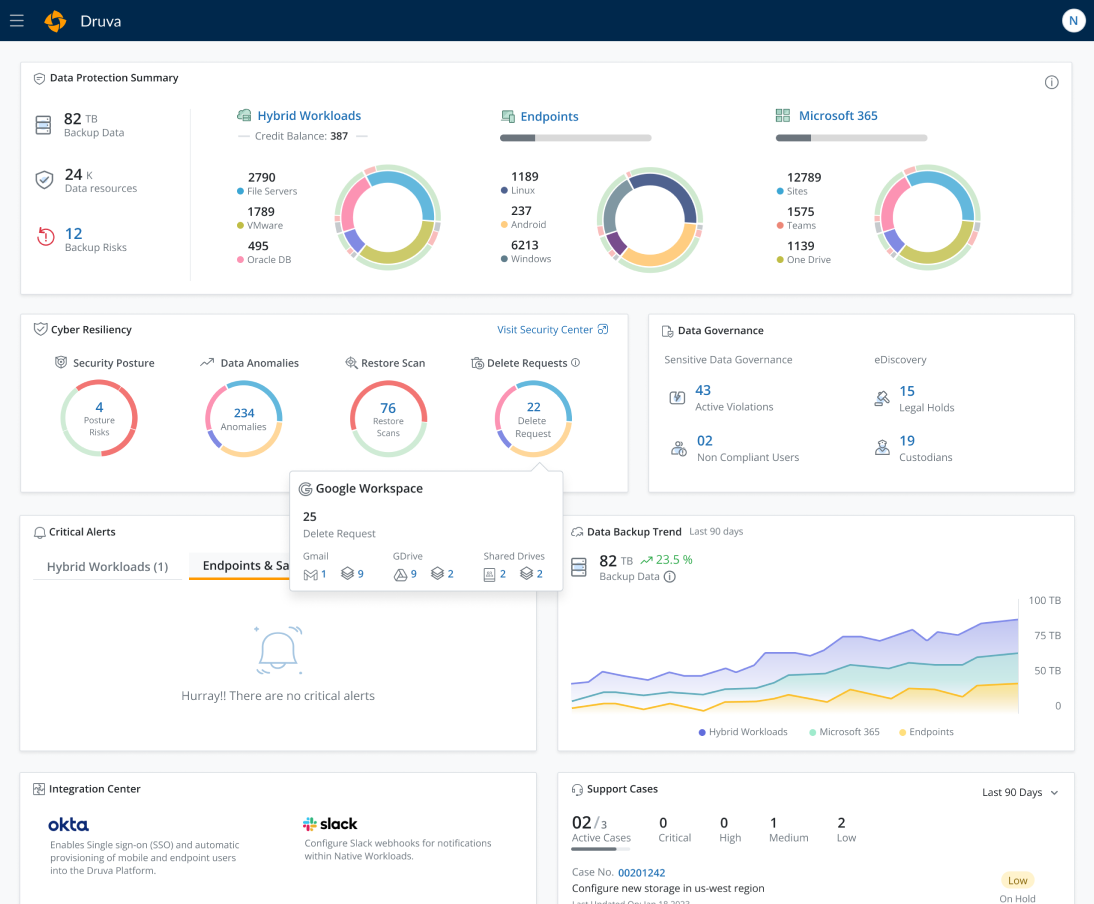
Druva delivers cloud disaster recovery as part of its fully SaaS data protection platform, built on AWS infrastructure. It provides one-click DR for on-premises VMs and recovers VMware and AWS workloads across AWS regions, with a stated RPO of an hour and RTO of minutes. Because it is fully SaaS, there is no DR hardware, software, or secondary site to manage. The platform automates DR plan testing through runbook execution and orchestration, and it stores backups as immutable copies isolated from the source environment. Failover and failback are supported for both VMware and AWS workloads.

Source: Druva
Key features include:
- Cloud DR for on-premises VMs: Druva provides one-click recovery of on-premises VMs to the cloud and can recover across any AWS region. It targets an RPO of an hour and an RTO of minutes. Backups serve as the basis for restoring to a point in time.
- VMware and AWS recovery: The platform backs up VMs wherever they run and recovers, fails over, and fails back across AWS regions for VMware and VMware Cloud on AWS. For AWS, it recovers Amazon EC2 and RDS resources across regions or accounts. Restored DR resources can be placed in an identical environment despite running in a different region or account.
- Failback: Druva restores operations to source servers on-premises or to VMware Cloud on AWS once the primary environment is available. Failover and failback are designed to complete in minutes. This supports returning to normal operations after an incident.
- Automated DR testing: Automated runbook execution, orchestration, and unlimited testing support DR audit and compliance requirements. Teams can validate DR plans without standing up dedicated infrastructure. Recovery runbooks allow validating systems in an isolated environment.
- SaaS delivery and immutable backups: As a fully SaaS solution, Druva removes the need to manage hardware, software, or additional DR sites, with centralized management of all DR plans from one console. Backups are immutable and isolated from the source environment, which protects them from ransomware, deletion, or corruption. Backup and cloud DR are consolidated in a single platform.
Limitations (as reported by users on G2):
- Cost: Pricing and some add-on features are reported as costly for certain workloads or services.
- Network dependency: As a cloud-native SaaS, performance depends heavily on network bandwidth, and initial backups or restores of large datasets can be slow.
- Reporting and permissions: Advanced reporting and granular role-based controls could be more flexible.
- Setup complexity: Initial configuration can be complex depending on environment requirements.
9. Arcserve

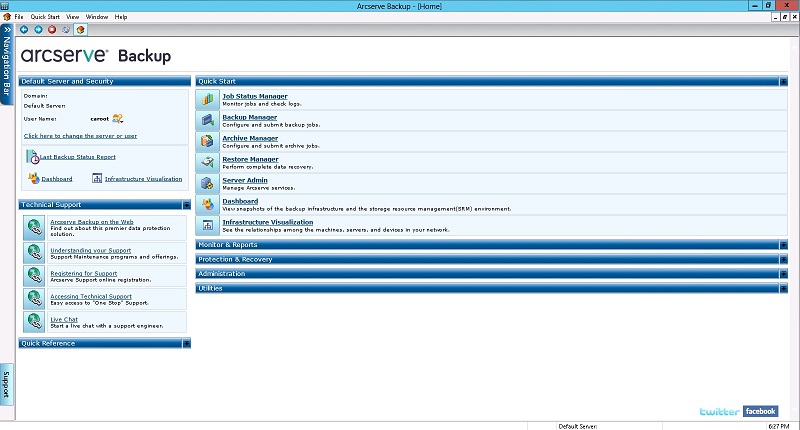
Arcserve Unified Data Protection (UDP) is a data resilience solution that backs up and restores data across physical, virtual, cloud, and hyperconverged environments from a single console. It serves as the technical backbone for disaster recovery plans, with automated DR testing, virtual standby, and SLA reporting. UDP includes AI-enabled anomaly detection that flags unusual backup behavior such as encryption activity or mass deletions. It supports instant VM and bare-metal recovery and extends to high availability and tape backup. The product is cloud-agnostic and can use the cloud as a backup source or destination.

Source: Arcserve
10. Acronis

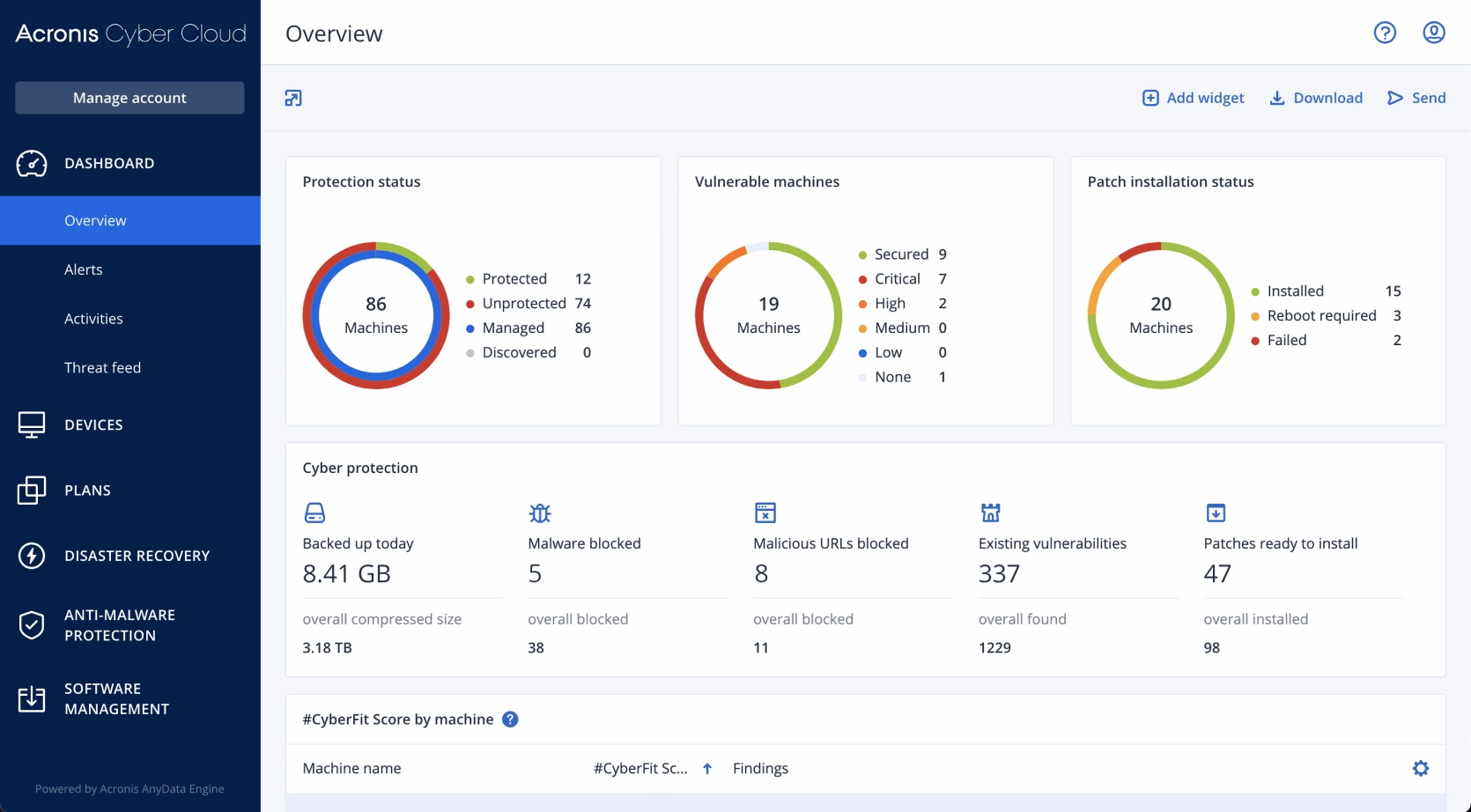
Acronis Disaster Recovery is an integrated component of the Acronis Cyber Protect platform, which combines backup, cybersecurity, patch management, and monitoring under a single agent and console. It replicates critical systems and applications in real time or on a schedule and fails them over to the Acronis Cloud during an outage. Failover systems can be activated within minutes so employees work from a cloud-hosted environment while on-premises systems are restored. The product uses predefined runbooks to orchestrate the order and dependencies of failover. It protects physical and virtual systems across Windows, Linux, VMware, and Hyper-V.

Source: Acronis
Key features include:
- Cloud failover: Acronis maintains ready-to-launch replicas of critical systems in the Acronis Cloud and fails them over during a disruption, with failover systems activated within minutes. Employees can continue working from the cloud-hosted environment while on-premises systems are restored in the background. Many SMB and mid-sized environments can reach RTOs under one hour.
- Disaster recovery runbooks: Predefined runbooks specify which systems to fail over, in what order, and with what dependencies, and execute automatically once a disruption is detected or declared. This orchestrates failover of multiple systems at once and reduces manual effort and human error. Runbooks can be tested in advance.
- Integrated cyber protection: Because DR is part of the Cyber Protect platform, it shares a single agent and console with backup, cybersecurity, patch management, and monitoring. The platform integrates EDR/XDR so that when a threat is stopped, failover to a clean cloud environment can occur, supporting failover to clean recovery points. This aligns DR with backup and security from one vendor.
- Physical and virtual support: Acronis protects physical and virtual systems, including Windows and Linux servers and VMware and Hyper-V virtual machines, across on-premises and cloud infrastructure. It supports physical-to-virtual recovery. This provides a unified approach across mixed environments.
- Cloud security and replication: Data is encrypted with AES-256 in transit and at rest, and the Acronis Cloud is hosted in data centers compliant with standards such as ISO 27001, HIPAA, and GDPR. Replication runs continuously or on a schedule to support high availability. The platform also includes ML-based ransomware protection.
Limitations (as reported by users on G2):
- Cost and pricing complexity: The product is positioned as a premium option with pricing that some users find complex and expensive for smaller businesses.
- Support responsiveness: Users report slow technical support responses and gaps in documentation.
- Performance: Backup and cloud restore speeds can be slow over the network, and integrated security agents can affect system performance.
- Configuration complexity: Access control and initial setup can be complex, and reporting and logs could be more detailed and customizable.
Supporting Disaster Recovery with Faddom Dependency Mapping
Disaster recovery goes beyond backups and failover; it requires a clear understanding of how your systems, business applications, and dependencies are interconnected to ensure that recovery plans work effectively when put to the test. This is where Faddom stands out. By continuously mapping all servers, applications, and traffic flows across on-premises, cloud, and hybrid environments, Faddom provides IT teams with the visibility needed to design reliable recovery strategies and avoid overlooked dependencies that can lead to downtime.
With real-time, agentless discovery and continuously updated maps, Faddom eliminates blind spots, ensures that application interdependencies are documented, and helps prioritize critical services for recovery. This context shifts disaster recovery from guesswork to a well-orchestrated and predictable process that adheres to strict Recovery Time Objectives (RTOs) and Recovery Point Objectives (RPOs). By aligning technical visibility with business continuity goals, Faddom empowers organizations to recover more quickly, reduce disruption, and strengthen resilience.
Schedule a demo today to discover how Faddom can enhance and streamline your disaster recovery strategy!