
What Is Cloud Migration?
Cloud migration inherently involves risks, primarily around security, compliance, and operational challenges. These include data breaches, regulatory violations, and potential disruptions to business operations. Organizations must carefully plan and execute their migration strategies to mitigate these risks effectively.
Table of Contents
ToggleSecurity risks of cloud migrations include:
- Data breaches and leaks: Migrating data to the cloud can expose it to new vulnerabilities, especially during transfer. Misconfigured cloud settings, inadequate access management, and insufficient network security can lead to data breaches.
- Data loss and corruption: Errors during data transfer or conversion can compromise data integrity, leading to loss of crucial information.
- Identity and access management (IAM) issues: Poorly managed access controls can grant unauthorized access to sensitive data, potentially leading to data breaches.
- API vulnerabilities: APIs, which are essential for cloud functionality, can be targeted by attackers if not properly secured.
- Insider threats: Employees or contractors with malicious intent can pose a threat to data security.
- Lack of visibility and control: Cloud environments can be complex, making it challenging to monitor and control data and resources.
Compliance risks include:
- Regulatory violations: Organizations must ensure their cloud environment complies with relevant regulations (e.g., GDPR, HIPAA).
- New compliance requirements: Cloud migration may introduce new compliance requirements that organizations need to understand and address.
- Vendor lock-in: Choosing a specific cloud provider can create dependencies, making it difficult to switch providers later.
Operational risks include:
- Service disruption: Migrating to the cloud can disrupt business operations if not planned carefully, leading to downtime.
- Skill gaps: Organizations may lack the necessary expertise to manage cloud environments effectively, potentially leading to misconfigurations and security issues.
- Cost overruns: Cloud migration can be expensive if not managed properly, potentially exceeding initial budget estimates.
- Slow migration process: Large-scale migrations can take a long time, potentially delaying the benefits of cloud computing.
- Added latency: Moving applications to the cloud can sometimes introduce latency, affecting performance.
- Unclear cloud migration strategy: A lack of a well-defined strategy can lead to inefficient migrations and increased risks.
Cloud Migration Security Risks
1. Data Breaches and Leaks
When sensitive data is moved to the cloud, there is an increased risk of exposure due to misconfiguration, insecure transfer methods, or vulnerabilities in the cloud environment itself. Data breaches can occur if proper access controls are not enforced or if encryption is not enabled both in transit and at rest.
Attackers often exploit weak authentication protocols or overlooked permissions to gain unauthorized access, potentially leading to regulatory penalties and reputational damage. Cloud providers generally maintain strong security defenses, but ultimate responsibility for data integrity lies with the organization migrating its data.
2. Data Loss and Corruption
Data loss and corruption risks increase during large-scale migrations due to the complexity of moving datasets across platforms, network interruptions, or format incompatibilities. Inadequate backup processes or improper synchronization routines may result in partial or inaccurate transfers, leaving critical information missing or damaged in cloud environments.
Automated migration tools can help minimize errors, but organizations must still conduct thorough testing to ensure data quality. Establishing redundant backup processes, implementing real-time integrity checks, and maintaining detailed migration logs are essential steps. These precautions help detect any data gaps or issues promptly.
3. IAM Issues
Identity and access management (IAM) systems are critical in the cloud, where decentralized environments multiply the surfaces for unauthorized access or privilege escalation. Common mistakes include misconfigured roles, use of shared accounts, over-privileging users, or failing to enable multifactor authentication.
These IAM issues can render systems vulnerable to both external attackers and insider threats, leading to data exposure or resource manipulation. Transition periods, when permissions and accounts are being migrated or re-provisioned, heighten these risks. Organizations must audit existing IAM policies, remove unnecessary privileges, and enforce strong password policies before migration begins.
4. API Vulnerabilities
Cloud services rely heavily on APIs for automation, administration, and integration. However, exposing APIs to the internet without adequate protections can introduce significant vulnerabilities, such as improper authentication, lack of input validation, or insufficient rate limiting.
Attackers can exploit these weaknesses to access sensitive data, disrupt operations, or escalate their privileges within the cloud environment. During and after migration, it’s critical to assess all existing and new APIs using security frameworks and tooling. Secure-by-design principles should be applied, such as using OAuth tokens, encrypting all endpoints, and regularly testing for vulnerabilities.
5. Insider Threats
Insider threats during cloud migration often stem from privileged users mishandling sensitive information or intentionally bypassing controls. Migration projects typically involve broad access for administrators, developers, or third-party consultants, increasing the number of people who can potentially compromise systems either accidentally or deliberately.
Organizations must enforce least-privilege principles throughout the migration process, restrict access to critical assets, and closely track activity logs for suspicious behavior. Regular security awareness training, proper offboarding, and the use of behavioral analytics can help identify and neutralize insider threats quickly.
6. Lack of Visibility and Control
Moving to the cloud often reduces the organization’s ability to directly track physical hardware and network infrastructure. Cloud service abstractions make it harder to spot misconfigurations or unauthorized changes, increasing the risk of operational blind spots. Inadequate visibility can delay incident response, complicate troubleshooting, or enable resource misuse without timely detection.
Establishing tracking tools that deliver real-time alerts and comprehensive logging is essential to restore visibility. Integrating these tools with centralized dashboards enables IT teams to track performance, usage, and anomalous activity across hybrid and multi-cloud environments.

Lanir specializes in founding new tech companies for Enterprise Software: Assemble and nurture a great team, Early stage funding to growth late stage, One design partner to hundreds of enterprise customers, MVP to Enterprise grade product, Low level kernel engineering to AI/ML and BigData, One advisory board to a long list of shareholders and board members of the worlds largest VCs
Tips from the Expert
In my experience, here are tips that can help you better navigate and de-risk your cloud migration efforts:
-
Define cloud exit strategies before you migrate:
Many teams overlook planning for how to leave the cloud or switch providers. Document exit criteria, data repatriation procedures, and decommissioning protocols upfront to reduce future vendor lock-in risk.
-
Simulate cloud failure scenarios during UAT:
Don’t just test functionality; simulate cloud outages, regional failures, or API throttling to assess the system’s resilience and rollback readiness before going live.
-
Use a “blast radius” model to sequence migrations:
Begin migration with systems that have the smallest operational or business blast radius if they fail. This phased risk exposure model provides learning opportunities without jeopardizing critical services early on.
-
Map latency-sensitive dependencies with synthetic tracking:
Before migrating workloads, run synthetic tests to map end-to-end latency across dependencies. This exposes risks that traditional discovery or architectural diagrams often miss.
-
Automate environment provisioning with drift detection:
Leverage infrastructure-as-code (IaC) paired with drift detection tools to ensure environments remain consistent post-migration. This minimizes environment-related troubleshooting later.
Cloud Migration Compliance Risks
7. Regulatory Violations
Organizations migrating to the cloud often face challenges in maintaining compliance with regulations such as GDPR, HIPAA, or PCI DSS, which mandate strict protections for sensitive data. Misunderstanding the controls and geographic constraints of cloud environments can result in accidental violations, such as storing personal data in jurisdictions without adequate legal protections or permitting unauthorized cross-border transfers.
While providers may ensure infrastructure security, customers are responsible for configuring workloads and enforcing compliance at the application or data layer. Failing to implement appropriate controls, maintain necessary audit trails, or conduct regular compliance checks can result in fines, sanctions, or forced service rollbacks.
8. New Compliance Requirements
Migrating to the cloud can introduce new compliance requirements, either from updated industry standards or from changes in how and where data is stored and processed. Adopting new cloud services may require re-architecting applications or revising business processes to meet these emerging obligations.
Organizations may find their existing compliance documentation or attestations insufficient after making the transition. Mitigating this risk requires early engagement with legal and compliance teams to fully map regulatory exposure and define new controls.
9. Vendor Lock-In
Vendor lock-in becomes a significant risk during cloud migration when organizations become dependent on proprietary APIs, tools, or services offered by a single cloud provider. This reliance can make it difficult to switch providers in the future, restrict negotiating power, and limit access to features available elsewhere.
Migrating away from a dominant platform can be costly and technically complex, particularly if significant customization or native integrations have been implemented. To avoid vendor lock-in, organizations should prioritize use of standard technologies, open APIs, and cloud-agnostic architecture patterns whenever possible during migration planning.
Cloud Migration Operational Risks
10. Service Disruption
Downtime or performance degradation during migration can disrupt business operations, lower customer satisfaction, and result in lost revenue. Technical issues such as network bottlenecks, data transfer failures, or compatibility problems between applications and the new environment often surface unexpectedly, especially if insufficient testing precedes a production cutover.
Minimizing service disruptions requires thorough planning and fallback mechanisms. Organizations should employ pilot migrations, staged rollouts, and automated rollback procedures to minimize risk. Regular health checks, backup strategies, and coordinated communication with stakeholders also help maintain business continuity.
12. Skill Gaps
Cloud migrations demand specialized skills in cloud architecture, security, automation, and application modernization. Many IT teams lack experience with the nuances of specific cloud platforms, leading to misconfigurations, deployment errors, or inefficient resource management. Addressing skill gaps is crucial to fully realize the benefits of cloud adoption and avoid costly mistakes.
Organizations should prioritize continuous training and upskilling, leveraging vendor-specific certification programs and hands-on labs. Encouraging collaboration among cross-functional teams and hiring experienced cloud professionals provides additional coverage for complex or mission-critical workloads during migration.
13. Cost Overruns
Unexpected costs frequently undermine cloud migration projects due to inaccurate forecasting, poor resource sizing, or unplanned consumption of cloud services. Cost overruns might result from overprovisioning, migration delays, or ineffective use of reserved instances and discounts.
Instituting FinOps practices early, with detailed upfront budgeting, shared accountability, and real-time cloud cost analytics, helps organizations control spending. Regular audits of cloud usage, timely decommissioning of unused resources, and negotiation of contracts or reservations with providers further drive efficient cost management throughout the migration lifecycle.
14. Slow Migration Process
Slow migrations decrease the value realization from cloud investments and can tie up internal resources for months or years. Causes include scope creep, unanticipated technical obstacles, dependency complexities, or inadequate automation.
Phased migration approaches and automated migration tooling speed up the process while reducing risk. Setting clear milestones, dedicating specialist teams, and implementing status tracking mechanisms ensures accountability and progress visibility, keeping projects on track and aligned with business priorities.
15. Added Latency
Migrating applications or data to the cloud can result in increased latency if network routes, integration points, or storage locations are not carefully optimized. Latency-sensitive applications may perform poorly in the cloud compared to on-premises deployments, especially if back-and-forth communications with legacy systems remain.
Addressing this risk requires thorough assessment of application dependencies and proactive infrastructure tuning. Cloud-native load balancing, use of edge services, and selecting optimal data residency regions can help minimize round-trip delays and maintain high performance for end users.
16. Unclear Cloud Migration Strategy
Migrating without a clearly defined strategy introduces unnecessary risk, cost, and confusion. Organizations lacking a thorough roadmap or clear business objectives often struggle to prioritize workloads, allocate resources, or measure progress.
A detailed migration strategy should incorporate workload assessments, dependency mapping, risk evaluations, and realistic success metrics. Involving business, IT, and compliance stakeholders in planning ensures the strategy is broadly understood and actionable, minimizing wasted efforts and improving long-term cloud adoption outcomes.
Learn more in our detailed guide to cloud migration strategy
Best Practices to Overcome Cloud Migration Risks
Here are some of the ways that organizations can better prepare themselves for cloud migration and to mitigate the associated risks.
1. Conduct a Comprehensive Discovery Phase
A successful migration begins with a thorough understanding of the existing IT landscape. This discovery phase involves cataloging all workloads, applications, databases, storage systems, network configurations, and interdependencies across environments. Without this insight, organizations risk migrating incompatible applications, missing key components, or underestimating the resources required.
The discovery process should include both automated and manual assessments. Tools like application dependency mapping, configuration management databases (CMDBs), and infrastructure inventory scanners can identify how systems interact and where potential bottlenecks exist. Interviews with stakeholders and system owners can uncover undocumented dependencies or business-critical nuances.
2. Adopt FinOps Practices
Cloud environments introduce variable and consumption-based pricing models that can quickly lead to runaway costs if unmanaged. FinOps is a practice that brings financial accountability to cloud spending by fostering collaboration between engineering, finance, and business teams.
Implementing FinOps starts with cost visibility. Organizations must tag resources by department, project, and environment, then use cost allocation reports and dashboards to track spending trends. Budgets and thresholds should be defined early, with automated alerts for anomalies or overages. Engineering teams must be empowered to view and optimize their usage data in real time.
FinOps also involves selecting the right pricing models, such as reserved instances, savings plans, or spot instances, based on workload profiles. Regular optimization reviews should identify unused or underutilized resources, and lifecycle policies should automate shutdown of non-production environments when not in use.
3. Embed Security Throughout Lifecycle
Security must be built into every phase of the process. Migrating workloads introduces new threat surfaces, access models, and compliance challenges, especially when sensitive data or regulated workloads are involved.
At the planning stage, organizations should conduct risk assessments and threat modeling exercises to define security requirements. Infrastructure-as-code templates should enforce baseline controls such as network segmentation, encryption, and identity management from the outset. Access should be governed by least privilege principles and enforced through IAM policies and multifactor authentication.
During migration, secure data transfer protocols (e.g., TLS, VPNs) and validation checks are essential to prevent interception or tampering. After workloads are live, continuous tracking tools, such as cloud-native security services, CSPM platforms, and intrusion detection systems must be deployed to identify misconfigurations, vulnerabilities, or suspicious activity.
4. Create a Cloud Center of Excellence
A cloud center of excellence (CCoE) is a centralized governance and enablement team that leads cloud adoption efforts across the organization. Its role is to define standards, build reusable assets, and support application teams with cloud-native practices.
A well-structured CCoE typically includes cloud architects, platform engineers, DevSecOps specialists, finance partners, and business stakeholders. The team sets architectural guidelines, defines automation pipelines, and curates a catalog of approved services and tools. It also provides training, office hours, and onboarding support to development teams.
In addition to technical leadership, the CCoE drives cultural change by advocating for DevOps principles, agile delivery, and shared accountability. It ensures compliance with governance, security, and cost management policies while enabling innovation.
5. Perform Zero‑Downtime Migrations
For customer-facing or mission-critical systems, downtime during migration is often unacceptable. Zero-downtime migration strategies enable continuous service availability by minimizing or eliminating user disruption during the transition.
Techniques include blue-green deployments, where two identical environments run in parallel, and traffic is gradually shifted from the old to the new system. Active-active replication can keep databases synchronized across both locations until the cutover. Tools like database replication, live VM migration, and content delivery network (CDN) failover strategies also support continuity.
Zero-downtime approaches require detailed coordination, rollback mechanisms, and extensive pre-migration testing. Network latency, data consistency, and session persistence must be considered to avoid errors during switchover.
6. Build with Cross‑Cloud Agnosticism
Cloud-agnostic architectures minimize dependency on any single provider by using open standards, modular design patterns, and portable components. This approach reduces the risk of vendor lock-in, improves resilience, and increases strategic flexibility.
Key design choices include using containers for application packaging, Kubernetes for orchestration, and Terraform or Pulumi for infrastructure automation. APIs should conform to open standards, and services like logging, tracking, and CI/CD should be decoupled from provider-specific implementations.
Data should be stored in formats and locations that allow easy export or replication to alternative platforms. Cloud-agnostic design also involves abstracting configuration and using service brokers or API gateways that can route traffic across clouds.
7. Train and Upskill Employees
Cloud migration success depends heavily on the knowledge and skills of the people executing it. Even experienced IT professionals may lack familiarity with cloud-native tools, services, and operational models. Addressing this gap is essential to reduce errors, improve efficiency, and fully leverage cloud capabilities.
Training programs should cover both foundational and advanced topics, tailored to different roles. Developers may need to learn serverless computing or container orchestration, while operations teams must master infrastructure-as-code, observability, and incident response in the cloud.
Organizations should encourage certification paths (e.g., AWS, Azure, GCP), hands-on labs, and internal knowledge sharing. Embedding cloud skills into performance reviews and project planning reinforces continuous learning.
8. Use Phased/Migration Waves
Large-scale cloud migrations should not attempt to move all workloads at once. Instead, a phased approach using migration waves reduces risk, allows for iterative learning, and improves quality assurance.
Each wave should focus on a defined set of workloads, ideally grouped by business unit, technical affinity, or criticality. Starting with low-risk, non-production systems provides an opportunity to refine tools, processes, and governance frameworks.
Subsequent waves can build on lessons learned, improving automation, runbooks, and stakeholder coordination. Parallel development and migration teams can help speed up progress while maintaining stability in the legacy environment.
9. Establish Strong Cloud Governance
Effective cloud governance provides guardrails to ensure secure, compliant, and cost-effective cloud usage. Without it, teams may inadvertently violate policies, overspend, or introduce security risks.
Governance frameworks should cover identity management, access controls, network security, tagging standards, resource provisioning limits, and logging policies. Cloud providers offer tools like AWS Organizations, Azure Policy, and Google Cloud Organization Policies to enforce these rules centrally.
Policy-as-code can be used to validate infrastructure before deployment, and anomaly detection tools can flag violations in real time. Governance policies should be regularly reviewed and updated to reflect evolving business and regulatory needs.
10. Leverage Automation Tools for Security Monitoring to Enhance Efficiency
Manual monitoring cannot keep pace with the scale and velocity of cloud environments. Automation tools improve efficiency by continuously scanning configurations, workloads, and activity logs to detect and respond to threats in real time.
Security automation includes services like AWS Security Hub, Azure Defender, and third-party CSPM tools that identify misconfigurations, enforce compliance rules, and trigger remediation actions. Automated threat detection platforms integrate with SIEMs to correlate events and escalate incidents.
Integrating security checks into CI/CD pipelines also helps catch vulnerabilities before they reach production. For example, infrastructure code can be scanned for security flaws, and container images can be validated for known vulnerabilities before deployment.
Related content: Read our guide to cloud migration tools
Reducing Cloud Migration Risk with Faddom Application Dependency Mapping
Success in cloud migration depends on strong planning, and planning is only reliable when you have complete visibility into every business application, server, and dependency before anything moves. Without this clarity, organizations encounter hidden connections that trigger service disruption, latency problems, compliance issues, and unexpected costs during migration.
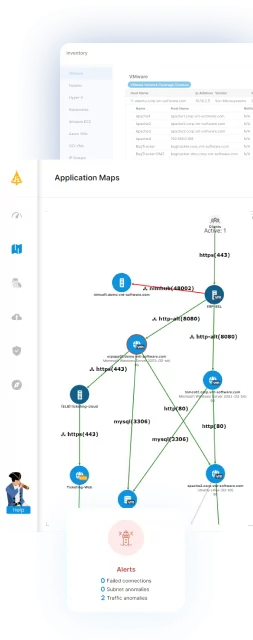
Faddom reduces these risks by continuously mapping real-time dependencies across on-premises, cloud, and hybrid environments. Its agentless discovery reveals every application flow and critical communication path that must stay intact. With this insight, teams can sequence workloads into accurate migration waves based on real business applications, keeping operations running smoothly while preventing issues caused by outdated or missing documentation. Faddom also supports architecture validation and smoother cutovers with always-updated visibility throughout the entire migration.
To see how Faddom can strengthen your cloud migration planning, fill out the form on the right to book a demo.