
What Are IT Audit Tools?
IT audit tools assist auditors in evaluating and ensuring the integrity, security, and compliance of information technology systems. They simplify the audit process by providing automated functionalities that support various phases of an IT audit, from planning and execution to reporting and follow-up.
The purpose of IT audit tools is to improve the efficiency and accuracy of IT audits. They achieve this by automating routine tasks, ensuring thorough documentation, and offering analytics and reporting features that provide deep insights into IT operations. This helps auditors identify potential risks, verify compliance with regulatory standards, and improve overall IT governance.
IT audit tools also support a systematic approach to auditing by incorporating best practices and standard frameworks. This ensures consistency in audit procedures and helps organizations maintain a high level of IT performance and security.
Editor’s note: Added recent information about the IT auditing market and updated details of IT auditing tools to reflect features and capabilities in 2026
This is part of a series of articles about IT asset management
IT Audit Market Trends
According to recent research, the global Information System (IS) Audit Services market is expanding steadily. The market reached $5.98 Billion in 2025 and is projected to reach $10.15 billion by 2033. Between 2025 and 2033, it is expected to grow at a compound annual growth rate (CAGR) of 6.83%.
Market expansion is driven by several factors. IT environments are becoming more complex due to digital transformation and cloud adoption. At the same time, cyber threats are increasing in scale and sophistication. Organizations must also comply with strict regulations such as GDPR, SOX, and HIPAA. These pressures require regular and more advanced IT audits.
The market is shifting from periodic, compliance-focused audits to continuous and technology-driven auditing models. Audit providers are integrating AI and data analytics to automate tasks, analyze large datasets, and detect anomalies in real time. This allows auditors to provide proactive risk insights instead of only retrospective assessments.
Despite strong growth, the market faces constraints. There is a global shortage of skilled IT auditors and cybersecurity professionals. Advanced audit technologies also require significant investment, which can limit adoption. Still, demand for independent assurance over IT controls, cloud systems, and digital infrastructure continues to drive long-term market growth.
Key Features of IT Audit Tools
IT audit tools typically offer the following features:
- Audit planning: Assists auditors in defining the scope and objectives of their audits, scheduling tasks, and allocating resources. The planning module often includes templates and checklists to simplify the audit preparation process and ensure nothing is overlooked.
- Compliance management: Monitors compliance with various regulatory standards such as GDPR, HIPAA, or PCI DSS. These tools provide frameworks and guidelines to help organizations stay compliant and prepare for audits.
- Audit trail: Logs all changes and actions taken within the IT environment, providing a chronological record that can be essential for forensic analysis and troubleshooting. This allows organizations to trace back any modifications made to the system, identify who made the change, and understand the reason behind it.
- Incident management: Enables quick identification, investigation, and resolution of IT-related incidents. These tools log incidents as they occur, classify them based on severity, and route them to appropriate personnel for action.
- Change management: Helps organizations control the lifecycle of all changes in their IT environment. This includes initiating, evaluating, approving, and documenting changes to ensure they are made securely and efficiently.
- Reporting and dashboards: These features provide visual insights into the audit process, highlight areas of concern, and track the progress of remediation efforts. Customizable reports allow for targeted analysis, while dashboards offer real-time monitoring of key performance indicators.
Related content: Read our guide to IT audit standards
IT Audit Tools vs. Related IT and Compliance Solutions
IT audit tools are often confused with other governance and security tools. While they may share features, their primary goal is different. IT audit tools focus on evaluating controls, collecting evidence, and documenting findings to support independent assurance. They are designed to assess whether IT processes and systems meet defined standards.
- Governance, Risk, and Compliance (GRC) platforms manage risk registers, policies, and compliance workflows. They provide a broad framework for managing organizational risk. IT audit tools, in contrast, are more focused on executing audits. Some organizations integrate audit tools into GRC platforms, but the audit function remains distinct.
- Security Information and Event Management (SIEM) systems collect and analyze log data in real time. They detect threats and trigger alerts. IT audit tools may review SIEM outputs as part of an audit, but they do not replace real-time monitoring systems. Their role is to evaluate whether monitoring controls are properly designed and operating effectively.
- Vulnerability scanners identify technical weaknesses such as missing patches or misconfigurations. They generate technical findings for remediation. IT audit tools use the results of these scans as audit evidence. However, they also assess governance, access controls, change management, and policy compliance, which go beyond technical vulnerabilities.
- IT service management (ITSM) tools manage incidents, changes, and service requests. They support daily IT operations. IT audit tools review ITSM records to verify that processes are followed and documented correctly. In short, operational tools run IT processes, while audit tools evaluate how well those processes are controlled and documented.
Top IT Audit Tools
IT Infrastructure and Security Auditing Tools
1. Faddom

The first step in auditing your IT systems is discovering and mapping all your existing servers and business apps. This is where Faddom comes in: It visualizes your on-premises and cloud infrastructure in as little as one hour without agents through application dependency mapping. Immediately see all your servers and applications and how they are dependent on each other.
- Faddom is agentless and doesn’t require credentials
- It is cheap, starting at $10K/year
- Map the entire environment in real-time, updating 24/7
- Quick: One person can map the entire organization in an hour
Learn more about Faddom for IT audits and compliance or start a free trial to the right

SolarWinds Network Configuration Manager (NCM) is part of SolarWinds Observability Self-Hosted and focuses on automating network device configuration management and compliance auditing. It helps organizations maintain continuous compliance by monitoring configuration changes, generating audit reports, and reducing configuration-related risks across network environments.
Features of SolarWinds Network Configuration Manager:
- Automated network audits: Continuously monitors device configurations and generates reports to identify and address non-compliance.
- Network configuration automation: Automates routine configuration management tasks to reduce manual effort and minimize misconfigurations.
- Configuration backup and restore: Provides reliable backup and restoration of device configurations to maintain network continuity.
- Network inventory: Maintains an up-to-date inventory of network devices for visibility and audit readiness.
- Vulnerability detection support: Helps identify and address configuration-related vulnerabilities before they impact operations.

Source: SolarWinds

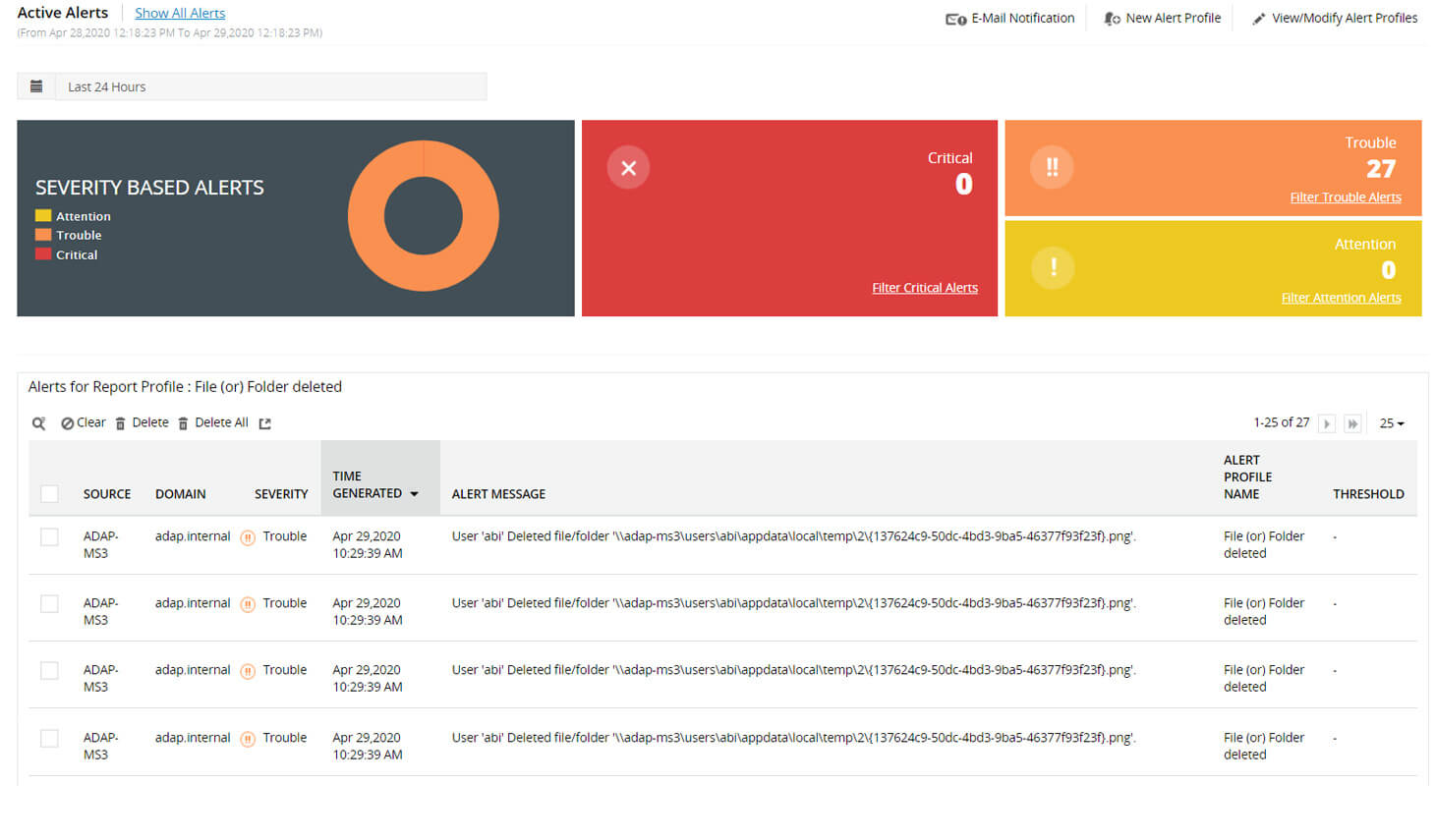
3. ManageEngine ADAudit Plus

ManageEngine ADAudit Plus is an IT auditing platform to monitor and secure hybrid Active Directory environments. It provides real-time visibility into changes across on-premises Active Directory, Microsoft Entra ID, Windows servers, file servers, workstations, and multi-cloud environments, supporting compliance reporting and threat detection.
Features of ManageEngine ADAudit Plus:
- Account lockout analysis: Tracks authentication failures and identifies the source of lockouts to support investigation and remediation.
- Real-time change notification: Sends instant alerts detailing who made a change, when it occurred, and from where within Windows environments.
- Threat detection and response: Detects Active Directory attacks and identifies risky configurations across Azure, AWS, and GCP, with options for automated response.
- Windows logon monitoring: Continuously audits user logon activity, including failures and historical logon events.
- Compliance reporting: Provides over 250 built-in reports aligned with standards such as SOX, PCI DSS, HIPAA, GDPR, FISMA, and ISO 27001.

Source: ManageEngine
4. Qualys Enterprise TruRisk Platform

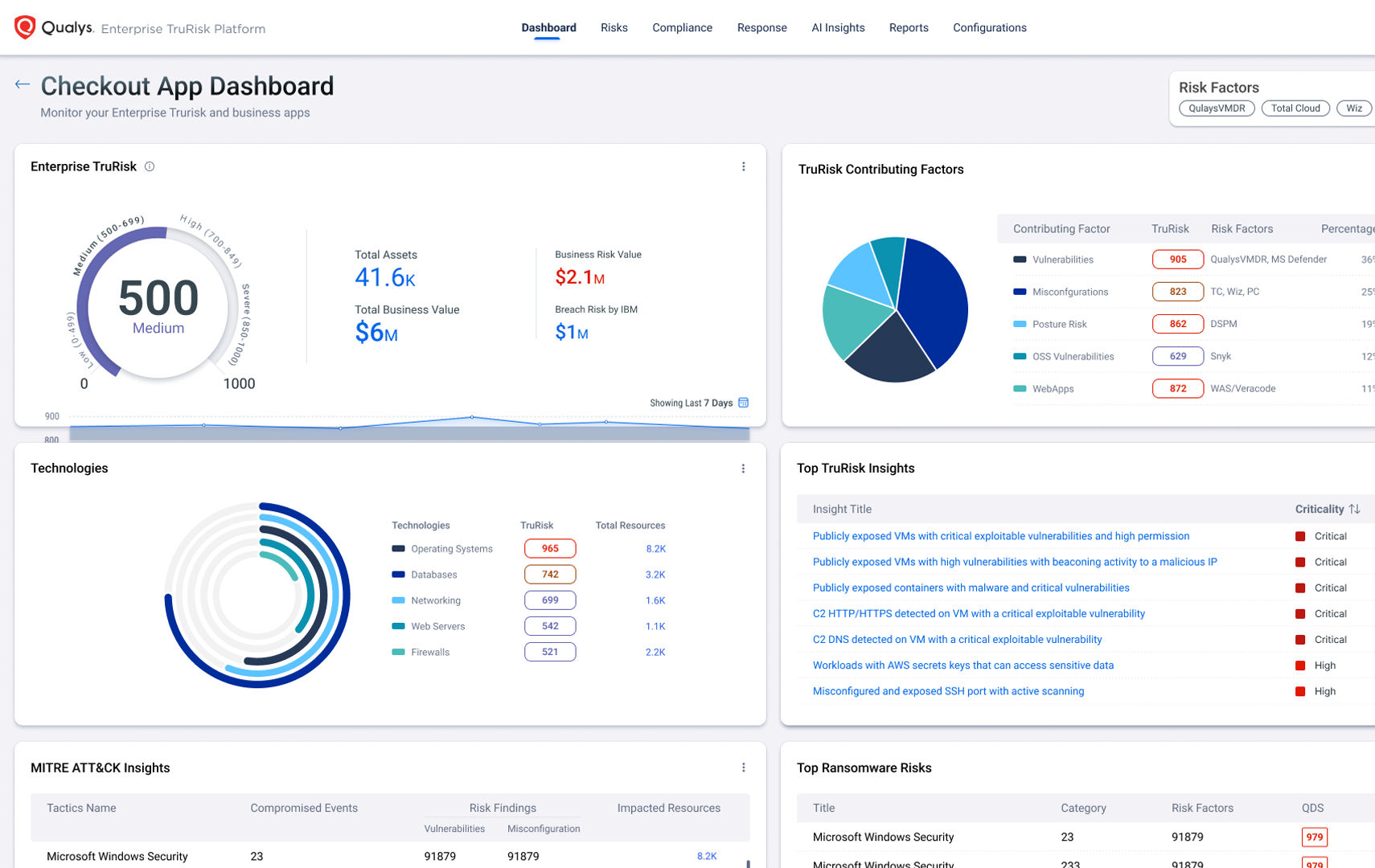
The Qualys Enterprise TruRisk Platform enables organizations to measure, communicate, and reduce cyber risk across internal and external attack surfaces. It builds a continuously updated inventory of assets and aggregates risk data from Qualys and non-Qualys sources to provide a unified view of vulnerability, misconfiguration, and compliance exposure.
Features of Qualys Enterprise TruRisk Platform:
- Unified asset inventory: Maintains a continuously updated inventory with business context to support risk-based auditing.
- Risk aggregation and scoring: Aggregates multiple risk factors, including vulnerabilities and misconfigurations, to quantify overall cyber risk.
- Dynamic dashboards and reporting: Provides executive dashboards and business unit reports to communicate risk posture clearly.
- Risk-based prioritization: Prioritizes remediation based on business impact using TruRisk scoring and AI-driven analysis.
- Integrated remediation workflows: Supports coordinated remediation across IT and security teams to reduce mean time to repair.

Source: Qualys
5. Netwrix Auditor

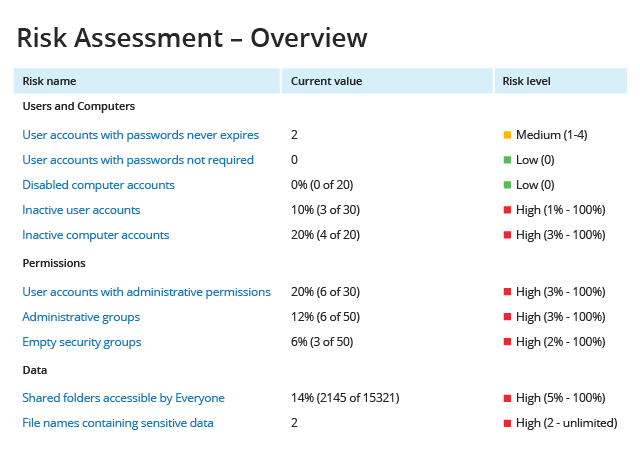
Netwrix Auditor is an IT audit software platform that provides centralized visibility into user activity, configuration changes, and access across IT systems. It collects and consolidates audit trails from environments such as Active Directory, Microsoft 365, file servers, databases, and network devices to support compliance, threat detection, and investigation.
Features of Netwrix Auditor:
- Centralized activity auditing: Tracks changes, logins, and access attempts across multiple systems from a single platform.
- Real-time alerts: Generates near real-time alerts on suspicious activities and critical changes.
- Risk assessments: Identifies excessive permissions and security gaps to reduce attack surface.
- Prebuilt compliance reports: Provides ready-to-use reports for regulations such as HIPAA, PCI DSS, and SOX.
- Accelerated incident investigation: Offers searchable audit trails and dashboards to support rapid forensic analysis.

Source: Netwrix
Audit Management and Governance (GRC) Platforms
6. ServiceNow Audit Management

ServiceNow Audit Management is part of the ServiceNow Governance, Risk, and Compliance suite. It supports risk-based internal auditing by centralizing audit planning, execution, issue tracking, and reporting within a single system. The platform integrates risk data and entity information to improve audit scoping and reduce recurring findings.
Features of ServiceNow Audit Management:
- Audit engagement lifecycle management: Supports creation, planning, scoping, execution, and reporting of audit engagements.
- Audit project management: Tracks resources, costs, and timesheets using integrated project portfolio management capabilities.
- Smart issue management: Uses AI and machine learning to prioritize, assign, and streamline issue remediation workflows.
- Evidence requests and consolidation: Enables structured evidence collection from frontline users and supports reuse across audits.
- Persona-based workspaces: Provides role-based dashboards and real-time views of audit activities and milestones.

Source: ServiceNow

7. AuditBoard

AuditBoard is a connected risk management platform that supports audit, risk, IT compliance, and ESG programs. It centralizes risk assessments, control testing, documentation, and issue management, while integrating with business systems to automate evidence collection and enable continuous monitoring.
Features of AuditBoard:
- AI-driven insights: Uses contextual insights and intelligent recommendations to support audit and compliance workflows.
- No-code analytics: Enables teams to analyze evidence, perform control testing, and identify high-priority risks without custom development.
- Automation of audit activities: Automates time-intensive processes to improve efficiency and scalability.
- Integrated reporting: Provides real-time reporting and dashboards across audit and risk programs.
- Extensive integrations ecosystem: Connects with over 200 tools to automate evidence collection and monitoring.

Source: AuditBoard

8. Archer Audit Management

Archer Audit Management is a risk-based audit management solution that consolidates the audit lifecycle within a single system. It enables audit teams to focus on high-risk areas, improve collaboration with risk and compliance functions, and gain visibility into key risks and control performance.
Features of Archer Audit Management:
- Risk-based audit approach: Aligns audit activities with the most critical business risks to improve impact and relevance.
- Complete audit lifecycle control: Manages planning, execution, and reporting within one centralized platform.
- Issues management integration: Connects audit findings with broader risk and compliance issue management processes.
- Audit engagements and workpapers: Supports efficient execution of engagements and documentation of workpapers.
- Audit planning and quality management: Enables structured risk assessment and control over the audit planning lifecycle.

Source: Archer
Conclusion
IT audit tools are essential for modern organizations to maintain robust IT governance, ensure compliance, and enhance security. By automating key audit processes, these tools increase efficiency, accuracy, and consistency, allowing auditors to focus on critical issues and strategic improvements. As technology continues to evolve, the role of IT audit tools will become even more pivotal in safeguarding IT environments and supporting organizational objectives.
Learn more about Faddom for IT audits and compliance or start a free trial by filling out the form on the sidebar!