
TL;DR: Device42 alternatives split into dependency mapping tools and IT asset management platforms. Best for: Faddom (agentless mapping), ServiceNow ITOM (AIOps service mapping), IBM Maximo (enterprise asset management), and Asset Panda (asset tracking).
What Is Device42?
Device42 is an IT management and data center operations solution. It helps organizations manage their IT infrastructure and operational data. Using Device42, businesses can automate the discovery of IT assets across multiple environments, ensuring accurate visibility into their infrastructure.
The platform offers tools including asset management, IP address tracking, and power and environmental monitoring. This enables organizations to optimize operations, enhance governance, and drive higher efficiency.
Core features of Device42 include:
- Auto-discovery: Agentless scanning identifies hardware, software, network components, and cloud resources across AWS, Azure, and GCP.
- Dependency mapping: Visualizes real-time interconnections between applications, services, and infrastructure to de-risk migrations.
- Data center infrastructure management (DCIM): Offers rack layouts, visual room heatmaps, and power and environmental tracking.
- IP address management (IPAM) and secrets: Tracks IP
This is part of an extensive series of guides about cybersecurity

Source: Device42
Device42 Alternatives At a Glance
The table below summarizes the key differences between these Device42 alternatives. We explore each tool in more detail in the sections that follow.
|
Category |
Solution |
Best For |
Key Strengths |
Things to Consider |
|
Infrastructure Discovery and Application Dependency Mapping |
Faddom |
Agentless real-time dependency mapping across hybrid and multi-cloud |
Agentless passive discovery, real-time continuous mapping, security and compliance risk scoring |
Reduced depth in very large or tightly segmented environments; some setup documentation could be clearer; limited niche integrations and customization |
|
Infrastructure Discovery and Application Dependency Mapping |
ServiceNow IT Operations Management |
AIOps-driven service mapping tied to ITSM and CMDB |
Real-time discovery with dynamic service mapping, event correlation with AIOps noise reduction, agentic automated remediation |
Complex setup and configuration; expensive and hard-to-predict pricing; agentless discovery may miss assets, requiring costly agent add-ons |
|
Infrastructure Discovery and Application Dependency Mapping |
Lansweeper |
Cyber asset intelligence across IT, OT, cloud, and IoT |
Continuous discovery of managed, unmanaged, and shadow assets, unified normalized inventory, vulnerability and lifecycle risk context |
Cloud product gets more development focus than on-premises; on-premises reporting requires SQL knowledge; support is mostly self-service |
|
IT and Enterprise Asset Management |
IBM Maximo Application Suite |
Unified enterprise asset and facilities management with predictive maintenance |
EAM, APM, and AIP combined in one suite, AI-driven condition-based maintenance, specialized asset classes across industries |
Complex setup often requiring specialists; dated interface in places; performance can slow under heavy reporting load |
|
IT and Enterprise Asset Management |
Asset Panda |
Configurable no-code asset tracking with mobile-first workflows |
No-code configurable tracking, mobile app with barcode and QR scanning, consolidated asset records with compliance and audit trails |
Asset-based pricing can grow with large counts; reporting is less advanced for granular analysis; mobile offline functionality is limited |
|
IT and Enterprise Asset Management |
AssetSonar |
Unified hardware and software ITAM with integrated patch management |
Hardware and software lifecycle tracking, integrated patch and vulnerability management, no-code workflow automation |
Limited custom fields and filters; reporting and dashboards can feel limited; bulk operations can be slow |
The Freshworks Acquisition of Device42: Background and Timeline
Freshworks announced its intent to acquire Device42 in May 2024 and completed the acquisition on June 6, 2024. The acquisition expanded Freshworks’ IT operations portfolio by adding Device42’s IT asset discovery, CMDB, and application dependency mapping capabilities to Freshservice and the broader Freshworks ITSM platform.
Before the acquisition, the two companies had already worked together through a technology partnership that integrated Device42 with Freshservice for asset discovery and configuration management. Following the acquisition, Freshworks positioned Device42 as the foundation for more advanced IT Asset Management (ITAM), service mapping, and AI-powered IT operations capabilities. The long-term goal is to provide a unified platform where organizations can automatically discover infrastructure, maintain an accurate CMDB, understand application dependencies, and use AI to improve incident response and operational efficiency.
Acquisition timeline:
- April 2022: Freshworks and Device42 expand their strategic partnership by integrating Device42 with Freshservice for enterprise asset management and service mapping.
- May 2, 2024: Freshworks announces a definitive agreement to acquire Device42.
- June 6, 2024: Freshworks completes the acquisition and officially adds Device42 to its ITSM and ITAM portfolio.
- Late 2024–2025: Freshworks releases tighter Freshservice integrations, introduces AI capabilities powered by Device42 data, and continues integrating the products while maintaining Device42 as a standalone offering.
What the Freshworks Acquisition Means for Existing Device42 Customers
For existing Device42 customers, Freshworks has committed to continuing Device42 as a standalone product, preserving existing support, APIs, and third-party integrations while gradually expanding integration with Freshservice. Customers can continue using Device42 independently, and Freshworks has stated that ongoing development and customer support remain priorities.
However, the acquisition also introduces uncertainty that organizations should consider when evaluating their long-term roadmap. As Device42 becomes more tightly integrated with the Freshworks ecosystem, future innovation may increasingly prioritize Freshservice and other Freshworks products. Organizations using ServiceNow, Jira Service Management, BMC Helix, or other ITSM platforms should monitor whether future capabilities remain platform-agnostic or become optimized primarily for Freshworks customers. Freshworks has highlighted integration with its own ITSM platform as one of the primary strategic goals of the acquisition.
Another consideration is product direction. Software acquisitions often shift engineering priorities toward platform integration rather than standalone feature development. Enterprise buyers frequently cite concerns such as changes to licensing, roadmap priorities, support quality, or the eventual retirement of overlapping functionality after acquisitions.
Key Features of Device42
1. IT Inventory and Asset Management
Device42 provides a centralized repository for tracking all hardware and software assets. This enables IT teams to maintain up-to-date records of their entire technology stack, facilitating better decision-making and compliance with regulatory requirements.
Furthermore, the platform supports automated asset discovery, which simplifies the tracking of new and existing assets. Real-time updates ensure that the IT inventory remains current, reducing manual tasks and the potential for errors.
2. CMDB
The Configuration Management Database (CMDB) in Device42 stores detailed information about all IT assets and their configurations, enabling easier management and troubleshooting of IT environments.
With the CMDB, businesses can visualize relationships and dependencies among hardware, software, and services. This is vital for effective change management and incident resolution, and can reduce downtime and improve service delivery.
3. Data Center Infrastructure Management (DCIM)
Device42’s DCIM capabilities provide tools for managing data center resources. It helps businesses plan, manage, and optimize the physical infrastructure of their data centers, including power, cooling, and space management. This ensures efficient use of data center resources while minimizing downtime.
DCIM capabilities also include features for environmental monitoring and power management. These features help data center operators identify potential issues before they escalate, ensuring proactive maintenance and operational continuity.
4. Application Dependency Mapping
Application dependency mapping in Device42 reveals the dependencies within and between software applications in the IT environment. It provides IT teams with a view of how applications interact with physical and virtual resources, which is important for risk management and troubleshooting.
Dependency mapping is especially important during system upgrades or migrations. By understanding dependencies, IT professionals can plan changes more effectively, ensuring minimal impact on business operations and service availability.
5. Cloud Recommendation Engine
Device42’s Cloud Recommendation Engine analyzes current infrastructure usage to make suggestions about optimal cloud configurations. This tool enables cloud migration planning by providing insights into cost, performance, and security considerations.
The engine uses real-time data and predictive analytics to recommend whether workloads should be moved to the cloud or optimized on-premises. This helps organizations make informed decisions about cloud investments.
6. Auto-Discovery
Device42 uses agentless scanning to automatically identify hardware, software, network components, and cloud resources across AWS, Azure, and GCP. This continuous auto-discovery keeps the CMDB up to date with an accurate inventory of physical, virtual, and cloud assets across the entire hybrid environment.
7. Auto-Discovery
Device42 provides IP address management that tracks IP allocations and subnet usage across the network. It also includes secrets management for secure storage of passwords and certificates, giving teams centralized control and visibility over their IP address space and sensitive credentials.
Related content: Read our guide to Device42 asset management (coming soon)
Device42 Limitations
When evaluating Device42, it’s important to be aware of the following limitations, reported by users on the G2 platform.
Steep Learning Curve
New users of Device42 may find it difficult to use without prior experience or training. The interface and navigation have a steep learning curve, which can delay initial productivity and makes the platform less accessible to users without extensive IT experience.
Limited Reporting Capabilities
Device42 does not offer an option to export reports detailing changes to subcomponents linked to devices, such as CPU and memory modifications. Although this data is available within the application, the inability to export it limits the utility of Device42 for tracking and documenting hardware changes over time, which is important for audit and compliance purposes.
Additional Costs for Essential Plugins
Some key plugins and features are not included in the base package of Device42, requiring additional purchases. This can lead to unexpected costs for organizations that might assume these core features are included in the initial licensing fee. As a result, businesses might face higher than anticipated expenses to fully utilize Device42.
System Performance Issues
Users have reported that Device42 can sometimes operate slowly, which can hinder workflow efficiency. This slow performance might be particularly noticeable during complex operations or when the system is handling large volumes of data.
Notable Device42 Competitors and Alternatives
How we selected these tools: We shortlisted Device42 alternatives based on the role each plays relative to Device42, spanning agentless infrastructure discovery and application dependency mapping, and broader IT and enterprise asset management, weighing discovery method, lifecycle depth, and integration breadth.
Faddom

Faddom is an application dependency mapping (ADM) tool that maps on-premises and cloud infrastructure in real time. It uses an agentless, passive approach that analyzes a copy of network traffic rather than installing software on servers, so it requires no agents, no server credentials, and no firewall changes, and it can run offline with all data kept inside the user’s environment. After deployment, Faddom automatically groups servers into business applications and produces a first map in about an hour. Maps then update continuously, 24/7, so the documentation reflects the current state of the environment. Faddom AI applies correlation and analysis to raw network data to generate the application and dependency maps.

Key features include:
- Agentless, passive discovery: Faddom maps servers, applications, and their dependencies by analyzing a copy of network traffic. Because it does not install agents, use server credentials, or require firewall changes, deployment is lightweight and read-only, and the platform can operate offline without sending data outside the environment.
- Real-time hybrid and multi-cloud mapping: The platform maps on-premises servers and cloud instances across hybrid and multi-cloud environments, automatically grouping servers into business applications. Maps update continuously, 24/7, so the view of dependencies and data flows reflects current conditions rather than a point-in-time snapshot.
- Asset documentation and CMDB inventories: Faddom maintains asset and dependency documentation, including diagrams and CMDB-style inventories, that can be exported. It is positioned as a continuously maintained source of truth intended to replace manual spreadsheets and outdated documentation.
- Change management and impact analysis: By showing how servers and applications depend on each other, Faddom supports tracking changes over time and assessing the downstream impact of planned changes, which is intended to reduce risk during updates and day-to-day operations.
- Migration and cost optimization planning: For data center and cloud migration, Faddom maps dependencies to support wave-based migration planning, server right-sizing, and cost prediction. It also surfaces resource usage to help identify cost-saving opportunities.
- Security and compliance visibility: Faddom detects external traffic, vulnerabilities, and anomalies, and produces a risk score that combines factors such as SSL, CVEs, users, and external traffic. It maps east-west traffic and dependencies to support microsegmentation, audit, and compliance work.
Limitations (as reported by users on G2):
- Depth in highly complex environments: Because the platform is agentless and works from network traffic, some users note that very large or tightly segmented environments may need additional configuration to capture every dependency at full granularity.
- Documentation clarity during setup: A few users reported that parts of the setup documentation could be clearer or more consistent, which extended the time needed to complete an initial deployment.
- Customization and niche integrations: Some users would like deeper customization options and broader integrations with certain specialized tools.
2. ServiceNow IT Operations Management

ServiceNow IT Operations Management (ITOM) is a suite within the ServiceNow AI Platform that applies AIOps to managing IT infrastructure and services across hybrid and cloud estates. It federates signals from systems, services, and applications, discovers infrastructure, and builds dynamic service maps using the Common Service Data Model (CSDM) to keep the CMDB accurate. ITOM combines discovery, service mapping, event management, and remediation so teams can track service health, identify root causes, and respond to incidents. It integrates natively with ServiceNow IT Service Management and connects to third-party tools through Service Graph Connectors.

Source: ServiceNow

Key features include:
- Discovery: ITOM Discovery automatically finds and maps physical, virtual, and cloud resources and their end-to-end service dependencies in real time, populating and maintaining the CMDB. It draws on first- and third-party discovery data to support root-cause analysis, prioritization, and impact assessment.
- Service mapping: Service Mapping builds dynamic maps that link infrastructure components to the business services they support, using the Common Service Data Model. The maps update as the environment changes, providing context for change management and incident resolution.
- Event management and AIOps: Event Intelligence correlates and de-duplicates alerts across disparate monitoring tools, using machine learning to reduce noise, create and prioritize incidents, and surface anomalies before they affect users.
- Change impact analysis: ITOM shows the downstream impact of a planned change before it is scheduled, so teams can see which services a given update could affect and avoid self-inflicted outages.
- Automated remediation: Agentic AI remediation identifies recurring root-cause patterns and triggers orchestrated workflows automatically, with policy-driven responses to repetitive incidents and system alerts.
- Service availability and integrations: A full-stack service health view centralizes data from monitoring and observability tools, cloud providers, and AI agents, while Service Graph Connectors unify data from specialized tools into the CMDB. Additional capabilities include certificate management and the Agent Client Collector.
Limitations (as reported by users on G2):
- Complex setup and configuration: Users report that getting full value requires significant setup effort and detailed knowledge of the organization’s own infrastructure, which can lengthen deployment.
- Pricing and licensing: Reviewers describe the pricing and licensing model as expensive and difficult to predict, particularly for small and mid-sized organizations.
- Discovery scope and agents: Some users note that the agentless discovery model did not scan all assets as expected and that adding agent-based discovery brings additional licensing cost.
- Usability: A number of users find the platform less intuitive than some alternatives, with certain tasks taking more steps than expected.
3. Lansweeper

Lansweeper is a cyber asset intelligence platform that discovers and inventories technology assets across IT, OT, cloud, and IoT environments. It continuously discovers and classifies managed, unmanaged, and shadow assets without manual effort, then normalizes the data into a single inventory enriched with context, relationships, and risk signals. The platform is built to give IT and security teams a shared, validated view of what exists in the environment, and it feeds that data into ITSM, CMDB, and security tools. Lansweeper offers agentless scanning alongside agents and cloud connectors, and the vendor states it is used across more than 30,000 environments.
Key features include:
- Asset discovery across IT, OT, cloud, and IoT: Lansweeper continuously discovers and classifies every connected asset, including managed, unmanaged, and shadow devices, across hybrid environments using active scanning, passive sensing, agents, and cloud connectors.
- Unified asset inventory: Discovered data is normalized and deduplicated into a single, continuously updated inventory. Records are relationship-aware, linking users to devices and systems, and can be grouped by location, environment, business unit, or lifecycle stage.
- Insights and risk context: The platform enriches assets with vulnerability data, warranty details, custom fields, and lifecycle signals, and flags assets that are at or approaching end of life, supporting risk assessment and spend forecasting.
- Diagrams and reporting: Lansweeper generates network topology and virtual-environment diagrams on top of the inventory and provides dashboards and reports for audits, cost optimization, and operational analysis.
- Integrations and orchestration: Lansweeper feeds asset data into ITSM, CMDB, and security tools through integrations with platforms such as ServiceNow, Jira Service Management, and Freshservice, and its orchestration capability automates actions across the stack.
Limitations (as reported by users on G2):
- On-premises versus cloud development: Users note that new capabilities are added mainly to the cloud instance while the on-premises version receives fewer major improvements, and that the cloud instance stores data in a specific regional data center, which raises data-sovereignty questions for some.
- Reporting complexity: The on-premises reporting function is described as complex, requiring knowledge of the underlying database structure and SQL to build certain reports.
- Support experience: Several users report that support is largely limited to knowledge-base articles, videos, and chat or forum channels, with little direct, real-time interaction.
- Interface learning curve: Some users find the interface overwhelming at first and configuration changes not always intuitive, and the software-deployment features are seen as limited.
IT and Enterprise Asset Management
4. IBM Maximo Asset Management

IBM Maximo Application Suite (MAS) is a unified asset and facilities management solution that brings maintenance, inspections, and reliability together for critical equipment and infrastructure, using AI to support asset uptime and performance. It is built for operations, maintenance, and facility teams dealing with downtime, aging assets, workforce constraints, and fragmented data. The suite combines enterprise asset management (EAM), asset performance management (APM), and asset investment planning (AIP), and offers specialized solutions for asset classes such as real estate and facilities, renewables, IT, and data centers. Maximo is licensed through a credit-based AppPoints model and is available as client-managed software or as SaaS.

Source: Maximo

Key features include:
- Enterprise asset management (EAM): Maximo provides a system of record for assets and work, combining real-time and historical data with work order management. Teams manage work, asset history, and maintenance processes in one place, with AI used to surface insights and support prioritization.
- Asset performance management (APM): APM uses AI, analytics, and sensor data to detect issues early, support condition-based maintenance, and help prevent failures. It turns asset condition data into maintenance actions intended to reduce unplanned downtime and extend asset life.
- Asset investment planning (AIP): AIP connects asset condition, risk, and financial impact so teams can evaluate scenarios, compare priorities, and align maintenance and replacement decisions with budgets and business goals for capital planning.
- Maintenance, inspection, and field service: The suite supports maintenance planning and scheduling, reliability-centered and condition-based maintenance, MRO inventory optimization, and field service with mobile access to asset data and work orders. Asset inspection analyzes images and video from cameras, drones, and mobile devices to detect defects and anomalies.
- Specialized asset classes and industry coverage: Maximo offers tailored solutions for real estate and facilities, renewables, IT asset and service management, and data center infrastructure, with configurations for industries such as manufacturing, energy and utilities, oil and gas, transportation, and government.
Limitations (as reported by users on G2):
- Complex setup and learning curve: Users describe initial setup and configuration as complex, often requiring dedicated Maximo specialists, and report a steep learning curve before teams become productive.
- Interface and usability: Some users find the interface dated and not always intuitive in certain modules, and note that configuring workflows, dashboards, and automation requires technical expertise rather than simple drag-and-drop tools.
- Performance under load: Reviewers report that performance can slow when running heavy reports or when multiple integrations are active.
- Mobile app and documentation: The mobile app is reported to experience occasional sync delays or minor crashes, and the documentation, while extensive, is described as highly technical and harder for beginners.
5. Asset Panda

Asset Panda is a configurable, cloud-based asset management platform with a mobile-first design for tracking physical and digital assets through their lifecycle. It is used to track items ranging from IT hardware and software licenses to vehicles, equipment, and contracts, and its web and mobile interfaces can be configured to match existing workflows. Asset records consolidate action histories, warranty information, user manuals, and photos in one place. The platform centers on mobile apps for iOS and Android with built-in barcode and QR code scanning, and includes AI-assisted setup and data entry through its Ursa capability. Integrations let it sync data across other tools to act as a single source of truth.
Key features include:
- Configurable asset tracking: Asset Panda lets organizations customize fields, workflows, and asset data without code, so the platform can track varied asset types across industries without changing how teams work.
- Mobile app with barcode and QR scanning: Native iOS and Android apps let users scan barcodes and QR codes to check assets in and out, update records, and capture photos in the field, removing the need for dedicated scanning hardware.
- Consolidated asset records: Each asset record brings together action history, warranty information, user manuals, and photos in one place, replacing spreadsheets with a central store of asset information.
- Lifecycle and maintenance management: The platform supports asset lifecycle tracking, maintenance management with work orders, inventory management with low-stock and downtime alerts, leased equipment tracking, and asset inspection with custom checklists.
- Compliance, auditing, and integrations: Compliance management provides standardized processes, signatures, and audit trails, mobile auditing supports inventory audits, and integrations sync data across the wider tech stack, with AI-assisted setup and data entry provided through Ursa.
Limitations (as reported by users on G2):
- Asset-based pricing: Because pricing is based on the number of assets tracked rather than users, costs can grow for organizations that need to track large volumes of assets.
- Reporting depth: Some users find the reporting capabilities less advanced than competing tools, particularly for granular analysis and fixed-asset accounting.
- Learning curve for advanced features: Configuring advanced features such as API integrations and custom workflows can require technical know-how, and initial implementation can feel involved.
- Limited offline use: Offline functionality in the mobile app is reported as limited, which can be a challenge in areas with poor connectivity.
6. AssetSonar

AssetSonar (EZO AssetSonar) is an IT asset management platform that brings hardware asset management, software asset management, IT service management, and patch management into one system with real-time visibility and automated workflows. It tracks hardware and software from procurement to retirement, discovers assets using an ITAM agent and integrations with tools such as Okta and Jamf, and helps optimize software licenses to reduce shelfware and SaaS sprawl. The platform includes CMDB-style visibility into asset relationships, automates asset workflows, and provides mobile scanning and check-in/check-out. It integrates with ITSM, identity, SaaS, procurement, and warranty tools, and offers AI-assisted insights through an assistant called Zoe.

Source: AssetSonar
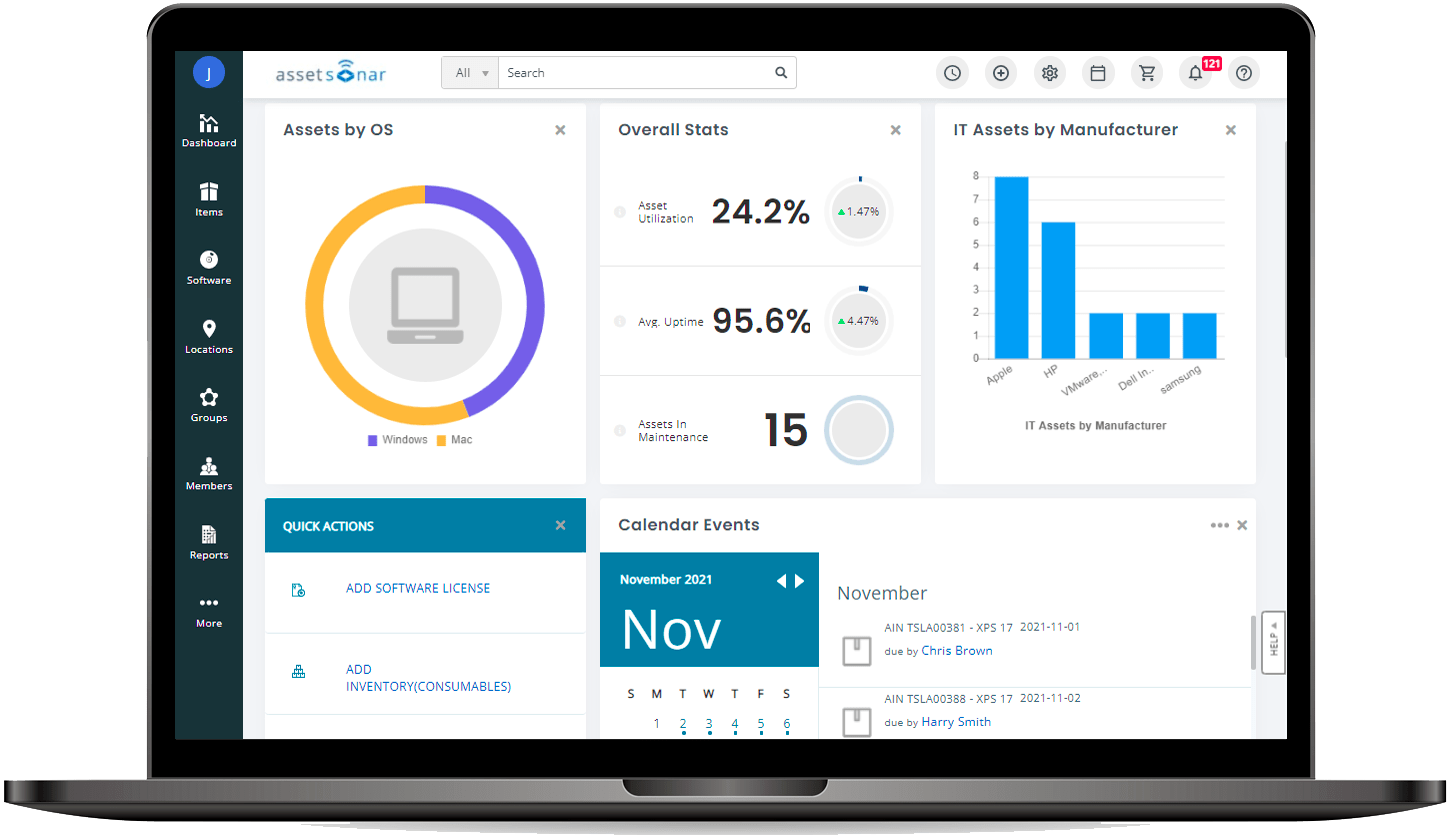
Key features include:
- Hardware and software asset management: AssetSonar tracks hardware across its lifecycle and discovers, optimizes, and controls software and licenses. It identifies underused licenses and tracks software usage to support reclamation and renewal decisions.
- Asset discovery and scanning: The platform discovers hardware, software, network, and SaaS assets using its ITAM agent and discovery integrations, providing real-time information on asset location, custody, and status.
- IT service management: AssetSonar surfaces asset intelligence within service tickets so agents have context during troubleshooting, and it integrates with service desks such as Zendesk and Jira to support incident and request handling.
- Patch management: A patch and vulnerability module highlights vulnerabilities on Windows, macOS, and Linux devices and lets administrators deploy or schedule updates from one dashboard to support security and audit readiness.
- Workflow automation and mobile access: A no-code workflow engine automates tasks such as approvals, provisioning, offboarding, license reclamation, and alerts across the platform and connected tools, while mobile apps support scanning, check-in/check-out, and alerts for renewals, audits, and policy violations.
Limitations (as reported by users on G2):
- Customization constraints: Users report that the inability to add unlimited custom fields, along with some restrictive filters and field controls, can make the platform feel inflexible for certain scenarios.
- Reporting and dashboards: Some users find reporting and dashboard views limited and note that customizing built-in reports can require technical expertise.
- Bulk operations: Reviewers report that bulk updates and asset imports can take longer than expected, which slows large-scale inventory changes.
- Mobile app scope: The mobile app is described as limited compared with the web interface, particularly for bulk actions and viewing detailed asset history.
Learn more in our detailed guide to Device42 competitors (coming soon)
Conclusion
In evaluating Device42 and its alternatives, it’s essential to consider the specific needs of your organization. Each platform offers unique features that cater to different aspects of IT asset management and infrastructure optimization. Whether you prioritize comprehensive dependency mapping, asset lifecycle management, or flexible asset tracking, there’s a solution that aligns with your operational goals and challenges.
Learn more about Faddom for IT asset discovery and management
See Additional Guides on Key Cybersecurity Topics
Together with our content partners, we have authored in-depth guides on several other topics that can also be useful as you explore the world of cybersecurity.
Solarwinds SAM
Authored by Faddom
- [Guide] SolarWinds SAM: Key Features,Pricing, Limitations, and Alternatives
- [Guide] PRTG Network Monitor vs. SolarWinds: 4 Key Differences and How to Choose
Lansweeper
Authored by Faddom
- [Guide] Lansweeper Pricing and Key Features
- [Guide] Understanding Lansweeper Pricing Tiers: Free, Starter, and Pro – Faddom
- [Product] Faddom | Instant Application Dependency Mapping Tool
AWS Backup
Authored by N2WS
- [Guide] AWS Backup: Top 15 Questions, How It Works, Pricing and Pros/Cons
- [Guide] AWS Backup for RDS: How It Works, Limitations & Doing It Right
- [Checklist] AWS Backup & DR
- [Product] N2WS | Cloud Backup and Restore