Read Time: 9 minutes

What Are IT Documentation Templates? 

IT documentation templates are structured outlines used by IT professionals to record and communicate specific details about an IT system. They help in standardizing the documentation process by providing a clear and concise format for detailing different aspects of an IT system.

By using an IT documentation template, you can save time in the process of creating, managing, and updating IT system documentation. Templates can also help ensure no critical information is left out during the documentation process.

Editor’s note: Updated information about IT documentation to reflect recent changes to the IT ecosystem, revised information about documentation templates to reflect updates as of 2026 and removed older templates.

Evolution of IT Documentation: Changes to IT Infrastructure and How They Impact Documentation Strategies

1. Shift from Static to Dynamic Infrastructure

Traditional IT environments were relatively stable, relying on on-premise servers and predictable system architectures. Documentation in these setups was often created once and updated infrequently.

However, modern IT environments are highly dynamic. With frequent deployments, updates, and configuration changes, documentation must evolve continuously. If it does not, it quickly becomes outdated and unreliable. In fast-moving systems, outdated documentation can create confusion, slow down troubleshooting, and increase technical debt.

As a result, documentation strategies must shift from static records to continuously updated resources that reflect the real-time state of systems.

2. Rise of Cloud and Hybrid Environments

The adoption of cloud computing and hybrid infrastructures has significantly increased system complexity. Organizations now operate across multiple environments—on-premise, public cloud, and private cloud—often simultaneously.

This shift requires documentation to go beyond simple system descriptions. It must now include:

  • Cloud configurations and services
  • Cross-platform integrations
  • Security policies across distributed systems

Modern IT documentation acts as a “single source of truth” for the entire technology ecosystem, mapping how all components interact and function together.

Without comprehensive documentation, it becomes difficult to manage dependencies and ensure system reliability in these distributed environments.

3. Need for Real-Time and Automated Documentation

Manual documentation processes struggle to keep pace with modern infrastructure. Frequent updates make it nearly impossible for teams to maintain accuracy using traditional methods alone.

Automation has become essential. Automated documentation tools can:

  • Generate documentation directly from systems or code
  • Keep documentation synchronized with infrastructure changes
  • Reduce human error and repetitive work

This approach ensures documentation stays accurate and up to date while saving time and effort. It also helps prevent inconsistencies that arise when documentation falls out of sync with actual systems.

Ultimately, automation transforms documentation from a manual burden into an integrated part of IT operations.

4. Transition to Centralized and Collaborative Documentation

As IT teams become more distributed, centralized documentation platforms have become critical. Instead of scattered files and siloed knowledge, organizations now rely on shared systems that enable collaboration.

These platforms allow:

  • Multiple users to contribute and update documentation in real time
  • Version control and audit trails
  • Easy access to accurate, up-to-date information

Modern tools emphasize collaboration, scalability, and integration with other systems, ensuring documentation evolves alongside the organization.

This shift reduces knowledge silos and improves communication across teams, especially in large or multi-site organizations.

5. Integration with Modern Development Practices

Modern IT practices such as DevOps and CI/CD require documentation to be integrated directly into development workflows.

Instead of being created after development is complete, documentation is now:

  • Written alongside code (“docs-as-code”)
  • Automatically updated during deployments
  • Version-controlled with the same tools as software

This integration ensures documentation reflects the latest system state and evolves with every change. It also reduces the gap between development and documentation, making both more reliable.

As a result, documentation becomes a continuous process rather than a one-time task.

6. Emergence of “Living Documentation”

Modern documentation is increasingly seen as a living system—constantly updated, interactive, and aligned with real-time operations.

Living documentation includes:

  • Automatically updated system records
  • Interactive diagrams and dependency maps
  • Integrated operational data and monitoring insights

Automation and AI are accelerating this shift by generating and maintaining documentation with minimal manual effort.

This approach ensures documentation remains relevant, accurate, and useful in rapidly changing environments.

Key Elements of IT Documentation Templates 

Modern IT documentation templates must reflect dynamic, distributed, and automated environments. Core elements now include:

  • System overview and architecture: A high-level view of the system, including services, dependencies, and data flows. This often includes cloud architecture diagrams, service maps, and links to live diagrams that update automatically.
  • Infrastructure as code (IaC) and configuration state: Instead of static configuration notes, this section references source-controlled infrastructure definitions (e.g., Terraform, CloudFormation). It documents how environments are provisioned and links directly to code repositories.
  • Environment and deployment details: Covers environments (dev, staging, production), deployment pipelines, and release processes. Includes CI/CD workflows, rollback strategies, and versioning practices.
  • Access control and identity management: Focuses on roles, policies, and identity providers (e.g., IAM, SSO). Emphasis is on centralized identity systems and automated access provisioning rather than manual lists.
  • Operational procedures and runbooks: Structured, actionable guides for operating systems in production. These are often integrated with incident management tools and include automated steps where possible.
  • Security and compliance posture: Documents security controls across environments, including zero-trust models, encryption, monitoring, and compliance requirements. It integrates with security tools for real-time status.
  • Observability and monitoring: Defines logging, metrics, tracing, and alerting setups. Includes dashboards, SLAs/SLOs, and links to monitoring systems to support real-time diagnostics.
  • Troubleshooting and incident response: Dynamic playbooks tied to actual incidents. Includes known failure patterns, automated remediation steps, and post-incident review links.
  • Dependencies and integrations: Maps internal and external service dependencies, APIs, and data exchange points. Often visualized and updated automatically.
  • Documentation ownership and lifecycle: Defines who owns each section, how updates are triggered (e.g., via code changes), and how stale content is detected and resolved.

Types of IT Documentation Templates 

Modern IT documentation is organized around systems, workflows, and automation rather than static components:

  • Cloud and infrastructure documentation template: Focuses on cloud-native and hybrid environments. Includes IaC references, service configurations, scaling policies, and cost considerations. Often integrates directly with cloud providers.
  • DevOps and pipeline documentation template: Documents CI/CD pipelines, build processes, testing stages, and deployment automation. Includes pipeline diagrams and configuration-as-code references.
  • Service and application documentation template: Describes individual services or microservices. Covers APIs, dependencies, runtime behavior, scaling, and failure modes. Designed for both developers and operators.
  • Runbook and operations documentation template: Provides step-by-step operational procedures for incidents, maintenance, and routine tasks. Often linked with monitoring and alerting systems.
  • Security and compliance documentation template: Captures security architecture, policies, audit trails, and compliance mappings (e.g., ISO, SOC 2). Frequently integrated with automated compliance tools.
  • Data and integration documentation template: Documents data flows, schemas, pipelines, and external integrations. Includes API contracts, event flows, and data lineage.
  • Disaster recovery and resilience documentation template: Expands beyond basic recovery plans to include high availability design, failover automation, recovery time objectives (RTO/RPO), and continuous testing strategies.
  • Knowledge base and collaborative documentation template: Centralized, continuously updated documentation platforms (e.g., wikis, docs-as-code systems). Supports versioning, collaboration, and integration with development and operations tools.

Learn more in our detailed guide to network documentation 

IT Documentation Template Examples 

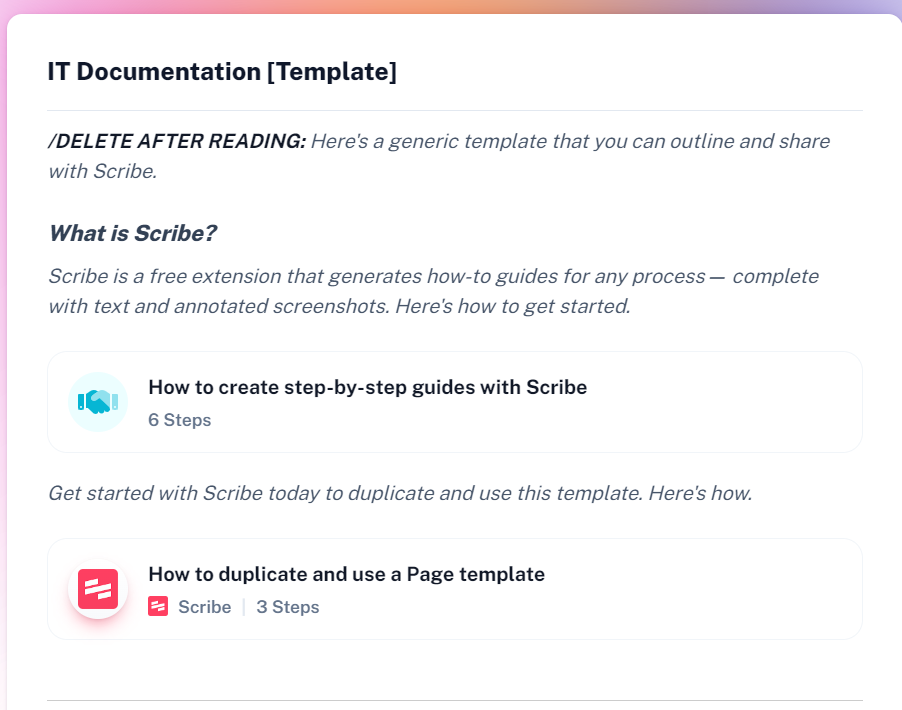
1. IT Documentation Template

This template provides a structured way to document a product, system, or process across its full lifecycle. It focuses on capturing key metadata, defining clear objectives, and organizing work into phases so teams can track progress and maintain consistency.

Template source: Scribe
File format: Web page

Template fields:

  • General information: Date, product name (kept consistent across systems), author, approver, and version for tracking ownership and changes.
  • Product overview: A clear and concise description of the product or feature being documented.
  • Objectives: Lists expected outcomes, including KPIs or metrics, which can be organized as bullet points or numbered by priority or timeline.
  • Phases: Recommended phases include planning, execution and launch, monitoring, and closure with ongoing follow-up. Each phase includes team members, start date, deadline, and supporting process documentation for individual tasks.
Link to template

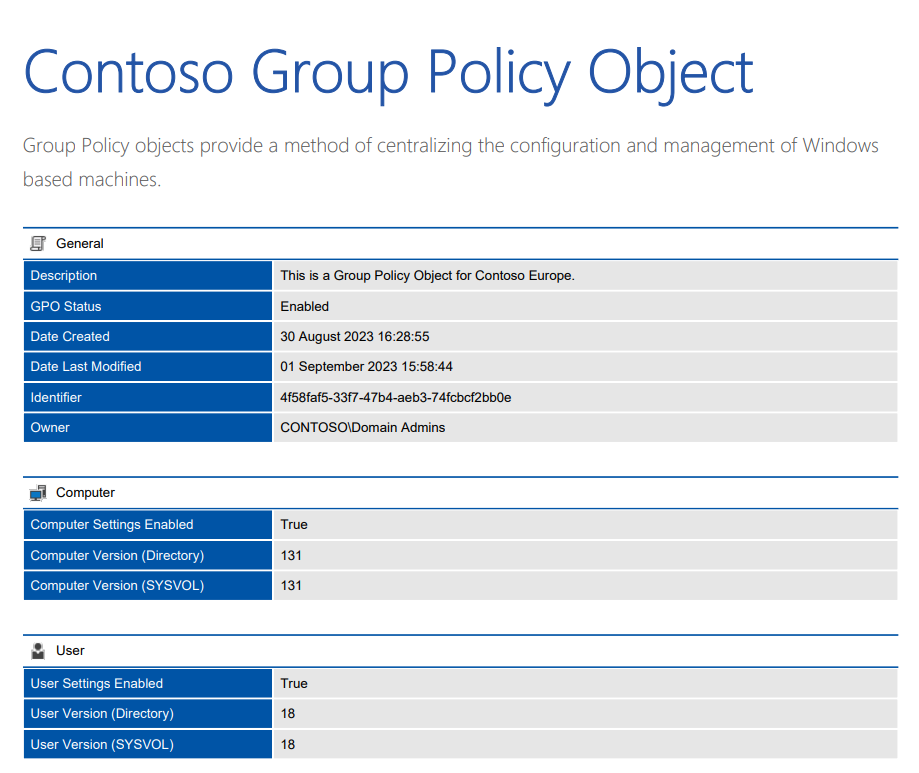
2. Group Policy Object (GPO) Documentation

This template is used to document and manage GPO settings that control workstation and user configurations across an organization. It provides a centralized reference for maintaining consistency, security, and compliance in system configurations.

Template source: Centrel Solutions
File format: PDF

Template fields:

  • General information: Includes GPO status, unique identifier, owner, linked locations, and assigned permissions.
  • Computer configuration: Covers system-level settings such as administrative templates, devices, environment variables, files and folders, IP security policies, local accounts, printers, registry settings, security configurations, shared resources, shortcuts, software installation, and firewall settings.
  • User configuration: Documents user-level settings including administrative templates, mapped drives, power settings, printer connections, and login scripts.
  • Version history: Tracks changes made to the GPO over time, including updates and revisions.
Link to template

3. Software User Manual Template

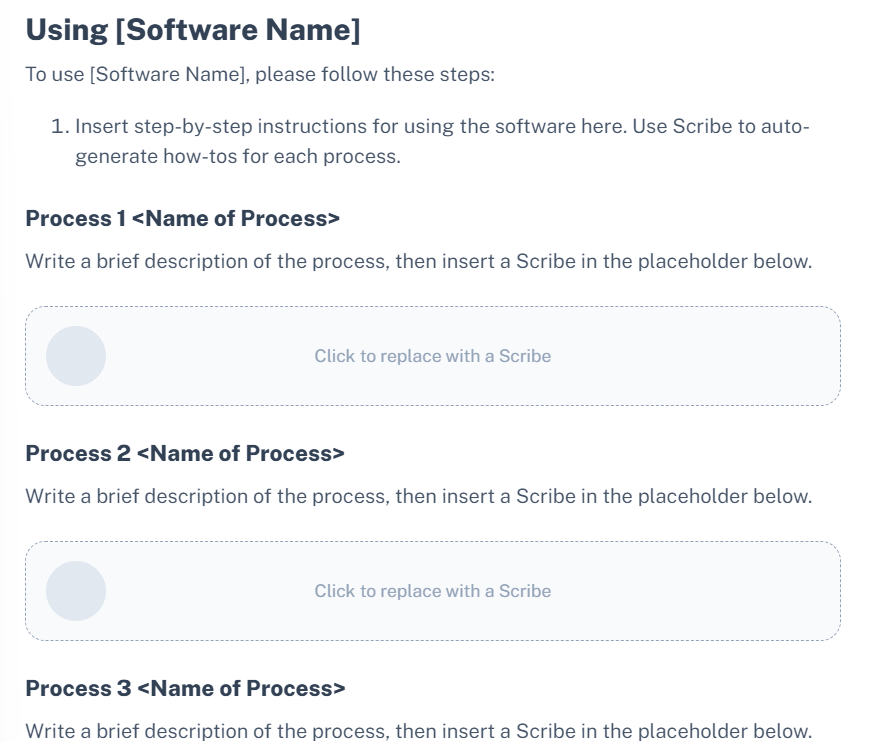
This template provides a structured guide for documenting how to install, use, and troubleshoot a software product. It is designed to help end users understand system requirements, navigate the interface, and complete key tasks with clear step-by-step instructions.

Template source: Scribe
File format: Web page

Template fields: 

  • General structure: Includes a table of contents covering introduction, setup, usage, troubleshooting, and support sections for easy navigation.
  • Introduction: Explains the purpose of the software and what users can expect from the manual. It sets context and defines the intended audience.
  • System requirements: Lists the minimum hardware and software specifications needed to run the application, including operating system, processor, memory, and storage.
  • Installation instructions: Provides step-by-step guidance for installing the software. This section is often supported by generated how-to guides or visual walkthroughs.
  • User interface overview: Describes the main components of the interface and how users interact with them. This helps users quickly understand navigation and layout.
  • Using the software: Breaks down key workflows into individual processes. Each process includes a short description and detailed steps for completing specific tasks.
  • Frequently asked questions (FAQ): Addresses common user questions with clear answers or linked guides to reduce support requests.
  • Troubleshooting: Offers solutions to common issues users may encounter, helping them resolve problems without external support.
  • Contacting support: Provides contact details or channels for users to reach the support team if issues cannot be resolved through the documentation.
Link to template

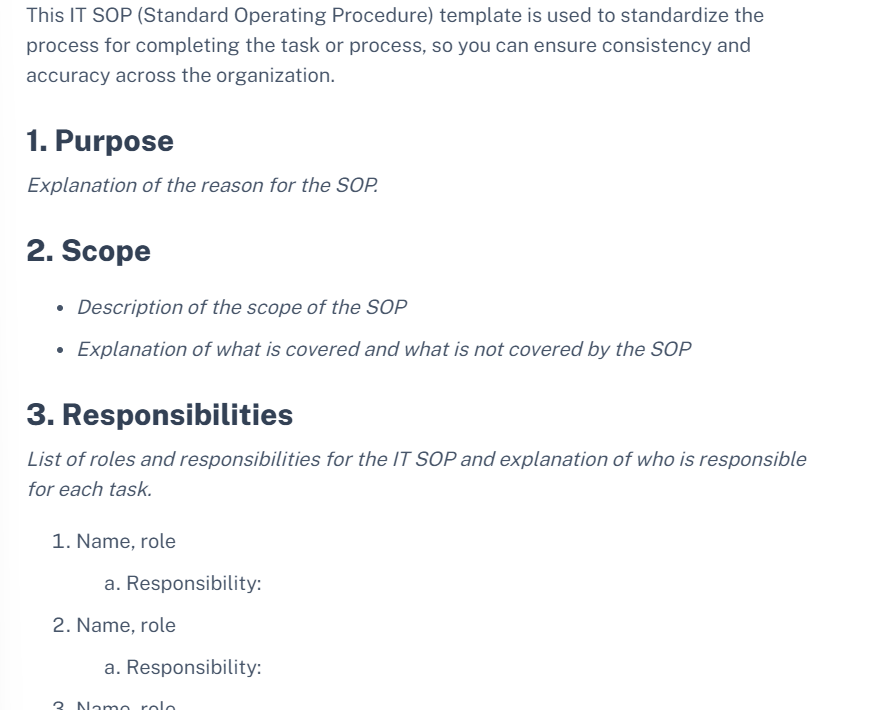
4. IT SOP Template

This template is used to document standard operating procedures for IT tasks and processes. It ensures consistency, accuracy, and repeatability by clearly defining how tasks should be performed and who is responsible for them.

Template source: Scribe
File format: Web page

Template fields:

  • Purpose: Defines the objective of the SOP and explains why the procedure exists. This section clarifies the intended outcome of the documented process.
  • Scope: Describes what the SOP covers and what it does not include. It sets boundaries to ensure users understand where the procedure applies.
  • Responsibilities: Lists the roles involved in the process and outlines their specific responsibilities. Each role is tied to clearly defined tasks to avoid ambiguity.
  • Procedures: Provides step-by-step instructions for completing tasks. Each procedure includes a short description followed by detailed execution steps, often supported by generated guides or walkthroughs.
  • Forms and templates: Links to any required documents, forms, or supporting templates. This section may also include instructions on how to use these resources correctly.
  • References: Includes sources or materials used to create the SOP, along with guidance on where to find additional information if needed.
  • Revision history: Tracks changes made to the SOP over time. It records updates, along with explanations for why those changes were introduced.

Link to template

Image of template:

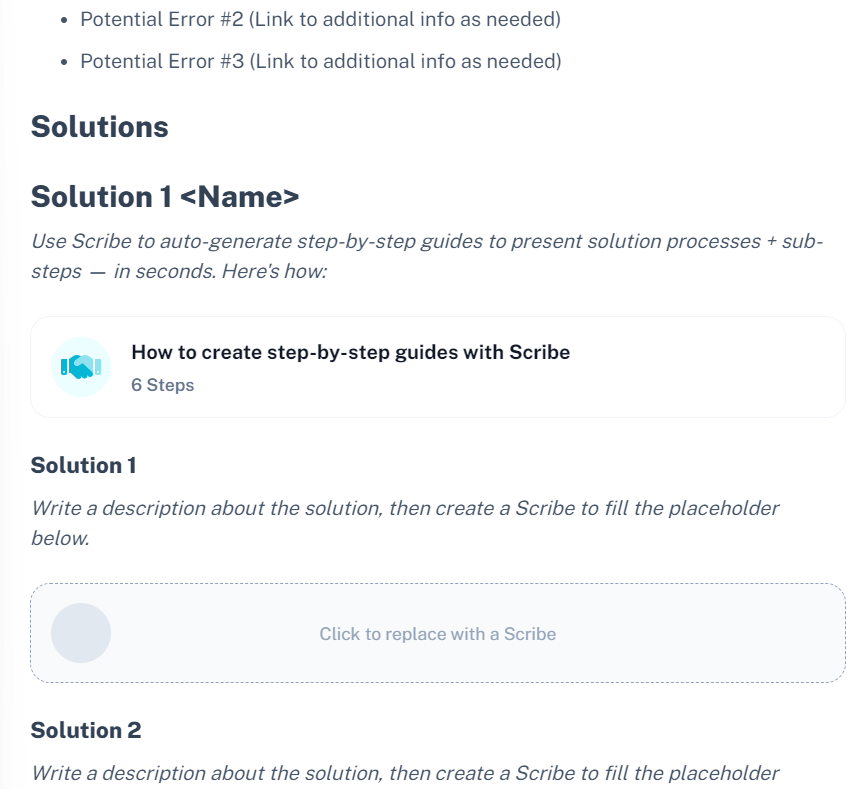
5. Troubleshooting Guide Template

This template is used to document how to identify, diagnose, and resolve technical issues. It provides a structured way to describe problems, list possible causes, and guide users through step-by-step solutions.

Template source: Scribe
File format: Web page

Template fields:

  • Title: Defines the issue being addressed and the context in which it occurs. This helps users quickly determine if the guide is relevant to their problem.
  • Problem: Describes the issue in detail, including symptoms and conditions. Visual aids such as screenshots or recordings can be included to clarify the problem.
  • Errors/Cause: Lists possible reasons for the issue. Each potential error or cause can include references or links to additional supporting information.
  • Solutions: Provides multiple ways to resolve the issue. Each solution includes a short explanation followed by step-by-step instructions, often supported by generated guides or walkthroughs.
  • Outcome: Explains the expected result after applying the solution. This helps users confirm whether the issue has been successfully resolved.
  • Links: Includes references to related fixes, documentation, or external resources that may help with the issue.
  • Conclusion: Summarizes the troubleshooting process and outlines any next steps if the problem persists.
  • Further reading: Provides links to related troubleshooting guides or documentation for deeper understanding or additional scenarios.

Link to template

Image of template:

Automate IT Dependency Documentation with Faddom

Faddom is not a traditional IT documentation tool, but it can help provide accurate documentation of network topologies and assets in the IT environment. Faddom’s agentless IT discovery capabilities allow you to discover all IT assets such as servers and business applications, and gain visibility into your hybrid infrastructure.
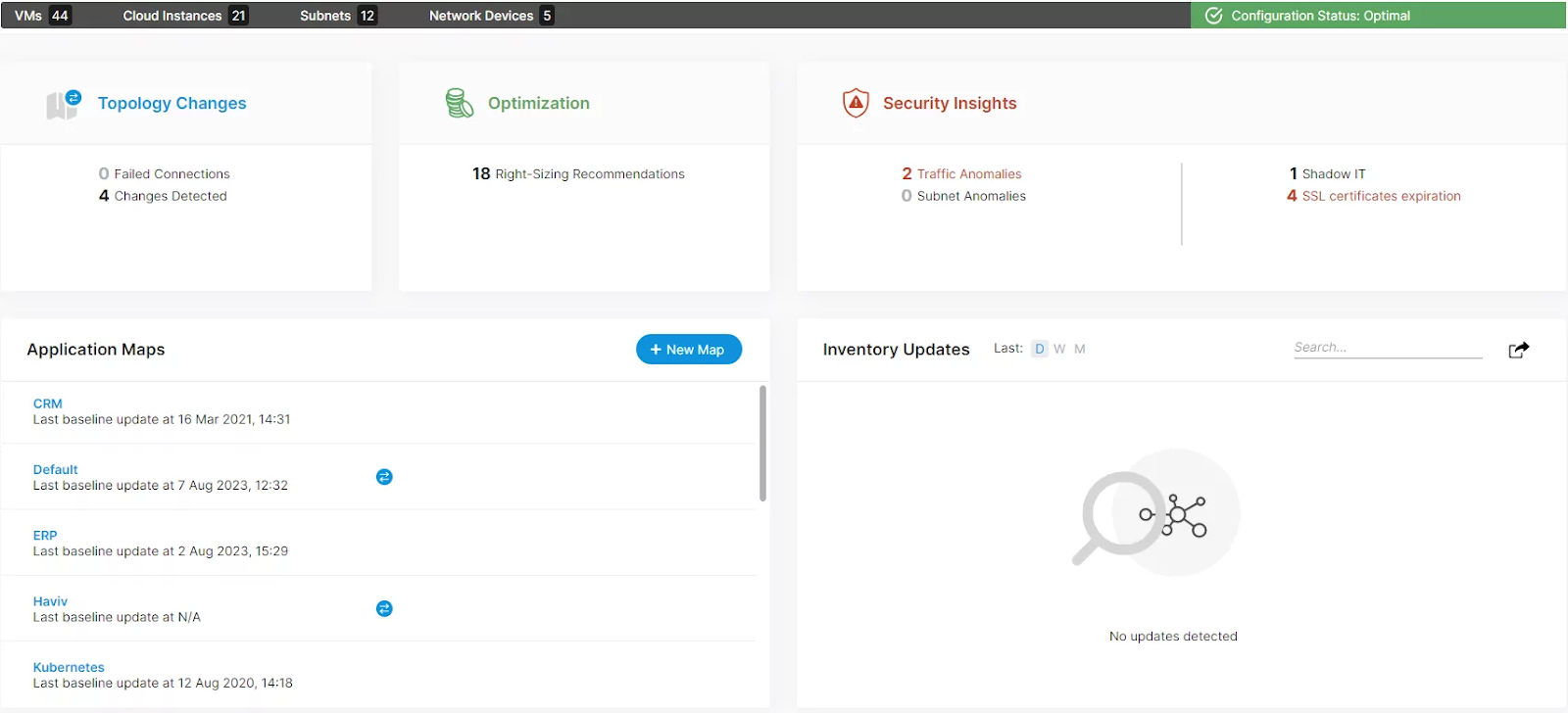
Before you can work with the assets in your IT environment, it is first critical to discover and document everything. Even if teams have not taken the time to create comprehensive, written documentation, Faddom can perform discovery of IT assets without needing to integrate with other software. It does not merely repeat information from elsewhere—rather, it creates original IT documentation that is a single source of truth and is automatically updated.

Once Faddom is done mapping the environment, you can search for anything such as an IP, server, subnet, port, or host name to see all the cloud-based and on premises connections, dependencies, and installed software details. You can also map physical network devices such as switches and routers, and export all the information into formats such as VISIO, XLS, and CSV.

Learn more about Faddom for IT documentation or schedule a call with our expert team!