
TL;DR: Device42 competitors range from agentless dependency mapping tools to full IT asset management platforms. Best for: Faddom (agentless mapping), Lansweeper (asset discovery), ServiceNow ITAM (lifecycle management), and Setyl (simple licensing).
What Is Device42?
Device42 is a data center and network management solution. It provides IT administrators with automated network discovery, inventory, and dependency mapping capabilities, ensuring all IT assets are accounted for and network interdependencies are clearly understood.
The software provides features like IP address management, device discovery, application dependency mapping, and power and environmental monitoring. Device42 supports businesses in maintaining an up-to-date inventory of their IT hardware and software, improving IT operational efficiency and minimizing downtime.
Device42 Competitors At a Glance
The table below summarizes the key differences between these Device42 competitors and alternatives. We explore each tool in more detail in the sections that follow.
|
Category |
Solution |
Best For |
Key Strengths |
Things to Consider |
|
Network Discovery and Dependency Mapping |
Faddom |
Agentless dependency mapping for hybrid and multi-cloud environments |
Agentless real-time discovery, AI-driven correlation, fast lightweight deployment |
Learning curve for terminology; read-only by design; occasional duplicate host entries |
|
Network Discovery and Dependency Mapping |
Lansweeper |
Agentless IT, OT, IoT, and cloud asset discovery at scale |
Broad agentless discovery, vulnerability and lifecycle insights, open API and MCP integrations |
Interface learning curve; pricing rises at higher tiers; discovery-focused, no remote control |
|
Network Discovery and Dependency Mapping |
BMC Helix Discovery |
Enterprise service modeling feeding AIOps and observability |
Blueprint-based service modeling, data reconciliation, security and compliance visibility |
High cost (starts at $50,000); limited cloud-migration assessment features |
|
IT and Enterprise Asset Management |
AssetSonar |
Cloud-based hardware and software asset lifecycle management with AI insights |
Hardware and software asset tracking, built-in ITSM, no-code workflow automation |
Limited reporting and filtering; customization more limited than some competitors |
|
IT and Enterprise Asset Management |
IBM Maximo Application Suite |
Enterprise asset and facilities management with predictive maintenance |
EAM, APM, and AIP in one suite, AI and IoT-driven condition monitoring, specialized asset classes |
Steep learning curve; complex configuration; slow for some bulk operations |
|
IT and Enterprise Asset Management |
ServiceNow IT Asset Management |
Full lifecycle IT, software, and cloud asset management on the ServiceNow platform |
Unified SAM, HAM, and Cloud Cost Management, CMDB integration, AI Agent automation |
High licensing cost; complex implementation; dated advanced-configuration interface |
|
IT and Enterprise Asset Management |
Asset Panda |
Highly configurable asset tracking with mobile-first workflows |
No-code configurability, offline mobile app with barcode and QR scanning, 18+ integrations |
Integration depth could improve; mobile app can lag; setup has a learning curve |
|
IT and Enterprise Asset Management |
Alloy Software |
Combined service desk, asset management, and CMDB in one platform |
Automated network discovery, integrated CMDB relationship mapping, software license reconciliation |
Dated interface; setup requires customization; automation setup takes patience |
|
IT and Enterprise Asset Management |
Setyl |
Simple hardware, software, and license tracking for midsize organizations |
100+ integrations, people management for onboarding and offboarding, ISO 27001 and SOC 2 support |
Limited advanced customization and analytics; mobile experience has room to grow |
|
IT and Enterprise Asset Management |
Ivanti Neurons for ITAM |
Strategic ITAM with configurable no-code workflows for full-lifecycle tracking |
Real-time discovery and reconciliation, CMDB integration, vendor scorecards |
Complex setup; resource-intensive customization; interface less modern |
Limitations of Device42
While Device42 is a respected IT solution, it also has its limitations, causing some organizations to seek alternatives. The following limitations were reported by users on the G2 platform.
Steep Learning Curve
Device42 presents a steep learning curve, especially for users without prior experience or specialized training. The interface and navigation are described as not particularly user-friendly, and the overall experience may initially feel overwhelming due to the complexity of features offered. New users need to allocate more time upfront to fully understand and utilize the various functionalities effectively.
System Performance
Users of Device42 may experience occasional slowdowns in system performance. This can impede work, especially during peak operational hours.
Limited Customization and Extensibility
The customization options within Device42 are restricted. Users cannot directly add custom Management Information Bases (MIBs), which are crucial for managing network devices. This reduces the tool’s ability to adapt to specific needs.
Plugin and Integration Issues
Device42’s architecture includes a basic set of functionalities, with several essential plugins not included in the base package. This setup often misleads users about the availability of core features, which are only accessible through separate add-ons. This complicates the user experience and can lead to additional costs.
Notable Device42 Competitors and Alternatives
Network Discovery and Dependency Mapping
1. Faddom

Faddom is an agentless application dependency mapping (ADM) and IT infrastructure discovery platform built for hybrid environments. It automatically discovers servers, business applications, and the dependencies between them across on-premises and cloud, and produces its first maps in under 60 minutes. The platform runs without agents, credentials, or firewall changes by passively analyzing a copy of network traffic, and it can operate offline so that data stays within the customer’s environment. Discovered servers are automatically grouped into business applications, and maps are kept up to date continuously, 24/7, using AI-driven correlation of network data. Faddom supports use cases including asset discovery and documentation, change management and impact analysis, data center and cloud migration, resource and cost optimization, IT audit and compliance, M&A IT integration, and internal attack surface management.
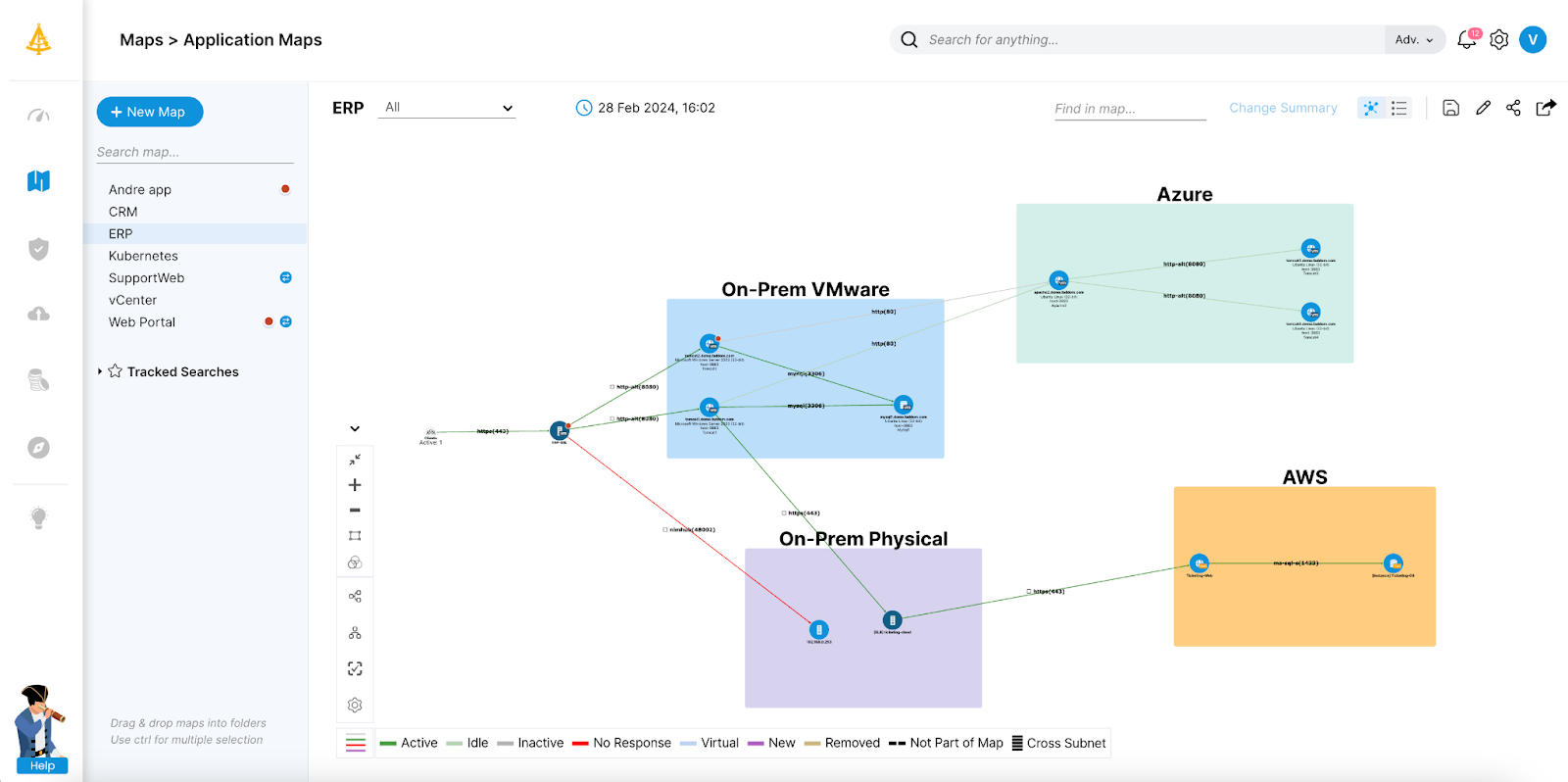
Key features include:
- Agentless dependency mapping: Faddom maps servers, applications, and their dependencies by passively analyzing a copy of network traffic. There are no agents to install, no server credentials to provide, and no firewall changes to make, and the read-only approach keeps all data within the customer’s environment.
- Real-time, continuously updated maps: The platform maps the entire environment in real time and updates 24/7, automatically grouping servers into business applications. Because maps reflect changes as they happen, the data supports ongoing change tracking and impact analysis rather than point-in-time snapshots.
- Hybrid and multi-cloud discovery: Faddom connects to on-premises and cloud data sources to discover hybrid business applications and presents them in a single view. It is platform-agnostic across hybrid and multi-cloud environments.
- Migration and change planning: By exposing application and infrastructure dependencies, Faddom supports wave-based migration planning and lets teams understand the impact of a change before making it, which helps reduce the risk of disruption during transformations.
- Security and compliance capabilities: The Secure features include SSL/TLS certificate tracking and external network discovery, alongside support for IT audit, compliance, and internal attack surface management. AI-driven correlation turns raw network data into application and dependency context.
- Fast, lightweight deployment: Faddom installs as a lightweight virtual appliance and produces its first maps within roughly an hour of deployment, without a lengthy setup or extensive configuration.
Limitations (as reported by users on G2):
- Learning curve for terminology: Some users note that Faddom’s terminology and full feature set take a little time to learn, and that getting the most from the platform involves ongoing use rather than a one-time setup.
- Read-only by design: Because Faddom focuses on mapping and visibility, it is a read-only tool, so teams that want to act on findings typically do so in their other operational or automation systems.
- Occasional duplicate host entries: A few users mention that a single server can sometimes appear under more than one hostname, for example after a virtual machine is migrated or an IP address changes.
2. Lansweeper

Lansweeper is an IT asset discovery and inventory platform that the vendor describes as a Cyber Asset Intelligence platform, providing visibility across IT, OT, IoT, and cloud environments. Its agentless deep-scan technology automatically finds and catalogs connected devices such as servers, workstations, and network devices, along with installed software and users, and an optional agent is available for remote scenarios. The platform consolidates this data into a centralized inventory with reconciliation and normalization, then layers on insights such as vulnerability data, lifecycle and end-of-life information, and dynamically generated diagrams. It connects to other IT and security tools through certified integrations, an open API, and workflow automation, and reports being used across more than 20,000 environments. Lansweeper positions itself as the intelligence layer between raw asset data and decision-making for IT, security, and finance teams.
Key features include:
- Agentless network discovery: Lansweeper automatically discovers and catalogs every connected asset—known or unknown, managed or unmanaged—across IT, OT, IoT, and cloud, identifying servers, workstations, network devices, and more. Discovery connectors can import and reconcile data from systems such as SCCM and Intune.
- Centralized asset inventory: Discovered hardware, software, and user data is consolidated into a single inventory, with reconciliation and normalization of software titles, versions, vendors, models, and firmware. Detailed asset profiles capture configuration, installed software, and ownership.
- Insights and diagrams: BI dashboards and custom views turn inventory into analysis, vulnerability insights surface known issues tied to assets, and lifecycle insights flag hardware and software nearing end of life. Dynamically generated diagrams show network topologies and virtual environments.
- Orchestration and automation: Workflows automate routine tasks, while an open API, webhooks, and certified integrations connect Lansweeper to other IT and security systems. An MCP server exposes validated asset data to AI agents.
- Software asset management: Lansweeper’s SAM capabilities support software license optimization and compliance, and data and insights can be exported to formats such as Excel, CSV, and PDF.
- Administration and security: Role-based access control, single sign-on, multi-factor authentication, and asset scopes govern who can see and do what, with data residency options in the EU or US.
Limitations (as reported by users on G2):
- Interface learning curve: Several reviewers note that the interface can feel overwhelming for new users, making navigation harder until they become familiar with the platform.
- Pricing and tiering: Users report that pricing has risen over time and that some capabilities, such as vulnerability scanning, sit in higher-priced tiers, while asset minimums can affect smaller deployments.
- Discovery-focused scope: Reviewers describe Lansweeper primarily as a discovery and inventory tool, noting that it does not include deeper management actions such as remote control or usage-based license metering.
- Cloud-first direction: Some long-time users observe that development effort is increasingly directed at the cloud edition, with the local installation receiving comparatively less focus.
3. BMC Helix Discovery

BMC Helix Discovery (formerly BMC Discovery, and earlier Atrium Discovery and Dependency Mapping) is a cloud-native discovery and dependency mapping solution that provides visibility into hardware, software, and service dependencies across multi-cloud and on-premises environments. It performs agentless, continuous discovery, automatically mapping assets and their relationships and keeping data current without manual updates. Blueprint-automated service modeling uses a library of blueprints to visualize the infrastructure that supports specific business services, while data reconciliation unifies information from diverse topology sources. The topology data can feed the broader BMC Helix platform to support observability and AIOps insights. BMC Helix Discovery is available as SaaS or on-premises and is aimed at large, complex enterprises, with pricing that starts at $50,000 for a Discovery Starter bundle and custom pricing for enterprise scope.

Key features include:
- Agentless continuous discovery: The solution automatically discovers assets and maps relationships across cloud and on-premises environments, refreshing data continuously so the view stays current without manual updates.
- Blueprint-automated service modeling: An extensive library of service modeling blueprints lets teams rapidly visualize and control the infrastructure that supports specific business services, building dynamic service models from discovered data.
- Application and service mapping: BMC Helix Discovery explores dependencies between discovered assets to show how components support business services, helping teams understand risk and the impact of changes.
- Data reconciliation: Information from diverse topology sources is unified and reconciled to provide a comprehensive, accurate view, and results can be published to a CMDB.
- Security and compliance: Detailed asset data helps pinpoint risks and undocumented (blind-spot) assets, supports regulatory compliance through automated, up-to-date inventories, and includes SSL/TLS certificate discovery and management.
- Multi-cloud visibility and AIOps input: The platform discovers and manages resources across multiple cloud environments and can feed topology data into the BMC Helix platform to power observability and AIOps insights.
Limitations (as reported by users on G2):
- Cost: Multiple reviewers describe BMC Helix Discovery as expensive, noting that the price can be prohibitive for smaller organizations and that some competitors offer comparable discovery at a lower cost.
- Cloud migration assessment: Some users say the product lacks the dedicated cloud-migration-assessment features that certain competitors provide.
- Lifecycle and financial depth: Reviewers mention that end-to-end IT asset lifecycle handling, financial analysis, and end-of-life or license information could be stronger, and that the monthly content updates do not always address these areas.
- Support and monitoring: A few users feel technical support and the stability of the monitoring tooling could be improved, and that partner demo and training access is limited.
IT and Enterprise Asset Management
4. Asset Sonar

AssetSonar, part of the EZO suite, is a cloud-based IT asset and service management platform that gives IT teams real-time visibility into hardware, software, and licenses across the organization. It discovers assets through an ITAM agent and integrations with tools such as Okta and Jamf, then tracks them from procurement to retirement. The platform brings together hardware asset management, software asset management, IT service management, patch management, and a no-code workflow automation engine, and adds an AI assistant for insights such as utilization, maintenance, expiring contracts, and unmanaged software. It targets mid-market to enterprise IT teams dealing with SaaS sprawl, shadow IT, and redundant licenses, and integrates with MDM and ITSM tools including Jamf, Zendesk, Intune, Jira, and SCCM. A mobile app supports scanning, check-in and check-out, and alerts.

Source: Ezo
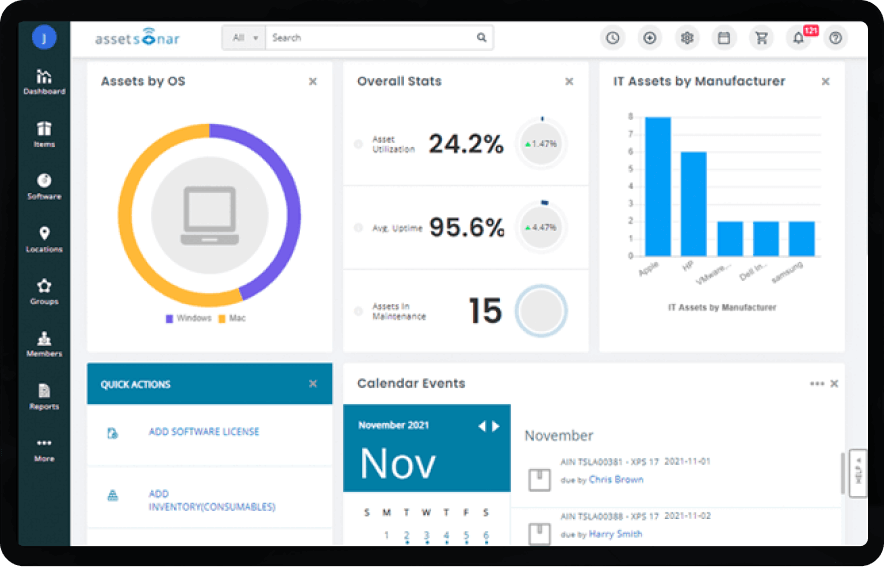
Key features include:
- Hardware asset management: AssetSonar tracks every device across the fleet with real-time location, custody, and status, managing hardware from procurement through retirement and supporting check-in and check-out and lifecycle decisions.
- Software asset management: The platform discovers software and licenses, tracks usage, and surfaces unused or duplicate seats so teams can reclaim licenses, stay ahead of renewals, and reduce shelfware.
- IT service management: A built-in service desk attaches live asset context to tickets, so agents can see the affected device, licenses, and warranties without switching tools, which helps speed up troubleshooting.
- Patch management: AssetSonar identifies vulnerabilities, prioritizes them by severity, and deploys patches across Windows, macOS, and Linux devices from a single dashboard to support compliance.
- Workflow automation: A no-code workflow engine turns IT policies into self-running processes, automating approvals, updates, alerts, and provisioning across AssetSonar and the wider stack.
- Compliance and mobile access: The platform supports audit-ready reporting, shadow IT detection, role-based access, and standards such as GDPR and SOC 2, and a mobile app allows scanning, asset lookups, and alerts on the go.
Limitations (as reported by users on G2):
- Reporting and filtering: Users report that pulling reports can be cumbersome and that filtering options are limited, which can make report generation time-consuming.
- Customization limits: Some reviewers want more tailored workflows and advanced configuration, finding the customization options more limited than those of certain competitors.
- Interface and learning curve: Several note that the interface can feel complex for new users, requiring training and patience before it is used effectively.
- Pricing and mobile app: A few users find that pricing can climb as needs grow and that the mobile app is less feature-rich than the desktop experience.
5. IBM Maximo Application Suite

IBM Maximo Application Suite (MAS) is a unified asset and facilities management platform that brings enterprise asset management (EAM), asset performance management (APM), and asset investment planning (AIP) together for critical equipment and infrastructure. Built for operations, maintenance, and facilities teams, it manages work, asset history, and maintenance processes in one place and uses AI, analytics, and IoT sensor data to support condition-based and predictive maintenance. The suite includes specialized asset classes for real estate and facilities, renewables, IT asset and service, and data centers, and covers use cases from maintenance management and asset inspection to inventory optimization and health, safety, and environment. It is delivered as client-managed software on Red Hat OpenShift or as software as a service, using a credit-based AppPoints licensing model. Maximo is used across industries such as manufacturing, energy and utilities, oil and gas, transportation, and government.

Source: IBM
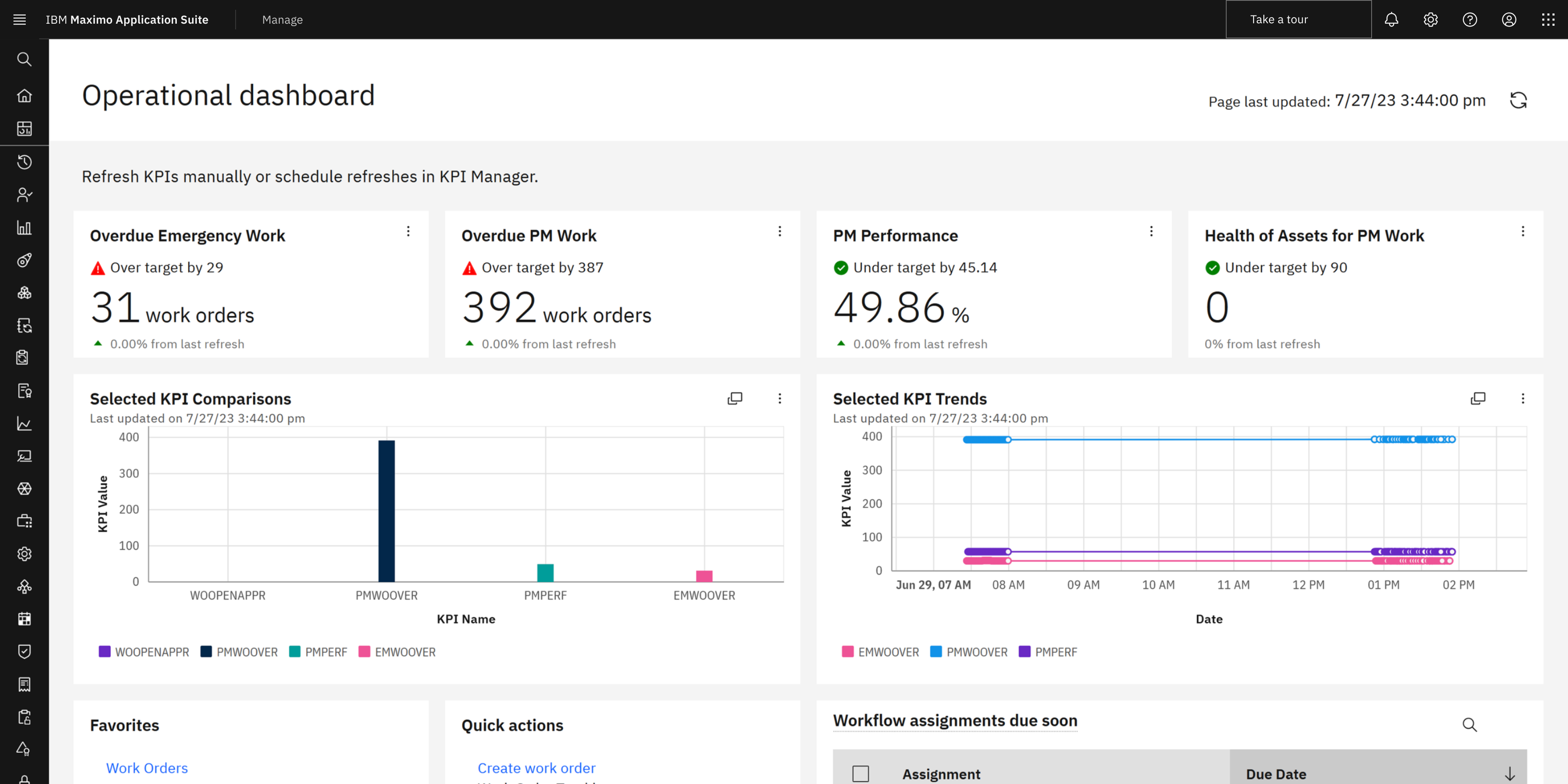
Key features include:
- Enterprise asset management: Maximo provides a system of record for assets and work, combining real-time and historical data with integrated work order management so teams can manage maintenance processes from acquisition through disposal.
- Asset performance management: Using AI, analytics, and sensor data, the suite detects issues early and supports condition-based maintenance, which helps reduce unplanned downtime and extend asset life.
- Asset investment planning: The planning capabilities connect asset condition, risk, and financial impact so teams can evaluate scenarios, compare priorities, and align maintenance and replacement decisions with budgets.
- Maintenance and inspection: Use cases include maintenance planning and scheduling, reliability-centered and condition-based maintenance, and AI-assisted asset inspection that analyzes images and video from cameras, drones, and mobile devices.
- Field service and inventory: Field technicians get mobile access to work orders and asset data to improve first-time fix rates, while MRO inventory optimization uses analytics and automation to right-size stock.
- Specialized asset classes and deployment: Tailored solutions cover real estate and facilities, renewables, IT asset and service, and data centers, and the suite can be deployed as client-managed software on Red Hat OpenShift or as SaaS with AppPoints licensing.
Limitations (as reported by users on G2):
- Steep learning curve: Reviewers report that training gaps lead to a steep learning curve and a time-consuming initial setup.
- Configuration complexity: Users note that configuration relies on technical skills and that some parts feel complex or not fully intuitive, particularly when enabling newer features.
- Documentation: Some say documentation does not always keep pace with the product’s evolution, which complicates setup and adoption.
- Performance for some tasks: A few reviewers find that certain operations, such as adding many assets individually, can be slow.
6. ServiceNow IT Asset Management

ServiceNow IT Asset Management (ITAM) manages the full lifecycle of hardware, software, and cloud IT assets on the ServiceNow AI Platform. It automates asset tasks from planning through end-of-life using ServiceNow AI Agents and connects to catalogs, the Configuration Management Database (CMDB), and procurement for real-time visibility. The product is organized into Software Asset Management, Hardware Asset Management, and Cloud Cost Management, with dedicated workspaces tailored for asset managers. Because it runs on the same platform as ServiceNow ITSM and ITOM, asset data is shared across service and operations workflows, which supports cross-functional processes such as employee onboarding and contract renewals. It is aimed at organizations that want to standardize asset data, reduce technology spend, and lower audit and compliance risk.

Source: ServiceNow

Key features include:
- Full lifecycle management: ITAM automates tracking, usage, and retirement of IT assets on a single platform, with AI Agents handling tasks from planning to end-of-life to improve data accuracy across contracts, costs, and compliance.
- Software asset management: SAM helps reclaim unused licenses, manage license compliance, and right-size software spend, normalizing discovered software data to reduce manual reconciliation.
- Hardware asset management: HAM tracks hardware across its lifecycle and manages data center assets from racks to facilities using automated workflows, supporting accurate, up-to-date records.
- Cloud cost management: The product automates cloud cost tracking and forecasting, provides real-time insights for multicloud decisions, and helps right-size cloud resources.
- CMDB and procurement integration: ITAM connects to catalogs, the CMDB, and procurement, giving asset and service teams a shared data model and visibility into warranty, depreciation, and contractual entitlements.
- Audit readiness and inventory: Dedicated audit-response capabilities maintain accurate asset and license records, and inventory management tracks and receives assets across stockrooms with AI agents and automated workflows.
Limitations (as reported by users on G2):
- Licensing cost: Many reviewers describe licensing costs as high, which can be a barrier for smaller and mid-sized organizations.
- Learning curve: Users frequently mention a steep learning curve that makes the system challenging for new users to grasp initially.
- Implementation complexity: Several note that implementation is complex and time-consuming, requires planning and in-house expertise, and depends on clean CMDB data.
- Interface and integrations: Some find the advanced-configuration interface dated relative to newer workspaces and report occasional friction connecting third-party tools.
7. Asset Panda

Asset Panda (Asset Panda Pro) is a cloud-based, highly configurable IT asset management and tracking platform that adapts to a team’s existing workflows rather than forcing predefined processes. It centralizes IT device information, syncs data through more than 18 integrations, and is built around mobile apps for iOS and Android with offline mode and built-in barcode and QR scanning. The platform tracks the full asset lifecycle—assignment, maintenance, repair, inspection, and depreciation—and supports service tickets, contract renewals, and customizable reports and dashboards. It uses AI capabilities to assist with setup and data import, and integrates with tools such as Slack, Zendesk, Okta, Microsoft Entra ID, Google Workspace, Jamf, and Apple Business Manager. It is used across industries including IT, education, government, healthcare, and construction.

Source: Asset Panda
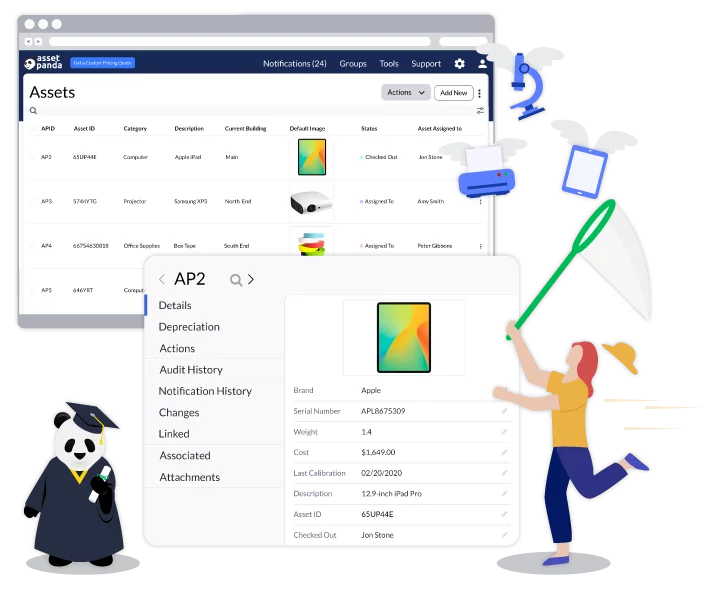
Key features include:
- Configurable asset tracking: Asset Panda lets teams create accounts, modules, custom fields, and user roles to track different asset types and use cases, adapting the platform to existing workflows without code.
- Mobile app with offline mode: Native iOS and Android apps with offline mode and built-in barcode and QR scanning let users add assets, run workflow actions, check items in and out, and access reports from anywhere.
- Full lifecycle and maintenance tracking: The platform maintains a complete history for each asset, calculates depreciation on a chosen schedule, schedules maintenance, and tracks repairs and inspections with customizable checklists.
- Service tickets and contracts: Users can create and respond to service tickets within Asset Panda and receive alerts when equipment or technology contracts approach expiration for renewals or renegotiation.
- Integrations and data sync: With more than 18 integrations to tools such as Slack, Zendesk, Okta, Microsoft Entra ID, Google Workspace, Jamf, and Apple Business Manager, device information syncs automatically to avoid duplicate work.
- Reporting and security: Customizable reports and dashboards (exportable to CSV, XLS, and PDF) provide visibility into inventory, while AWS hosting, TLS 1.2 encryption, and role-based permissions protect data.
Limitations (as reported by users on G2):
- Integration depth: Some reviewers feel integration capabilities could be improved, which can limit certain workflows.
- Mobile performance: Users mention that the mobile app can be slow at times, with occasional syncing issues that affect quick updates.
- Reporting and interface: A few note that the dashboard and some interface areas could be more comprehensive and would benefit from updates.
- Initial setup: Reviewers say the implementation and configuration process can feel daunting at first and involves a learning curve.
8. Alloy Software

Alloy Software provides IT asset management through its Alloy Navigator platform, which combines service desk, asset management, network inventory, and a CMDB in one system. The ITAM capabilities manage physical, virtual, and cloud assets across their full lifecycle and are described by the vendor as AI-driven. On-demand and scheduled network scans discover servers, PCs, laptops, and other networked devices and automatically collect installed-software information for inventory and compliance. The platform ties assets to a Configuration Management Database that visualizes service-asset relationships and supports impact analysis for change and incident management. Additional capabilities include software asset management, a service catalog, equipment checkout, maintenance planning, contract and purchase order management, and a mobile inventory scanner app.

Source: Alloy Software

Key features include:
- Automated asset discovery: Alloy performs on-demand and scheduled network scans to detect servers, PCs, laptops, and other networked devices on the LAN, automatically gathering installed-software details into a central inventory.
- Asset lifecycle management: The platform tracks hardware and software assets from procurement to disposal, keeping a complete history of incidents, maintenance, and warranty contracts, and automating reorder notifications for consumables.
- CMDB and relationship mapping: An integrated CMDB stores configuration items and graphically displays relationships between physical and virtual components of IT services, helping teams foresee the impact of infrastructure changes.
- Software asset management: Alloy reconciles purchased licenses against actual usage, reclaims unused licenses, and validates compliance with predefined entitlement rules to help organizations stay audit-ready.
- Service catalog and equipment checkout: Automated workflows handle requesting and provisioning of IT assets and services, and a self-service portal lets users reserve and borrow equipment with automatic return notifications.
- Contracts, purchasing, and mobile: Contract management tracks renewals, purchase order management controls purchasing and vendors, and the Alloy inventory scanner app supports real-time and offline barcode scanning from a phone.
Limitations (as reported by users on G2):
- Dated interface: Several reviewers feel the user interface looks dated and less modern than some competing tools.
- Setup and configuration: Users note that initial setup and configuration require customization and that the platform is powerful rather than fully plug and play.
- Learning curve: Some say there is a learning curve and that complex customization can require technical skills, which can be cumbersome for small teams.
- Automation setup: A few mention that configuring automation rules for the first time takes patience.
9. Setyl

Setyl is a cloud-based IT asset and license management platform that gives teams a single source of truth for hardware assets, software and SaaS licenses, users, vendors, and IT spend. It tracks hardware from purchase to disposal with device auto-detection, consolidates SaaS subscriptions and licenses into a software asset register, and connects through more than 100 integrations including Microsoft 365, Google Workspace, MDM and RMM systems, SSO, IAM and IDP systems, HR tools, ticketing desks, and accounting packages. The platform adds people management for onboarding and offboarding, IT spend tracking with financial reports and license rightsizing, and compliance features that help teams prepare for ISO 27001, SOC 2, and other audits. Setyl emphasizes a user-friendly interface with little learning curve and reports that it can be set up in about an hour. It targets midsize and larger organizations that want visibility and control without heavy enterprise complexity.

Source: Setyl

Key features include:
- Hardware asset management: Setyl provides a hardware inventory with status and location, full lifecycle tracking from purchase to disposal, device auto-detection to discover and import assets, and physical asset labels for inventory and recovery.
- Software and license management: A software asset register consolidates SaaS subscriptions, licenses, and applications, with spend and renewal monitoring, shadow IT detection via login auto-detection, and vendor due-diligence audits.
- People management: The platform streamlines employee onboarding and offboarding by assigning and recovering equipment and access, tracks employee status, and produces cost-per-employee reports.
- IT spend management: Setyl builds a complete picture of IT spend, visualizes trends with financial reports, maps transactions against detected spend, and supports license rightsizing and renewal reminders to cut waste.
- Compliance and IT safeguarding: An information asset register, access controls, vendor management, and a security audit checklist help teams address ISO 27001, SOC 2, and other standards.
- Integrations: With more than 100 out-of-the-box integrations across core systems, MDM and RMM, SSO, IAM and IDP, HR, ticketing, and accounting, Setyl consolidates data sources into one platform.
Limitations (as reported by users on G2):
- Advanced customization and reporting: Some users note that Setyl lacks the highly customized dashboards and in-depth analytics found in enterprise-grade alternatives.
- Mobile functionality: Reviewers point to room for improvement in the mobile experience, such as asset scanning and phone-based check-in and check-out.
- Automation depth: Some express a desire for more advanced automation features.
- Enterprise complexity: A few note that the structured framework may be less suited to very large, complex enterprises with elaborate, specialized workflows.
10. Ivanti Neurons for ITAM

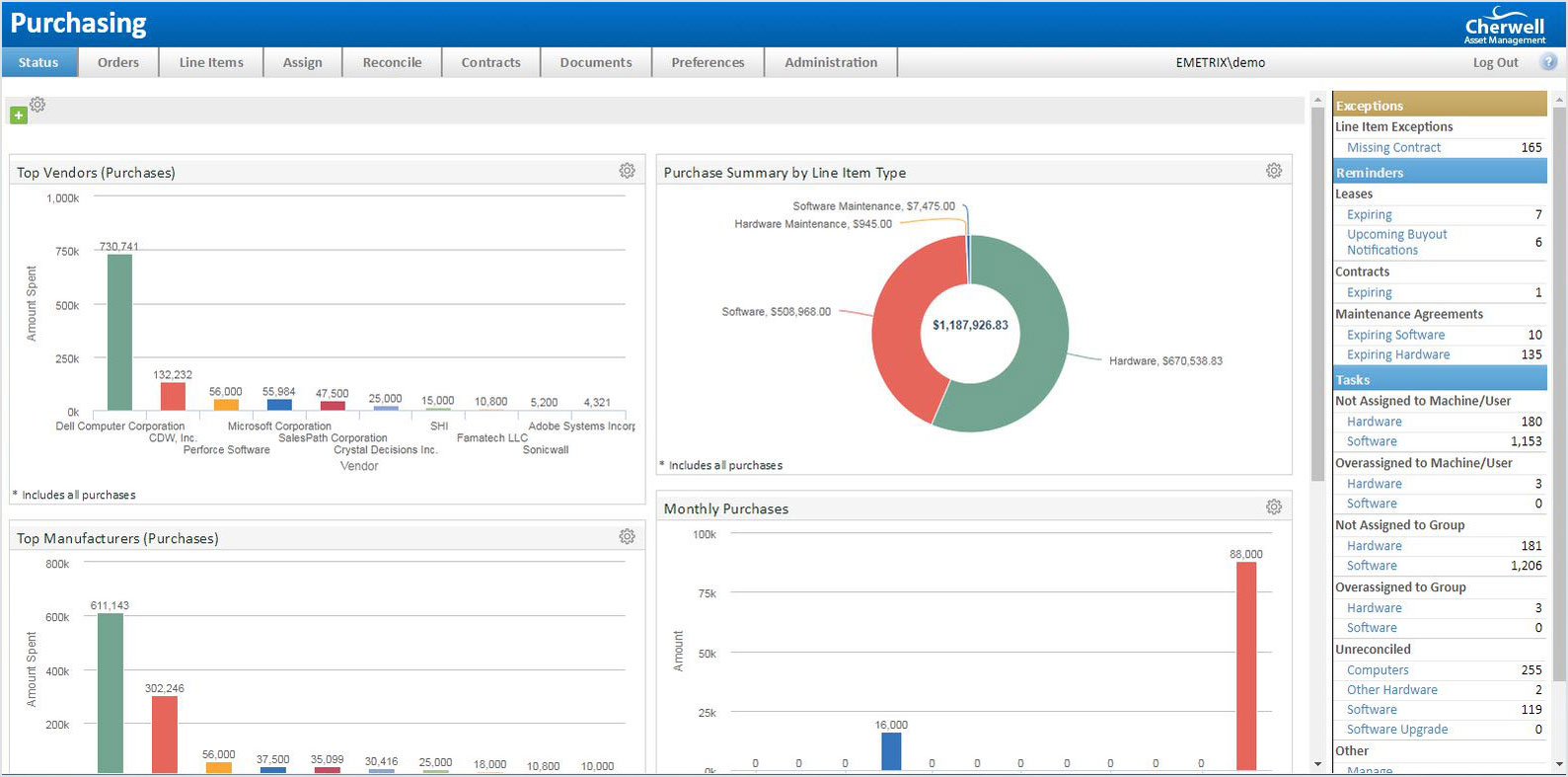
Ivanti Neurons for ITAM (formerly associated with Cherwell Asset Management) is a strategic IT asset management solution that consolidates IT asset data and lets teams track, configure, optimize, and manage assets through their full lifecycle. It covers hardware, server, client, virtual, cloud, and software assets from purchase to disposal, using real-time discovery, automated reconciliation, and normalization to pre-populate an asset repository in minutes. The asset repository integrates with the service management CMDB, and the solution is built on Ivanti’s configurable, no-code platform so teams can define their own workflows or use out-of-the-box processes. It is delivered as a cloud service on the multi-tenant, ISO 27001-certified Ivanti Neurons platform and is also available on-premises, with a mobile app for managing assets remotely. It integrates with related products such as Ivanti Neurons for ITSM and Ivanti Neurons for Discovery

Source: Ivanti
Key features include:
- Full lifecycle tracking: The solution provides consistent asset management from procurement to purchase order, invoicing, receipt, deployment, and disposal, maintaining records of identifying data, lifecycle status, stock, location, and warranty.
- Asset repository and discovery: Real-time discovery, automated reconciliation, and normalization pre-populate a unified asset repository, and data can be imported from sources such as Ivanti Neurons for Discovery and Ivanti Endpoint Manager.
- Product catalog: A product catalog provides visibility into purchased and assigned assets, current stock levels, and active orders to speed provisioning and reduce service desk calls.
- Cost and contract visibility: The platform reports on IT spend, calculates and tracks asset age and value, and manages contracts to support informed contract negotiations.
- Vendor management and barcode scanning: Vendor information and performance are stored in vendor scorecards, and barcode scanning speeds asset lookup and bulk asset tracking.
- Deployment, mobility, and integration: Hosted on Ivanti’s multi-tenant cloud platform or on-premises, the solution integrates with the service management CMDB and Ivanti Neurons for ITSM, offers a mobile app, and supports dashboards and automation.
Limitations (as reported by users on Gartner Peer Insights):
- Complex setup: Reviewers note that initial setup and configuration can be complex and require careful planning.
- Customization and reporting effort: Some say advanced customizations and reporting adjustments take time to optimize, and that the extensive feature set can overwhelm teams new to enterprise ITAM.
- Interface: A few find the interface less modern or intuitive than some competing solutions, which contributes to a learning curve.
- Resource investment: The high level of configurability can require significant resources, which may make it less accessible for smaller teams, and occasional data sync issues are also mentioned.
Conclusion
In the competitive landscape of IT asset management, various platforms offer distinct features and functionalities tailored to different organizational needs. These tools not only help in tracking and managing assets but also enhance operational efficiency through integration capabilities, compliance management, and cost control measures.
As businesses continue to evolve, IT asset management systems become crucial, influencing the effectiveness of IT operations, IT costs, and overall organizational productivity. Choosing the right tool depends on specific business requirements, including the scale of operations, the complexity of IT environments, and strategic goals related to asset management and optimization.
Learn more about Faddom for IT asset documentation and discovery