
TL;DR: IT mapping tools discover infrastructure and dependencies so workloads can be grouped into migration waves before anything moves. Faddom is best for agentless real-time hybrid mapping, Device42 for move groups with cloud sizing, ServiceNow for CMDB-linked service maps, and Azure Migrate for Azure-targeted assessments.
What Are IT Mapping Tools and Why Are They Critical for Migration Planning?
IT mapping tools are specialized software solutions designed to automatically discover, visualize, and document the components and topology of an organization’s IT environment. These tools map infrastructure elements such as servers, network devices, cloud resources, and applications, enabling IT teams to gain a comprehensive real-time view of their technology ecosystem.
Why IT mapping is essential for migration planning:
- Improving visibility across the IT environment: Creates an accurate, current inventory of servers, applications, cloud assets, databases, and network resources before migration.
- Identifying application and infrastructure dependencies: Shows how workloads, databases, APIs, services, and infrastructure components interact so related systems can move together.
- Reducing migration risk and service disruption: Helps teams identify critical systems, plan migration windows, prepare rollback options, and validate post-migration connectivity.
Key capabilities of effective IT mapping tools for migration planning:
- Automated asset discovery: Continuously detects infrastructure, applications, databases, cloud resources, and network devices to maintain an accurate migration inventory.
- Real-time dependency mapping: Identifies live relationships between systems so teams can group connected workloads into safer migration waves.
- Dynamic network topology visualization: Produces interactive maps of devices, subnets, connections, and traffic paths to support planning and troubleshooting.
- Data flow and integration mapping: Documents how data moves between applications, databases, APIs, file systems, and external platforms.
- Migration readiness assessments: Evaluates workloads for compatibility, utilization, dependencies, and technical blockers before migration begins.
- Asset classification and tagging: Groups assets by owner, application, environment, criticality, location, or compliance status to simplify planning.
- Change tracking and configuration monitoring: Tracks infrastructure and dependency changes so migration plans remain accurate in dynamic environments.
- Reporting and migration dashboarding: Provides dashboards and reports for inventory, readiness, risks, wave status, and stakeholder communication.
Editor’s note: Updated IT mapping service information to reflect features and service components in 2026, and added one new service.
IT Mapping Tools for Effective Migration Planning: Top Solutions at a Glance
The table below summarizes the key differences between the tools covered in this guide. We explore each of them in more detail in the sections that follow.
|
Category |
Solution |
Migration Capabilities |
Key Strengths |
Things to Consider |
|
IT Mapping and Dependency Discovery Platforms |
Faddom |
Agentless dependency mapping for wave-based migration planning |
Real-time hybrid maps with no agents, credentials, or firewall changes |
Terminology and some setup steps take time to learn |
|
IT Mapping and Dependency Discovery Platforms |
Device42 |
Migration move groups with cloud instance sizing and pricing |
Agentless discovery plus affinity groups and utilization data |
Setup and navigation can be complex for smaller teams |
|
IT Mapping and Dependency Discovery Platforms |
ServiceNow Discovery and Service Mapping |
Migration mapping that feeds an existing ServiceNow CMDB |
Agentless discovery with tag-based and top-down service maps |
High cost and complex setup requiring skilled administrators |
|
IT Mapping and Dependency Discovery Platforms |
BMC Helix Discovery |
Blueprint-driven service modeling across cloud and on-premises |
Agentless continuous discovery with topology data reconciliation |
Pricing and reliance on the wider BMC Helix platform |
|
IT Mapping and Dependency Discovery Platforms |
Dynatrace |
Real-time topology discovery across a full technology stack |
Single-agent deployment with automatic dependency detection |
Cost and a steep learning curve for new administrators |
|
Cloud Migration Assessment and Planning Tools |
Flexera One Cloud Migration and Modernization |
Business-service-based prioritization and cost modeling |
Bottom-up discovery, dependency mapping, workload assessments |
Complex setup and a learning curve across the platform |
|
Cloud Migration Assessment and Planning Tools |
Azure Migrate |
Discovery, dependency mapping, and assessment for Azure moves |
6R assessments, dependency maps, readiness and cost insights |
Azure-only target and setup effort in large estates |
|
Cloud Migration Assessment and Planning Tools |
AWS Transform |
Agentic discovery and wave planning for large AWS migrations |
Dependency analysis, wave grouping, and network conversion |
AWS-only target and landing zone prerequisites |
Why IT Mapping Is Essential for Migration Planning
Improving Visibility Across the IT Environment
Migration projects require an accurate understanding of the existing environment. IT mapping tools automatically discover infrastructure components and present them in a single view, reducing reliance on outdated spreadsheets and manually created diagrams. This gives teams a reliable inventory of servers, virtual machines, network devices, cloud resources, databases, and applications before migration begins.
Better visibility also helps identify gaps, redundant systems, and unmanaged assets that could affect the migration. With an up-to-date map, IT teams can define the migration scope more accurately, estimate resource requirements, and make informed decisions about which systems should be migrated, consolidated, or retired.
Identifying Application and Infrastructure Dependencies
Applications rarely operate in isolation. They depend on databases, APIs, storage systems, network services, authentication providers, and other applications. IT mapping tools automatically identify these relationships, allowing teams to understand how workloads communicate and which components must be migrated together.
Dependency mapping also prevents common migration mistakes, such as moving an application without its required backend services or network connections. By understanding these relationships in advance, organizations can group related workloads into migration waves and reduce unexpected issues during deployment.
Reducing Migration Risk and Service Disruption
A complete infrastructure map enables teams to assess the potential impact of planned changes before they occur. Critical systems, single points of failure, and heavily connected services become easier to identify, making it possible to schedule migrations during appropriate maintenance windows and prepare rollback plans if needed.
IT mapping tools also support validation after migration by allowing teams to compare the new environment with the original topology. This helps confirm that all required components, connections, and services are functioning as expected, reducing downtime and accelerating issue resolution if problems arise.
What IT Mapping Tools Can Discover
IT mapping tools automatically discover and document the components that make up an IT environment, helping teams understand what exists, where it runs, and how systems depend on one another.
Key infrastructure elements discoverable by mapping tools:
- Applications and business services: Discover business applications, the services they provide, and where they are deployed across on-premises and cloud environments.
- Servers, virtual machines, and containers: Identify physical servers, VMs, and containerized workloads, including operating systems, IP addresses, installed software, and resource usage.
- Cloud resources and SaaS platforms: Map public and private cloud resources such as compute, storage, databases, load balancers, and connected SaaS applications.
- Databases and data flows: Detect database platforms and instances, map which applications access them, and analyze data flows between systems.
- Network devices and connections: Discover routers, switches, firewalls, access points, and load balancers while mapping network topology and communication paths.
Key Capabilities of Effective IT Mapping Tools for Migration Planning
Automated Asset Discovery
Automated asset discovery continuously scans the IT environment to identify infrastructure components without requiring manual data collection. It detects servers, virtual machines, containers, cloud resources, applications, databases, and network devices. It can also collect technical details such as operating systems, IP addresses, installed software, hardware specifications, and ownership information.
This capability helps organizations build a complete and accurate inventory before migration begins. It reduces the risk of missing unmanaged, inactive, or poorly documented systems that could affect the project. Continuous discovery also keeps the inventory current as assets are added, removed, or reconfigured.
Accurate discovery improves migration scoping and cost estimation. Teams can determine which systems should be migrated, retired, consolidated, or replaced, while avoiding unnecessary work on obsolete infrastructure.
Real-Time Dependency Mapping
Real-time dependency mapping identifies relationships between applications, servers, databases, network services, APIs, and external systems. It monitors communication patterns and updates dependency information as workloads move or configurations change.
This capability helps teams understand which components must be migrated together. For example, an application may depend on a database, authentication service, file server, and external API. Missing any of these connections could cause service failures after migration.
Dependency maps also support migration wave planning. Closely connected systems can be grouped into the same wave, while high-risk dependencies can be tested before production changes are made.
Dynamic Network Topology Visualization
Dynamic network topology visualization automatically creates interactive diagrams of devices, connections, subnets, and communication paths. Unlike static network diagrams, these maps update as the infrastructure changes.
Teams can use topology views to understand how servers, switches, routers, firewalls, load balancers, and cloud networks are connected. This makes it easier to identify bottlenecks, routing dependencies, isolated segments, and single points of failure.
During migration planning, topology maps help teams evaluate how moving a workload may affect connectivity. They also support troubleshooting by showing where traffic flows and which devices may be responsible for access or performance issues.
Data Flow and Integration Mapping
Data flow mapping shows how information moves between applications, databases, APIs, file systems, middleware, and external platforms. It identifies both direct connections and multi-step integrations that support business processes.
This visibility is important because infrastructure dependencies do not always reveal how data is exchanged. A system may appear independent while still relying on scheduled file transfers, message queues, API calls, or shared databases.
By documenting these flows, teams can protect critical integrations during migration. They can also identify data security requirements, latency concerns, transfer volumes, and sequencing constraints before systems are moved.
Migration Readiness Assessments
Migration readiness assessments analyze discovered assets to determine whether they are suitable for migration. They evaluate factors such as operating system versions, software compatibility, hardware utilization, storage requirements, network dependencies, and cloud support.
The assessment can identify systems that require upgrades, configuration changes, licensing reviews, or performance testing before migration. It may also flag workloads that are better suited for replacement, retirement, or continued on-premises operation.
Readiness results help teams prioritize remediation work and estimate migration effort more accurately. They also reduce delays by exposing technical blockers before the migration window begins.
Asset Classification and Tagging
Asset classification organizes discovered resources into logical groups based on attributes such as application, department, owner, location, environment, criticality, or compliance status. Tags make large inventories easier to search, filter, and manage.
For migration planning, classification helps teams separate production systems from development and testing environments. It also supports the identification of business-critical workloads, regulated data, and systems with strict recovery requirements.
Consistent tagging improves migration wave design and accountability. Teams can assign owners, track status, apply policies, and report progress across groups of related assets.
Change Tracking and Configuration Monitoring
Change tracking records updates to infrastructure, applications, configurations, and dependencies over time. It identifies when assets are added, removed, moved, or modified and preserves a history of those changes.
This capability is useful because migration plans can quickly become outdated in dynamic environments. A new server, firewall rule, database connection, or software update may introduce risks that were not present during the initial assessment.
Configuration monitoring helps teams detect these changes before migration begins. It also supports post-migration troubleshooting by allowing administrators to compare the environment before and after a change.
Reporting and Migration Dashboarding
Reporting and dashboard features present migration data in clear, actionable views. They can summarize asset inventories, dependency risks, readiness scores, migration wave status, unresolved issues, and completed tasks.
Technical teams can use detailed reports to investigate systems and dependencies, while project managers can track schedules, risks, and progress. Executive dashboards can provide a high-level view of migration scope, cost, and completion status.
Custom reports also support audits, governance reviews, and stakeholder communication. By presenting consistent data from a central source, dashboards reduce reporting gaps and make it easier to identify delays or risks that require attention.
Notable IT Mapping Tools for Migration Planning
How we selected these tools: We shortlisted IT mapping tools based on automated infrastructure discovery, application and network dependency mapping, migration wave planning, and readiness and cost assessment.
IT Mapping and Discovery Tools
1. Faddom

Best for: Agentless dependency mapping for wave-based migration planning
Strengths: Real-time hybrid maps with no agents, credentials, or firewall changes
Things to consider: Terminology and some setup steps take time to learn
Faddom is agentless software that maps on-premises and cloud infrastructure, with servers automatically grouped by business application. It deploys passively using read-only permissions and produces its first maps within about an hour, without installing agents, supplying server credentials, or changing firewall rules. It can also run entirely offline, keeping topology data inside the organization’s own environment.
For migration work, Faddom applies a wave-based approach. Teams map dependencies in real time, group the applications and servers that must move together, and compare the environment before, during, and after a move. Additional capabilities cover cloud cost calculation, identification of components needed for backup and recovery, and data center transformation planning.
Key features include:
- Agentless, passive discovery: Collects data from a copy of network traffic rather than from installed agents, so nothing is deployed on monitored servers and no server credentials or firewall rule changes are needed.
- Automatic application grouping: Discovered servers are grouped into business applications, so teams can see which machines and services belong to the same workload before defining move groups.
- Wave-based migration planning: Dependency data is used to build migration waves of applications that must move together, and to surface subnets, servers, and connections that incomplete documentation leaves out.
- Real-time map updates: Maps update continuously as the environment changes, which keeps migration documentation aligned with reality across long-running projects.
- Hybrid data source support: Connects to on-premises virtualization platforms and cloud accounts, mapping physical, virtual, and cloud instances from legacy to modern architecture in one view.
- Cloud calculator: Reports compute, storage, and network usage so resources can be rightsized when workloads are moved to a new environment.
- Offline operation: Runs without an internet connection and does not require third-party access to the environment.

Limitations (as reported by users on G2):
- Terminology learning curve: Some users report that the product’s terminology and the mix of discovery sources take time to get used to at the start of a project.
- Duplicate host entries: Several reviewers note that a single server occasionally appears under more than one hostname, which requires manual reconciliation.
- Map layout control: Some users would like more control over dependency map layouts, which can look crowded before they are filtered.
Book a demo to get your live dependency map in under an hour!
2. Device42 ADM

Best for: Migration move groups with cloud instance sizing and pricing
Strengths: Agentless discovery plus affinity groups and utilization data
Things to consider: Setup and navigation can be complex for smaller teams
Device42 is an agentless discovery and dependency mapping platform that builds a map of IT infrastructure from the building down to the individual server. It discovers physical, virtual, and cloud devices and records which hardware and services support each business application. Discovery can be run on a schedule so the inventory is refreshed on a rolling basis rather than rebuilt for each audit.
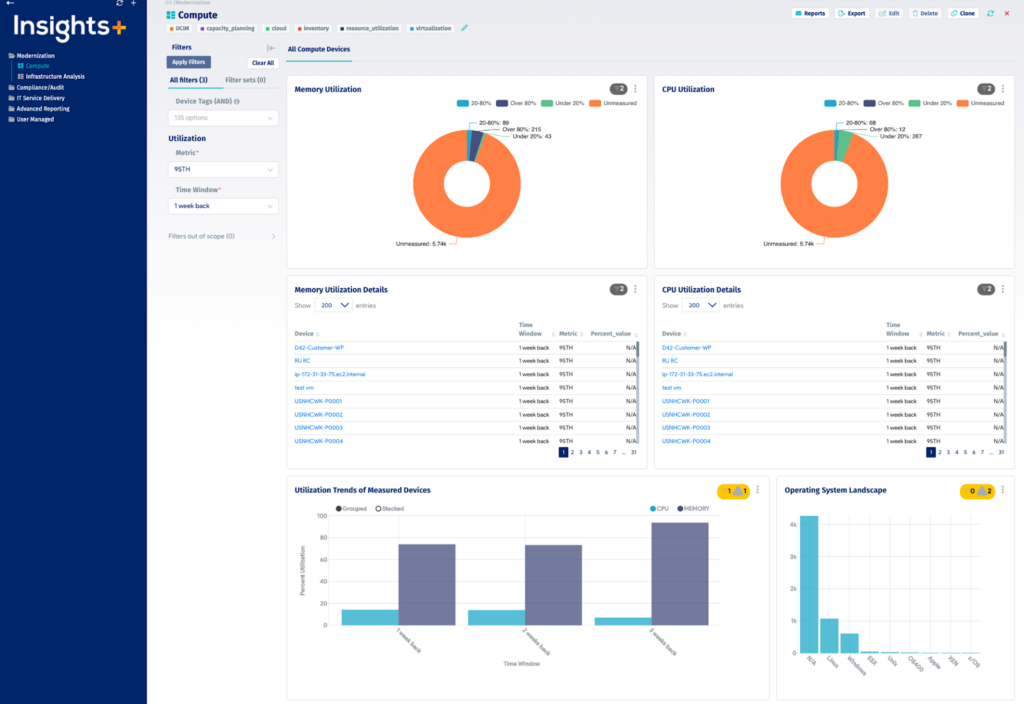
For migration projects, Device42 combines that discovery data with its Resource Utilization, Affinity Groups, Business Applications, and Cloud Recommendation Engine modules. Together these turn raw inventory into move groups, target sizing recommendations, and price comparisons across cloud platforms.
Key features include:
- Agentless auto-discovery: Discovers physical, virtual, and cloud devices without agents and runs on a schedule, so inventory does not need to be rebuilt manually before each migration wave.
- Application dependency mapping: Maps the interdependencies supporting key business applications, including which services, listening ports, and remote machines each server relies on.
- Automatic Affinity Groups: Divides infrastructure into logical move groups around a key application, pulling in all servers and services that the application depends on.
- Resource Utilization: Measures and records current disk, network, CPU, and memory usage for running workloads, providing the profile data used for target sizing.
- Cloud Recommendation Engine: Selects appropriately sized cloud instances for each workload and provides price comparisons for those instances across competing cloud platforms.
- Business Applications: Lets teams build custom application layouts from one or more Affinity Groups, starting from a backbone service that pulls in its required dependencies.
- Data ingestion and integrations: Imports spreadsheet and CSV data, pulls from external systems such as Microsoft SCCM and BMC Remedy, and connects to configuration management and ITSM tools.

Source: Device42
Limitations (as reported by users on G2):
- Setup and navigation complexity: Reviewers describe the initial configuration and the interface as complex to work through, particularly for smaller teams.
- Performance with large datasets: Some users report slowdowns when the appliance handles very large data volumes or a high number of concurrent API requests.
- Add-on based pricing: Users note that parts of the functionality are priced as separate add-ons rather than being included in a single product price.
- Discovery coverage gaps: A few reviewers mention limited discovery support for certain storage and network vendors, and difficulty exporting component-level change reports.
- Auto-discovery configuration: Reviewers report that a first scan can pull in duplicates and decommissioned machines unless discovery scope is planned carefully in advance.
3. ServiceNow Discovery and Service Mapping

Best for: Migration mapping that feeds an existing ServiceNow CMDB
Strengths: Agentless discovery with tag-based and top-down service maps
Things to consider: High cost and complex setup requiring skilled administrators
ServiceNow Discovery and Service Mapping are two IT Operations Management products that run on the ServiceNow platform. Discovery finds hardware, cloud, and container resources across on-premises, cloud, containerized, and hybrid infrastructure and records them in the CMDB. Service Mapping then builds a structured view of how those components combine into business services.
For migration planning, the pairing is most relevant to organizations already running ServiceNow. Maps update automatically whenever a change is detected, and the resulting service-aware records can be used to judge which components must move together and what the business impact of a given change would be.
Key features include:
- Automated agentless discovery: Identifies infrastructure and applications on-premises, in the cloud, or in containerized environments without requiring an agent on every host.
- Event-driven discovery: Receives configuration events as they occur across multiple cloud environments, so cloud inventory does not wait for the next scheduled scan.
- Multiple mapping methods: Generates service maps using tag-based, top-down, and traffic-based methods, with machine learning applied to the mapping process.
- Multicloud mapping support: Provides out-of-the-box discovery and mapping for a range of cloud platforms, which matters when source or target environments span more than one provider.
- Automatic map updates: Service maps update whenever a change is detected, so dependency records reflect the current environment rather than a point-in-time snapshot.
- CMDB integration: Feeds discovery and mapping data into the ServiceNow CMDB, creating a single record set that other platform processes act on.
- Client-based visibility: Uses a unified agent to close common discovery gaps such as domain controllers, DMZ hosts, and endpoints.
- Content service: Applies application fingerprints to identify technologies during discovery without building custom patterns for every product.
Limitations (as reported by users on G2):
- Implementation complexity: Reviewers describe configuring Discovery and Service Mapping as time-consuming work that generally requires experienced administrators.
- Licensing cost: Users report that the advanced Discovery and Service Mapping modules add significant licensing cost, particularly at enterprise scale.
- Dependence on CMDB data quality: Several reviewers note that mapping accuracy declines when CMDB data is incomplete, duplicated, or not actively maintained.
- Mapping accuracy in complex environments: Some users report gaps or inconsistencies in service maps for complex and custom applications, requiring additional tuning and validation.
- Steep learning curve: Reviewers mention that advanced capabilities require specialized knowledge and training before teams can use them effectively.
- Upgrade maintenance: Users note that platform upgrades can break custom discovery patterns, adding testing effort each release cycle.
4. BMC Helix Discovery

Best for: Blueprint-driven service modeling across cloud and on-premises
Strengths: Agentless continuous discovery with topology data reconciliation
Things to consider: Pricing and reliance on the wider BMC Helix platform
BMC Helix Discovery, previously known as BMC Atrium Discovery and Dependency Mapping, builds a view of data center assets and the relationships between them. Each scan collects information and dependencies for software, hardware, network, storage, and versions, so an application map can be produced starting from any single piece of information about it. It is available as SaaS or on-premises.
For migration planning, the product addresses the visibility gap directly: lack of visibility into applications and dependencies affects migration planning, capacity optimization, and service availability. Blind spot detection surfaces hidden or undocumented assets and relationships, while data reconciliation merges topology data from multiple sources into a single view.
Key features include:
- Agentless continuous discovery: Automatically finds assets and maps relationships across cloud and on-premises environments, keeping data current without manual updates.
- Blueprint-automated service modeling: Uses a library of service modeling blueprints to visualize the infrastructure supporting a specific business need, rather than modeling every service by hand.
- Data reconciliation: Unifies data from different topology sources into one record set, which matters when discovery data arrives from more than one tool.
- Blind spot detection: Exposes hidden or undocumented assets, dependencies, and relationships that would otherwise be left out of a migration scope.
- Multi-cloud visibility: Discovers and manages resources across diverse cloud environments with limited configuration and management overhead.
- Topology data ingestion: Feeds discovery topology and third-party data into the wider BMC Helix platform, connecting service models, topology, and telemetry in one place.
- SSL/TLS certificate discovery: Finds and manages security certificates across the infrastructure, which is relevant when services are re-pointed during a move.
- Deployment options and outposts: Runs as SaaS or on-premises, with outposts registered to reach segmented parts of the estate.
Limitations (as reported by users on G2):
- Cost relative to alternatives: Reviewers repeatedly describe the product as expensive compared with competing discovery tools, with add-on licensing raising the total further.
- Cloud migration assessment gaps: One reviewer notes that competing discovery tools are commonly used for cloud migration assessment where equivalent features are not available here.
- Appliance storage limits: Several users report that appliance system disks larger than 2TB are not supported, which constrains large data volumes.
- Interface usability: A number of reviewers describe the interface as difficult for newcomers and less refined than the underlying functionality.
- Integration and support responsiveness: Users mention that integration with other BMC tools and the speed of support responses could be improved.
5. Dynatrace

Best for: Real-time topology discovery across a full technology stack
Strengths: Single-agent deployment with automatic dependency detection
Things to consider: Cost and a steep learning curve for new administrators
Dynatrace performs application topology discovery, identifying the components and dependencies of an entire technology stack end to end and presenting them as a visual, interactive graph. Discovery runs after a single agent is installed and does not require manual configuration to map the environment.
Its Smartscape technology detects websites, applications, services, processes, hosts, networks, and infrastructure, along with the causal dependencies between them. The topology recognizes changes to the IT environment as they occur, so the architecture view stays current rather than being reassembled by hand at the start of each migration project.
Key features include:
- Single-agent deployment: One agent installation is enough to auto-discover the components and dependencies of the full stack, without per-component configuration.
- Smartscape topology detection: Detects causal dependencies between websites, applications, services, processes, hosts, networks, and infrastructure within minutes of deployment.
- Interactive topology view: Displays the application topology as a visual, dynamic graph where any component can be selected to drill into its performance details.
- Broad technology coverage: Covers AWS, Microsoft Azure, Google Cloud, Oracle Cloud, VMware, Windows, Linux, Docker, Red Hat OpenShift and OpenStack, SAP, IBM z/OS, and common runtimes and databases.
- Continuous change recognition: Recognizes changes to the IT environment on the fly and maintains an up-to-date blueprint of the application architecture.
- Automatic performance baselining: Learns normal performance for metrics such as response time and CPU health without manual threshold configuration, giving a comparison point for post-move validation.
- Automated root cause analysis: Applies big data analytics to identify the reasons behind performance problems and determines whether an issue affects customers.
Limitations (as reported by users on G2):
- Pricing at scale: Reviewers describe the licensing model as expensive and hard to predict as environments grow, particularly for large Kubernetes or microservices estates.
- Steep learning curve: Users report that the breadth of features and configuration options requires considerable training before teams use the platform effectively.
- Instrumentation complexity: Several reviewers note that instrumenting environments and setting up alerting profiles is tedious and can slow investigations.
- Cluttered dashboards: Users describe the interface as dense, with dashboards that need tuning before they are readable and that can be slow to load.
- On-premises and legacy coverage: Some reviewers mention limited support for on-premises data center scenarios and for platforms such as IBM iSeries and batch processes.
Cloud Migration Assessment and Planning Tools
6. Flexera One Cloud Migration and Modernization

Best for: Business-service-based prioritization and cost modeling
Strengths: Bottom-up discovery, dependency mapping, and workload assessments
Things to consider: Complex setup and a learning curve across the platform
Flexera One Cloud Migration and Modernization is the migration planning component of the Flexera One platform. It performs bottom-up discovery of IT resources and maps dependencies, then presents them in the context of business services rather than as isolated servers. That context is used to decide which applications should move and in what order.
The solution also covers cloud cost assessment and workload placement, comparing cloud type, provider, instance choice, buying type, and resource provisioning against workload, budget, and performance requirements. The source environment can be on-premises or an existing cloud provider, and the target can be any supported cloud provider.
Key features include:
- Agentless discovery collection: Builds an IT inventory using lightweight collection intended to run with no impact on the environment being scanned.
- Application dependency mapping in business context: Maps dependencies and shows how they affect business services, so migration candidates are assessed against how the business actually consumes them.
- Migration prioritization: Breaks entire migrations into smaller sub-divisions and supports automated grouping, so applications are sequenced rather than moved in a single event.
- Cloud cost assessment: Analyzes public, private, and hybrid cloud costs to indicate which provider, instance choice, buying type, and provisioning level suits a given workload and budget.
- Workload placement assessments: Provides workload assessments across the current estate so teams can prioritize workloads and identify which providers fit their performance requirements.
- Cloud-to-cloud support: Supports migrations where the source is an existing cloud provider rather than only on-premises infrastructure.
- Operational risk and savings reporting: Reports application consumption by location and surfaces operational risk and potential cost savings ahead of a move.

Limitations (as reported by users on G2):
- Complex implementation: Reviewers commonly describe initial configuration and data integration across multiple systems as resource-intensive and time-consuming.
- Steep learning curve: Users report that the breadth of modules and platform terminology requires training before the tool can be used effectively.
- Reporting flexibility: Several reviewers say report customization is limited and often needs additional technical knowledge or an external BI tool.
- Performance with large datasets: Users mention interface lag and slow dashboard loading when working with large reports or import volumes.
- Cost for smaller organizations: Reviewers note high minimum annual commitments and additional charges that can be prohibitive below enterprise scale.
7. Azure Migrate

Best for: Discovery, dependency mapping, and assessment for Azure moves
Strengths: 6R assessments, dependency maps, readiness and cost insights
Things to consider: Azure-only target and setup effort in large estates
Azure Migrate is Microsoft’s hub for discovering, assessing, and migrating workloads to Azure. It automatically discovers infrastructure, applications, and data, and reports dependencies and readiness for each workload. Assessments measure cloud readiness, identify risks, and estimate cost and complexity before anything is moved.
Planning is organized around the 6R options: rehost, refactor, rearchitect, rebuild, replace, and retire. An Azure Copilot migration agent, built on the Azure Migrate platform, orchestrates the sequence from discovery through execution and coordinates with first and third-party tools while maintaining tracking across the project.
Key features include:
- Automatic discovery of the estate: Discovers infrastructure, applications, and data across the source environment, including servers running in VMware environments, and reports readiness alongside the inventory.
- Dependency mapping: Creates a dependency map of discovered workloads so teams can see which systems communicate and which must be migrated together.
- 6R treatment assessment: Aligns each workload with a treatment of rehost, refactor, rearchitect, rebuild, replace, or retire, and generates readiness and cost insights for that choice.
- Application awareness grouping: Groups tagged resources that depend on each other, so related resources can be collocated for cost and performance reasons after the move.
- Migration orchestration: Coordinates across agents and tools during execution, with unified visibility and tracking from discovery through cutover.
- Modernization paths: Supports migrating ASP.NET web apps at scale to Azure App Service or Azure Kubernetes Service, and containerizing Java web applications running on Apache Tomcat for AKS.
- Right-sizing and cost comparison: Provides right-sizing insights and AI assistance for comparing options when assembling a cost case for stakeholders.
Limitations (as reported by users on G2):
- Setup complexity in large estates: Reviewers report that initial setup and configuration can be complicated in large or highly specialized environments.
- Cost estimate precision: Users note that cost estimates can be vague and that additional tools are needed for accuracy, since assessments lean toward like-for-like sizing rather than platform services.
- Assessment output interpretation: Some reviewers say assessment findings can be overwhelming and need careful interpretation before they translate into decisions.
- Dependency mapping effort: Users mention that enabling dependency mapping through agent installation took longer than expected, and that some flagged dependencies turn out to be false positives.
- Azure as the only target: Reviewers point out that the service supports migration to Azure only, and that some workloads and older source platform versions are not covered.
8. AWS Transform

Best for: Agentic discovery and wave planning for large AWS migrations
Strengths: Dependency analysis, wave grouping, and network conversion
Things to consider: AWS-only target and landing zone prerequisites
AWS Transform is a collaborative enterprise transformation workbench that uses AI agents to run cloud migrations from discovery through cutover. The migration agent discovers on-premises environments and collects performance data, network connections, database metadata, and server specifications across VMware, bare metal, and Hyper-V estates without manual data gathering.
It accepts multiple ingestion formats, including RVTools, NetApp DII, Migration Evaluator, and MPA exports, so existing discovery data can be reused. Agents then analyze application dependencies, business priorities, and technical constraints to group workloads into migration waves, and produce TCO projections and business cases from the same dataset.
Key features include:
- Automated discovery and assessment: Discovers on-premises environments and collects performance data, network connections, database metadata, and server specifications across mixed hypervisor and bare metal estates.
- Third-party data ingestion: Accepts ingestion formats including RVTools, NetApp DII, Migration Evaluator, and MPA exports, so discovery data from other tools can serve as input.
- Dependency analysis and wave planning: Analyzes application dependencies alongside business and technical priorities, then groups workloads into migration waves with adjustable composition, sequencing, and timing.
- TCO and business case generation: Produces TCO projections and business cases from assessment data, with what-if scenarios and customizable assumptions.
- Network conversion: Translates on-premises network configurations into AWS constructs such as VPCs, subnets, security groups, transit gateways, and routing tables, with output in CloudFormation, CDK, Terraform, or LZA formats.
- Landing zone generation: Generates Landing Zone Accelerator configurations that establish multi-account AWS environments with governance and security controls before workloads move.
- Rehost and replatform paths: Assigns each application during wave planning to rehosting on Amazon EC2 or containerization to Amazon ECS or EKS, and orchestrates replication, testing, and cutover for both.
Limitations (based on publicly available sources):
- AWS as the only target: The service is built around AWS as the destination, so it does not support planning moves to other cloud platforms.
- Environment prerequisites: An AWS landing zone, core account security baselines, and secure connectivity from source environments are expected before the agents and connectors can operate.
- Human review still required: Vendor documentation classifies transformation tasks by automation success, with some requiring human review and certain features needing refactoring rather than direct migration.
- Preview capabilities: Several capabilities, including continuous modernization and the FSx for NetApp ONTAP block storage target, remain in preview rather than generally available.
- Pricing visibility: Pricing is consumption based and not fully published, which makes cost estimation harder before an engagement begins.
Related content: Read our guide to IT mapping services
Conclusion
IT mapping tools are essential for managing modern, distributed infrastructures where assets span on-premises data centers, cloud services, and hybrid environments. By delivering accurate, up-to-date visualizations of systems and their dependencies, they help IT teams improve troubleshooting, support compliance, and plan changes with confidence. The result is better control over infrastructure, reduced downtime, and stronger alignment between IT operations and business needs.