
Why is Network Mapping Important?
Network maps help with network visualization, device monitoring, and network diagnosis. For example, imagine that a company has installed new software that consumes too much data. Perhaps the application has bugs or is experiencing an error. Finding that specific software, identifying the problem and resolving it can be done much more quickly and easily with network maps.
In general, network maps can also help to address compliance issues, automate additional IT processes, optimize networks, save time, and see live traffic, top protocols, uptime, downtime, network coverage, and data volume in a single dashboard with associated reports.
Network Mapping Market and Trends
Network Mapping Market Growth
According to recent market research, the network mapping software market is expected to grow steadily over the coming years. Industry forecasts estimate an annual growth rate of about 7.9% between 2026 and 2033. This growth is largely driven by the increasing complexity of modern IT infrastructures and the growing need for tools that can visualize and manage networks effectively.
Organizations rely more on digital services, cloud systems, and connected devices. As a result, IT teams require software that can clearly map network components, monitor connections, and help resolve issues quickly. Rising cybersecurity concerns and the broader digital transformation across industries are also increasing demand for these tools.
Key Technology Trends
Several technology trends are shaping the development of network mapping tools. Artificial intelligence and machine learning are being integrated into these platforms to automate network analysis and optimization. These technologies help detect patterns in network behavior and reduce downtime by identifying issues earlier.
Another important trend is real-time monitoring. Modern tools allow administrators to view network changes and performance data instantly, which helps teams respond faster to failures or performance problems.
Cloud-based network mapping platforms are also expanding rapidly as organizations move their infrastructure to the cloud and need scalable management tools.
Security and Usability Developments
Security integration is becoming a key feature in network mapping platforms. Many solutions now include capabilities for identifying unknown devices, detecting threats, and supporting incident response processes. This aligns with the growing emphasis on cybersecurity across organizations.
At the same time, vendors are improving user interfaces and usability. Modern tools increasingly focus on intuitive dashboards and simplified workflows, allowing even non-specialized staff to visualize and understand network structures more easily.
Key Features of Network Mapping Tools
Network mapping software offers a range of features that help IT teams visualize, monitor, and manage network infrastructure efficiently. These tools provide real-time insights, automate discovery, and enhance security. Below are the essential features of network mapping software:
- Automated discovery: Scans the network to detect devices, connections, and topology in real time, reducing the need for manual input.
- Visual network representation: Provides interactive diagrams that illustrate physical and logical relationships between devices.
- Real-time monitoring: Continuously tracks network status, traffic patterns, and performance metrics to detect anomalies.
- Customizable alerts: Notifies administrators of connectivity issues, high bandwidth usage, or security threats.
- Device and IP address management: Helps track and manage IP allocations, identify unauthorized devices, and prevent conflicts.
- Security analysis: Identifies vulnerabilities, unauthorized access points, and potential threats within the network.
- Performance optimization: Highlights bottlenecks, latency issues, and inefficiencies to improve overall network performance.
- Integration with IT systems: Connects with network monitoring, security, and IT asset management tools for centralized oversight.
- Compliance reporting: Generates reports for audits and regulatory requirements, ensuring adherence to industry standards.
- Scalability: Adapts to growing networks by dynamically updating maps as new devices are added.
8 Notable Network Mapping Tools
Network Mapping and Topology Visualization Tools
1. Faddom

Faddom provides a powerful, agentless network mapping platform that offers a real-time, interactive view of your IT infrastructure. It automatically discovers all network components, connections, and dependencies, enabling IT teams to enhance troubleshooting, security, and compliance without interrupting operations.
Key features include:
- Agentless asset discovery: Instantly maps all network connections and dependencies without impacting performance.
- Real-time traffic analysis: Detects unexpected connections, bottlenecks, and anomalies to improve security and efficiency.
- Hybrid IT visibility: Covers both on-premise and cloud environments.
- Change impact analysis: Helps IT teams anticipate risks before modifying the infrastructure.
- Comprehensive documentation & compliance: Keeps an up-to-date, audit-ready map for governance and IT management.
- Seamless integration: Works alongside ITSM, SIEM, and monitoring tools for a unified view of network dependencies.

2. Solarwinds Network Topology Mapper

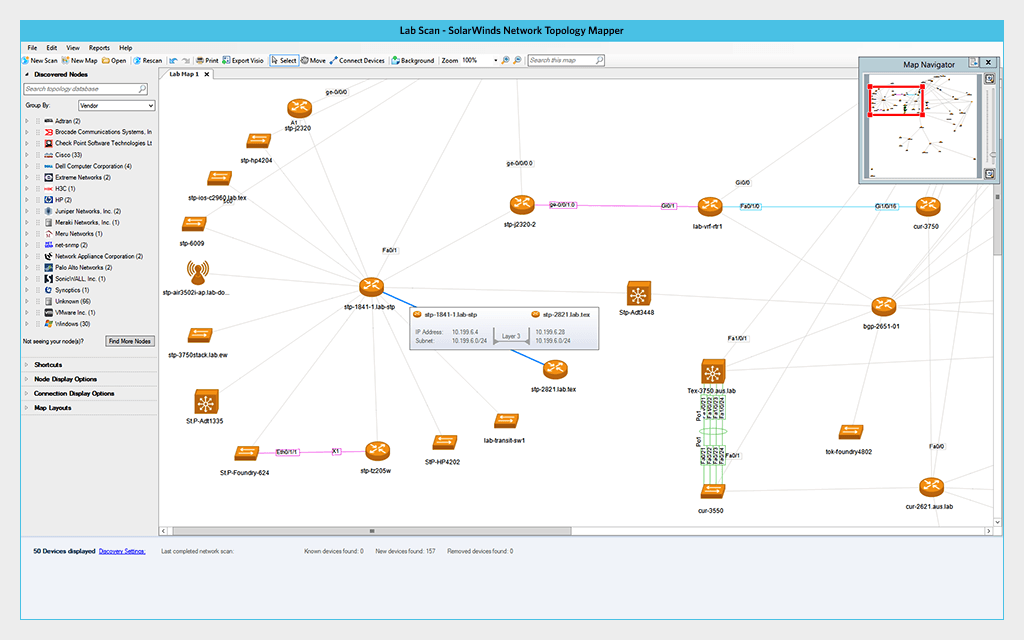
SolarWinds Network Topology Mapper is a tool to automatically discover network devices and generate topology maps without manual effort. It supports continuous updates, ensuring that maps reflect changes such as newly added or removed devices. The tool also enables the creation of multi-level diagrams for better visibility into complex environments.
Key features include:
- Automated network discovery: Detects devices across the network and updates maps when changes occur.
- Dynamic topology mapping: Generates multi-level logical diagrams to represent complex infrastructures.
- Automated diagram creation: Eliminates manual diagramming by generating maps automatically.
- Topology change detection: Keeps network layouts up to date as devices are added or modified.
- Export and customization options: Allows editing of nodes and exporting diagrams for documentation and compliance.

Source: SolarWinds
3. Device42

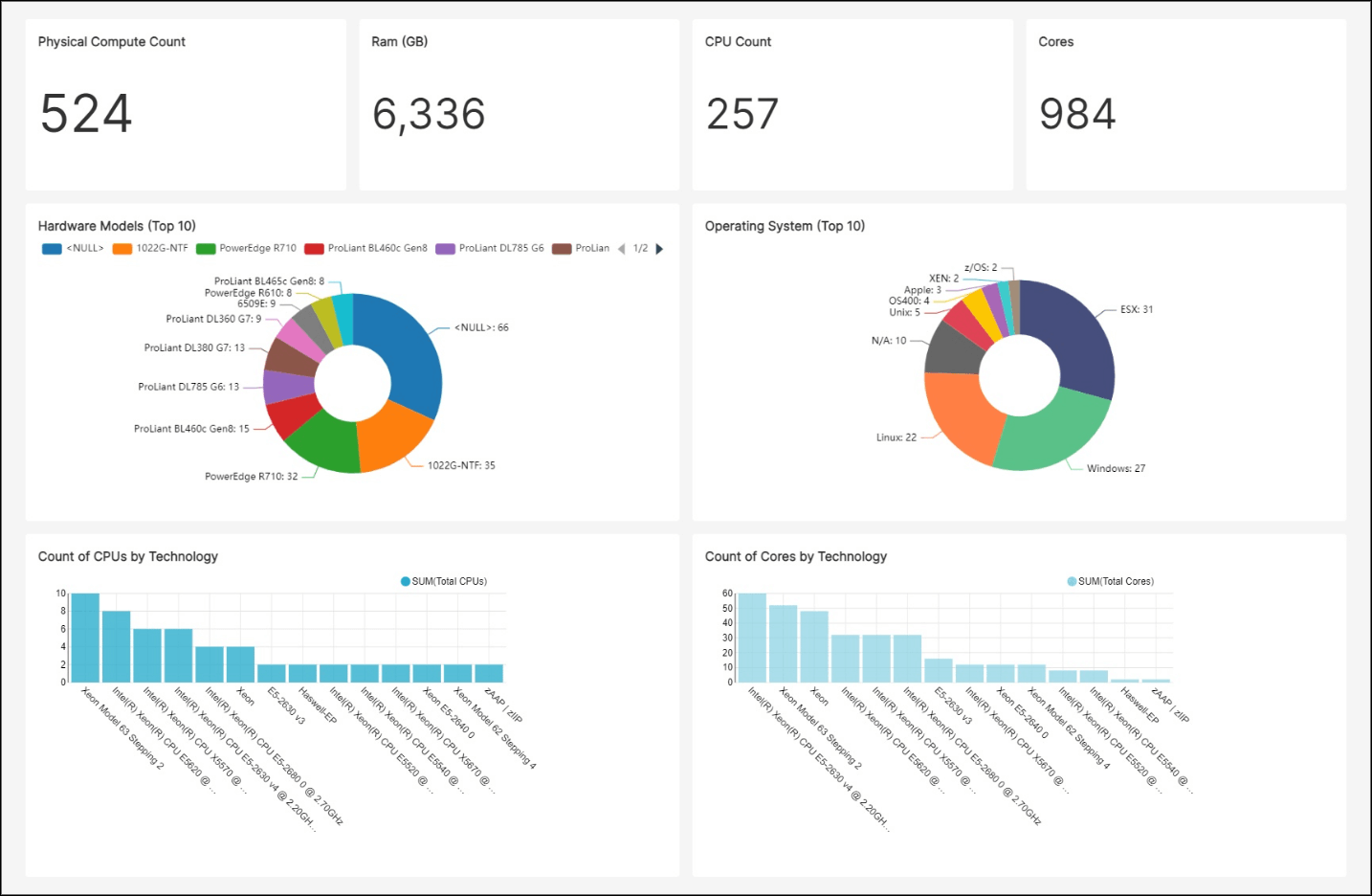
Device42 is a discovery and dependency mapping platform focused on hybrid IT environments. It provides visibility into infrastructure components, relationships, and resource utilization. The platform supports continuous discovery and maintains an up-to-date view of assets, making it useful for capacity planning and operational management.
Key features include:
- Hybrid infrastructure discovery: Identifies assets across data centers and cloud environments.
- Dependency mapping: Visualizes relationships between applications, services, and infrastructure components.
- Configuration management database (CMDB): Maintains continuously updated configuration and asset data.
- IP address management: Provides centralized visibility and control over IP allocations.
- Resource utilization insights: Identifies underused or over-provisioned assets to support optimization.

Source: Device42
4. OpManager Network Mapping

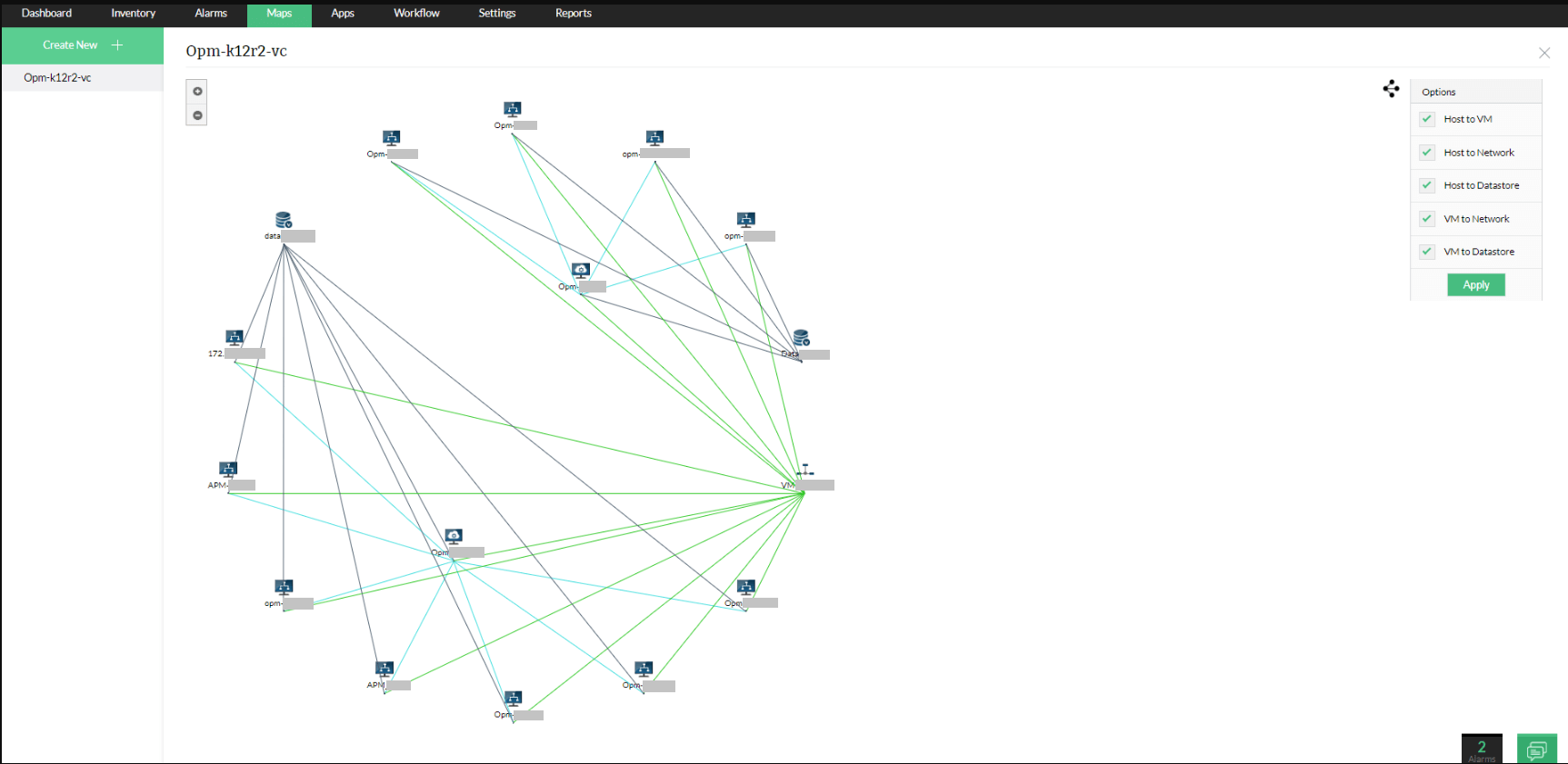
OpManager provides network mapping capabilities that convert discovered device data into interactive topology maps. It supports automatic discovery, real-time updates, and visualization of both physical and logical connections. The tool also integrates mapping with monitoring and alerting to support faster troubleshooting.
Key features include:
- Automated device discovery: Uses protocols like SNMP and ICMP to detect and classify devices.
- Interactive topology maps: Displays devices and connections with live performance data.
- Layer 2 topology visualization: Shows physical connections between switches, routers, and endpoints.
- Dependency mapping: Identifies relationships between services and infrastructure for root cause analysis.
- Topology-aware alerting and reporting: Correlates faults with network maps and generates reports for analysis.

Source: ManageEngine
5. N‑able N-central Network Mapping Software

N-able N-central includes network mapping capabilities for managed service providers and IT teams managing distributed environments. It focuses on automated discovery, continuous updates, and visualization of network topology. The tool helps teams maintain accurate maps and quickly identify issues across managed networks.
Key features include:
- Automated topology discovery: Detects devices and builds detailed network maps automatically.
- Dynamic map updates: Reflects changes in the network as devices are added or removed.
- Visual network representation: Provides clear views of connections and dependencies between devices.
- Scheduled network scans: Allows regular scanning to maintain up-to-date topology data.
- Troubleshooting support: Helps identify performance issues and connectivity problems using visual insights.

Source: N‑able
Network Monitoring and Scanning Tools
6. Nmap
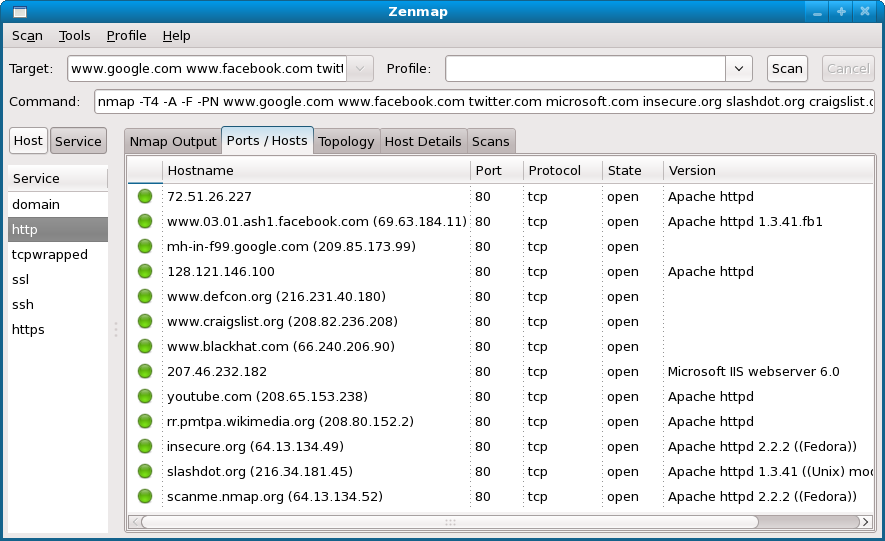
Nmap is an open-source network scanning and discovery tool used to identify hosts, services, and network configurations. It is widely used for network inventory, security auditing, and mapping network structures. The tool supports both command-line usage and graphical interfaces through Zenmap.
Key features include:
- Network discovery: Identifies hosts and services within a network using scanning techniques.
- Port scanning: Detects open ports and running services on target systems.
- Service and OS detection: Determines operating systems and service versions running on devices.
- Scriptable engine: Extends functionality with scripts for advanced scanning and automation.
- Cross-platform support: Runs on multiple operating systems including Windows, Linux, and macOS.
 Source: Nmap
7. Paessler PRTG Network Monitor

Paessler PRTG Network Monitor provides unified monitoring and mapping capabilities across IT infrastructure. It automatically discovers devices and tracks performance metrics such as bandwidth, availability, and resource usage. The platform uses sensors to monitor different aspects of the network and supports distributed monitoring environments.
Key features include:
- Automatic network discovery: Detects devices and configures monitoring automatically.
- Sensor-based monitoring: Tracks metrics like bandwidth, CPU usage, and availability using configurable sensors.
- Real-time performance monitoring: Monitors network health, traffic, and device status continuously.
- Centralized management console: Provides a single interface to monitor the entire infrastructure.
- Distributed monitoring support: Enables monitoring across multiple sites and remote environments.

Source: Paessler
8. Intermapper

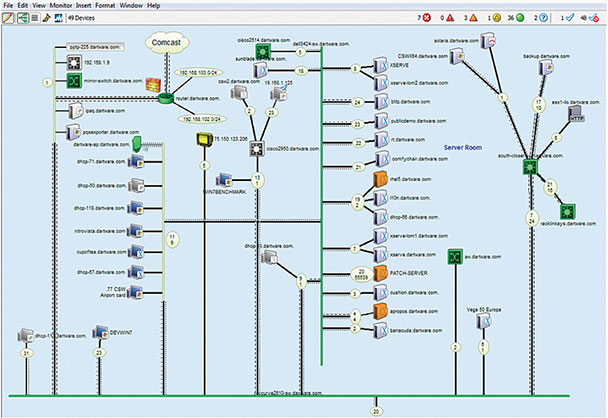
Intermapper is a network monitoring and mapping tool that provides real-time visualization of network devices and performance. It creates interactive maps that display device status using color-coded indicators, helping administrators quickly identify issues. The platform also includes alerting and reporting features to support proactive network management.
Key features include:
- Automatic network mapping: Discovers and maps all IP-enabled devices in the network.
- Real-time visualization: Displays device status with color-coded indicators for quick analysis.
- Proactive monitoring and alerts: Sends alerts when performance thresholds are exceeded.
- Customizable map layouts: Supports hierarchical maps and flexible visualization options.
- Capacity planning and reporting: Uses historical data and trend analysis to support network planning.



Source: Fortra
Try Faddom’s Network Mapping Feature
We at Faddom, a new IT cloud InfraOps startup, have created a new feature for mapping physical network devices such as switches and routers to troubleshoot problems, analyze the impact of changes, generate documentation, and ensure compliance.