
What Is Legacy Application Modernization?
Legacy application modernization is the process of updating, refactoring, or replacing outdated software systems to improve performance, security, and business agility without losing core value. It can involve changing the application architecture, source code, infrastructure, data layer, or deployment model. The goal is to address limitations such as high maintenance costs, security risks, poor scalability, and difficulty integrating with newer systems.
Modernization does not always require replacing an application. Teams can migrate an existing application to newer infrastructure, update its runtime and dependencies, expose functionality through APIs, or refactor parts of the code into services. The right approach depends on the application’s condition, business value, technical dependencies, and the cost and risk of making changes.
Why modernize legacy systems?
- Lower maintenance costs: Reduce high expenses tied to maintaining old, brittle code and proprietary infrastructure.
- Better security: Patch vulnerabilities found in unsupported or deprecated software.
- Improved scalability: Leverage cloud capabilities like auto-scaling to handle shifting business demands.
- Faster innovation: Integrate modern technologies like APIs, microservices, and AI-driven capabilities.
Strategies for modernizing legacy applications:
- Encapsulate with APIs: Expose legacy functionality through modern interfaces without changing the core application.
- Rehost (lift and shift): Move applications to new infrastructure with minimal changes to their code or architecture.
- Replatform: Adopt newer platforms or managed services through targeted changes without substantially redesigning the application.
- Refactor: Improve code structure, frameworks, and maintainability while preserving existing functionality.
- Rearchitect into microservices: Split a monolith into independently deployable services when the benefits justify added complexity.
- Rebuild or replace: Create a new custom application or adopt commercial software when further modernization is impractical.
- Retire or retain: Remove applications that no longer deliver value, or keep stable systems when modernization offers insufficient benefits.
Best practices for successful modernization projects:
- Assess legacy systems and define measurable goals: Document dependencies, risks, and performance baselines, then set measurable modernization targets.
- Prioritize applications by business value and risk: Rank applications by criticality, cost, security exposure, and dependencies to determine modernization order.
- Choose a modernization strategy per application: Match each approach to business needs, technical constraints, expected lifespan, and total cost.
- Modernize incrementally with the strangler fig pattern: Replace functionality gradually, validating new components before retiring their legacy equivalents.
- Validate data and test continuously during migration: Reconcile migrated data and continuously test functionality, integrations, performance, and security.
- Design the target environment for scale and security: Plan for growth, resilience, access controls, recovery, and monitoring from the outset.
Benefits of Modernizing Legacy Applications
Modernizing legacy applications can reduce the operational and technical constraints created by aging software. Key benefits include:
- Lower maintenance costs: Modern platforms, frameworks, and automated processes can reduce the effort required to maintain outdated code and infrastructure.
- Improved security: Modernization makes it easier to replace unsupported components, apply security updates, and implement current authentication and access controls.
- Better performance and scalability: Updated architectures can handle changing workloads more efficiently and scale resources as demand increases.
- Faster development: Modern development tools, APIs, automated testing, and CI/CD pipelines help teams release features and fixes more quickly.
- Easier integration: APIs and modern integration patterns make it simpler to connect applications with cloud services, SaaS platforms, and other internal systems.
- Greater reliability: Replacing fragile components and introducing monitoring and automation can reduce failures and simplify recovery.
- Improved developer experience: Current languages, frameworks, documentation, and tooling make applications easier to understand, test, and modify.
Legacy Application Modernization vs. Migration vs. Replacement
Legacy application modernization updates an existing application to improve its architecture, maintainability, security, or performance. It can include refactoring code, updating frameworks, adopting APIs, or moving selected components to cloud-native services. The application and its core business logic usually remain in place while outdated parts are improved.
Application migration focuses on moving an application from one environment to another, such as from an on-premises data center to the cloud. Migration may require configuration or compatibility changes, but it does not necessarily change the application’s architecture or functionality. For example, a team might move a virtual machine to cloud infrastructure without modifying the application running on it.
Application replacement involves retiring the legacy system and adopting or building a different application. Organizations may choose replacement when the existing system is too expensive, risky, or difficult to modernize. Replacement can remove accumulated technical debt, but it also requires migrating data, rebuilding integrations, and adapting existing business processes.
7 Strategies for Modernizing Legacy Applications
1. Encapsulate With APIs
Encapsulation leaves the legacy application’s core code in place but exposes its data or functionality through APIs. The API layer gives modern applications a stable interface while hiding older protocols, data formats, and implementation details.
For example, a retailer might have a mainframe application that manages inventory. Instead of replacing it, the team can create REST APIs that let an ecommerce application check inventory and reserve products without connecting directly to the mainframe.
Encapsulation is useful when the legacy system remains reliable but is difficult to integrate with newer applications. It also works well as an intermediate step in a gradual modernization program, especially when replacing the entire system would be expensive or risky.
2. Rehost (Lift and Shift)
Rehosting moves an application from its existing infrastructure to a new environment without significantly changing its code or architecture. The most common example is moving applications from physical servers or on-premises virtual machines to cloud virtual machines.
For example, an organization could move a Java application and its existing runtime from an on-premises VMware environment to virtual machines on AWS. The application’s architecture stays largely unchanged, while the underlying infrastructure moves to the cloud.
Rehosting is useful when an organization needs to leave a data center quickly, replace aging hardware, or move many applications under a tight deadline. It can provide infrastructure benefits without the cost and risk of modifying application code.
3. Replatform
Replatforming moves an application to a newer platform while making targeted changes that let it use newer infrastructure or managed services. Unlike rehosting, it changes parts of the application’s runtime environment without substantially redesigning the application.
For example, a team could containerize an existing web application and replace its self-managed PostgreSQL database with a managed cloud database. The application retains its basic architecture but requires less infrastructure management.
Replatforming is useful when teams want more cloud benefits than rehosting provides but cannot justify a major rewrite. Common use cases include adopting containers, managed databases, managed application runtimes, or cloud-based caching and messaging services.
4. Refactor
Refactoring changes the internal structure of application code without substantially changing what the application does for users. It can include updating frameworks, removing duplicated code, separating tightly coupled modules, and replacing obsolete libraries.
For example, a company might refactor a large Java application by upgrading its framework, separating database access from business logic, and adding automated tests. Users continue to access the same functionality, but developers gain a codebase that is easier to modify and maintain.
Refactoring is useful when the application still meets business requirements but accumulated technical debt slows development or creates security and reliability problems. It can also prepare an application for later replatforming or architectural changes.
5. Rearchitect Into Microservices
Rearchitecting changes the application’s fundamental design. One approach is to break a monolithic application into smaller services that represent separate business capabilities and can be developed, deployed, and scaled independently.
For example, an ecommerce monolith could be divided into services for product catalogs, orders, payments, and shipping. The order service could then scale independently during periods of high transaction volume without requiring the entire application to scale.
This approach is useful when a monolith prevents teams from releasing components independently or when different parts of an application have significantly different scaling requirements. It is best suited to applications where these benefits justify the added complexity of service communication, observability, deployment, and distributed data management.
6. Rebuild or Replace
Rebuilding creates a new application from scratch based on current requirements rather than modifying the existing codebase. Replacement retires the custom application and moves its functions to another product, such as a commercial package or SaaS platform.
For example, an organization might rebuild a decades-old customer portal using a modern web stack while migrating its existing customer data. Alternatively, it could replace an internally developed customer relationship management system with a SaaS CRM.
Rebuilding is useful when existing code or architecture makes further modernization impractical but the organization still needs custom functionality. Replacement is more appropriate when standard software can satisfy the business requirements without maintaining a custom application.
7. Retire or Retain
Retirement removes a legacy application that no longer provides enough business value to justify its cost and risk. Retention is a deliberate decision to leave an application largely unchanged because modernization is unnecessary or does not provide sufficient benefits.
For example, a company might retire an old reporting application after confirming that its reports are available in a newer analytics platform. It might retain a stable manufacturing application that runs on an isolated network and rarely requires changes.
Retirement is useful for redundant, unused, or obsolete applications and can reduce maintenance costs and the attack surface. Retention is appropriate for stable systems with limited change requirements when migration or modernization would introduce more cost and risk than value.
Challenges in Modernizing Legacy Applications
Modernizing legacy applications is not a simple task. This section discusses some of the biggest speed bumps organizations may encounter.
Architectural Complexity
Legacy applications can be difficult to understand and modify, as the original developers have often left the company. This makes it challenging to find qualified developers who can modify the code—not to mention find replacement parts for older hardware components, if applicable.
Legacy systems also often have complex interdependencies and may be built based on outdated technologies that are no longer supported. Particularly during the transition period, the interoperation of old and new architectures can be difficult to navigate.
Data Migration
Migrating data from legacy applications to new systems can be a complex and time-consuming process. Ensuring data integrity, availability, and security throughout the transition is often overlooked or given a lower priority during the transition. However, without data continuity, many applications cannot perform properly.
Legacy applications may store data in formats incompatible with modern data storage structures, making it difficult to migrate data to new systems without losing or corrupting it. In addition, during the migration process, there’s always a risk of data corruption, alongside downtime and other business disruptions.
This is why proper mapping between old and new data structures is critical, as it will ensure that data remains accessible and usable post-migration.
Vendor Lock-In
Adopting new solutions may be difficult, costly, or disruptive, especially if legacy applications are tied to specific vendors or technologies. While modernizing legacy applications presents a golden opportunity to break free of a vendor who no longer meets the organization’s needs, this must be done with great care.
Organizations may experience compatibility challenges when integrating with non-standard legacy systems. The primary goal here is to ensure that if a change of vendor is required, it has minimal impact on operations.
Skillset Gap
Organizations may not have the skills and expertise in-house to modernize their legacy applications. To ensure success, they may have to hire new staff or even consider outsourcing all or part of the modernization project to a third-party vendor.
It’s essential to assess the organization’s personnel and develop a plan, such as investing in skills upgrading or bringing on new hires, to get a clear picture. This will allow it to address any gaps before starting the modernization process.
How AI Is Changing Legacy Application Modernization
AI tools can accelerate several parts of legacy application modernization by analyzing large codebases and identifying dependencies, obsolete libraries, duplicated logic, and potential security issues. This is especially useful for applications with limited documentation, where teams first need to understand how the system works before changing it.
Generative AI can also assist with code transformation. For example, it can help convert older languages or framework patterns into newer equivalents, generate unit tests, document existing modules, and suggest refactoring changes. These capabilities can reduce repetitive work, but generated code still requires review, testing, and validation because automated transformations can introduce incorrect behavior.
AI is also being used to support application assessment and migration planning. By combining code analysis with runtime data, logs, and dependency information, AI-assisted tools can help classify applications and recommend whether they should be rehosted, replatformed, refactored, replaced, or retired.
The main benefit is speed rather than full automation. AI can reduce the time required for discovery, documentation, code conversion, and testing, but modernization decisions still depend on business requirements, architecture constraints, security needs, and operational risk.
Best Practices for Legacy Application Modernization
Assess Legacy Systems and Define Measurable Goals
Start by documenting each application’s architecture, dependencies, data flows, integrations, infrastructure, and known technical issues. Include operational metrics such as incident frequency, maintenance effort, deployment time, performance, availability, and infrastructure cost. Code analysis and application performance monitoring tools can help uncover dependencies that are missing from existing documentation.
The assessment should also identify unsupported operating systems, frameworks, libraries, databases, and other components that create security or operational risks. Review which teams and business processes depend on the application so that modernization work does not unexpectedly disrupt downstream systems.
Define measurable goals before selecting technologies or migration approaches. Examples include reducing deployment time from days to hours, lowering infrastructure costs by a target percentage, reducing critical vulnerabilities, or improving recovery time. Establishing baseline measurements makes it possible to compare results before and after modernization.
Prioritize Applications by Business Value and Risk
Not every legacy application should be modernized at the same time. Rank applications based on business criticality, maintenance cost, security exposure, technical debt, regulatory requirements, failure impact, and dependence on unsupported technologies.
Applications with high business value and high technical risk often deserve earlier attention. However, dependencies also affect sequencing. A low-priority application may need to be addressed first if several critical systems depend on its APIs, database, or infrastructure.
Use the prioritization process to allocate modernization resources where they provide the greatest benefit. Low-value or redundant systems may be better candidates for retirement, while stable applications with few risks may remain unchanged until modernization becomes necessary.
Choose a Modernization Strategy per Application
Select a strategy based on the application’s condition, expected lifespan, business importance, and technical constraints. A stable application may only require rehosting or replatforming, while a tightly coupled system that slows development may need refactoring or rearchitecting.
Avoid applying one modernization strategy across the entire application portfolio. Even different components of the same application can require different approaches. For example, a team might retain core business logic, expose it through APIs, move the database to a managed service, and rebuild the user interface.
Consider the total cost and risk of each option rather than only the initial migration effort. Operational costs, required engineering skills, licensing, testing, downtime, and future maintenance should all influence the decision.
Modernize Incrementally With the Strangler Fig Pattern
The strangler fig pattern replaces a legacy application gradually instead of rebuilding and switching over the entire system at once. Teams create new components around the existing application and progressively redirect functionality or traffic to them.
For example, a team might move authentication to a new service first, followed by billing, reporting, and other functions. A routing or API layer can direct requests to either the legacy system or the new components while both operate during the transition.
This approach limits the scope of individual changes and makes failures easier to isolate. It also allows teams to validate new functionality with real workloads before retiring the corresponding legacy components. Clear boundaries between old and new functionality are important to prevent temporary integrations from becoming permanent technical debt.
Validate Data and Test Continuously During Migration
Data migration should include validation before, during, and after data is moved. Check record counts, field mappings, data types, referential integrity, duplicates, encoding, and business rules. For critical systems, reconciliation processes should confirm that important values such as account balances or transaction totals match between environments.
Testing should cover more than individual code changes. Use automated unit, integration, API, regression, performance, security, and end-to-end tests to verify that modernized components behave as expected. Test integrations with downstream systems because changes in formats, timing, or error handling can cause failures even when the application itself works correctly.
Where possible, compare the outputs of the legacy and modernized systems using the same inputs. Continuous testing throughout the project catches behavioral differences earlier, when they are generally easier and less expensive to correct.
Design the Target Environment for Scale and Security
Do not reproduce legacy infrastructure limitations in the target environment. Design the new architecture around expected workloads, availability requirements, recovery objectives, geographic needs, and anticipated growth. Use horizontal scaling, load balancing, caching, queues, or managed services where they address specific application requirements.
Build security into the architecture rather than adding it after migration. Apply least-privilege access, encryption, centralized identity management, secrets management, network controls, vulnerability scanning, logging, and automated patching where appropriate. Include backup and disaster recovery processes and test that systems can actually be restored.
Infrastructure as code and automated deployment pipelines can make environments more consistent and repeatable. Monitoring, tracing, metrics, and alerts should also be implemented as part of the target architecture so teams can identify performance problems and failures after migration.
How Dependency Mapping Reduces Modernization Risk
As noted above, application dependency mapping (ADM) is a vital step that can make the whole process of legacy application modernization so much simpler. ADM lets organizations identify and visualize dependencies between software applications and components. This helps them understand the complex relationships affecting legacy systems and make informed decisions about how to modernize them.
The results of ADM can help streamline legacy application modernization in a few ways.
Understanding Legacy Applications
Identifying all components that make up a legacy application and the interdependencies among components enables organizations to understand how legacy applications function and interact.
Identifying True Business Value
Knowing which applications are most critical to business operations helps to plan and prioritize app modernization, with minimal business disruption along the way.
Pinpointing Bottlenecks and Security Risks
Understanding which legacy apps present the greatest bottlenecks and security risks will help prioritize modernization efforts to improve overall performance and security.
Cutting Costs, Lowering Risks
Lastly, ADM helps identify and mitigate risks such as data loss, downtime, and security vulnerabilities. It also enables organizations to avoid vendor lock-in since it helps them choose a modernization approach that is compatible with their existing systems.
Faddom: A Partner in Modernization
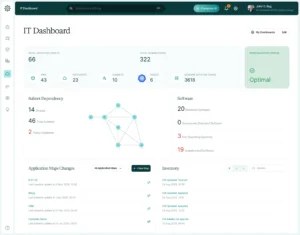
Faddom is a comprehensive ADM tool that maps dependencies for all types of applications, including legacy applications. Designed to help organizations understand all their applications and environments, Faddom makes it easier to plan and execute legacy application modernization projects safely and efficiently via:
- Legacy application topology discovery
- Impact analysis
- Modernization planning and execution
- Reporting and dashboarding for ongoing insights and progress tracking
Faddom documents IT infrastructure both on-premises and in the cloud, producing a comprehensive map of all servers, applications, and dependencies in under 60 minutes. It’s very easy to use and scales seamlessly to make taking the first steps toward application modernization a breeze for organizations of all sizes.
Future-Proofing with Modern, Competitive Apps
Most organizations today have concluded that legacy application modernization is essential to remain competitive and secure. Although there will be inevitable challenges along the way, the benefits, such as scalability, cost savings, and ease of maintenance, are far too great to overlook.
By carefully planning and executing the process, organizations can minimize risk and disruption while paving the way to achieving all the benefits of modern applications. Making application discovery mapping an integral part of that planning process can increase the odds of success while cutting the cost and complexity of any application modernization project.
With Faddom, ADM is fast and easy. To start a free trial and see how quickly Faddom can get to work making your application modernization project easier from start to finish, just fill out the form on this page.