
TL;DR: APM tools range from dependency mapping to enterprise architecture and SaaS management platforms. Best for: Faddom (agentless mapping), SAP LeanIX (enterprise architecture), Torii (SaaS management), and Flexera (software asset management).
What Are Application Portfolio Management Tools?
Application Portfolio Management (APM) tools are software solutions designed to assist organizations in managing their suite of IT software applications and services. These tools provide a comprehensive framework for IT leaders and decision-makers to catalog, monitor, and analyze their software assets, ensuring alignment with business goals and strategies.
APM tools provide insights about each application’s business value, cost, and technical condition, enabling informed decision-making regarding IT investments, optimizations, and retirements. By leveraging APM tools, organizations can achieve a holistic view of their application landscape, identifying redundancies, uncovering cost-saving opportunities, and prioritizing investments based on strategic importance and performance.
Application portfolios rarely stay static. Mergers and acquisitions bring in overlapping systems, cloud migrations shift workloads onto new infrastructure, and shadow IT or unsanctioned SaaS subscriptions accumulate outside any central record. Without an accurate, continuously updated view of what applications exist, how they connect, and what they cost, organizations struggle to make confident decisions about consolidation, modernization, or retirement, and often end up paying for redundant licenses or carrying risk from undocumented dependencies.
Application Portfolio Management Tools At a Glance
The table below summarizes the key differences between these application portfolio management tools. We explore each tool in more detail in the sections that follow.
|
Category |
Solution |
Best For |
Key Strengths |
Things to Consider |
|
Application Discovery and Dependency Mapping |
Faddom |
Agentless dependency mapping across hybrid and multi-cloud |
Agentless read-only discovery, real-time continuous mapping, risk scoring with CMDB-ready exports |
Onboarding and documentation could be clearer; very large or specialized environments may need manual adjustment; interface could use further polish |
|
Application Discovery and Dependency Mapping |
Device42 |
Agentless discovery with a CMDB feeding portfolio decisions |
Automated infrastructure and cloud discovery, Application Groups from communication patterns, Impact Charts and Lists |
Initial setup and learning curve; performance can slow at scale during large scans; manual upgrades required |
|
Application Discovery and Dependency Mapping |
BMC Helix Discovery |
Enterprise-grade service modeling feeding AIOps and observability |
Agentless continuous discovery, blueprint-automated service modeling, data reconciliation to a single record |
Stability concerns reported; limited client-side discovery; premium pricing starting around $50,000 |
|
Enterprise Architecture and APM Platforms |
SAP LeanIX |
Enterprise architecture-driven portfolio rationalization |
Automated inventory with AI-assisted discovery, TIME framework rationalization, configurable meta model with reference catalog |
Complexity and learning curve; reporting can be hard to interpret; standalone SaaS discovery product discontinued |
|
Enterprise Architecture and APM Platforms |
ServiceNow |
Portfolio management tied natively to the ServiceNow platform |
Centralized inventory from CMDB and Discovery, invest, sustain, or replace rationalization, capability-based planning |
Learning curve from platform breadth; configuration effort for dashboards and workflows; value depends on broader ServiceNow adoption |
|
Enterprise Architecture and APM Platforms |
Ardoq |
Graph-based enterprise architecture for dependency and impact analysis |
Graph-based data model connecting apps, capabilities, and processes, dynamically updated dashboards and roadmaps, unlimited-user collaboration |
Learning curve to model effectively; setup described as tedious; support and scale can be challenging for large multi-country deployments |
|
Enterprise Architecture and APM Platforms |
OrbusInfinity |
Governed application inventory with native Microsoft and Visio integration |
Configurable metamodel with central repository, 20+ pre-built portfolio reports, health and risk scoring with audit trail |
Visio performance can lag at scale; reporting and export described as basic; cost can be a barrier for smaller organizations |
|
Enterprise Architecture and APM Platforms |
Bizzdesign |
Business-value-centered rationalization using standards-based modeling |
ArchiMate, BPMN, C4, and UML modeling, business capability mapping, merger, divestiture, and cloud transformation support |
Learning curve and complexity; desktop versus web experience differs; performance can slow with large repositories |
|
SaaS Management and Software Optimization |
Torii |
Continuous SaaS discovery and license optimization |
Continuous SaaS, AI, and desktop app discovery including shadow IT, automated license reclamation, no-code workflow automation |
Fewer or less robust integrations than some competitors; reporting flagged for accuracy and flexibility; cost-prohibitive for smaller SaaS portfolios |
|
SaaS Management and Software Optimization |
BetterCloud |
Centralized SaaS operations with deep Google Workspace and Microsoft 365 support |
No-code user lifecycle automation, license reclamation and renewal management, 100+ integrations with 1,000+ actions |
Integration breadth trails some competitors outside core platforms; legacy and modern console split creates friction; licensing costs can be high |
|
SaaS Management and Software Optimization |
Flexera |
Unified software, hardware, and SaaS asset management |
Multi-source discovery with high recognition and normalization rates, effective license position calculation, cloud license management |
Implementation complexity; fewer direct SaaS integrations; interface can feel dated and sluggish with large datasets |
|
SaaS Management and Software Optimization |
CAST Highlight |
Source-code-based portfolio analysis for modernization and risk |
Source-code scanning across languages and frameworks, cloud readiness and technical debt analysis, open-source and IP risk detection |
Interface navigation can be confusing; limited rule customization; learning curve from breadth of metrics |
Key Features of Application Portfolio Management Tools
An APM solution should provide the following capabilities:
Inventory Management
An APM tool should provide a centralized repository for detailed information about each application in the organization’s portfolio. This includes data on software versions, deployment environments, licensing, usage patterns, and ownership. Effective inventory management enables organizations to maintain an accurate and up-to-date overview of their application landscape.
Having a comprehensive inventory aids in identifying application overlaps and gaps within the portfolio, facilitating consolidation efforts and ensuring that each application serves a distinct, necessary function. By streamlining the application inventory, companies can reduce complexity, manage costs more effectively, and enhance the overall agility of their IT environment.
Application Discovery and Dependency Mapping
Application discovery and dependency mapping features allow organizations to automatically identify and catalog applications across their IT environment, including on-premises, cloud, and hybrid systems. This can help understand how applications interact with each other and with underlying infrastructure, creating a detailed map of dependencies.
This feature supports risk management by highlighting critical applications and their interdependencies, enabling more informed decision-making during IT transformations. It also simplifies the complexity of managing modern IT environments, where applications are increasingly distributed and interconnected, by providing clear visibility into the application ecosystem.
Cost Tracking and Financial Analysis
Cost tracking and financial analysis functionalities enable organizations to monitor and analyze the financial aspects of their application portfolios. This includes tracking direct costs like licensing and maintenance fees, as well as indirect costs such as support and infrastructure expenses. By understanding the total cost of ownership (TCO) of each application, companies can identify opportunities for cost reduction, such as retiring redundant or underutilized applications.
Financial analysis features also help in aligning IT spending with business value, ensuring that investments are directed towards applications that offer the highest return or strategic advantage. This capability supports more strategic budgeting and financial planning processes, optimizing the allocation of IT resources in support of business objectives.
Performance and Usage Monitoring
APM tools track metrics such as application availability, response times, and user activity levels, offering valuable data for assessing application health and effectiveness. Understanding application performance and usage patterns helps IT leaders make evidence-based decisions about where to invest in upgrades, which applications to retire, and how to improve user experience.
This continuous monitoring capability also enables proactive management of the application portfolio, allowing organizations to address performance issues before they impact business operations. By ensuring applications meet performance standards and user needs, companies can enhance productivity and maintain high levels of service quality.
Portfolio Rationalization
Portfolio rationalization is the systematic evaluation and management of the application portfolio to ensure it remains aligned with business strategies and objectives. This involves assessing the value, cost, risk, and performance of each application to determine its continued relevance and contribution to the organization.
Rationalization efforts can lead to decisions such as consolidating similar applications, upgrading strategic applications, or retiring obsolete ones. This can reduce complexity, lower costs, and focus resources on high-value applications that support business growth and innovation.
Learn more in our detailed guide to application rationalization.
Common Application Portfolio Management Use Cases
Application Rationalization
Application portfolio management tools help organizations identify redundant, obsolete, or underutilized applications and determine which systems should be retained, consolidated, replaced, or retired. By combining business value, technical health, cost, and usage data, APM platforms support objective rationalization decisions that reduce complexity while maintaining essential business capabilities.
Examples:
- Identifying duplicate CRM or HR systems
- Retiring unused legacy applications
- Consolidating overlapping departmental software
- Prioritizing applications for investment or replacement
Cloud Migration Assessment
Before migrating applications to the cloud, organizations need to understand application dependencies, infrastructure requirements, and expected migration costs. APM tools provide inventories, dependency maps, and technical assessments that help determine whether applications should be rehosted, replatformed, refactored, or retired as part of a cloud migration strategy.
Examples:
- Assessing cloud readiness
- Identifying migration dependencies
- Estimating cloud infrastructure costs
- Building migration waves and priorities
Legacy Application Modernization
Many organizations use APM tools to evaluate aging applications that have become expensive to maintain or no longer meet business requirements. By assessing technical debt, business criticality, and modernization effort, APM platforms help prioritize which applications should be modernized and which can continue operating without significant investment.
Examples:
- Modernizing monolithic applications
- Replacing unsupported software
- Refactoring applications into microservices
- Prioritizing technical debt reduction
Merger and Acquisition Integration
Following a merger or acquisition, organizations often inherit overlapping application portfolios with duplicate business capabilities and inconsistent technology standards. APM tools provide a consolidated inventory and dependency view, helping IT teams identify redundant applications, evaluate integration options, and plan system consolidation while minimizing business disruption.
Examples:
- Consolidating duplicate ERP systems
- Standardizing collaboration platforms
- Mapping cross-company application dependencies
- Planning application retirement after integration
Technology Business Management
Application portfolio management supports Technology Business Management (TBM) by connecting application inventories with financial, operational, and business data. This enables IT leaders to understand the total cost of ownership, allocate technology spending to business capabilities, and make investment decisions based on measurable business value rather than technical factors alone.
Examples:
- Tracking application total cost of ownership (TCO)
- Allocating IT costs to business units
- Measuring application business value
- Supporting IT budgeting and investment planning
Notable Application Portfolio Management (APM) Software
How we selected these tools: We shortlisted application portfolio management tools based on the role each plays in the portfolio, spanning agentless discovery and dependency mapping, enterprise architecture and rationalization, and SaaS and software asset management, weighing discovery method, business-context depth, and rationalization capability.
Application Discovery and Dependency Mapping
These tools focus on automatically discovering applications and infrastructure and mapping how they connect. They are the foundation of portfolio management, because accurate decisions depend on knowing what exists and how it is related.
1. Faddom

Faddom is an agentless application dependency mapping (ADM) platform that maps servers, cloud instances, applications, and their dependencies across on-premises, cloud, and hybrid environments. It works by analyzing a copy of network traffic, so it does not install agents, store credentials, or require firewall changes, and it can run offline within an organization’s own environment. After deployment, it produces a first map of the environment in under an hour and automatically groups servers into business applications. Faddom uses AI-driven correlation to turn raw network data into real-time application and dependency maps, and it keeps those maps updated continuously as the environment changes. The result is a single, continuously updated view of the IT estate intended for IT, cloud, and security teams.
Key features include:
- Agentless, read-only discovery: Faddom discovers and maps the environment by listening to a copy of network traffic rather than installing software on each server. There are no agents to deploy, no stored credentials, and no firewall reconfiguration, and the system can operate offline so data stays within the organization.
- Real-time application dependency mapping: The platform visualizes east-west traffic and the dependencies between servers and applications, automatically grouping servers into the business applications they support. Maps update 24/7 as infrastructure changes, providing a continuously current picture rather than a point-in-time snapshot.
- Hybrid and multi-cloud coverage: Faddom is platform-agnostic and connects on-premises data centers with multiple cloud environments into one view. This surfaces connections that would otherwise be hard to see, including shadow IT and unexpected outbound traffic.
- Change management and impact analysis: By showing how systems connect before changes are made, Faddom supports change planning and wave-based migration sequencing. Teams can assess which systems will be affected by a change and plan accordingly.
- Security and compliance support: Faddom assigns a risk score that combines factors such as SSL status, known CVEs, users, and external traffic, and it detects traffic anomalies. It also produces asset inventories, diagrams, and CMDB-ready exports to support audits and compliance work.
- Cost optimization and documentation: The dependency and traffic data helps identify rightsizing and consolidation opportunities and keeps IT documentation and diagrams current without manual effort.

Limitations (as reported by users on G2):
- Onboarding and documentation: Some users note that getting fully comfortable with the product takes a little time, and a few have found that setup documentation could be clearer during initial deployment.
- Very large or specialized environments: In highly complex estates, or for non-standard and some cloud-native resources, occasional manual adjustment may be needed to capture everything.
- Interface refinements: A few users would welcome further polish to parts of the interface.
Learn more about Faddom or get a free trial using the sidebar form!
2. Device42

Device42, now a Freshworks company, is a discovery and dependency mapping solution that automatically builds a centralized inventory of physical, virtual, and cloud assets along with their relationships. It performs agentless discovery using native protocols such as WMI, SSH, and SNMP, with optional agents for sensitive or disconnected devices, and it covers environments ranging from legacy mainframes to cloud containers. Device42 groups assets into Application Groups based on real communication patterns and generates dependency and impact diagrams. The data feeds a near real-time CMDB and supports migration planning, change management, and compliance work. It connects to other tools through more than 30 integrations and an open REST API.
Key features include:
- Automated infrastructure and cloud discovery: Device42 discovers assets agentlessly through native protocols, with optional agents where needed, across on-premises, cloud, and hybrid environments. It includes dedicated AWS and Azure cloud discovery and maintains a continuously updated inventory of servers, network components, software, and services.
- Application dependency mapping: The built-in ADM module discovers applications, their dependencies, manufacturers, and versions, and visualizes application-to-application and application-to-server relationships. For machines that cannot be accessed directly, dependency maps can be built out using NetFlow data.
- Application Groups and automated service discovery: Device42 automatically groups assets by their real communication patterns, and calculation rules let teams define what belongs in each group. Automated service discovery identifies active services and the ports they use across on-premises, cloud, and hybrid systems.
- Impact charts and impact lists: Auto-generated diagrams illustrate service connections and potential ripple effects, while impact lists show upstream and downstream relationships and which organizational groups rely on a device. This supports retirement, consolidation, and change decisions.
- CMDB and integrations: A near real-time, automated CMDB sits at the center of the platform, and Insights+ provides reporting and dashboards. More than 30 integrations (including ServiceNow and Jira) and an open REST API allow data to be extracted or injected.
- Business Services modeling: Teams can build Business Service views manually or from Application Groups, add metadata such as owners, SLAs, and disaster-recovery details, and export or print the resulting charts.
Limitations (as reported by users on G2):
- Initial setup and learning curve: Several users describe the platform as complex to configure and navigate at first, particularly for smaller teams or users without extensive IT experience.
- Performance at scale: Occasional performance slowdowns are reported during large discovery scans in complex, multi-site environments.
- Reporting and export gaps: Users note limited ability to export detailed change reports for sub-components such as CPU and memory, and that the platform does not support external databases.
- Manual upgrades: Customers are generally responsible for handling platform updates themselves.
3. BMC Helix

BMC Helix Discovery, formerly BMC Discovery (ADDM), is a cloud-native discovery and dependency mapping solution that provides visibility into hardware, software, and service dependencies across on-premises and multi-cloud environments. It performs agentless, continuous discovery and can build an application map from any known piece of information about a system. The platform uses service-modeling blueprints to map infrastructure to the business services it supports, and it reconciles data from multiple topology sources into a single record that can be published to a CMDB. Topology data can also feed the wider BMC Helix platform to support observability and AIOps. BMC Helix Discovery is available as SaaS or on-premises.
Key features include:
- Agentless continuous discovery: The solution automatically discovers assets and maps their relationships across cloud and on-premises environments, keeping data current without manual updates. It can be deployed as SaaS or on-premises depending on requirements.
- Application and service mapping: Dynamic service modeling maps complex infrastructure to applications and services, and “start anywhere” application modeling lets teams build a map from any known data point. Dependency views are used to understand risk and the impact of changes.
- Blueprint-automated service modeling: A library of service-modeling blueprints helps teams quickly visualize and control the infrastructure that supports specific business services.
- Data reconciliation: The platform unifies data from diverse topology sources into a consistent record, verifies accuracy and consistency, and can publish results to any CMDB.
- Security and compliance support: Detailed asset data is used to identify risks and backdoor entry points, and blind-spot detection exposes hidden or undocumented assets and relationships. It also discovers and manages SSL/TLS certificates and produces inventories to support audits.
- Observability and AIOps feed: Topology data, combined with third-party data, can be ingested into the BMC Helix platform to support observability, root-cause analysis, and recommended-action capabilities.
Limitations (as reported by users on PeerSpot):
- Stability: Some users report that the platform and its monitoring components could be more stable.
- Limited client-side discovery: Coverage is focused on the data center, and discovery of client-side assets such as desktops, printers, and IoT devices is more limited.
- Customization and query language: Users request more customization options, and the query language has a learning curve.
- Pricing and licensing: The product is positioned at the premium end (its starter bundle begins around $50,000), and users would like a more flexible licensing model.
- Storage and cloud assessment: Some users note disk-storage capacity limits and the absence of built-in cloud-migration assessment features.
Enterprise Architecture and Application Portfolio Management Platforms
These platforms govern the application portfolio in a business context. They maintain an inventory, connect applications to capabilities and strategy, and support rationalization, lifecycle planning, and transformation decisions.
4. LeanIX


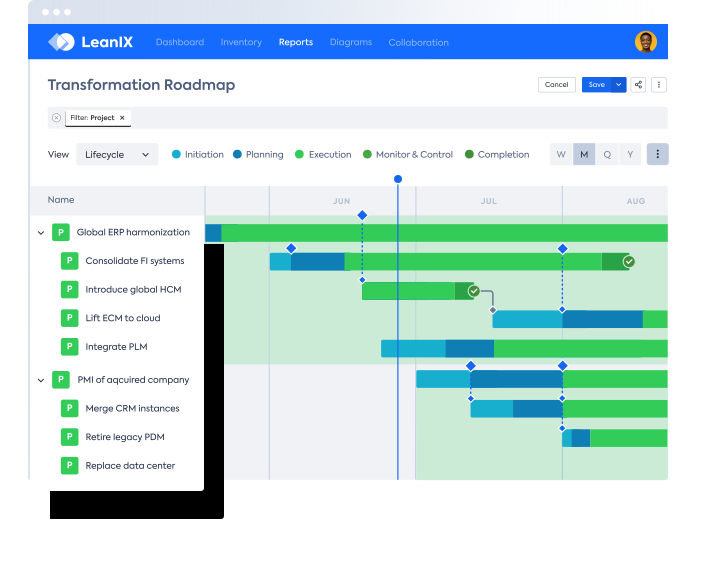
SAP LeanIX is a cloud-based enterprise architecture and application portfolio management solution (LeanIX became part of SAP in 2023 and was merged into SAP SE in 2025). It builds a continuously updated inventory of the application landscape using imported data, integrations, open APIs, and AI assistance, and it connects applications to business context such as capabilities and ownership. The platform supports application rationalization through predefined reports and the Gartner TIME framework, and it presents portfolio insights through dashboards, reports, and diagrams. It is priced by the number of applications and allows unlimited users.
Key features include:
- Data import and automated discovery: SAP LeanIX builds its inventory from spreadsheet imports, open APIs, and a range of integrations, and it can automatically discover SaaS applications and SAP systems. An AI-assisted inventory builder can extract architectural elements and relationships from diagrams and images.
- Dependency and impact mapping: The platform shows how applications, interfaces, and IT components connect across the landscape, and it maps applications to business context to expose dependencies and risks. Establishing ownership strengthens governance.
- Application rationalization: Predefined reports evaluate applications by total cost of ownership, usage, and other criteria, and the Gartner TIME framework is used to categorize applications and standardize decisions. Teams can model the impact of retiring an application before committing.
- Best-practice meta model and reference catalog: A configurable, best-practice meta model standardizes how architecture data is captured, and a reference catalog provides industry-specific business capability maps and reference data.
- Dashboards, reports, and diagrams: Customizable dashboards track metrics such as data quality, functional fit, technical fit, and total cost of ownership, with color-coded indicators and historical trends. Automated reports and diagrams visualize the landscape and its dependencies.
- Collaboration and automation: The platform supports an unlimited number of users, gathers input through configurable surveys and quality seals, and uses no-code, rule-based automations and calculations to reduce manual effort.

Source: LeanIX
Limitations (as reported by users on G2):
- Complexity and learning curve: Some users find the platform complex and note it can feel daunting for newcomers working in large environments.
- Reporting: Users report that report content can be hard to interpret and lacks folder structure, and that reporting is an area for improvement.
- Integrations: Out-of-the-box integrations are described as somewhat limited, and building custom integrations can require resources teams do not always have.
- Modules and discovery: Some capabilities require additional modules, and the standalone SaaS discovery product was discontinued.
- Support: A lack of after-hours support has been mentioned, which can be an issue for releases outside business hours.
5. ServiceNow

ServiceNow Application Portfolio Management (APM) is a module available with ServiceNow Enterprise Architecture, delivered on the broader ServiceNow platform. It provides a centralized inventory of business applications and draws on the platform’s CMDB, Discovery, software asset management, and cost-modeling capabilities to give a view of the portfolio. The module supports application rationalization with invest, sustain, or replace decisions, and it aligns technology investments to business capabilities through capability-based planning. Because it sits inside ServiceNow, it links applications to business services, incidents, and changes managed elsewhere on the platform.
Key features include:
- Centralized application inventory: The module visualizes the full application portfolio through a centralized inventory of business applications, populated using CMDB and Discovery data from the wider platform.
- Application rationalization: Teams make data-driven decisions on whether to invest in, sustain, or replace each business application, supported by cost modeling that helps identify redundant and obsolete applications.
- Capability-based planning: Capability mapping aligns technology investments and services to business value streams, helping leaders connect spending to business outcomes.
- Enterprise Architecture Workspace: A consolidated workspace presents actionable, real-time insights so that portfolio decisions can be made from a single interface.
- Digital integration view: The module helps teams visualize and understand the complete integration landscape across applications.
- Platform integration: Native connections to IT Service Management, IT Operations Management, IT Asset Management, and the CMDB link applications to business services, incidents, and changes, and support cloud transformation planning.

Source: ServiceNow

Limitations (as reported by users on SoftwareReviews; reviews often reflect the broader ServiceNow platform of which APM is a module):
- Learning curve: The breadth of features and integrations can overwhelm new users without proper training.
- Configuration effort: Customizing dashboards, reports, and workflows can be time-consuming for non-experts, and implementation can be complex and resource-intensive.
- Cost: Licensing for ServiceNow, including APM capabilities, can be high and may be a challenge for smaller organizations.
- Ecosystem dependency: Much of the value depends on adopting the wider ServiceNow platform, and assessment workflows can be difficult to scale across very large numbers of applications.
6. Ardoq

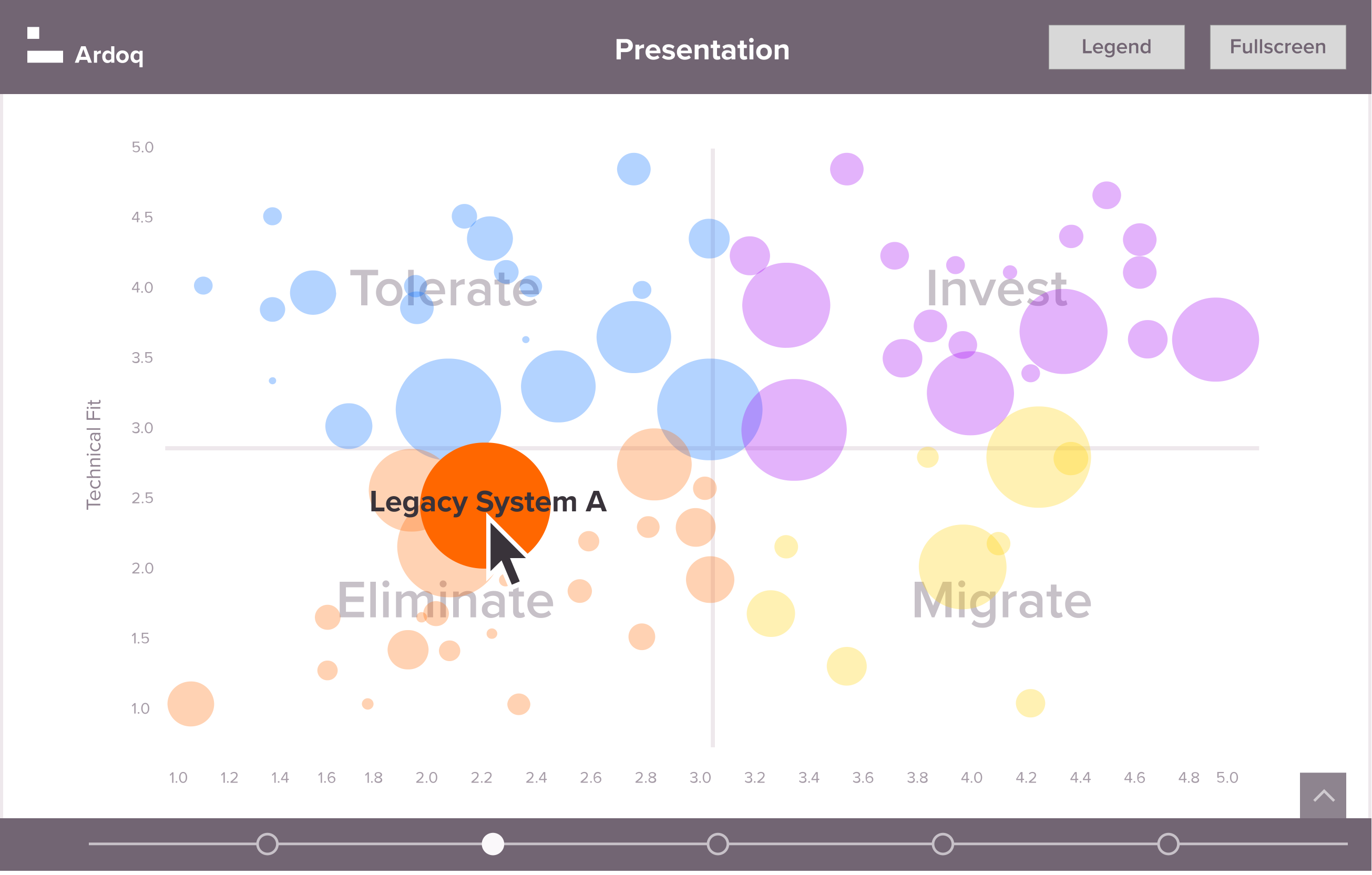
Ardoq is a cloud-based enterprise architecture and application portfolio management platform built on a graph-based data model. The model connects applications, capabilities, processes, and people, which makes it possible to trace dependencies and analyze the impact of changes. Ardoq gives an overview of applications, their owners, and their costs, and it supports rationalization by assessing the inventory against business fit, technical health, cost, and value. The platform uses dynamically updated visualizations, reports, and roadmaps, offers integrations and APIs to connect data sources, and allows broad collaboration with an unlimited-user model.
Key features include:
- Graph-based data model: Ardoq represents the organization as a connected, living model of applications, capabilities, and processes. The graph structure makes it straightforward to trace dependencies for impact analysis and transformation planning.
- Application overview and ownership: The platform provides an overview of all applications and their costs and clarifies which organizational needs each application fulfills and who owns it.
- Application rationalization: Ardoq assesses the application inventory to identify low-value and redundant systems, measures which capabilities are candidates for optimization, and estimates the associated cost savings.
- Analytics, dashboards, and roadmaps: Models, reports, and dashboards are dynamically updated rather than static, and the platform supports future-state modeling and roadmaps. Ardoq Discover presents architecture to non-technical stakeholders.
- APIs and integrations: Integrations and open APIs connect data sources such as Jira and ServiceNow, and an Excel importer with auto-configuration simplifies data import.
- Stakeholder engagement and collaboration: An unlimited-user model lets the organization crowdsource and validate data from business owners, helping keep the model accurate and current.

Source: Ardoq
Limitations (as reported by users on G2):
- Learning curve: Because the tool is powerful and flexible, some users find it takes time to learn how to model their organization effectively, and they note that onboarding materials could be expanded.
- Setup: The setup process is described by some as tedious and time-consuming, and ease of setup is rated lower than some peers.
- Integrations: A few users find the integration options limited for certain workflows.
- Support and scale: Some users would like improved customer support, and managing data and models across very large, multi-country deployments can present challenges.
7. OrbusInfinity

OrbusInfinity, from Orbus Software, is a cloud-based enterprise architecture and IT portfolio management platform with native Microsoft integration. For application portfolio management, it helps teams build a governed application inventory, assess application health, support rationalization, and govern lifecycle and technology standards. It uses a configurable metamodel and a central repository, and it ships with more than 20 pre-built reports for IT portfolio management. Modeling can be done using the familiar Visio environment alongside the platform, and portfolio data can be aggregated into views tailored to different stakeholders.
Key features include:
- Centralized application inventory: OrbusInfinity builds a governed, enterprise-wide application inventory that captures ownership, lifecycle stage, technology classification, and business alignment in one structured record.
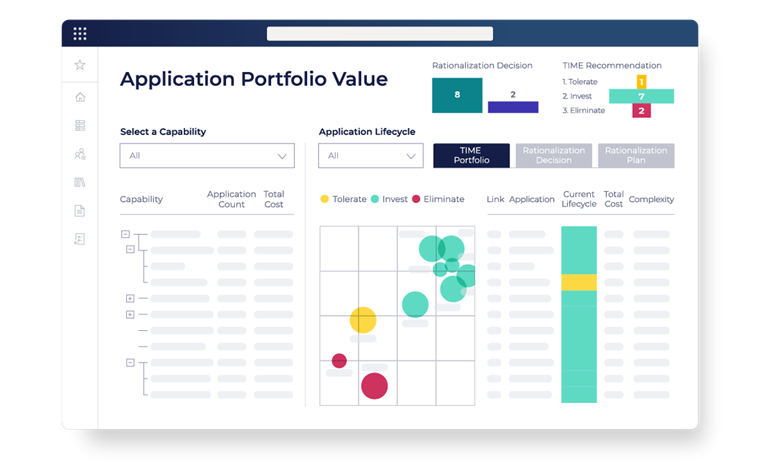
- Application health assessment: Applications are scored against standardized health and risk criteria, including business value, technical condition, risk exposure, and strategic alignment, with changes tracked over time through an audit trail.
- Rationalization support: Teams compare applications across cost, capability, risk, and lifecycle, map redundant or overlapping capabilities, model rationalization scenarios, and document decisions for governance.
- Lifecycle and technology standards governance: The platform aligns applications to approved technology standards and lifecycle policies, flags deviations, and supports planning for migrations, upgrades, and retirements.
- Reporting and visualizations: More than 20 pre-built IT portfolio reports, along with catalog, lifecycle, and technology radar visualizations, surface portfolio status by domain, health, or risk tier.
- Microsoft integration and configurable metamodel: A familiar Microsoft and Visio experience, a configurable metamodel, and a central repository let the data model reflect how a given portfolio actually works.

Source: OrbusInfinity
Limitations (as reported by users on G2):
- Visio performance at scale: Some users report that the Visio integration can lag when modeling thousands of objects and relationships, especially in more complex views.
- Reporting and data handling: Out-of-the-box reporting is described as basic, exporting (for example, traceability matrices to Excel) and custom reporting can be limited, and some data tasks involve extra steps.
- Repository governance: Certain artifact-management actions, such as deletion, and aspects of access control are not fully controllable through workflow.
- Onboarding and customization: There is a learning curve, framework-driven folder structures can hinder broader adoption, and some advanced features are limited in customization.
- Cost: Subscription cost can be a barrier for smaller organizations.
8. Bizzdesign

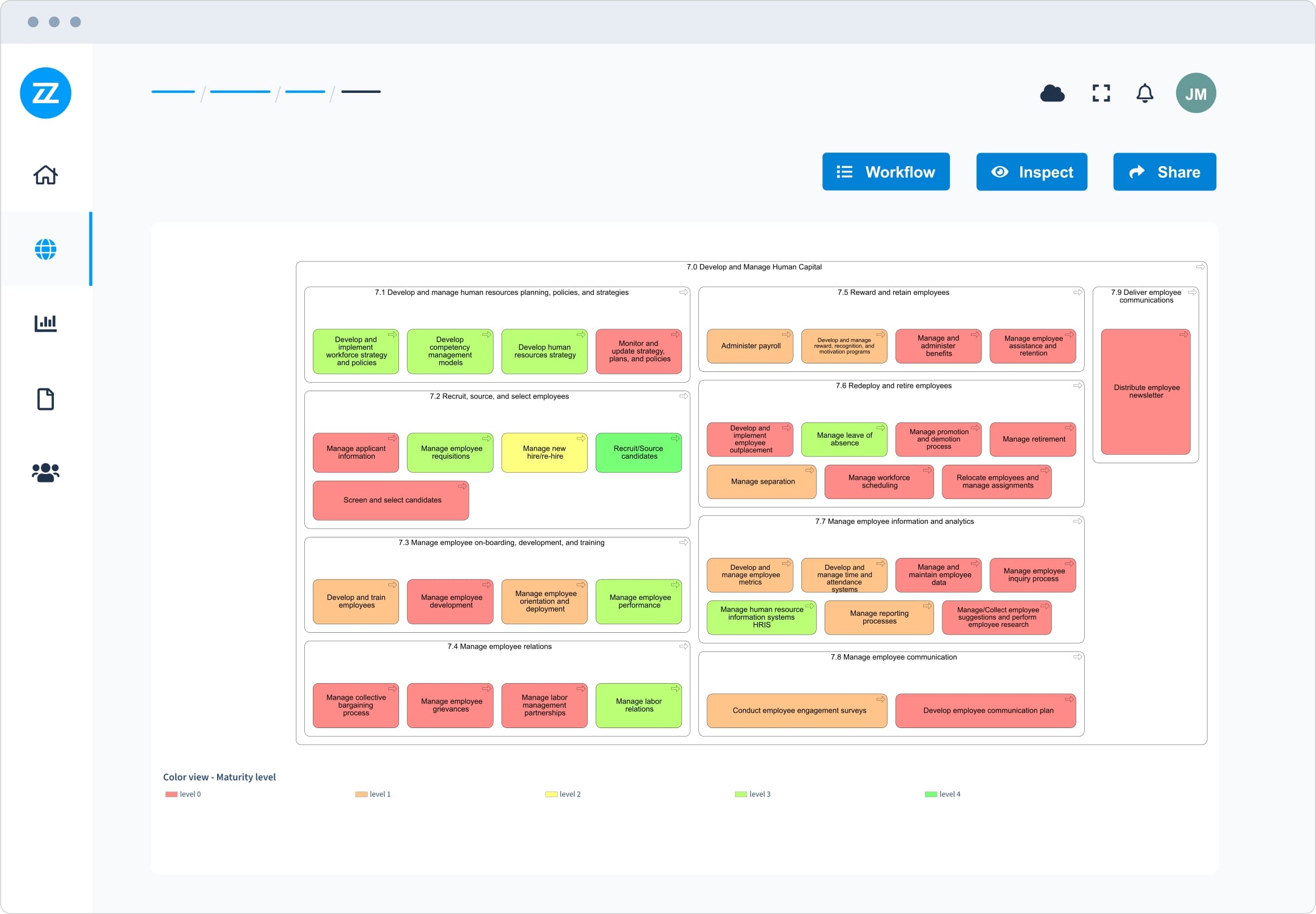
Bizzdesign is an enterprise architecture and application portfolio management vendor whose products include Bizzdesign Horizzon, Alfabet, Hopex, and Unify. Its application portfolio management solution focuses on putting business value at the center of portfolio decisions, helping organizations simplify a growing application landscape, reduce cost and risk, and support transformation. It maps applications to business capabilities and strategy, identifies rationalization opportunities using business fit, technical health, cost, and value metrics, and supports merger and divestiture scenarios as well as cloud migration assessment. The solution is built on standards-based modeling such as ArchiMate and BPMN, with a central repository as a single source of truth.
Key features include:
- Application rationalization: Bizzdesign maps applications to business capabilities and strategy and identifies rationalization opportunities using business fit, technical health, cost, and value metrics. Teams can then build a rationalization plan and track expected cost savings.
- Business value mapping: The solution prioritizes focus areas by linking applications to capabilities and strategy, helping surface functional redundancy and a simpler target landscape.
- Pre- and post-merger IT management: Teams can define an IT portfolio strategy aligned with merger, acquisition, or divestiture goals, accelerate consolidation, separation, and due-diligence decisions, and build integration and carve-out roadmaps with clear ownership.
- Cloud transformation support: Applications can be assessed for migration and modernization, migration paths optimized for return and risk, and cloud transformation roadmaps aligned to execution.
- Standards-based modeling: The platform supports native, open-standards modeling including ArchiMate, BPMN, C4, and UML, backed by a central repository intended as a single source of truth.
- Dashboards and collaboration: Interactive dashboards and analytics, AI-assisted capabilities, and enterprise-wide collaboration (including through Bizzdesign Unify) help stakeholders work from shared models.

Source: Bizzdesign
Limitations (as reported by users on G2):
- Learning curve and complexity: The large feature set can feel overwhelming for beginners, and meaningful adoption generally requires training.
- Desktop versus web experience: Core modeling in Enterprise Studio is a client application, and users note that the interface differs between the desktop tool and the web portal.
- Integrations: Integration capabilities and the documentation around them are flagged by users as areas for improvement.
- Performance: The application can feel slow with large repositories or datasets.
- Dashboards and automation: Building dashboards can be difficult for non-technical users, and some data tasks still require scripting.
SaaS Management and Software Optimization
These tools concentrate on the software and SaaS side of the portfolio. They discover applications and subscriptions, track usage and spend, and surface risk and technical health to support rationalization and cost decisions.
9. Torii

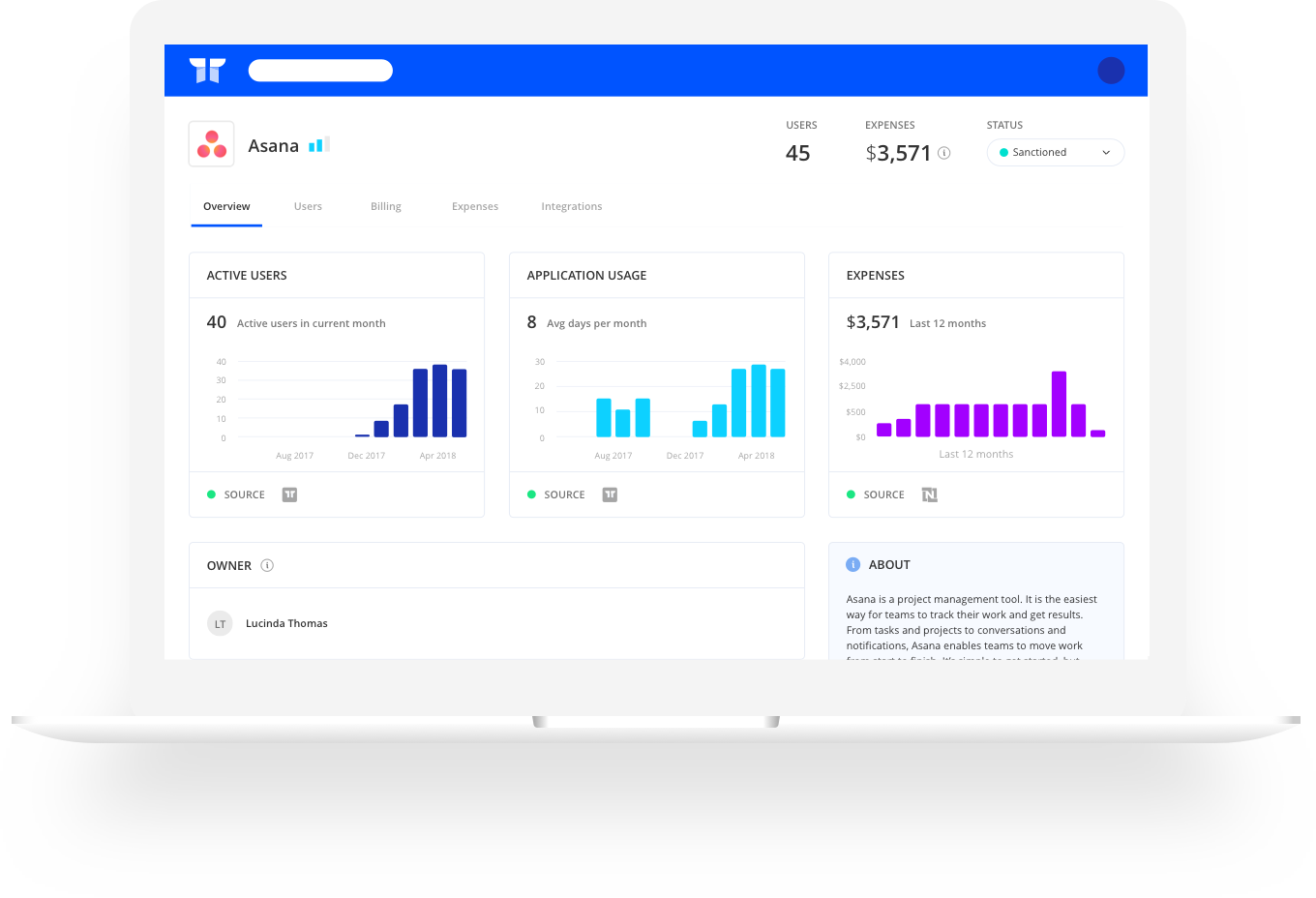
Torii is a SaaS management platform that helps IT, finance, and security teams discover, manage, and optimize cloud applications. It continuously discovers SaaS, AI, and desktop applications across an organization’s estate, including shadow IT, and resolves the accounts and entitlements behind them. Torii automates license reclamation based on live usage, manages contracts and renewals, and provides no-code workflows for tasks such as onboarding and offboarding. It also includes identity governance capabilities and a dashboard for tracking AI spend and token usage.
Key features include:
- Continuous SaaS discovery: Torii continuously discovers SaaS, AI, and desktop applications across the estate, surfaces shadow IT, and maps the accounts and entitlements associated with each application.
- Cost optimization: The platform reclaims licenses automatically based on live usage data, ingests contracts and detects renewal clauses with alerts, and runs always-on workflows so that savings continue without manual intervention.
- Workflow automation: A no-code workflow builder automates onboarding and offboarding with dynamic decisioning, routes app requests and approvals to owners, and provides a library of actions, triggers, and templates.
- Contract and renewal management: Torii maintains a central repository of contractual documents and tracks renewals, reducing the manual effort of chasing the latest terms across systems.
- Identity governance: The platform discovers entitlements, governs access with policy guardrails and approvals, and supports access requests and reviews to help prove compliance.
- AI management dashboard: A dedicated dashboard tracks AI spend by time, user, and model, flags overlapping AI tools, and forecasts spend.

Source: Torii
Limitations (as reported by users on G2):
- Integration breadth: Some users note that integrations are fewer or less robust than competitors, which can limit the data available for certain applications.
- Reporting: Reporting is flagged for more accuracy and flexibility, and advanced reporting and customization options are more limited on lower-tier plans.
- Access management: Keeping a fully accurate view of usage and access changes can be challenging, and complex provisioning or license reconciliation may require manual adjustment.
- Cost: The platform can be cost-prohibitive for smaller organizations with limited SaaS portfolios.
10. BetterCloud

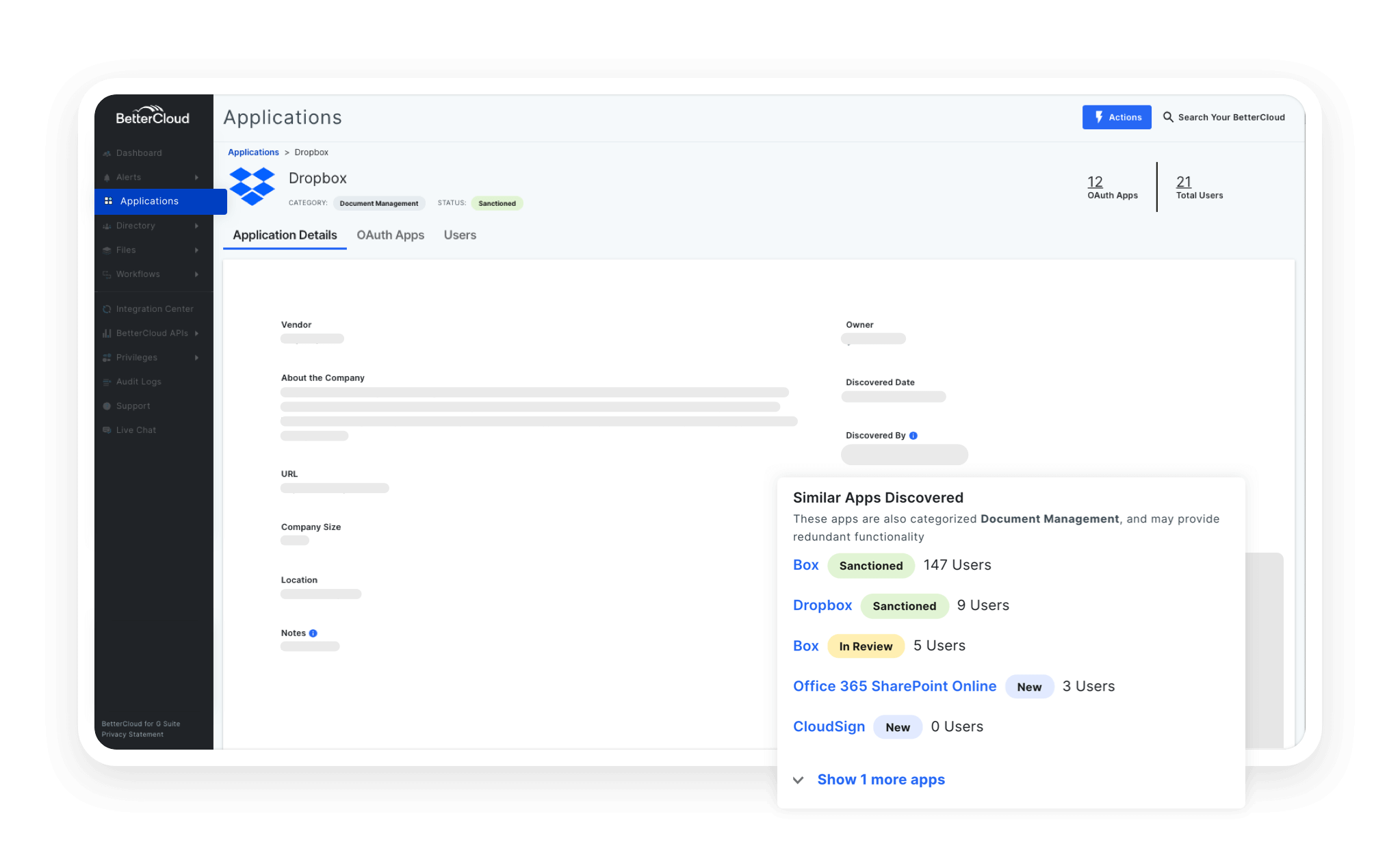
BetterCloud is a SaaS management platform (acquired by CoreStack in 2026) focused on automating IT operations and enforcing security and policy across cloud applications. It centralizes SaaS administration so that teams can manage apps, data, and user roles from one place, and it uses no-code workflows to automate tasks such as onboarding, offboarding, and role changes. BetterCloud also helps control SaaS spend by reclaiming unused licenses and managing renewals, and it provides file governance to scan for policy violations and enforce permissions. It offers integrations across SaaS applications, with particularly deep support for Google Workspace, Microsoft 365, and Okta.
Key features include:
- User lifecycle automation: A no-code, drag-and-drop workflow builder automates onboarding and offboarding with dynamic decisioning and scheduling, supported by a library of workflow actions, triggers, and templates.
- Spend optimization: BetterCloud reclaims unused licenses, manages software licenses and renewals against benchmarks, identifies underutilized resources, and helps prevent overlapping subscriptions.
- File governance and security: The platform scans files to monitor for policy violations, sets granular user roles and permissions across SaaS apps, and helps reduce the time required to audit potential exposures.
- Centralized SaaS operations: Teams manage applications, data, and user roles from a single platform and enforce policies consistently across connected SaaS applications.
- Integrations: BetterCloud provides more than 100 out-of-the-box integrations and over 1,000 actions, with the ability to build custom integrations, and especially deep coverage of Google Workspace, Microsoft 365, and Okta.

Source: BetterCloud
Limitations (as reported by users on G2):
- Integration breadth: Coverage is strongest for Google Workspace and Microsoft 365, and some users report that certain integrations lack full functionality and that breadth trails some competitors.
- Console split: A split between legacy and modern consoles can create day-to-day workflow friction for Google Workspace administrators.
- Cost: Licensing fees can be high for organizations that use SaaS extensively.
- Performance: Syncing can lag when handling large data volumes.
- Granular control: Provisioning segmentation and department-level visibility, along with filtering, are cited as areas that could be improved.
11. Flexera

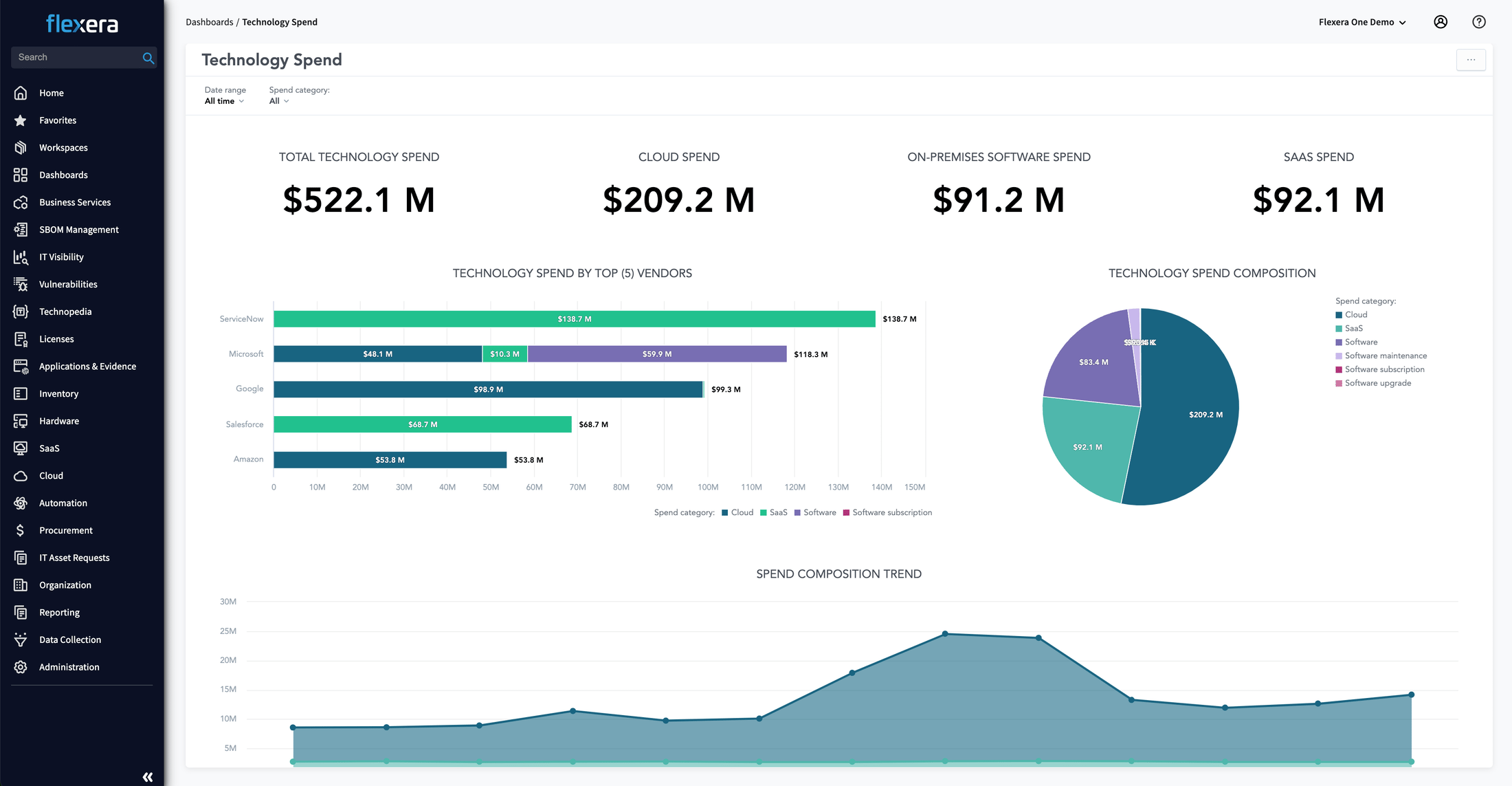
Flexera One IT Asset Management (ITAM) unifies software asset management, hardware asset management, and SaaS management on the Flexera One platform. It combines multi-source discovery with high recognition and normalization rates, drawing on the Technopedia catalog of technology data, to build accurate inventory across hybrid environments. The product calculates effective license positions for complex software, supports vendor audits and renewals, and automates aspects of the asset lifecycle. It also discovers and optimizes SaaS usage and connects to cloud license management for software running in the cloud.
Key features include:
- Discovery and normalization: Flexera One ITAM combines multi-source discovery across environments such as Windows, IBM, Oracle, SAP, macOS, and iOS with recognition and normalization rates the vendor reports at over 98 percent, powered by the Technopedia catalog of more than five million products across 100,000 vendors.
- License optimization: The product calculates an effective license position for complex software from vendors such as Microsoft, Oracle, and IBM, drawing on a library of over two million software use rights, thousands of use-case templates, and automated optimization workflows.
- Vendor audit and renewal support: Flexera One reduces the manual effort of audits and renewals, is positioned as an IBM-certified alternative to ILMT that integrates with IBM License Service, and is described as verified by Oracle across several products.
- Asset lifecycle and hardware management: The platform automates the hardware lifecycle from procurement to disposal, reclaims unused software, and connects to Flexera App Broker for provisioning.
- SaaS management: Flexera One discovers shadow SaaS, removes redundant applications, and optimizes subscriptions based on actual usage across vendors such as ServiceNow, Salesforce, Workday, and Microsoft.
- Cloud license management: A complementary capability provides visibility into cloud software spend and helps optimize bring-your-own-license and pay-as-you-go positions.

Source: Flexera
Limitations (as reported by users on G2):
- Implementation complexity: Initial setup and configuration are described as time-consuming and as requiring expertise and resources.
- SaaS integrations: Some users note fewer direct SaaS integrations than competing products.
- Interface and performance: Parts of the interface feel dated to some users, and the product can be sluggish with large datasets or complex reports.
- Reporting: Built-in reporting and scheduling are seen as limited, with some users relying on policy templates that have data-size constraints.
- Support and data refresh: Support response times can be slow, and some metering data updates only on a weekly basis.
9. CAST Highlight

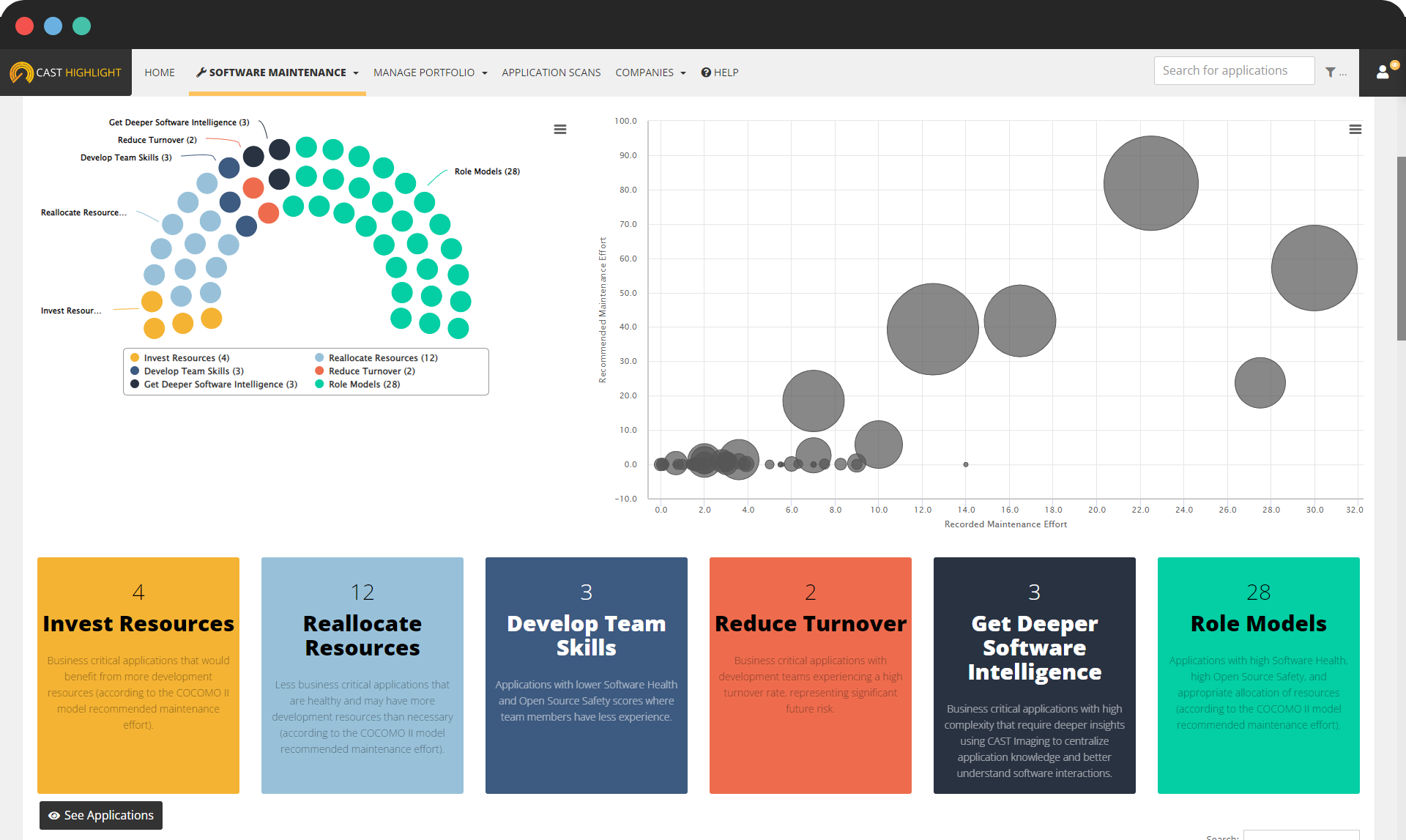
CAST Highlight is a cloud-based software intelligence product that analyzes application source code across a portfolio to inform modernization, cloud migration, technical-debt, and open-source-risk decisions. It rapidly scans large volumes of code across many languages, frameworks, and databases, and surfaces facts about technical debt, cloud blockers, open-source and intellectual-property risk, and software composition. The product also provides green-software insights tied to code efficiency, and it presents application health, resiliency, and benchmark data in dashboards intended to support both technical teams and executive reporting.
Key features include:
- Source-code-based portfolio analysis: CAST Highlight analyzes application source code to report on the languages, frameworks, and databases in use, the third-party and open-source components present, and the rate at which components are reused.
- Cloud readiness and migration: The product charts migration routes for applications, identifies cloud blockers along with the fixes and effort required, and points to best-fit cloud-native services.
- Technical debt analysis: It distinguishes between technical debt that is worth addressing and debt that can be left, ranks remediation options by return on investment, and helps identify fragile applications before they cause outages.
- Open-source and IP risk: CAST Highlight surfaces intellectual-property exposures and open-source security issues and catalogs obsolete components that are still in use.
- Green software insights: The product traces code inefficiencies and their associated CO2 impact and helps prioritize mitigation by impact and effort.
- Dashboards and benchmarks: Application health, resiliency, and technical-debt views, together with industry benchmarks, support board-ready reporting and progress tracking across the portfolio.

Source: CAST Highlight
Limitations (as reported by users on G2):
- Navigation: Some users find the interface confusing and report occasional difficulty locating particular reports.
- Rule customization: End-user options to add, edit, or remove analysis rules are described as limited.
- Learning curve: The breadth of metrics and features can feel overwhelming for new users at first.
Conclusion
In conclusion, Application Portfolio Management (APM) tools are indispensable for organizations aiming to streamline their IT operations and align their software assets with business strategies. These tools offer detailed inventory management, application discovery, cost tracking, performance monitoring, and portfolio rationalization. By leveraging APM solutions, businesses can gain a comprehensive understanding of their application landscape, optimize their IT investments, and drive innovation.
The future of IT management is dynamic and demands constant adaptation. APM tools offer the insights and agility needed to navigate the evolving landscape. As businesses continue to rely on technology to drive growth and innovation, the role of APM tools will become even more critical. Organizations that invest in these solutions will be better positioned to optimize their application portfolios, mitigate risks, and seize new opportunities.
Learn how Faddom enables IT discovery and mapping by booking a demo with one of our experts!