Introducing Zabbix and Datadog
Zabbix is an open-source, free IT infrastructure monitoring tool offering high customizability and control, while Datadog is a subscription-based, cloud-native platform known for its user-friendly interface, seamless integrations, and robust real-time monitoring, particularly suited for cloud-native applications and enterprises needing out-of-the-box observability. Your choice depends on prioritizing budget and customization (Zabbix) versus ease of use, cloud integration, and comprehensive features (Datadog).
Table of Contents
ToggleZabbix
- Model: Open-source and free to use.
- Cost-effective: No licensing fees for the core software.
- Customization & control: Offers greater flexibility and control over the monitoring system due to its open-source nature.
- Scalable: Designed to scale from small to very large environments with hundreds of thousands of devices.
- Versatile: Capable of monitoring servers, networks, and infrastructure components like routers and firewalls.
Key considerations for choosing Zabbix:
- Steep learning curve: Requires more technical effort and expertise to set up and configure effectively.
- Resource intensive: Can be resource-intensive, especially in large deployments.
- Maintenance & support: Requires in-house resources for maintenance, customization, and potential support.
Datadog
- Model: Subscription-based, with costs tied to the number of monitored hosts or instances.
- User-friendly: Features a clean, user-friendly interface and powerful, configurable dashboards.
- Cloud-native: Built for cloud environments and widely used by cloud-native startups.
- Integrated platform: Provides a unified observability platform including application performance monitoring (APM), log management, security monitoring, and more.
- Ease of use: Known for being easy to get up and running with out-of-the-box features and a wide range of integrations.
Key considerations for choosing Datadog:
- Cost: Can be expensive, especially with extensive data retention requirements.
- Less control: As a SaaS platform, it offers less direct control compared to an open-source solution.
Zabbix vs. Datadog: Key Differences
1. Monitoring Scope
Datadog provides a monitoring platform that covers infrastructure, applications, logs, security, and user experience. It supports a wide range of cloud-native technologies including containers, Kubernetes, multi-cloud services, and serverless architectures. This makes it suitable for businesses looking to monitor everything from network activity to application-level transactions within a unified interface.
Zabbix specializes in traditional IT infrastructure monitoring. It offers support for servers, network equipment, and other on-premise systems. Its capabilities include SNMP and ICMP monitoring, custom script execution, and support for user-defined checks. Zabbix is well-suited for environments with a mix of physical and virtual machines, where control over infrastructure and configuration is required. However, it lacks native support for application performance monitoring and is not as optimized for dynamic or containerized environments.
2. Data Collection Methods
Datadog uses a hybrid data collection model that supports both agent-based and agentless approaches. The Datadog agent can be deployed on various operating systems to collect host-level metrics, while integrations with cloud providers and third-party services enable data collection without direct agent installation. This flexibility allows users to monitor a wide range of systems with minimal configuration and simplifies adoption in hybrid or cloud-native environments.
Zabbix primarily relies on agent-based data collection, meaning that an agent needs to be installed on each system to be monitored. This provides more granular control and customization but can be labor-intensive in large deployments. Zabbix does support agentless monitoring through SNMP and ICMP, which is useful for network hardware like switches, routers, and firewalls. Its agentless capabilities are useful for network-centric use cases but may require more manual configuration and tuning compared to Datadog’s integrations.
3. Alerts and Notifications
Zabbix provides an alerting system with features such as trigger conditions, custom notification messages, and escalation chains. Alerts can be sent via email, SMS, or webhooks, and the system can execute actions automatically if certain conditions are met. Escalation logic allows notifications to be routed to additional recipients or systems if no response is received, ensuring that incidents are not missed. However, configuring alerts in Zabbix typically involves manual setup, including defining SMTP settings and customizing scripts, which can be time-consuming.
Datadog takes a more automated approach with its alerting system, using machine learning through its Watchdog feature. Watchdog automatically detects anomalies, performance regressions, and other unexpected changes without requiring users to set static thresholds. Alerts are highly contextual and can be delivered through various channels such as Slack, PagerDuty, and email. Datadog’s alert grouping and dynamic thresholds help reduce alert fatigue, making it easier for teams to respond to real issues rather than being overwhelmed by false positives or redundant messages.
4. Scalability and Performance
Datadog’s architecture is built for scalability. As a fully managed SaaS platform, it handles infrastructure provisioning, database performance, and data storage automatically. This makes it effective for large enterprises and fast-growing businesses that need to scale their monitoring capabilities quickly without worrying about backend maintenance. Datadog performs well under high-load conditions and supports dynamic scaling, which is crucial for modern microservices and multi-cloud environments.
Zabbix requires users to manage their own infrastructure. While it can scale to handle thousands of devices and parameters, doing so involves planning and tuning. Users must optimize databases, configure distributed monitoring components, and ensure adequate storage and compute resources. Zabbix supports proxies for distributed monitoring and high-availability setups, but these features require manual configuration. As a result, it requires more operational effort to maintain performance in large or complex environments.
5. Ease of Use and Setup
Datadog is user-friendly and fast to deploy. As a SaaS product, it does not require any local server installation or infrastructure provisioning. Users simply sign up, deploy agents, and start integrating with supported services. The setup process is guided, and Datadog provides documentation and pre-built configurations that make onboarding smooth even for users with limited monitoring experience.
Zabbix, being a self-hosted solution, requires installation on a server, along with configuration of the database, web server, and monitoring agents. While Zabbix provides virtual appliances, pre-configured images, and templates that ease deployment, users still need a solid understanding of server and network configuration. The initial setup may take longer, and subsequent customization can require knowledge of scripting and templating. Zabbix is better suited for teams with dedicated IT staff who can maintain and tune the platform over time.
6. Integrations and Ecosystem
Datadog offers a large integration ecosystem, with over 600 officially supported integrations. These include popular cloud platforms like AWS, Azure, and GCP, as well as DevOps, CI/CD, and security tools. This breadth of support enables organizations to integrate Datadog into nearly any modern technology stack with minimal effort. Many integrations come with pre-configured dashboards and metrics, reducing the time needed to gain visibility.
Zabbix also supports integrations but with a smaller catalog of official options. Users often rely on community plugins, custom scripts, and the Zabbix API to extend the platform. While this allows for customization, it increases complexity and may require ongoing development effort. Zabbix is well-suited for environments where tailored monitoring is needed, but organizations must be prepared to invest time in building and maintaining integrations.
7. Security
Datadog includes security features that go beyond traditional monitoring. It offers threat detection, security monitoring, and compliance tracking for standards such as SOC 2, HIPAA, and GDPR. It also supports cloud security posture management, enabling users to identify misconfigurations and vulnerabilities across their cloud infrastructure. This makes Datadog not just a monitoring tool, but also a component in a company’s security strategy.
Zabbix does not include native security monitoring or compliance tooling. Security is determined by how well the platform is deployed and configured. Users are responsible for securing the server, database, and network access. To achieve comparable functionality, third-party tools or integrations are necessary. This makes Zabbix less attractive for organizations that require built-in security and compliance capabilities.
8. Cost and Licensing
Zabbix is fully open source and free to use. There are no licensing fees or feature restrictions based on pricing tiers. This makes it a cost-effective option, particularly for small and medium-sized businesses or organizations with limited budgets. However, the total cost of ownership can increase due to the need for hardware, hosting, and IT staff. Paid technical support is available for organizations that need professional assistance or service-level guarantees.
Datadog follows a subscription-based pricing model with multiple tiers, including plans for infrastructure monitoring, APM, serverless environments, log management, and security. Pricing is based on the number of hosts and volume of data, and while a free tier is available (with limited retention), the cost can grow quickly in large-scale deployments..
9. Strengths and Weaknesses
Zabbix’s main strength lies in its cost-efficiency, flexibility, and control. It is useful for organizations that want a customizable monitoring solution without recurring licensing costs. Its support for SNMP, ICMP, and script-based monitoring makes it effective in traditional data center environments. However, Zabbix requires more manual configuration, lacks built-in support for modern application monitoring, and offers limited security and log management features out of the box.
Datadog excels in ease of use, breadth of integrations, and scalability. It is well-suited for cloud-native environments and organizations looking for unified observability across infrastructure, applications, and security. Its automated setup, machine learning-driven alerts, and visualization tools make it accessible. However, its subscription-based pricing can become expensive over time, and its agent-based model can be inconvenient for highly distributed or resource-constrained environments.

Lanir specializes in founding new tech companies for Enterprise Software: Assemble and nurture a great team, Early stage funding to growth late stage, One design partner to hundreds of enterprise customers, MVP to Enterprise grade product, Low level kernel engineering to AI/ML and BigData, One advisory board to a long list of shareholders and board members of the worlds largest VCs
Tips from the Expert
In my experience, here are tips that can help you better evaluate and deploy Zabbix or Datadog effectively:
-
Use Datadog’s APM to identify Zabbix blind spots:
Deploy Datadog’s APM features on test workloads to uncover insights (like slow traces or service dependencies) that traditional infrastructure tools like Zabbix may miss. This can guide what custom monitoring you need to replicate.
-
Offload DevOps-specific telemetry to Datadog while retaining infrastructure oversight in Zabbix:
For teams already using Zabbix, integrating Datadog solely for app-layer observability or CI/CD telemetry helps avoid duplicating effort while embracing DevOps visibility.
-
Benchmark agent performance across both platforms:
Run side-by-side agent deployments and compare resource usage, data granularity, and system impact, especially in environments with constrained CPU/memory budgets or embedded systems.
-
Design retention-aware data flows:
For long-term data archiving, offload metrics from Datadog to your own systems via its APIs. In Zabbix, regularly trim historical data to maintain performance, or externalize storage for analytics.
-
Cap Datadog data ingestion with pre-filtering agents:
Use filters on the Datadog agent to control what gets sent (e.g., ignore ephemeral containers, exclude verbose logs), especially to manage licensing costs and reduce noise.
Datadog vs. Zabbix: How to Choose?
Choosing between Datadog and Zabbix depends on your organization’s technical requirements, operational maturity, and resource availability. Beyond core features, several practical considerations can influence the right fit for your environment:
-
- Operational overhead: Zabbix requires internal expertise to manage system updates, database performance, and scaling strategies. Datadog offloads these responsibilities to the provider, making it better for teams without dedicated ops staff.
-
- Update and release cadence: Datadog introduces new features regularly and updates are applied automatically. Zabbix users must manually upgrade versions and validate backward compatibility, which can delay adoption of new capabilities.
-
- Audit and compliance requirements: For companies in regulated industries, Datadog offers built-in audit trails and compliance reports. With Zabbix, implementing similar controls requires external tools or custom scripting.
-
- Long-term flexibility vs. short-term speed: Zabbix offers customization for long-term use in stable infrastructures. Datadog is better for short-term scalability and experimentation in fast-changing environments like startups or cloud-native teams.
-
- Data retention and ownership: Zabbix gives you control over monitoring data and retention policies. In Datadog, retention is determined by your subscription tier, and exporting historical data may involve additional steps or limitations.
-
- Hybrid and air-gapped environments: Zabbix can be deployed in isolated or secure networks without internet access. Datadog requires outbound connectivity, which may not be acceptable in air-gapped or classified deployments.
-
- Customization vs. standardization: Zabbix is appropriate if you need to build customized checks, logic, and visualizations. Datadog is optimized for teams that prefer using standardized, ready-to-go integrations with minimal configuration.
Related content: Read our guide to Zabbix alternatives
How Faddom Complements Zabbix and Datadog with Complete Dependency Mapping
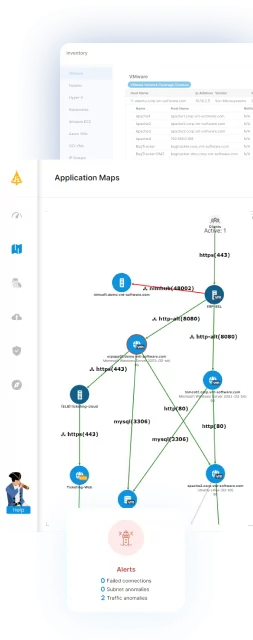
Faddom provides a crucial capability that is missing in both Zabbix and Datadog: fast and accurate agentless application dependency mapping. It automatically discovers how applications communicate, identifies which servers support specific services, and reveals hidden dependencies across hybrid and multicloud environments. This capability offers teams the context they cannot obtain from monitoring metrics alone, enabling them to troubleshoot issues more quickly, plan cloud migrations effectively, validate changes, and prevent outages caused by unknown relationships.
Additionally, Faddom seamlessly integrates with Zabbix, allowing teams to maintain their existing monitoring dashboards while enriching them with a comprehensive dependency context. By combining monitoring data with real-time application maps, IT teams can instantly understand impact paths and resolve issues more efficiently than if they relied solely on Zabbix or Datadog.
Discover how Faddom can enhance your monitoring ecosystem with complete visibility into dependencies. Book a demo with our team by filling out the form on the right!