What Is Nmap?
Nmap, short for Network Mapper, is a widely used open-source tool designed for network discovery and security auditing. Originally released in 1997, Nmap enables administrators and security professionals to scan networks, identify live hosts, detect open ports, and ascertain running services.
It supports a range of scanning techniques, from basic ping sweeps to advanced TCP SYN scans, and includes scripting capabilities for deeper assessments and automation. Over the years, Nmap has become the de facto utility for network reconnaissance and vulnerability assessment due to its flexibility and detailed reporting.
It operates from the command line but also offers the Zenmap graphical user interface for improved usability. Nmap’s versatile output formats, including XML and grepable logs, support integration with various security tools and workflows used in cybersecurity operations.
Key Limitations of Nmap in Modern Environments
While Nmap remains a powerful tool in cybersecurity, several limitations arise when using certain versions, particularly browser-based implementations or free-tier offerings. These constraints can affect scanning depth, flexibility, and overall usability in complex environments. The limitations were reported by users on the G2 platform.
Limitations:
- Feature restrictions in free tier: The free version limits key functions such as scanning IP ranges, scheduling scans, and using additional command options. These capabilities are only available in paid plans, which can hinder thorough network assessments for users on a budget.
- Limited VPN scanning capabilities: Nmap’s browser-based versions cannot configure VPN settings, making it ineffective for scanning internal infrastructure protected behind a VPN. This presents a major challenge for organizations with remote or segmented networks.
- Reduced command-line functionality: The web interface lacks the full flexibility of the native command-line version. Advanced scripting, use of custom NSE scripts, and deep scan customization are not supported, limiting its usefulness for detailed assessments.
- Scan frequency and target restrictions: For security and performance reasons, online versions may restrict how often scans can be run and limit the number or type of targets. These constraints can interrupt ongoing workflows during larger reconnaissance operations.
- Not equivalent to full Nmap: The online version does not provide the full capability set of locally installed Nmap. Restrictions on advanced features and script execution make it less suitable for in-depth security reporting or complex audit tasks.
Criteria for Evaluating Nmap Alternatives
Speed and Scalability
In large networks, scan speed and scalability are critical decision factors. A suitable alternative must efficiently handle thousands or millions of targets without causing bottlenecks or requiring excessive computational resources. Nmap’s performance can be hindered by its detailed scanning approach, whereas some alternatives optimize for high-speed, lightweight sweeps, enabling rapid mapping of expansive infrastructures.
The ideal tool should balance thoroughness with the ability to adapt to the scope and complexity of the environment. Scalability also encompasses the ability to parallelize scans and manage network changes dynamically.
Ease of Use and User Interfaces
Ease of use can greatly impact the adoption and effectiveness of a scanning tool. While command-line utilities offer flexibility and scripting options, graphical interfaces lower the barrier for less-experienced users and streamline routine operations. An alternative’s usability is measured not only by its setup process and documentation but also by the intuitiveness of its dashboards, reporting formats, and error handling capabilities.
Modern user interfaces cater to a wide audience, from network novices to penetration testers. Features such as drag-and-drop asset management, visual network maps, and context-rich alerts help minimize configuration errors and accelerate the learning curve. Also important are support for customization, keyboard shortcuts, and integration with ticketing systems.
Active vs Passive Scanning Capabilities
Active scanning directly interacts with networked systems, making it easier to discover live hosts and open ports but also increasing detection risks and network load. Passive scanning, in contrast, listens to network traffic to identify assets and monitor changes without directly probing devices. Modern environments often benefit from a combination of both techniques.
A strong Nmap alternative should offer flexible scanning options to accommodate various security policies and compliance requirements. For example, organizations in heavily regulated sectors may prefer more passive approaches to avoid risk of disruption. The ability to toggle between or combine scanning types provides granular control over the discovery process.
Integration with Security and Monitoring Platforms
Seamless integration with SIEMs, vulnerability management, and monitoring platforms is crucial for organizations aiming to centralize their security operations. Many Nmap alternatives offer native connectors or APIs, allowing scan data to feed directly into incident response workflows or compliance dashboards. This enhances correlation, enrichment, and automated remediation processes across the security stack.
Effective alternatives should support common output formats (JSON, XML, CSV) and provide hooks for custom integrations. This approach ensures compatibility with orchestration tools and enables automated triggering of scans based on external events.
Licensing and Cost Considerations
Nmap is open source, but not all alternatives are freely available. Licensing models vary widely: some tools offer fully open, community-driven versions, while others are commercial solutions requiring subscription fees or per-device payments. When considering an Nmap alternative, organizations should weigh total cost of ownership, evaluating the balance between required features, support availability, and ongoing operational costs.
Cost also relates to scalability. Free or low-cost tools may suffice for basic scans or small networks, but advanced features such as automated compliance reporting, priority support, or data retention often reside behind paywalls. Understanding licensing terms, such as restrictions on commercial use or limits on assets, is key to avoiding unexpected expenses or support gaps.
Notable Nmap Alternatives
1. Faddom

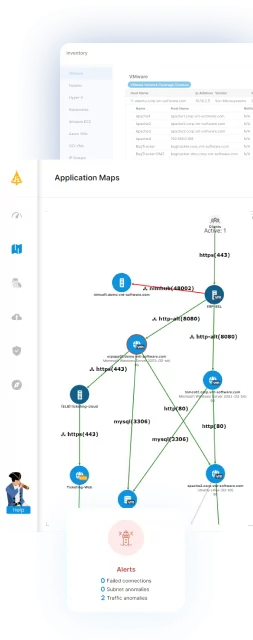
Faddom is an agentless application dependency mapping and network discovery platform that offers continuous visibility across hybrid and multicloud environments without requiring active probing or causing network disruption. Unlike traditional scanners such as Nmap, which depend on active packets, Faddom passively observes real traffic to identify assets, map connections, and reveal real-time dependencies. This makes it a powerful alternative for organizations seeking safer, continuous, and comprehensive visibility beyond conventional port scanning.
Key capabilities include:
- Agentless passive discovery: Automatically identifies assets, servers, applications, and communication paths without generating scan traffic.
- Real-time dependency mapping: Visualizes how systems communicate across on-premises, cloud ahd hybrid environments to support troubleshooting, audits, and segmentation planning.
- Low-risk visibility: No impact on fragile, sensitive, or regulated environments that cannot be actively scanned.
- Continuous tracking: Updates maps in real-time as infrastructure changes, unlike snapshot-based port scanning.
- CMDB enrichment: Populates and maintains accurate CI data and relationships for platforms like ServiceNow.
- Security insights: Highlights unexpected traffic, unknown systems, and risky east-west and north-south communication patterns often missed by scanners.
See how you can achieve continuous, agentless visibility without agents. Fill out the form on the right to book a demo with Faddom experts!
2. Masscan

Masscan is an asynchronous port scanner optimized for high-speed, wide-range discovery rather than deep per-host fingerprinting. It adopts an Nmap-like command syntax so users can reuse familiar options, but under the hood it uses its own ad hoc TCP/IP stack and an asynchronous transmit/receive design to push millions of probes per second.
Key features include:
- Internet-scale performance: Capable of millions of packets/second (configurable rate), intended to scan large ranges quickly.
- Asynchronous architecture: Separate transmit and receive threads for maximal throughput and low per-probe latency.
- Nmap-style usage: Command syntax and many compatible options to ease migration for Nmap users (but no default ports; users must specify -p).
- Arbitrary ranges: Flexible specification of IP and port ranges, with support for IPv4 and IPv6.
- Randomized ordering: Index-encryption technique randomizes probe order to spread load across targets and avoid overwhelming subnets.
3. ZMap

ZMap is an open-source scanner for research-grade discovery. It swaps Nmap’s per-host request/response bookkeeping for a pseudorandom iteration over the 32-bit IPv4 space, letting a single machine probe every IP once in a randomized order. That design and an iterative formula (based on cyclic multiplicative groups) remove the need to aggregate replies per host.
Key features include:
- Internet-scale performance: With 1 Gbps of bandwidth ZMap can scan the IPv4 space on a single port in ~44 minutes; with 10 Gbps it can complete scans in under five minutes.
- Pseudorandom permutation of address space: Uses cyclic multiplicative groups and an iterative formula to visit every 32-bit address exactly once in a pseudorandom order.
- Low per-probe state: Avoids building large reply databases; upfront cost to generate the iteration list is small compared with aggregating per-probe state.
- Single-probe default (speed vs coverage): Sends one probe per IP by default, sacrificing a small fraction (~2%) of hosts for massive speed gains.
- Subnet load smoothing: Randomized ordering prevents many probes from converging on the same subnet simultaneously, reducing accidental denial-of-service risk.
4. Wireshark

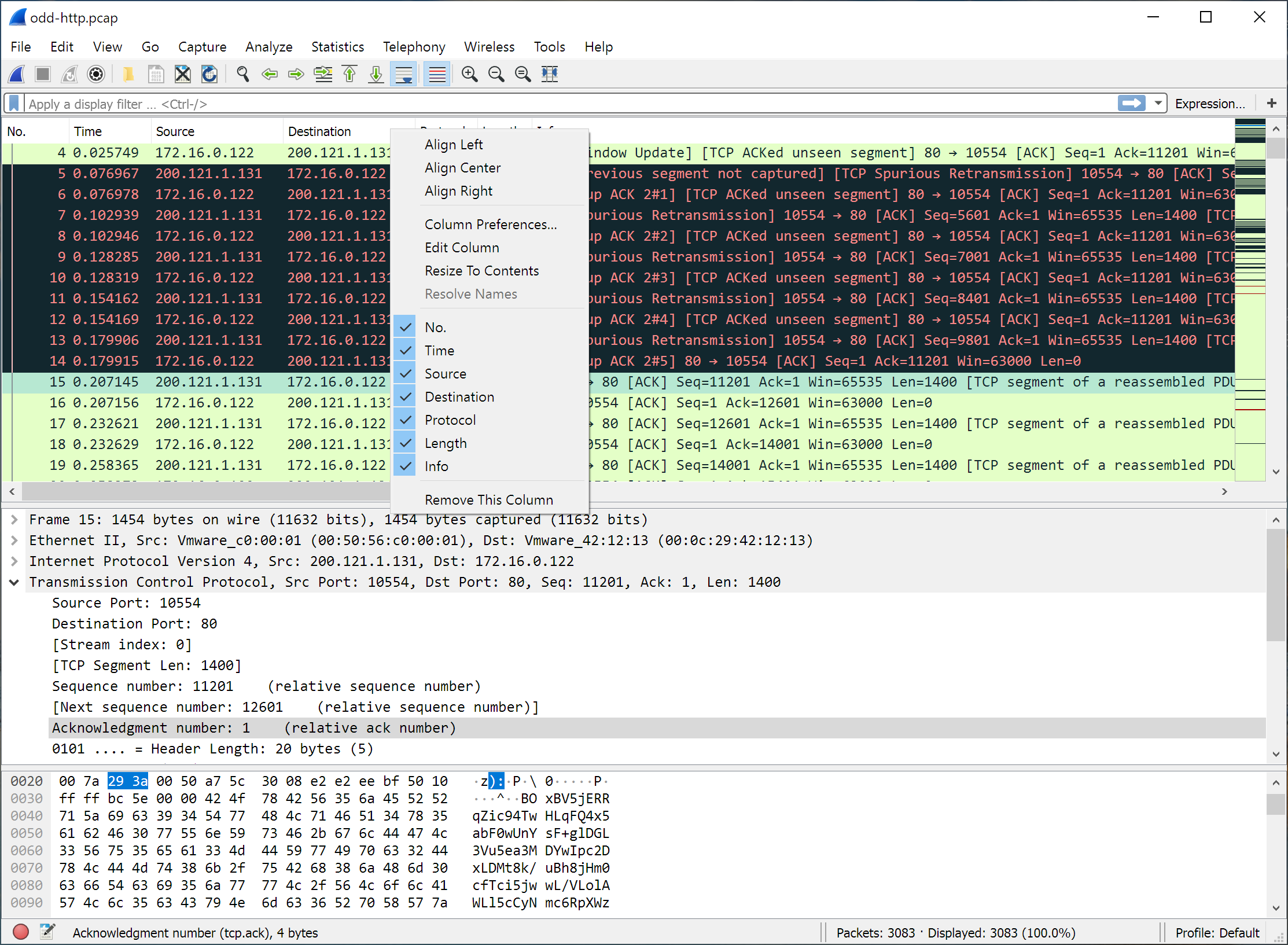
Wireshark is a free, open-source packet analyzer for inspection of network traffic. It captures live data from network interfaces or imports packet trace files, then decodes protocol structures and displays fields in a human-readable way. Originally released as Ethereal in 1998 and renamed in 2006, Wireshark has become the standard tool for network troubleshooting, protocol development, and security analysis.
Key features include:
- Cross-platform support: Runs on Linux, macOS, BSD, Solaris, Windows, and other Unix-like systems.
- Packet capture: Collects live network traffic via pcap/Npcap or imports capture files from tcpdump, CA NetMaster, snoop, Sniffer, and Microsoft Network Monitor.
- Protocol dissection: Parses networking protocols, showing encapsulation layers and individual field details.
- Capture modes: Supports promiscuous mode for Ethernet interfaces and monitor mode for wireless adapters.
- Remote analysis: Can dissect packet streams captured on remote machines and forwarded over TZSP or OmniPeek-compatible protocols.

Source: Wireshark
5. ManageEngine OpUtils

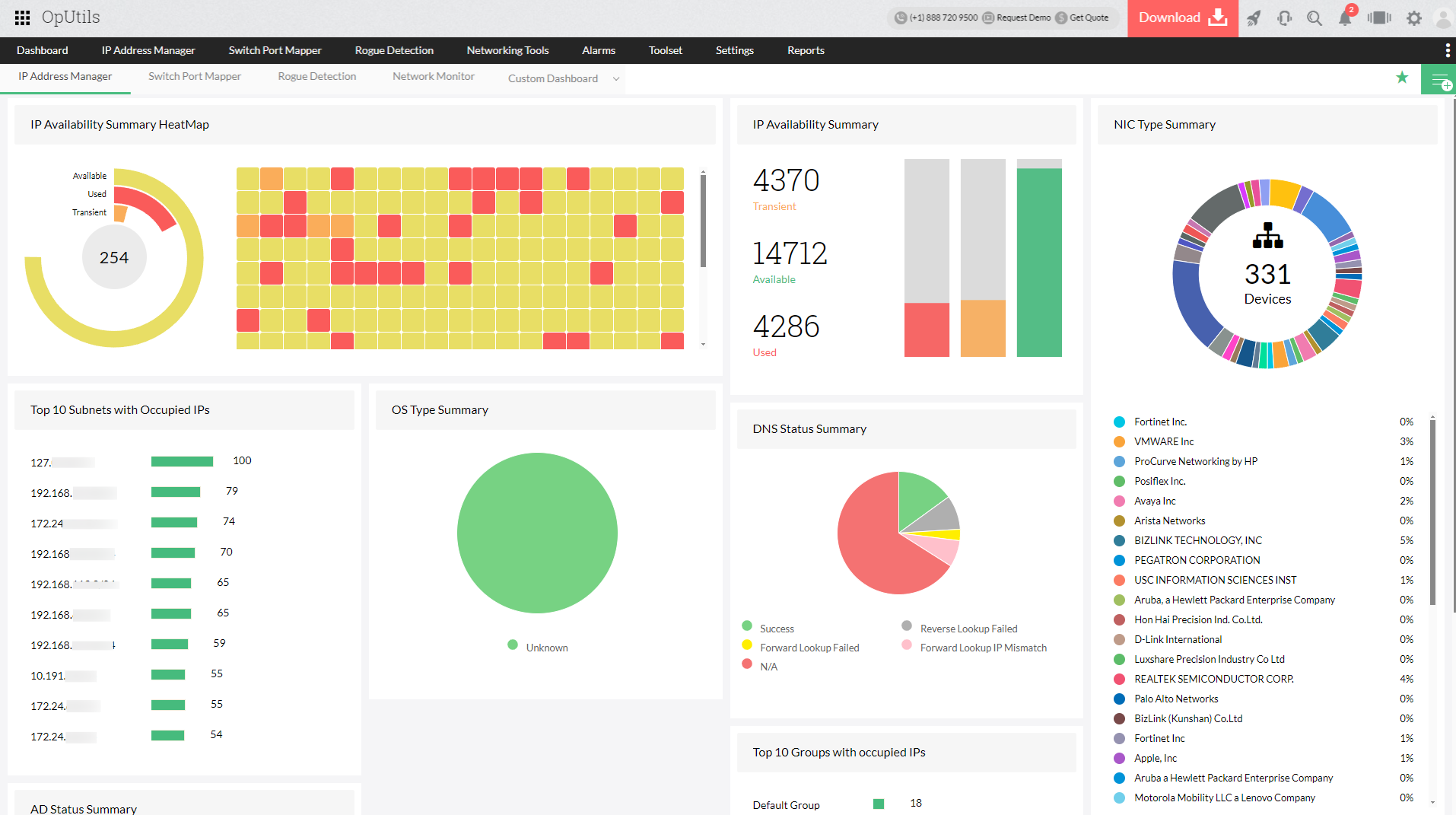
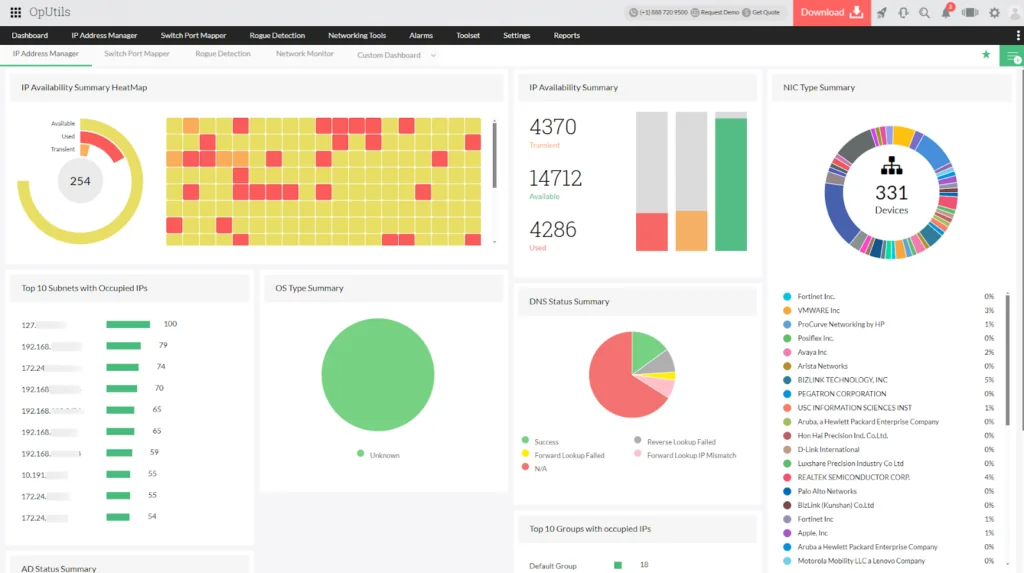
ManageEngine OpUtils is a network management toolkit that combines IP address management (IPAM), DHCP monitoring, switch port mapping, and rogue device detection in one console. It is designed for IT teams managing dynamic, large-scale networks, providing visibility into IP allocation, port usage, and unauthorized devices.
Key features include:
- Automated IP address management: Discovers and tracks IPv4/IPv6 addresses, monitors utilization, and prevents conflicts with real-time IP scanning.
- DHCP scope monitoring: Tracks IP pool utilization, integrates with Active Directory, and generates automated reports and alerts on allocation issues.
- Switch port mapping: Scans and monitors switch ports, showing IP, MAC, and VLAN associations to improve visibility and control of port usage.
- Rogue device detection: Identifies unauthorized devices, classifies them as trusted/guest/rogue, and provides real-time alerts with blocking options.
- Unified management console: Integrates IPAM, DHCP, switch mapping, and security insights into a single dashboard with centralized reporting.
Source: ManageEngine
6. PRTG Network Monitor
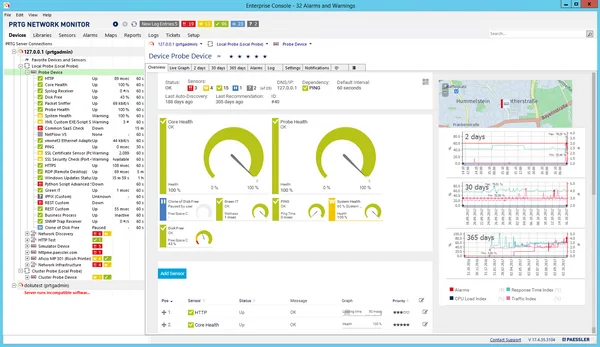
PRTG Network Monitor is an all-in-one monitoring platform that provides visibility into networks, servers, applications, databases, and cloud services. It uses sensors to track performance and availability across infrastructure components, giving IT teams insights into system health and capacity.
Key features include:
- Coverage: Monitors networks, servers, applications, databases, LAN devices, and cloud services from one platform.
- Sensor-based monitoring: Deploys customizable sensors for metrics such as bandwidth, CPU load, SQL queries, and application availability.
- SNMP support: Collects performance data from a range of SNMP-enabled devices.
- Maps and dashboards: Provides a map designer for building custom dashboards with live status indicators.
- Alerts and notifications: Supports thresholds and multi-channel notifications (email, push, HTTP requests, etc.) for proactive issue management.
Source: Paessler
7. Scapy

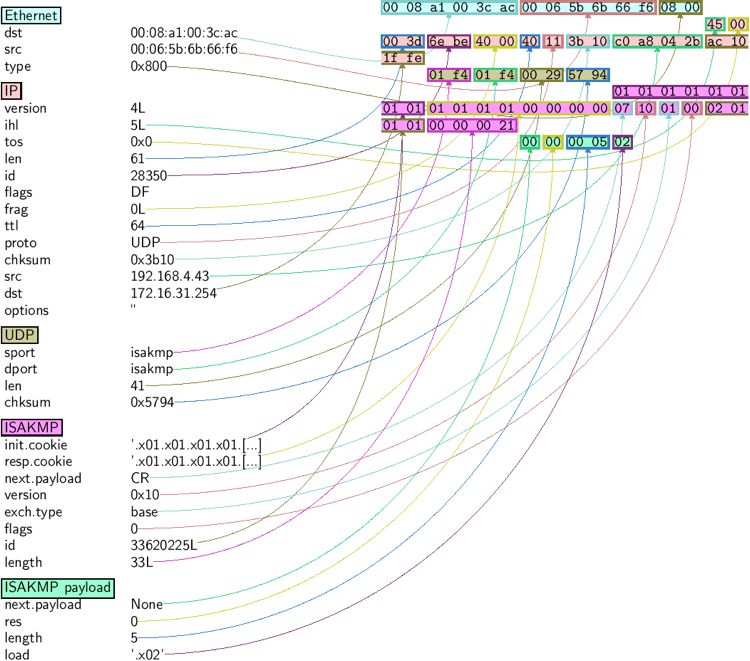
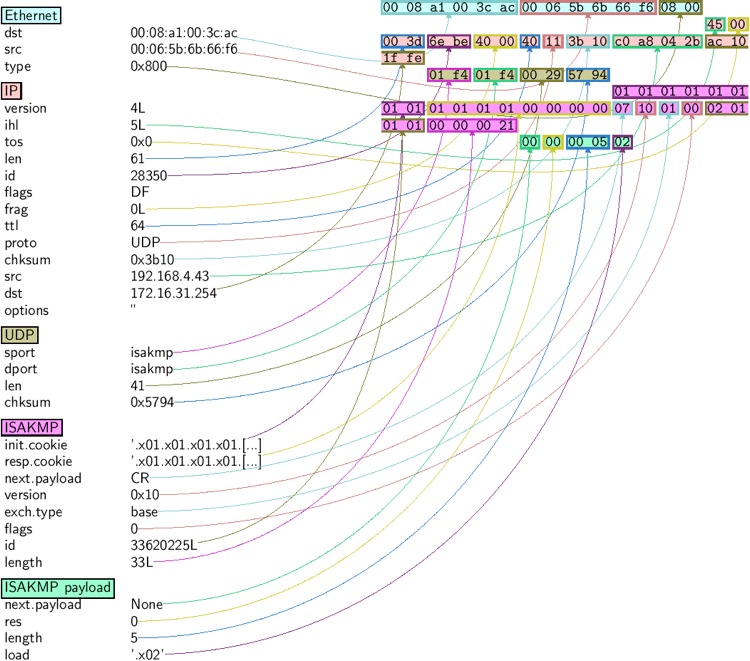
Scapy is a Python-based interactive packet-manipulation framework that lets developers craft, send, capture, decode, and forge network packets programmatically. It exposes a compact DSL (using native Python) to build packets as stacked layers with overridable field defaults, then send them, match replies to requests, and return full decoded packet pairs for post-processing.
Key features include:
- Send, sniff, dissect, and forge packets: Control over packet creation and transmission across many protocols.
- Python DSL: Describe packets and scenarios directly in Python.
- Layered packet model: Build packets by stacking layers; fields have useful defaults you can override.
- Full decoded output: Returns complete decoded packets (request/answer pairs and unmatched packets) to help interpret results later and from multiple viewpoints.
- Request–reply matching: Automatically pairs sent packets with received responses for easy analysis.
Source: Scapy
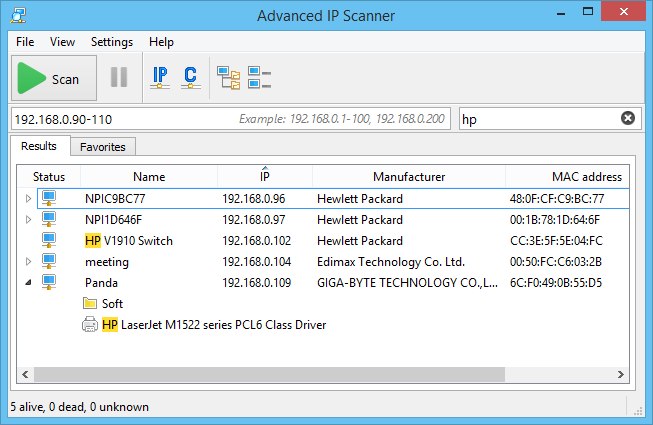
8. Advanced IP Scanner

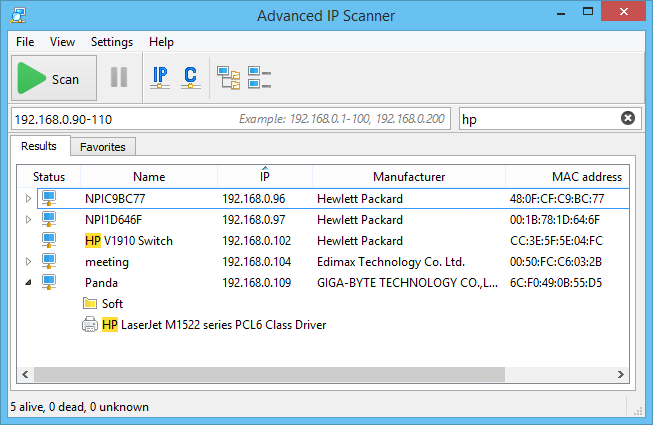
Advanced IP Scanner is a free Windows-based LAN scanner for quick network discovery and remote management. It detects devices on a local network, providing details such as IP and MAC addresses, shared folders, and availability. Beyond simple scanning, it integrates with RDP and Radmin for remote access and supports switching computers on or off remotely.
Key features include:
- Fast LAN scanning: Quickly detects all active devices on a local network.
- Device information: Displays IP addresses, MAC addresses, and available network shares.
- Remote access: Integrates with RDP and Radmin for direct remote control of computers.
- Power management: Can remotely power off or wake up computers.
- Export options: Saves scan results to CSV for reporting or documentation.
Source: Advanced IP Scanner
Conclusion
When selecting a network scanning tool, it’s essential to balance technical requirements with the operational context of the environment. Factors such as scan performance, customization capabilities, ease of use, and integration flexibility play a significant role in tool effectiveness. Additionally, organizations should evaluate how well a solution aligns with their network scale, security policies, and resource constraints. Choosing the right tool involves not only comparing features but also understanding how each option fits into broader workflows and security strategies.