What Are Application Migration Services?
Application migration services help organizations move software applications from one environment to another. This could involve transitioning from on-premises infrastructure to the cloud, moving between cloud providers, or shifting from one data center to another. The goal is to preserve application functionality while improving scalability, performance, or cost-efficiency.
These services include tools and processes to assess existing environments, replicate workloads, and reconfigure systems for compatibility in the new environment. They reduce the risk and complexity of migrations, providing automation, monitoring, and support throughout the transition.
This is part of a series of articles about Application Migration
The Need for Application Migration Services in 2026
Organizations migrate applications to stay competitive, reduce costs, and improve system performance. However, moving applications between environments is complex and risky. Application migration services address technical, operational, and business challenges that arise during this process.
- Modernizing legacy systems: Many legacy applications run on outdated hardware or unsupported software. Migration enables modernization without fully rebuilding the application.
- Reducing infrastructure costs: Maintaining on-premises infrastructure is expensive. Cloud or optimized environments can lower capital and operational expenses.
- Improving scalability: Traditional infrastructure often cannot scale quickly. Migration to cloud platforms allows dynamic resource allocation based on demand.
- Enhancing performance and reliability: New environments offer better load balancing, geographic distribution, and fault tolerance. This improves uptime and user experience.
- Strengthening security and compliance: Modern platforms provide built-in security controls, encryption, and compliance certifications. Migration helps meet regulatory requirements.
- Supporting business continuity: Data center outages and hardware failures create risk. Migration strategies often include redundancy and disaster recovery capabilities.
- Enabling digital transformation initiatives: Cloud-native services, APIs, and automation tools are easier to adopt after migration. This supports innovation and faster development cycles.
Handling data center closures or cloud strategy changes: Organizations may need to exit data centers or switch cloud providers. Migration services ensure smooth transitions with minimal disruption.
Key Features of Application Migration Services
Automated Replication
Automated replication simplifies the migration process by continuously copying application data, configurations, and system states from the source environment to the destination. This is typically done using agents or lightweight tools that run on the source machines and handle the replication without needing manual coordination.
By automating these tasks, organizations can avoid the complexity of scripting or manually transferring files, reducing the likelihood of errors or missed dependencies. It also allows migrations to proceed in the background with minimal disruption to production systems.
Additionally, automated replication is often designed to be application-agnostic.
Incremental Replication
Incremental replication improves the efficiency of data transfer by sending only the changes made since the last synchronization. This is especially important in large-scale environments where transferring entire workloads repeatedly would be time-consuming and resource-intensive.
With incremental updates, organizations can keep the destination environment closely aligned with the source while minimizing bandwidth usage and reducing the total time required for final cutover. It also supports near-zero-downtime migrations, since the system can remain operational until just before the switch is made.
Most solutions include mechanisms to track file changes, database transactions, or block-level differences, ensuring precise and consistent updates without full data duplication.
Support for Diverse Source Environments
Effective application migration services are designed to handle a broad array of infrastructure types and configurations. This includes support for physical servers, on-premises virtual machines (e.g., VMware, Hyper-V), legacy platforms, and different operating systems such as Windows and Linux.
In heterogeneous environments, this allows enterprises to consolidate or modernize applications without major rewrites. It also enables phased or hybrid migration strategies where only part of the infrastructure is moved initially. Many tools include compatibility layers or conversion utilities to adapt workloads to the target platform.
Built-in Monitoring and Management
Built-in monitoring capabilities allow teams to track every stage of the migration process through centralized dashboards and real-time metrics. These tools provide visibility into replication status, data transfer speeds, error logs, and resource utilization.
Management features often include the ability to start, pause, or resume migrations; set up alerts for failed tasks or threshold violations; and generate reports for auditing and compliance. This makes it easier to coordinate large-scale migrations involving multiple systems or applications.
Post-Migration Optimization
After applications have been migrated, optimization tools help align them with the target environment’s best practices. This can include resizing compute resources to better fit actual usage patterns, reconfiguring network settings, and replacing legacy components with cloud-native services for improved scalability or cost-efficiency.
Optimization also involves performance tuning, such as adjusting database indexes, upgrading dependencies, or improving security configurations to match the target platform’s capabilities. In cloud migrations, tools may recommend autoscaling policies, storage tiering, or load balancing adjustments.
Notable Application Migration Services and Tools
Migration Planning, Observability and Data-Specific Tools
1. Faddom

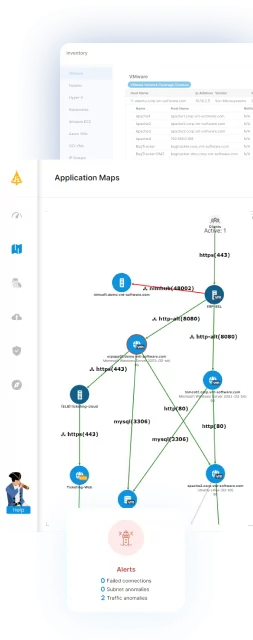
Faddom is a lightweight, agentless application dependency mapping solution that supports seamless migration planning across hybrid environments. Unlike traditional tools, Faddom passively discovers and maps application and infrastructure dependencies in real-time without needing credentials, agents, or active scanning.
Key features include:
- Real-Time Dependency Mapping: Automatically maps every server, connection, and dependency in your hybrid environment, ensuring complete visibility.
- Quick Deployment: Install in under 60 minutes and get instant visibility.
- Wave-Based Migration Strategy: Faddom facilitates wave-based migration by real-time mapping of dependencies and grouping assets into business applications. This allows teams to migrate seamlessly while minimizing disruptions to business operations.
- Change Management: Tracks infrastructure and communication changes to validate pre and post-migration environments, ensuring continuity and reducing cutover risk.
- Optimized Resource Planning: Enables precise rightsizing and helps eliminate unused or redundant infrastructure, cutting unnecessary costs.
- Multi-Purpose Use: Beyond migration, it supports cybersecurity, change management, documentation, discovery, and compliance initiatives, all from a single deployment.

Source: Faddom
2. Cloudsfer

Cloudsfer is a data migration and backup platform that supports transfers between cloud services and from on-premises systems to the cloud. It provides automated processes to move content across more than 20 cloud storage providers and enterprise content management systems.
Key features include:
- Cloud-to-cloud migration: Transfers data between supported cloud storage platforms such as Dropbox, Google Drive, OneDrive, SharePoint Online, Box, Amazon S3, and others.
- On-premise to cloud migration: Migrates data from local file systems and enterprise content management systems, including platforms like FileNet, Documentum, and OpenText LiveLink, to cloud environments.
- Multi-user migration: Supports bulk migration of multiple user accounts while maintaining structure and access settings.
- Automated backup and replication: Enables scheduled or continuous replication between cloud and on-premises environments to support backup and disaster recovery use cases.
Encrypted data transfer: Secures communications during migration processes to protect data in transit.

Source: Cloudsfer
3. Dynatrace

Dynatrace is an observability and software intelligence platform that supports cloud migration through monitoring, dependency analysis, and AI-driven insights. It provides unified visibility across applications, infrastructure, and user experience, helping teams assess readiness, monitor performance during migration, and detect issues after cutover.
Key features include:
- Unified observability platform: Collects and analyzes application, infrastructure, log, and user experience data across hybrid and cloud environments.
- Automated dependency mapping: Continuously maps services and infrastructure components to provide real-time topology and context.
- AI-driven anomaly detection: Uses built-in AI capabilities to detect anomalies, predict issues, and identify root causes without manual correlation.
- Log analytics and data lakehouse: Unifies observability data for contextual analysis and troubleshooting across teams.
- Cloud and Kubernetes monitoring: Integrates with major cloud providers and container platforms to monitor workloads before, during, and after migration.

Source: Dynatrace
4. IBM Turbonomic

IBM Turbonomic is an application resource management platform that aims to assure performance across hybrid and multicloud environments. It continuously analyzes application demand and automatically adjusts compute, storage, and network resources. This helps organizations optimize workloads before, during, and after migration.
Key features include:
- Full-stack visibility: Continuously analyzes applications, containers, virtual machines, and infrastructure to map dependencies and resource flows.
- Automated resource optimization: Automatically right-sizes and scales compute, storage, and network resources based on real-time demand.
- Performance assurance: Monitors utilization across CPU, memory, storage, and network to prevent bottlenecks and maintain service levels.
- Capacity forecasting: Uses historical and live metrics to model capacity needs and support planning decisions.
- Hybrid and multicloud support: Optimizes workloads across on-premises data centers, public clouds, and Kubernetes environments.
Source: IBM
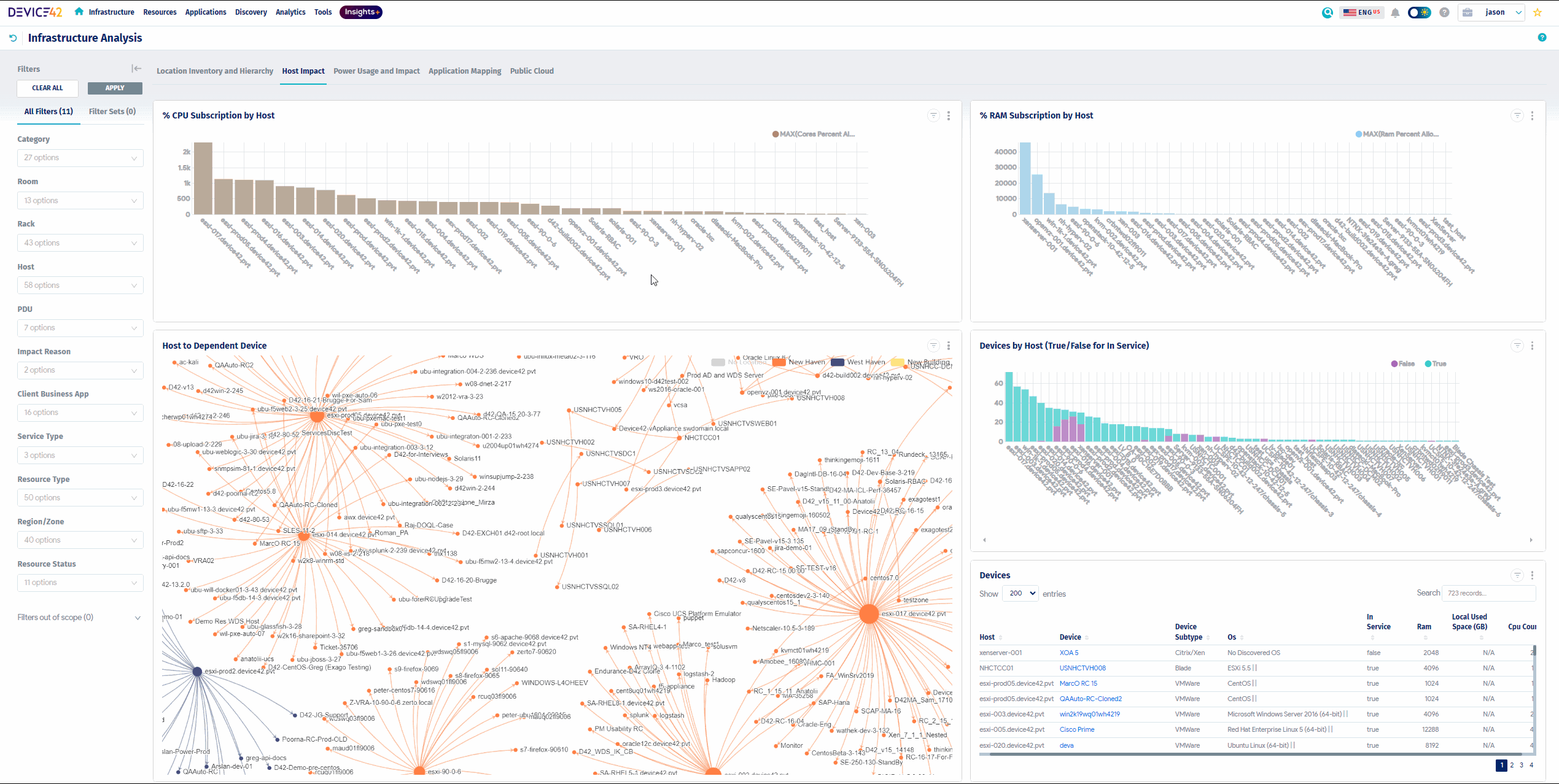
5. Device42

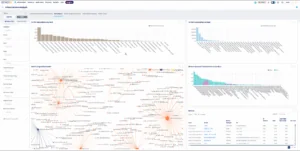
Device42 is an IT discovery and dependency mapping platform that provides visibility into application and infrastructure relationships across hybrid and multi-cloud environments. It helps organizations understand how business services, applications, and underlying infrastructure components are connected.
Key features include:
- Application dependency mapping: Visualizes connections between applications, services, and infrastructure components to identify relationships and risks.
- Automated discovery: Discovers devices and services across data centers and cloud environments to build an up-to-date inventory.
- Business service modeling: Creates visual representations of business services, including associated devices, owners, and service-level details.
- Impact analysis: Identifies which systems and services are affected by outages or planned changes.
- Compliance support: Provides documentation and visibility into data flows and system relationships to simplify audits.
Source: Device42
Cloud-Native Migration Platforms
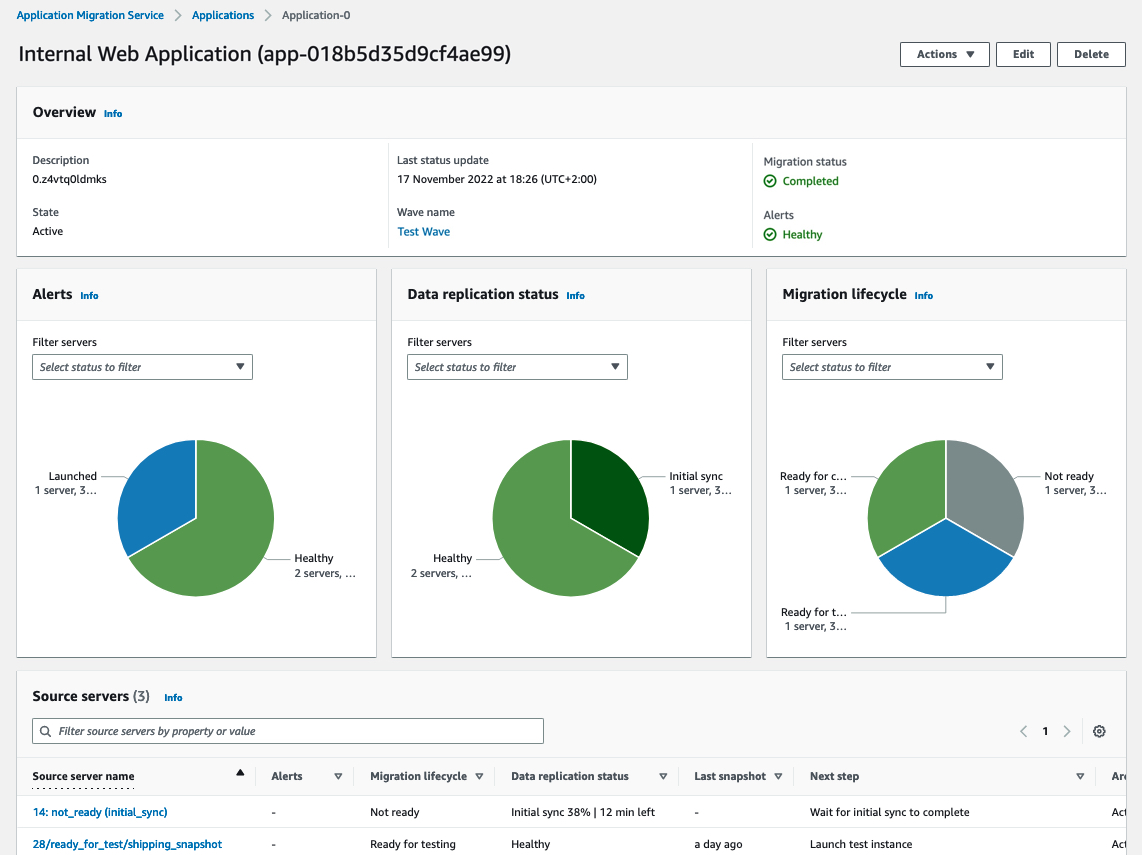
6. AWS Application Migration Service

AWS Application Migration Service is a managed migration tool that replicates source servers to AWS without requiring application changes. It supports migrations from on-premises and other cloud environments and enables modernization during the migration process. The service is designed to reduce migration time and cost while maintaining operations during replication.
Key features include:
- Automated server replication: Continuously replicates source servers, including applications and system configurations, to AWS.
- Support for diverse source environments: Migrates workloads from physical servers, VMware vSphere, Microsoft Hyper-V, and other cloud platforms.
- Application modernization options: Allows integration with modernization workflows and related AWS services during migration.
- Minimal downtime cutover: Keeps source systems operational during replication and limits disruption during final switchover.
- Cross-region migration: Supports migrations across AWS Regions and accounts.

Source: Amazon
7. Azure Migrate

Azure Migrate is a centralized service that helps organizations discover, assess, migrate, and modernize on-premises workloads to Azure. It provides tools and guidance to plan phased migrations and track progress from a single dashboard. The platform also includes cost optimization features and security capabilities integrated with Azure services.
Key features include:
- Discovery and assessment: Scans on-premises environments to evaluate cloud readiness, identify risks, and estimate migration costs.
- Centralized dashboard: Tracks migration progress and manages transformation activities from a unified interface.
- Phased migration planning: Supports structured migration waves based on assessment insights and business priorities.
- Security and compliance integration: Leverages Azure’s built-in security and compliance capabilities during migration.
- Modernization support: Enables migration and modernization of workloads such as VMware VMs and web applications to Azure services.

Source: Microsoft
8. Google Cloud Migration Center

Google Cloud Migration Center is a unified platform that supports end-to-end migration to Google Cloud. It provides tools for cost estimation, automated asset discovery, infrastructure assessment, and migration planning. The platform enables organizations to evaluate their current environments and prepare structured migration strategies without modifying existing workloads during assessment.
Key features include:
- Cloud cost estimation: Generates estimates of future Google Cloud costs based on current infrastructure configurations.
- Automated asset discovery: Scans on-premises environments to build an inventory of servers and supported databases.
- Infrastructure assessment: Produces total cost of ownership reports and technical fit analyses for Google Cloud services.
- Dependency identification: Identifies application and network dependencies to determine migration groupings.
- Migration execution support: Provides tools and guidance for rehost, replatform, and refactor strategies.

Source: Google Cloud
9. VMware HCX

VMware HCX is a workload mobility platform that enables large-scale migration and rebalancing across VMware-based environments. It supports movement between on-premises data centers and cloud platforms such as VMware Cloud on AWS, Azure VMware Solution, and Google Cloud VMware Engine.
Key features include:
- Any-to-any workload mobility: Moves workloads across VMware platforms and supported cloud environments.
- Multiple migration methods: Supports bulk migration and live migration with minimal or no downtime.
- Hybrid networking: Uses VMware NSX to provide automated routing and secure connectivity between source and target sites.
- Operational rebalancing: Enables workload movement for scaling, compliance, or cost management purposes.
- Business continuity support: Combines replication and network connectivity features to maintain application availability.

Source: VMware
10. OpenText Migrate

OpenText Migrate is a workload migration platform that supports movement across physical, virtual, and cloud environments. It enables structured, repeatable migrations with near-zero downtime and centralized orchestration. The platform uses continuous replication and automated workflows to reduce manual effort and migration risk.
Key features include:
- Any-to-any migration: Supports migration between physical, virtual, and cloud platforms, including AWS, Azure, Google Cloud, and VMware environments.
- Automated orchestration: Provides centralized administration to manage discovery, provisioning, replication, and cutover.
- Continuous byte-level replication: Keeps source and target systems synchronized with real-time replication of data and system changes.
- Non-disruptive testing and cutover: Allows validation of target systems and automated cutover with minimal downtime.
- Encrypted data transfer: Uses AES 256-bit encryption to secure data during replication
Learn more in our detailed guide to application migration tools
Conclusion
Application migration services simplify the complexity of transitioning workloads by offering automation, compatibility support, and post-migration optimization. However, not all solutions provide real-time visibility into dependencies, agentless deployment, or change management out of the box. The best tools provide a complete map of your hybrid infrastructure in minutes, helping reduce risk, prevent overspending, and support long-term modernization not just during the migration but also after it’s complete. Look for a platform that delivers accurate, continuous mapping without disrupting your systems.
Discover more about Data Center Migration with Faddom