TL;DR: A CMDB tool stores configuration items, their attributes and the relationships between them as one record of the IT estate. Faddom is best for agentless dependency mapping, Device42 is best for deep hybrid discovery, and ServiceNow CMDB for large platform-wide programs.
What Is a CMDB Tool and Why Is It Critical for Enterprise IT?
A Configuration Management Database (CMDB) tool is a specialized software solution designed to maintain a central repository of information about an organization’s IT assets, also known as configuration items (CIs). These assets can include hardware, software, networks, documentation, and relationships between them.
The primary purpose of a CMDB is to provide a unified view of all IT resources and their dependencies, enabling IT teams to manage assets and their configurations efficiently throughout their lifecycle.
Why CMDB is a critical component of enterprise IT:
- Centralized IT infrastructure visibility: Creates a single source of truth for IT assets, relationships, and dependencies across on-premises, cloud, and hybrid environments.
- Faster incident and problem resolution: Gives support teams accurate CI context, change history, and dependency data to diagnose issues faster and reduce MTTR.
- Improved change management: Helps teams assess change impact before implementation, reducing outage risk and improving auditability.
- Better risk and compliance management: Tracks regulated assets, dependencies, vulnerabilities, and policy gaps to support audits and risk mitigation.
- Support for hybrid and multi-cloud environments: Consolidates asset and dependency data across data centers, public clouds, private clouds, and dynamic infrastructure.
Enterprise CMDB Tools at a Glance
The table below summarizes the key differences between the tools covered in this guide, including what each one is built around and where teams tend to hit friction. We explore each tool in more detail in the sections that follow.
| Category | Solution | Best For | Key Strengths | Things to Consider |
| Discovery-led CMDB and dependency mapping | Faddom | Agentless dependency mapping across hybrid estates | Passive collection, no agents or credentials, fast setup | Duplicate host records, reporting depth |
| Discovery-led CMDB and dependency mapping | Device42 | Deep hybrid discovery feeding an enterprise CMDB | Broad discovery, data enrichment, 40+ integrations | Complex setup, slowdowns on large data volumes |
| Discovery-led CMDB and dependency mapping | Lansweeper | Keeping an existing CMDB current with fresh data | IT, OT, IoT and cloud discovery with normalization | Cloud and on-prem feature gaps, SQL for reports |
| ITSM platform CMDB | ServiceNow CMDB | Enterprises standardizing on one ITSM platform | Service Graph connectors, data health, unified maps | High cost, heavy configuration effort |
| ITSM platform CMDB | BMC Helix CMDB | Large ITIL estates already running BMC Helix ITSM | Scale, federation, reconciliation, change impact data | Dated interface, complex customization |
| ITSM platform CMDB | Jira Service Management Assets | Teams already running IT on the Atlassian platform | Flexible object schemas, ticket linking, Discovery | Steep admin learning curve, basic reporting |
| ITSM platform CMDB | ManageEngine ServiceDesk Plus CMDB | ITIL service desks needing a built-in CMDB | Baselines, data quality policies, impact analysis | Dated UI, limited standard reports |
Related content: Read our detailed feature comparison of the top CMDB tools.
Why Enterprises Need a CMDB
Centralized IT Infrastructure Visibility
A CMDB provides enterprises with a single, authoritative source of truth for all IT assets and their relationships. By consolidating information that might otherwise be scattered across different departments or tools, the CMDB ensures that IT teams have real-time visibility into the entire technology stack. This centralized view eliminates blind spots, enabling teams to understand how components are interconnected and how changes in one area may impact others.
With this visibility, organizations can better manage complex environments, including hybrid and multi-cloud setups. Accurate mapping of infrastructure allows for more informed planning and resource allocation. Additionally, it becomes easier to identify outdated or redundant assets, supporting cost optimization and lifecycle management. The result is a more agile, responsive IT operation that can adapt quickly to business needs.
Faster Incident and Problem Resolution
When incidents occur, rapid access to accurate information is crucial. A CMDB tool provides IT support teams with detailed records of configuration items, their current state, and historical changes. This comprehensive data set allows teams to diagnose issues quickly by understanding how various systems interact and what recent modifications might have contributed to the problem.
By leveraging the CMDB, organizations can implement effective root cause analysis and reduce mean time to resolution (MTTR) for incidents. The tool’s ability to show dependencies and relationships means that support staff can anticipate the ripple effects of outages or failures, prioritize responses, and prevent escalation. Ultimately, this leads to improved service quality and higher end-user satisfaction.
Improved Change Management
Change management is a critical IT process, and a CMDB helps by providing a reliable foundation for evaluating the impact of proposed changes. Before approving or implementing any modification, IT teams can use the CMDB to assess which assets and services will be affected. This reduces the risk of unintentional disruptions and helps ensure that changes align with organizational policies and goals.
The CMDB enables better tracking and documentation of all changes made within the environment. This historical record is invaluable for audits, compliance, and troubleshooting. By simplifying change management processes and minimizing the likelihood of errors, a CMDB supports continuous improvement and operational stability.
Better Risk and Compliance Management
Enterprises face increasing regulatory pressures and must demonstrate control over their IT environments. A CMDB helps organizations identify and track assets subject to compliance requirements, such as those governed by GDPR, HIPAA, or PCI DSS. With centralized data, IT and compliance teams can quickly generate reports, monitor for policy violations, and address gaps before they become significant issues.
The CMDB supports risk management by highlighting dependencies and vulnerabilities within the IT landscape. By understanding which configuration items are critical and how they interrelate, organizations can prioritize risk mitigation efforts and respond proactively to emerging threats. This leads to a more resilient, audit-ready IT environment.
Support for Hybrid and Multi-Cloud Environments
Modern enterprises often operate across on-premises, cloud, and hybrid infrastructures. Managing assets in such diverse environments is challenging without a unified approach. A CMDB bridges this gap by consolidating data from various sources, providing a holistic view of all assets—regardless of their location or platform.
This comprehensive coverage allows IT teams to monitor, manage, and optimize resources seamlessly across public clouds, private clouds, and traditional data centers. The ability to track dependencies and performance across environments ensures that service delivery remains consistent, and potential issues are detected early. As organizations scale or adopt new technologies, the CMDB remains a vital tool for maintaining control and visibility.
Key Features to Look for in Top Enterprise CMDB Tools
1. Automated Discovery and Dependency Mapping
Automated discovery is essential for keeping the CMDB accurate and up to date. This feature enables the tool to scan the IT environment continuously or on-demand, identifying new or changed assets without manual intervention. Dependency mapping complements discovery by revealing how assets interact, showing relationships such as application-to-server or server-to-network connections.
This automation eliminates the risks of human error and reduces the time required to maintain the CMDB. Accurate dependency maps are especially important for:
- Troubleshooting
- Impact analysis
- Change management
By ensuring that the CMDB reflects the current state of the environment, organizations can make better decisions and respond faster to incidents and changes.
2. Configuration Item Lifecycle Management
Lifecycle management tracks configuration items from acquisition to retirement. A robust CMDB tool provides workflows and automation to manage each stage, including:
- Procurement
- Deployment
- Maintenance
- Decommissioning
This helps organizations optimize asset utilization and plan for upgrades or replacements.
Effective lifecycle management also ensures that compliance and security requirements are met throughout the asset’s existence. By documenting each change and status update, the CMDB supports auditing, reduces risk, and helps control costs. Automated notifications and reporting further simplify asset governance.
3. Data Reconciliation and Normalization
Data reconciliation ensures the CMDB remains consistent by resolving conflicts and eliminating duplicates when importing or updating information from multiple sources. Normalization standardizes data formats, ensuring that all configuration items follow a unified structure for attributes like:
- Names
- Types
- Locations
Together, these features prevent data fragmentation and improve the reliability of insights drawn from the CMDB. Accurate, normalized data is crucial for analytics, reporting, and integrations with other IT management tools. As a result, IT teams can trust the CMDB as a single source of truth.
4. ITSM and ITAM Integrations
Integration with IT Service Management (ITSM) and IT Asset Management (ITAM) platforms is critical for maximizing the value of a CMDB. These integrations allow for seamless data exchange, enabling the use of real-time configuration information through processes such as:
- Incident management
- Problem management
- Change management
- Asset management
Such connectivity reduces data silos and manual work, ensuring that all IT processes are informed by the latest asset data. It also improves service delivery by enabling automated workflows and comprehensive reporting. Organizations benefit from greater efficiency, accuracy, and a more cohesive IT management ecosystem.
5. Cloud and Container Discovery
With the growing adoption of cloud services and containerized applications, CMDB tools must support discovery in these environments. This capability allows the CMDB to detect and track resources in AWS, Azure, Google Cloud, Kubernetes, and similar platforms, capturing details like:
- Instances
- Clusters
- Service relationships
By extending discovery to cloud and containers, the CMDB maintains a complete inventory of all assets, regardless of where they reside. This visibility is vital for managing dynamic, ephemeral resources that can appear and disappear rapidly. It also supports compliance and security initiatives by ensuring nothing is overlooked.
6. API and Third-Party Integrations
Modern CMDB tools offer robust APIs and support for third-party integrations, allowing organizations to connect the CMDB with other enterprise systems such as monitoring, security, or orchestration tools. These integrations enable:
- Automated updates
- Event-driven actions
- Enriched data sharing across platforms
APIs and integrations also future-proof the CMDB, making it easier to adopt new technologies or workflows as business needs evolve. They support custom use cases, enable advanced automation, and help organizations build a unified IT operations platform tailored to their environment.
7. AI-Assisted Data Management and Automation
AI-driven features enhance CMDB data quality and operational efficiency by automating routine tasks such as anomaly detection, data enrichment, and predictive maintenance. Machine learning algorithms can:
- Identify patterns
- Suggest corrections
- Highlight potential issues before they impact services
Automation powered by AI also simplifies processes like incident response, change approval, and compliance monitoring. By reducing manual workloads and minimizing errors, AI-assisted CMDB tools help organizations achieve higher accuracy, faster response times, and a more proactive approach to IT management.
Top-Rated Enterprise CMDB Tools
How we selected these tools: We shortlisted CMDB tools based on automated discovery breadth, configuration item relationship and dependency mapping, data reconciliation and normalization, ITSM and ITAM integration, and coverage of hybrid and multi-cloud estates.
Discovery-Led CMDB and Dependency Mapping Tools
1. Faddom

Best for: Agentless dependency mapping across hybrid estates
Strengths: Passive collection, no agents or credentials, fast setup
Things to consider: Duplicate host records, reporting depth
Faddom maps on-premises and cloud infrastructure in real time, grouping servers automatically by business application. It collects data passively using standard protocols including NetFlow, sFlow, IPFIX, SNMP, SSH, WMI, ETW, syslog, and AWS and Azure flow logs, without installing agents, supplying server credentials, or opening firewalls.
The platform correlates network traffic with infrastructure and cloud-native sources to build and maintain dependency maps, and covers discovery, change management, cybersecurity, anomaly detection, migration, IT audit and compliance, and cost optimization. Deployment is designed to produce a first map within 60 minutes, and collection is read-only.
G2 rating: 4.5 out of 5 (111 reviews)
Key features include:
- Agentless, passive discovery: Collects data through mirrored traffic and standard protocols, so no software is installed on servers and no credentials are stored. Data stays inside the customer environment and the platform can run offline.
- Real-time application dependency mapping: Maps the environment continuously and updates 24/7, showing east-west traffic and communication flows between servers and applications rather than a point-in-time snapshot.
- Hybrid and multi-source correlation: Connects on-premises, virtualization, and cloud environments, then correlates network, infrastructure, and cloud-native data into a single set of application maps.
- Change tracking and impact simulation: Tracks changes to business applications and lets teams simulate the impact of a proposed change on connected systems before it is made.
- AI-driven correlation and anomaly detection: Applies AI-based correlation and analysis to raw network data, and detects unusual traffic patterns and behavior in the environment.
- ITSM and CMDB integration: Pushes real-time application dependency context into incident, change, and CMDB records, and extends to other platforms through open APIs, webhooks, and standard protocols.
- Security and identity tool integrations: Feeds real application communication patterns into segmentation and microsegmentation design, identity-based access analysis, and vulnerability correlation workflows.
Limitations (as reported by users on G2):
- Duplicate host records: Several reviewers report a single server appearing under multiple hostnames, typically after an IP change or a move between platforms.
- Terminology learning curve: Some users needed time to get familiar with the platform’s terminology and to classify results arriving from different discovery sources.
- Report and export depth: A few reviewers would like richer exportable reports and deeper analytics, particularly for executive-level summaries.
2. Device42

Best for: Deep hybrid discovery feeding an enterprise CMDB
Strengths: Broad discovery, data enrichment, 40+ integrations
Things to consider: Complex setup, slowdowns on large data volumes
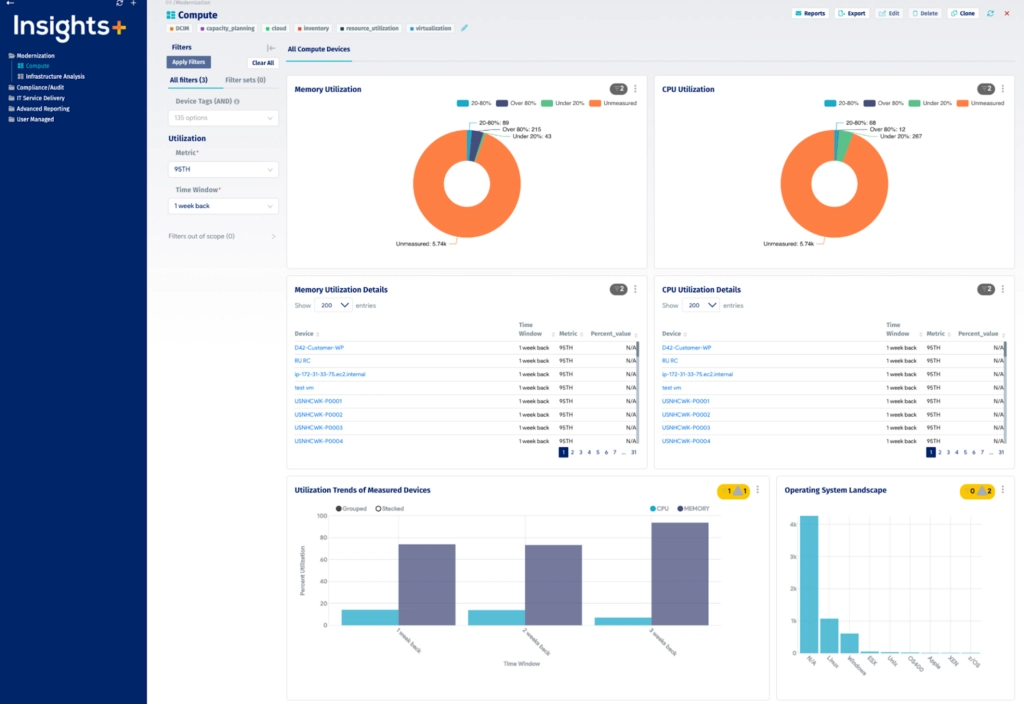
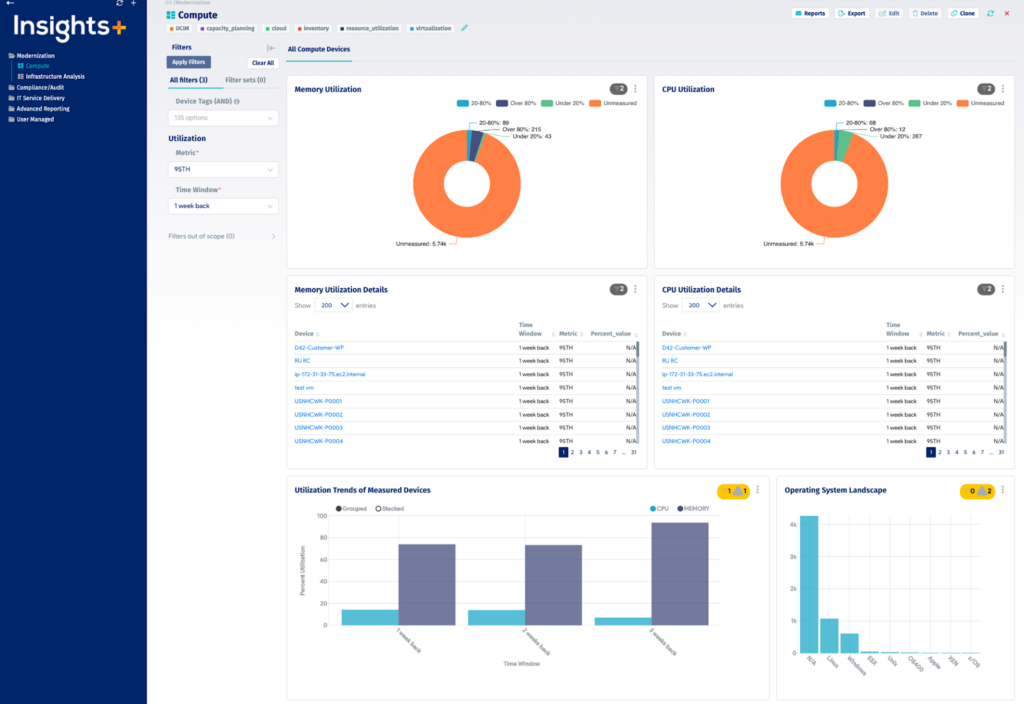
Device42 combines agentless discovery with a preconfigured CMDB covering hardware, software, network devices, end-user devices, cloud resources, and the relationships between them. Discovery spans legacy technologies through to cloud containers, and preconfigured configuration items and relationships are supplied so the database has structure before customization begins.
Beyond inventory, the platform deduplicates records, standardizes vendor and software naming, and adds end-of-life and end-of-support data. It also includes data center layout and rack visualization, IP address management, software license management, SSL certificate discovery, and password management within the same platform.
G2 rating: 4.7 out of 5 (51 reviews)
Key features include:
- Automated hybrid discovery: Agentlessly pulls data from physical servers, hypervisors, cloud accounts, network devices, and applications, running on a schedule so configuration item records reflect the current environment.
- Data enrichment and normalization: Deduplicates records automatically and normalizes vendor, operating system, and software names across the estate, then adds end-of-life and end-of-support dates from providers including Microsoft, Adobe, and Oracle.
- Flexible data model: Ships with preconfigured configuration items and relationships that can be adapted, plus unlimited custom fields and metadata tags to hold business context specific to the organization.
- Dependency mapping and impact analysis: Generates topology showing both network-level connections and the business services running on top, with upstream and downstream relationships used for change impact assessment.
- Reporting, dashboards, and InsightsAI: Provides out-of-the-box and custom reports, configurable dashboards, and a natural-language query tool that returns answers and custom reports from infrastructure data.
- 40+ out-of-the-box integrations: Connects to ITSM tools including Freshservice, ServiceNow, Jira and Zendesk, configuration management tools including Puppet, Chef, Ansible and System Center, and SIEM tools including Splunk and Logstash.
- Audit-ready inventory: Captures applications, services, infrastructure, and dependencies in one repository, with scheduled reports used to evidence coverage during audits.
Limitations (as reported by users on G2):
- Setup and navigation complexity: Reviewers describe the platform as complex to configure and navigate initially, which they note is more demanding for smaller teams.
- Performance under load: Users report slowdowns when handling large data sets or high volumes of API requests, with one noting the single-appliance architecture as a constraint.
- Add-on pricing structure: Some reviewers note that certain capabilities are priced separately as add-ons rather than being included in the base package.
- Discovery coverage gaps: A number of reviewers found discovery depth limited for some vendors and hardware, requiring manual work to fill in the detail.
- Reporting and export constraints: Users mention difficulty exporting some sub-component change data and downloading topology diagrams in bulk rather than one at a time.
Source: Device42
3. Lansweeper

Best for: Keeping an existing CMDB current with fresh data
Strengths: IT, OT, IoT and cloud discovery with normalization
Things to consider: Cloud and on-prem feature gaps, SQL for reports
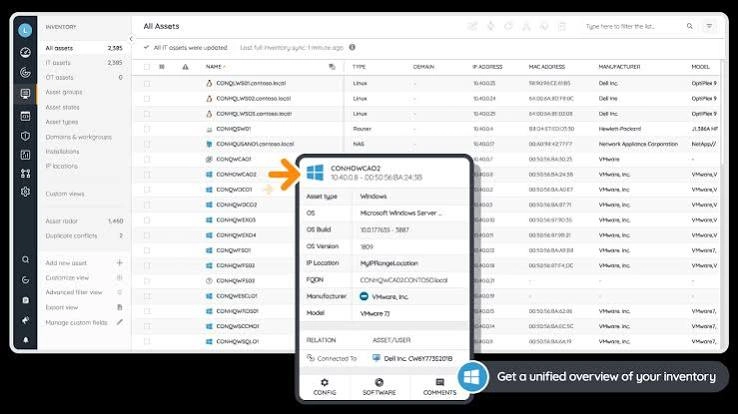
Lansweeper is an asset intelligence platform rather than a service desk, and it is commonly deployed alongside an existing CMDB. It discovers and classifies assets across IT, operational technology, IoT, and cloud environments, including managed, unmanaged, and shadow devices, without requiring agents on every device.
Discovered records are normalized, deduplicated, and classified at scale, then enriched with ownership, configuration state, lifecycle status, and dependency relationships. That enriched data is synced into ITSM, CMDB, and security tooling, with continuous discovery used to close the gap between what the CMDB records and what is actually deployed.
G2 rating: 4.4 out of 5 (68 reviews)
Key features include:
- Cross-domain asset discovery: Continuously discovers and classifies assets across IT, OT, cloud, and IoT environments, covering managed, unmanaged, and shadow devices without manual effort.
- Normalization and deduplication at scale: Normalizes, deduplicates, reconciles, and classifies discovered data automatically, so records arriving from different sources resolve into one consistent inventory.
- Record enrichment: Adds ownership, configuration state, lifecycle status, and dependency relationships to each asset record, giving incident and change teams context attached to the configuration item itself.
- Continuous CMDB validation: Runs discovery continuously and syncs enriched records into the CMDB, removing scheduled reconciliation cycles and manual exports between systems.
- ITSM and security tool integrations: Pushes validated asset intelligence into ITSM, CMDB, procurement, and security platforms so those systems act on the same asset data.
- Risk and lifecycle context: Applies vulnerability data and lifecycle signals to assets, which supports risk assessment, spend forecasting, and identification of assets nearing end of life.
Limitations (as reported by users on G2):
- Cloud and on-premises feature disparity: Multiple reviewers report functionality present on-premises that is missing in the cloud version, with development effort concentrated on the cloud product.
- Synchronization between deployments: Users describe the cloud and on-premises sync as unreliable and not fully bidirectional, leading to data inconsistencies and manual reconciliation.
- Custom reporting requires SQL: Building reports beyond the supplied set relies on SQL queries and knowledge of the underlying database schema, which reviewers note is a barrier for some administrators.
- Support responsiveness: Several reviewers report slow or unresolved support interactions, with some noting the absence of a phone channel.
- Pricing changes: Users mention price increases over time and licensing tiers that step up in large increments, which they found awkward at certain estate sizes.
- Interface performance: Reviewers describe the interface as dated in places and note performance issues and fixed page-size limits when working through large asset lists.
Source: Lansweeper

ITSM Platform CMDB Tools
4. ServiceNow CMDB

Best for: Enterprises standardizing on one ITSM platform
Strengths: Service Graph connectors, data health, unified maps
Things to consider: High cost, heavy configuration effort
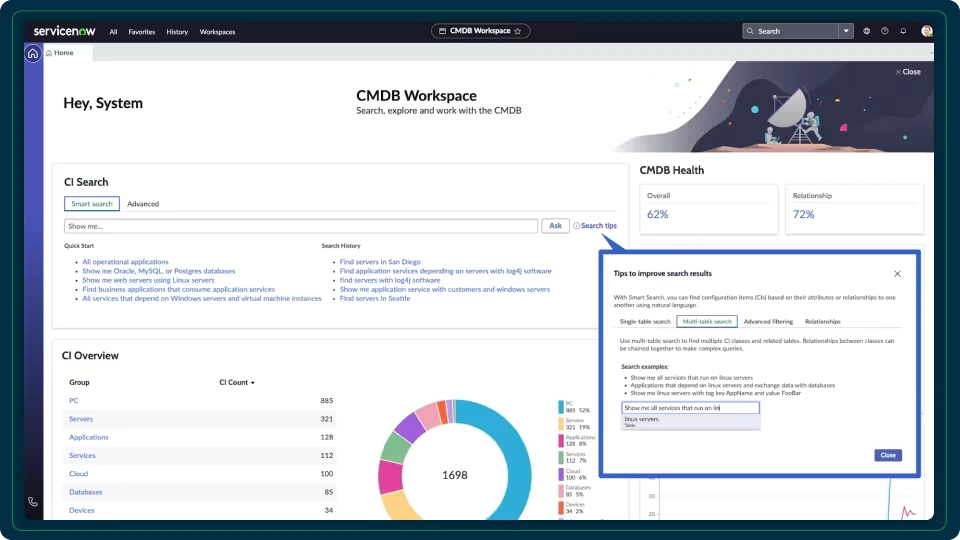
ServiceNow CMDB is delivered as part of the ServiceNow AI Platform and acts as the system of record for configuration item data shared across the platform’s other applications. Data is curated from multiple sources into a single view, with certified connectors used to bring in information from external IT systems.
The product includes a dedicated workspace for configuration managers, continuous assessment of data accuracy for audit and AI use cases, and visualization that presents both technical configuration item relationships and business service context. It sits alongside ServiceNow Discovery, Service Mapping, and Asset Manager, which are licensed as separate applications.
Rating: 4.3 out of 5 on PeerSpot, 8.6 out of 10 average score (34 reviews). G2 does not list ServiceNow CMDB as a standalone product, only ServiceNow IT Service Management.
Key features include:
- CMDB Workspace: Provides a central workspace for tracking activity, checking data accuracy, and deriving insight, giving configuration managers a single place to administer the database.
- Service Graph Connectors: Certified connectors integrate data from external IT systems into the CMDB, reducing the amount of custom integration code needed to populate configuration item records.
- Multi-source data acquisition: Curates data arriving from several sources into a consolidated view of automatically populated CMDB data, so records from discovery, monitoring, and third-party systems resolve together.
- Continuous data accuracy assessment: Assesses the accuracy of CMDB data on an ongoing basis, producing audit data sets and supporting downstream AI use cases that depend on trustworthy configuration data.
- Visualization and reporting: Presents technical configuration item relationships and business context in a unified map, used for understanding dependencies and assessing the scope of a change or incident.
- Digital lifecycle management: Acts as a shared system of record and action across digital products, so configuration data is consumed by ITSM, ITOM, and asset management processes on the same platform.
Limitations (as reported by users on PeerSpot):
- Cost and licensing complexity: Reviewers consistently place pricing at the high end and describe licensing that varies by module, with per-user and per-transaction models that make cost estimation difficult.
- Configuration effort required: Multiple reviewers note that the CMDB functions as a platform rather than a finished configuration management tool, and needs significant development work before it becomes robust.
- Learning curve for new users: Users report that newcomers struggle with the concepts and processes, and several called for more structured training or self-guided courses.
- Data accuracy governance: Reviewers describe ongoing effort to keep data current and free of duplicates when it arrives from many sources, with clear data ownership needed to maintain trust in the records.
- Reporting presentation: Some users found the reporting function less user-friendly than expected and asked for stronger visuals and dashboards.
- Support consistency: Reviewers report that support quality varies between cases, and that customization requests take longer to resolve than standard issues.
Source: ServiceNow

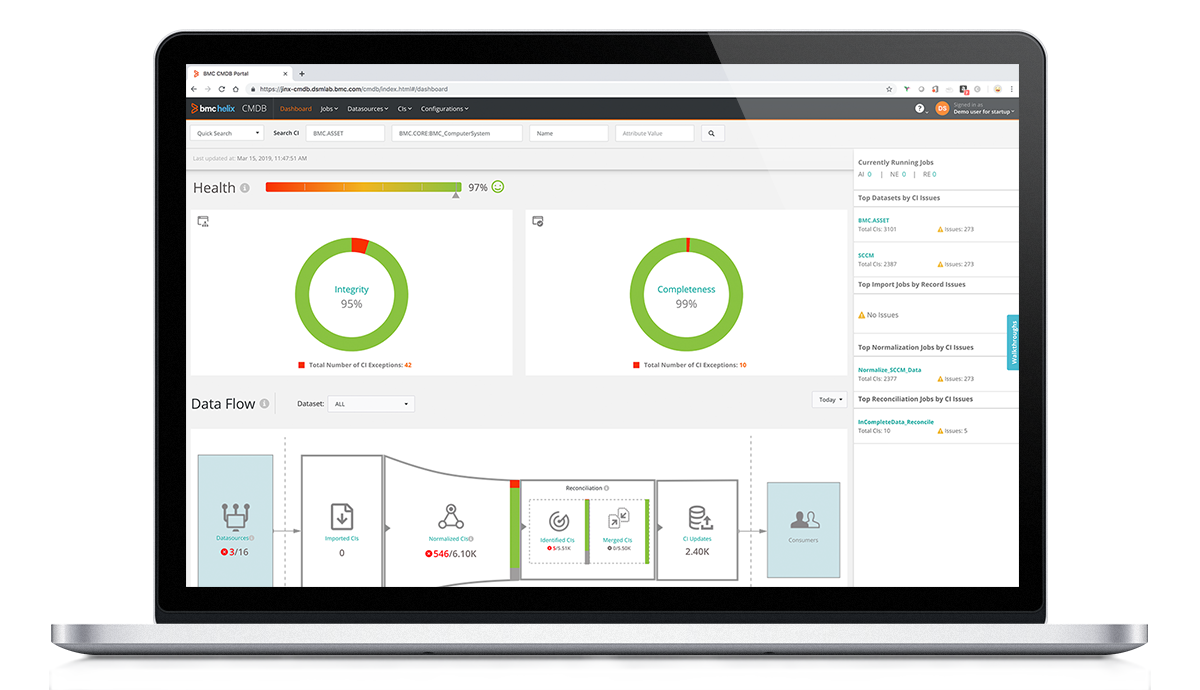
5. BMC Helix CMDB

Best for: Large ITIL estates already running BMC Helix ITSM
Strengths: Scale, federation, reconciliation, change impact data
Things to consider: Dated interface, complex customization
BMC Helix CMDB maintains configuration data and service models across on-premises and cloud services, and is designed to hold hundreds of millions of configuration items. Data can be populated automatically through BMC Helix Discovery and BMC Helix Client Management, or imported and federated from other sources using integration tooling and APIs.
The product is organized around three working roles. Configuration managers maintain data quality and track configurations, change managers use dependency data for impact assessment and conflict detection, and service desk agents pull configuration context into ticket handling and routing.
G2 rating: 3.7 out of 5 (6 reviews)
Key features include:
- Large-scale configuration item management: Maintains data and service models covering hundreds of millions of configuration items, including on-premises hardware and software as well as cloud services.
- Automated population and federation: Populates and updates the CMDB through BMC Helix Discovery, BMC Helix Client Management, and other out-of-the-box connectors, and federates data from external sources through integration tooling and APIs.
- Change impact and conflict detection: Supplies configuration and dependency data for change advisory boards, shows which infrastructure, applications, and services a change affects, and flags conflicts when multiple changes are scheduled for the same window.
- Service desk configuration context: Surfaces which services are affected by a ticket, retrieves detailed configuration data for the assets involved, and routes tickets to a resolver group based on CMDB data.
- Granular role-based access: Access can be defined at the level of individual configuration items and attributes, which matters in multi-tenant and heavily regulated environments.
- Predefined configuration management KPIs: Ships with KPIs for measuring the configuration management process or policy, presented through a configuration management dashboard covering CMDB health.
- Relationship visualization: Displays configuration data graphically so relationships and dependencies between items can be traced without querying the underlying tables.
Limitations (as reported by users on G2):
- Interface design: Reviewers describe the interface as basic and dated across both the Windows and web consoles, with one noting that screen space is used inefficiently.
- Customization complexity: Users report that customization is complex, and that reconciliation, normalization, and integration jobs are monitored across separate windows rather than one central location.
- Stability and change downtime: One enterprise reviewer reported instances of the application becoming unavailable, and noted that even small changes required scheduled downtime.
- Audit trail visibility: The same reviewer described difficulty tracing user activity and logs within the product.
- Connector learning curve: A reviewer noted that it takes time to understand and use the out-of-the-box connectors correctly, and advised negotiating on licensing cost and support terms.
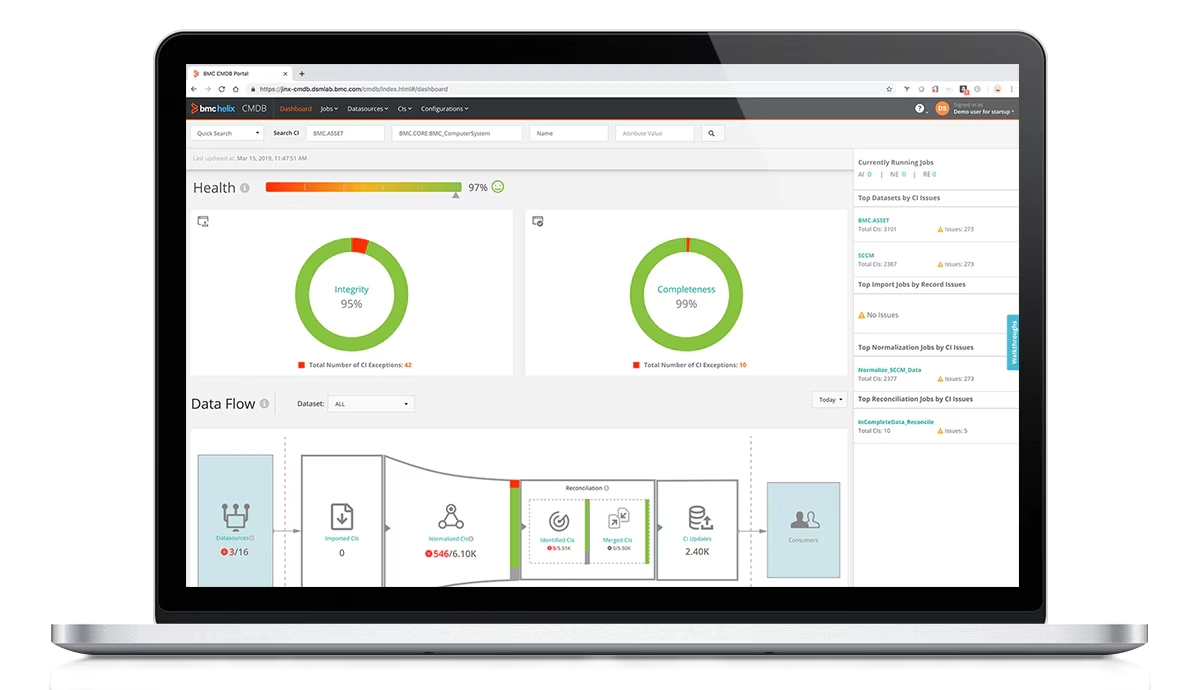
Source: BMC
6. Jira Service Management Assets

Best for: Teams already running IT on the Atlassian platform
Strengths: Flexible object schemas, ticket linking, Discovery
Things to consider: Steep admin learning curve, basic reporting
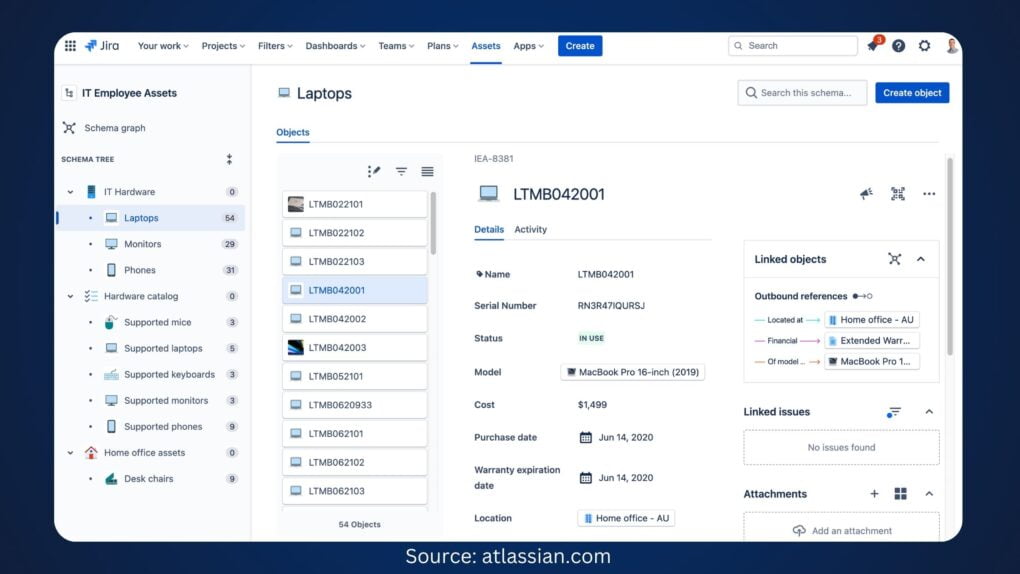
Atlassian does not sell a standalone CMDB. Assets is the asset and configuration management capability inside Jira Service Management, included from the Standard plan upward. The database is built from object schemas, which hold object types and objects, and multiple schemas can be created so different teams manage their own data and auditing stays manageable.
Objects are linked to each other through references to express dependencies, and linked to Jira work items through an Assets custom field so configuration context appears in the issue view and customer portal. Data arrives via CSV and JSON imports, the Assets Discovery scanner, or Data Manager on the higher plans.
G2 rating: 4.3 out of 5 (991 reviews for Jira Service Management; G2 does not list Assets separately)
Key features include:
- Object schemas as the configuration database: An object schema is the configuration management database itself, holding object types and objects. Multiple schemas allow data to be split into smaller sets for auditing and team ownership.
- Object references for dependencies: Objects are linked to one another through references, building the graph of relationships and dependencies between configuration items.
- Assets custom field on work items: Objects are linked to Jira work items so agents see asset context inside the issue, and requesters can select the relevant asset from the portal when raising a request.
- Assets Discovery scanner: An agentless scanner picks up network assets, with an optional agent for more detail. Administrators choose which assets and attributes to import, write custom scanning patterns, and schedule runs that trigger automation on detected changes.
- Data Manager on Premium and Enterprise: Consolidates, cleanses, and reconciles asset data from multiple sources, highlights discrepancies, and includes a schema importer for automating the integration process.
- Import configurations and schema templates: Data imports from CSV, JSON, and Assets Discovery use either a predefined structure or manual object type, attribute, and child object mapping. Templates cover IT asset management, people, and facilities.
- Automation and reporting: Automation rules update objects from work item input and raise notifications for license, warranty, and stock thresholds. Reporting through Atlassian Analytics covers configuration data health, accuracy, and completeness.
Limitations (as reported by users on G2):
- Administrative learning curve: The most commonly raised issue. Reviewers describe configuration of workflows, permissions, schemes, and custom fields as demanding, particularly for teams without a dedicated Jira administrator.
- Interface navigation: Users describe the interface as cluttered, with several noting that locating specific settings takes many steps and that non-technical stakeholders struggle to navigate it.
- Reporting depth out of the box: Reviewers report that reporting is basic unless dashboards are customized extensively or third-party add-ons are purchased.
- Performance at scale: Users report the platform slowing down with large projects, high ticket volumes, extensive filters, or many custom fields.
- Licensing cost and tier structure: Reviewers note that costs rise as agent counts grow, that some capabilities require Premium or Enterprise plans, and that licensing cannot be purchased in small increments.
- Configuration effort for advanced use cases: Several users describe complex service level agreement setups and multi-client scenarios as requiring ongoing administrative maintenance.
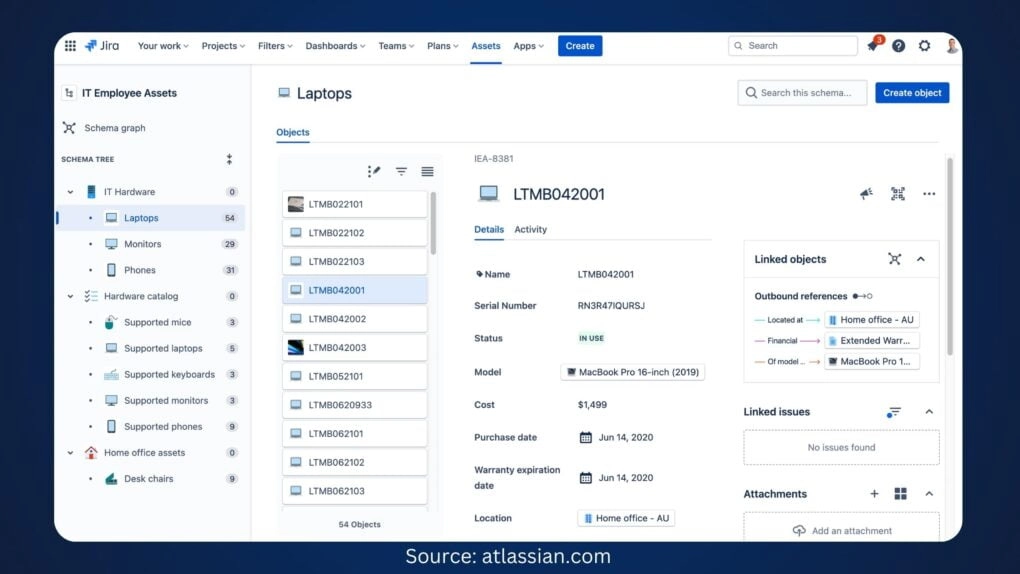
Source: Jira
7. ManageEngine ServiceDesk Plus CMDB

Best for: ITIL service desks needing a built-in CMDB
Strengths: Baselines, data quality policies, impact analysis
Things to consider: Dated UI, limited standard reports
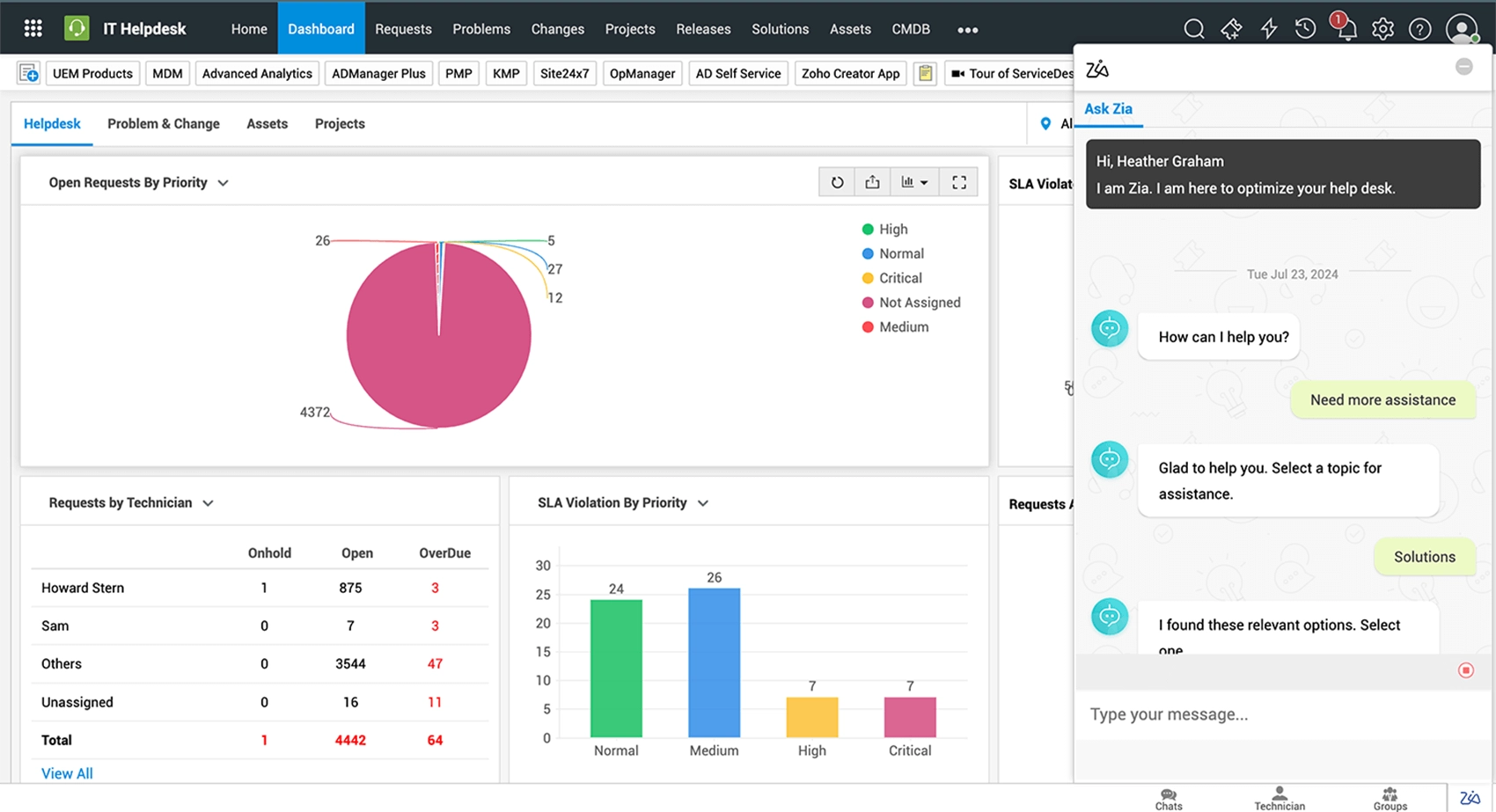
ServiceDesk Plus includes a built-in CMDB that acts as the record of configuration data for the service desk. Configuration items are populated through built-in discovery or third-party tools, and newly added assets sync as configuration items through predefined sync rules, identifier rules, and field mappings intended to prevent duplicates.
Relationships are mapped on a drag-and-drop canvas with custom relationship types, and service-specific segments of the infrastructure are saved as Business Views. Configuration items associate with incident, problem, change, project, and release records, so the dependency map is reachable from any of those processes.
G2 rating: 4.2 out of 5 (250 reviews for ManageEngine ServiceDesk Plus; G2 does not list the CMDB module separately)
Key features include:
- Relationship mapping and Business Views: Configuration item dependencies are laid out on a drag-and-drop canvas with custom relationship types, and service-specific segments are saved as Business Views for repeat reference.
- CI Impact Analysis extension: Select a configuration item, or apply condition-based filtering for a particular depth and direction, and the full impact path is displayed.
- CMDB Baselines: Captures versioned snapshots of configuration item attributes and relationships, scoped by configuration item type or by an entire Business View. Baselines are compared to show what was added, removed, or modified, with per-item version history for drift detection and audits.
- Data quality policies: Policies are configured per configuration item type to track incomplete, stale, and orphaned items, defining required fields, staleness duration, and essential relationships. Each item carries a data quality scorecard alongside its configuration.
- CMDB health dashboard: Presents configuration item counts by status, data quality metrics by item type, and associations with other ITSM modules in one view.
- Integration Mapping: Records which integration and instance each configuration item was ingested from, so items can be filtered by source and duplication traced back to its origin.
- Layer 2 and application dependency discovery: Syncs Layer 2 network devices, applications, and their interdependencies through integrations with ManageEngine’s observability suite, and populates configuration items from third-party monitoring tools.
Limitations (as reported by users on G2):
- Setup and customization effort: The most frequently raised issue. Reviewers describe initial configuration as time-consuming and the volume of settings as overwhelming, with advanced customization requiring considerable effort.
- Interface design: Multiple reviewers describe the interface as dated compared with competing products, and several report it feeling heavy or sluggish in large environments and on hosted plans.
- Reporting limitations: Users report constraints in the standard report set, with customized reports sometimes requiring a separate ManageEngine analytics product.
- Support responsiveness: Several reviewers report delays in support response, with some noting that working through a local partner was more effective than direct channels.
- Customization limits: Reviewers mention caps on the number of fields available and constraints on modifying the console, which limited the customizations they wanted to build.
- Upgrade disruption: One reviewer noted that upgrades change the software enough that users need to relearn parts of it, and another reported that upgrades are not automated.
- Integration coverage: A reviewer reported that integration with some existing applications was weaker than their previous system, requiring a connector and retention of the older tool for certain ticket types.
Source: ManageEngine
Conclusion
Choosing a CMDB tool comes down to how well it can maintain accurate configuration data and make that data useful across IT operations. Enterprises should prioritize automated discovery, reliable dependency mapping, data reconciliation, hybrid and cloud coverage, and integration with existing ITSM and ITAM workflows. The right approach should also match the organization’s scale and available administrative resources, since a feature-rich CMDB provides limited value if keeping its data trustworthy requires more manual effort than the team can sustain.