TL;DR: Nagios tracks host and service availability through plugin-based checks, but many teams supplement or replace it. Faddom is best for agentless dependency mapping, Zabbix for free full-stack infrastructure monitoring, Prometheus for cloud native metrics, and Datadog for managed SaaS observability.
What Is Nagios Monitoring?
Nagios is a free, open-source IT infrastructure monitoring platform that tracks systems, networks, applications, and services. It can monitor servers, network devices, applications, databases, and services such as HTTP, DNS, and SMTP. Nagios periodically runs checks against these resources and compares the results with configured thresholds or expected states.
How it works:
- Hosts and services: Organizes monitored infrastructure into devices such as servers and routers and the services or resources associated with them.
- Active checks: Periodically runs configured plugins to poll hosts and services and determine their current status.
- Passive checks: Accepts status results submitted by external applications, agents, or monitoring processes.
- Nagios plugins: Uses external executables or scripts to perform checks and return status information to Nagios Core.
- Check scheduling and state changes: Schedules checks at configured intervals and uses SOFT and HARD states to confirm persistent problems before taking action.
- Alerts and notifications: Notifies configured contacts about qualifying problem and recovery states according to notification rules and filters.
Infrastructure Monitoring Tools at a Glance
The table below summarizes the key differences between the tools covered in this section. Each one is explored in more detail further down.
| Category | Solution | Best For | Key Strengths | Things to Consider |
| Commercial monitoring and mapping platforms | Faddom | Mapping servers, applications, and dependencies without agents | Agentless collection, real-time hybrid mapping, fast deployment | Niche tools and non-standard systems may need extra configuration |
| Commercial monitoring and mapping platforms | Datadog Infrastructure Monitoring | SaaS monitoring across cloud, hybrid, and on-premises hosts | 900+ integrations, tag-based analytics, cross-signal correlation | Costs can climb quickly with data volume and host growth |
| Commercial monitoring and mapping platforms | Paessler PRTG | All-in-one monitoring of networks, servers, cloud, and OT | Sensor-based setup, live maps and dashboards, multiple interfaces | Sensor-based licensing gets costly as environments grow |
| Commercial monitoring and mapping platforms | Site24x7 | Cloud-based monitoring of servers, networks, and applications | 100+ server metrics, automated remediation, plugin integrations | Pricing across monitor types is complicated to follow |
| Open-source monitoring platforms | Zabbix | Free, full-featured monitoring of servers, networks, and clouds | Agent and agentless collection, templates, proxies for scale | Complex initial setup, and large estates need database tuning |
| Open-source monitoring platforms | Prometheus | Metrics and alerting for cloud native systems and services | Dimensional data model, PromQL, service discovery, exporters | PromQL is hard to learn, and visualization needs Grafana |
| Open-source monitoring platforms | Icinga | Check-based monitoring with a modern web interface | Plugin directory, APIs, clustering, hybrid cloud coverage | Steep learning curve, and command line knowledge helps |
| Open-source monitoring platforms | Checkmk | Discovery-driven monitoring across hybrid infrastructure | Service auto-discovery, 2,000+ integrations, distributed sites | Advanced configuration and custom checks take learning |
Related content: Read our guide to Zabbix alternatives
How Does Nagios Monitoring Work?
1. Hosts and Services
Nagios organizes monitored infrastructure primarily around hosts and services. A host represents a physical or virtual device, such as a server, router, switch, or workstation. Host checks determine whether that device is UP, DOWN, or UNREACHABLE. Nagios can also use parent relationships between hosts to distinguish a device that is actually down from one that is unreachable because another network device has failed.
A service represents something running on or associated with a host, such as HTTP, DNS, disk usage, CPU load, or a database service. Each host and service definition can specify how frequently checks run, when checks are permitted, how many retry attempts are required, and whether active or passive checks are enabled.
2. Active Checks
Active checks are initiated by the Nagios Core process and are the standard method for regularly polling hosts and services. When a check is due, Nagios executes the configured plugin and provides the information needed to perform the check. The plugin tests the target and returns its result to Nagios, which then processes the result and can update status information, execute event handlers, or send notifications.
Active checks normally run according to the configured check_interval or retry_interval. Nagios can also perform checks on demand, for example when it needs current information to determine whether a host or network segment is reachable.
3. Passive Checks
Passive checks are performed outside the Nagios Core process. An external application, agent, or monitoring process performs the check and submits the resulting status information to Nagios for processing. Nagios then handles the result in essentially the same way as an active check result, including updating status, logging events, and potentially sending notifications.
Passive checks are particularly useful for events that cannot be efficiently polled at fixed intervals, such as SNMP traps or security alerts. They can also be useful when systems are behind firewalls or as part of distributed and redundant monitoring architectures.
4. Nagios Plugins
Nagios Core relies on external programs called plugins to perform the actual monitoring checks. The Core monitoring engine does not contain built-in logic for testing every type of host or service. Instead, it executes a plugin whenever it needs to determine the state of a monitored resource.
Plugins can be compiled executables or scripts written in languages such as Shell, Perl, Python, PHP, or Ruby. A plugin performs a test (for example, checking whether a web server responds or whether disk usage exceeds a threshold) and returns the result to Nagios. This plugin architecture also makes it possible to create custom checks for applications and infrastructure that are not covered by existing plugins.
5. Check Scheduling and State Changes
Nagios schedules active checks using settings such as check_interval, retry_interval, and check_period. Under normal conditions, when a host is UP or a service is OK, checks generally run according to the normal check_interval.
When Nagios detects a potential problem, it can move the host or service into a SOFT state and repeat the check according to the shorter retry_interval. If the problem continues for the configured max_check_attempts, Nagios changes it to a HARD problem state. HARD state changes are significant because they can trigger notifications and other configured actions. Once in a hard state, future checks normally return to the regular check_interval.
6. Alerts and Notifications
Nagios can notify configured contacts when monitored hosts or services enter significant problem or recovery states. Notifications are generally triggered by a HARD state change, such as a service becoming critically unavailable after its configured retry attempts have been exhausted. Nagios can also send repeated notifications when an object remains in a hard problem state and its configured notification interval has elapsed.
Before sending a notification, Nagios applies several filters. Notifications can be suppressed when notifications are globally disabled, when the resource is in scheduled downtime, when it is flapping, or when the particular state is excluded by the host or service notification configuration. Administrators can also
Nagios Core vs. Nagios XI
Nagios Core and Nagios XI use the same underlying Nagios monitoring engine, but they target different operational needs:
- Nagios Core is the free, open-source product and provides the fundamental monitoring capabilities for hosts, services, applications, network devices, and custom metrics.
- Nagios XI is the commercially licensed product built on Nagios Core, adding management, visualization, reporting, and enterprise-oriented features.
Nagios Core is primarily configured through text-based configuration files and the command line. This gives experienced administrators considerable control and flexibility, but setup and ongoing management can require more manual work. Nagios XI adds a web-based configuration interface, Configuration Wizards, auto-discovery capabilities, customizable dashboards, performance graphs, and advanced reporting.
Another major difference is reporting and administration. Nagios XI provides features such as availability and SLA reporting, REST API access, multi-tenancy, an integrated database, and commercial support. Depending on the XI edition, organizations can also use features such as capacity-planning reports, scheduled reports, audit logs, and bulk configuration tools.
Nagios Core is suitable for technically experienced teams that want an open-source monitoring platform and are comfortable managing configuration manually. Nagios XI is better suited to organizations that want the Nagios monitoring engine with easier administration, richer dashboards and reporting, and professional support. Existing Nagios Core checks and plugins can also be used with Nagios XI, which can simplify migration between the two products.
Key Nagios Limitations
Nagios provides broad infrastructure monitoring and extensive customization, but G2 reviewers also point to several drawbacks that can increase deployment and management effort, particularly in larger or more complex environments:
- Complex setup and configuration: Initial deployment and configuration can be difficult, especially for teams without prior Nagios experience.
- Requires technical expertise: Advanced configuration, troubleshooting, and plugin management may require strong Linux, networking, and monitoring knowledge.
- Dated or less intuitive interface: Some reviewers describe parts of the GUI and dashboards as less modern or user-friendly than competing platforms.
- Customization can require manual effort: Custom checks, integrations, and plugins may require scripting or additional configuration.
- Limited depth for some specialized monitoring: Nagios can provide broad visibility, but some reviewers report that specialized areas such as database or network performance monitoring may lack deeper diagnostic detail.
- Troubleshooting can be time-consuming: Identifying problems with configurations, plugins, or Nagios itself can require significant investigation.
- Scaling may require tuning: Large environments may need additional operating system, database, or Nagios configuration tuning to maintain performance.
- Commercial licensing costs: Nagios XI requires a paid license, and some reviewers consider its pricing a drawback compared with Nagios Core or other monitoring options.
Notable Infrastructure Monitoring Tools
How we selected these tools: We shortlisted infrastructure monitoring platforms based on host and service checking, metric collection, alerting and notification handling, automated discovery and dependency visibility, and coverage of both on-premises and cloud environments.
Commercial Monitoring and Infrastructure Mapping Platforms
1. Faddom

Best for: Mapping servers, applications, and dependencies without agents
Strengths: Agentless collection, real-time hybrid mapping, fast deployment
Things to consider: Niche tools and non-standard systems may need configuration
Faddom is an agentless platform that maps on-premises and cloud infrastructure and automatically groups discovered servers by business application. It builds dependency maps from a copy of network traffic, so it requires no agents, no server credentials, and no firewall changes, and it can run in offline environments.
The platform applies AI-driven correlation to turn raw network data into application and dependency maps that update around the clock. Teams use it to document assets, analyze the impact of planned changes, plan migration waves, prepare for audits, and identify cost optimization opportunities. First maps appear within one hour of deployment.
Key features include:
- Agentless data collection: Faddom reads a copy of network traffic instead of installing software on monitored servers. No agents, credentials, open firewalls, or internet access are needed, and all data stays inside the environment.
- Automatic application grouping: Discovered servers of all types are grouped into business applications, and the topology updates in real time as the environment changes.
- Hybrid environment coverage: Connects to on-premises data centers and cloud accounts and maps both in one view, including air-gapped and multi-cloud environments.
- Change impact simulation: Users can simulate the effect of a planned change on dependent servers and applications before carrying it out.
- Risk scoring and anomaly detection: A risk score combines SSL status, CVEs, users, and external traffic, and automated detection runs 24/7 for traffic anomalies and abnormal behavior.
- Migration and compliance output: Wave-based migration planning, exportable diagrams, and CMDB inventories support data center moves and frameworks such as NIST, DORA, CJIS, and FedRAMP.
- Nagios event integration: Receives host and service notifications from Nagios Core and Nagios XI, placing infrastructure events alongside topology data. Teams can choose which monitored hosts and services send problem and recovery events to Faddom.
Limitations (as reported by users on G2):
- Interface customization: Some users suggested more flexibility in the interface layout and how information is displayed.
- Reporting options: A few users expressed interest in additional reporting capabilities, including more customizable dashboards and visualizations.
2. Datadog Infrastructure Monitoring

Best for: SaaS monitoring across cloud, hybrid, and on-premises hosts
Strengths: 900+ integrations, tag-based analytics, cross-signal correlation
Things to consider: Costs can climb quickly with data volume and host growth
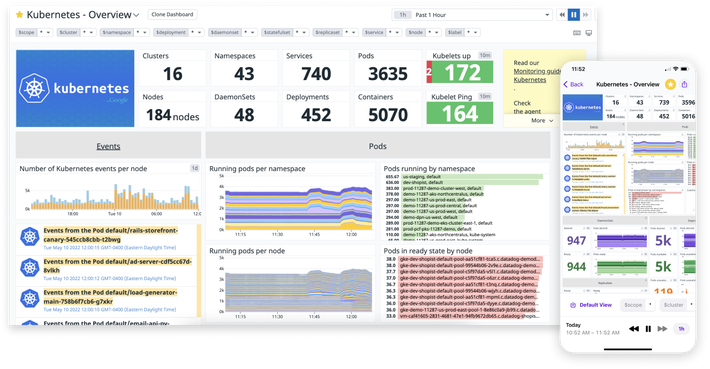
Datadog Infrastructure Monitoring is a SaaS product that collects metrics from cloud, hybrid, edge, and on-premises environments and presents them through dashboards, visualizations, and alerts. Deployment does not require professional services or extensive training, and the interface does not require a query language to use.
The product tracks tens of thousands of infrastructure metrics out of the box and keeps continuous historical records, including for infrastructure that no longer exists. It works alongside Datadog Application Performance Monitoring and supports OpenTelemetry, and it adds configuration checks and vulnerability detection for cloud accounts, hosts, and containers.
Key features include:
- Broad integration coverage: Vendor-backed integrations for Kubernetes, serverless platforms, and more than 900 other technologies, deployable on-premises, hybrid, edge, and multi-cloud.
- Tag-based search and analytics: Infrastructure is sliced and filtered using tags, and tagging issues can be identified and corrected to close attribution gaps.
- Cross-signal correlation: One-click correlation links related metrics, traces, logs, and security signals from across the stack during troubleshooting.
- AIOps event correlation: Events are correlated automatically to surface issues from the noise and reduce the volume of alerts reaching teams.
- Configuration change tracking: Configuration changes are tracked across multi-cloud environments to check for consistency.
- Cloud security posture checks: Continuous configuration checks across cloud accounts, hosts, and containers, with out-of-the-box support for more than 15 compliance frameworks including PCI DSS, SOC 2, HIPAA, GDPR, and CIS.
- Custom metrics handling: Custom metrics are ingested with selective indexing for querying, and distribution metrics calculate globally accurate percentiles across the whole estate.
Limitations (as reported by users on G2):
- Cost at scale: Reviewers report that spending escalates quickly and unpredictably as log indexing, custom metrics, and host counts grow.
- Pricing complexity: The pricing model is described as hard to forecast, and the free tier is limited enough that teams move to paid plans early.
- Support process: Some reviewers describe support handled largely by email, with log data submitted for analysis and responses that can take a day or more.
- Fit for smaller teams: Reviewers at smaller companies frequently flag the cost as prohibitive relative to their infrastructure footprint.

Source: Datadog
3. Paessler PRTG

Best for: All-in-one monitoring of networks, servers, cloud, and OT
Strengths: Sensor-based setup, live maps and dashboards, multiple interfaces
Things to consider: Sensor-based licensing gets costly as environments grow
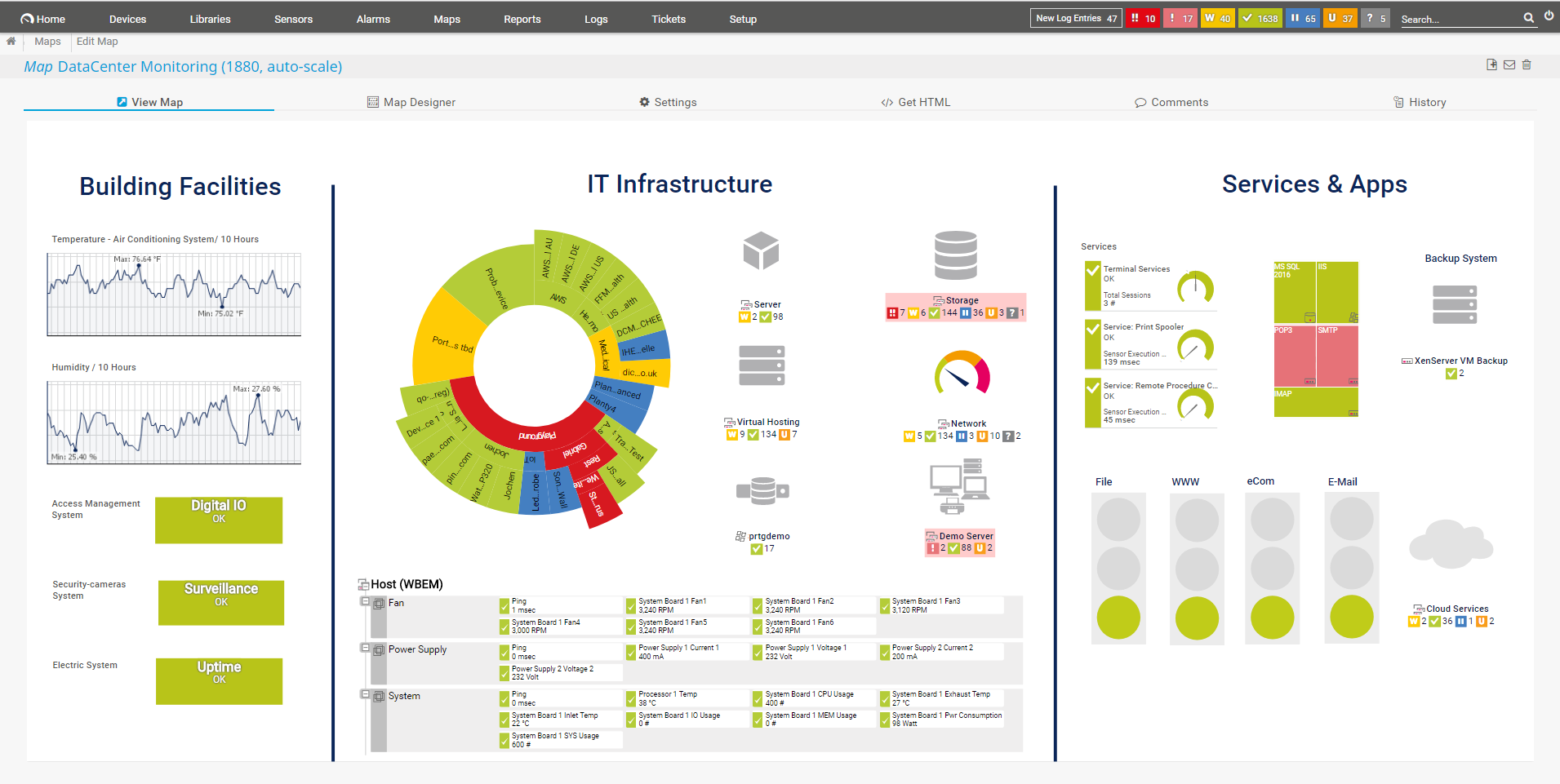
Paessler PRTG monitors systems, devices, traffic, and applications from a single platform that covers networks, databases, applications, cloud services, servers, LANs, and SNMP-capable devices. Monitoring is built around sensors, where each sensor represents one measurement point such as a port, a service, or a specific metric on a device.
The product family includes PRTG Network Monitor for self-hosted deployments, PRTG Enterprise Monitor for larger estates, PRTG Hosted Monitor as a hosted option, and PRTG UVexplorer. A fully featured 30-day trial is available for download, and licensing is based on sensor count.
Key features include:
- Sensor-based monitoring: Every monitored item is configured as a sensor, which sets both what is measured and how the deployment is licensed.
- Maps and dashboards: Real-time maps display live status information, and the PRTG map designer builds custom dashboards for different audiences.
- Alerts and notifications: Custom thresholds trigger alerts, with built-in notification methods including email, push notifications, and HTTP requests.
- Multiple user interfaces: A web interface, a desktop app that edits many monitoring objects at once, and iOS and Android apps.
- SNMP and network coverage: SNMP monitoring covers routers, switches, servers, printers, and workstations, alongside bandwidth monitoring, NetFlow monitoring, and network topology mapping.
- Distributed monitoring: Monitoring can be distributed across separate sites and locations from one installation.
- Extensibility: Functionality is extended through the HTTP API and custom sensors, with scripts and templates available from the PRTG Sensor Hub.
Limitations (as reported by users on G2):
- Sensor licensing costs: Reviewers report that costs rise as sensor counts increase, which can limit scalability in larger environments.
- Sensor planning overhead: Organizing and managing hundreds of sensors logically becomes an administrative task in itself as environments expand.
- Initial configuration effort: Setting up complex infrastructures can feel overwhelming, and advanced customization calls for deeper technical knowledge.
- Remote probe troubleshooting: Diagnosing probe disconnections across multiple remote sites can take longer than expected.

Source: Paessler
Related content: Read our guide to Paessler PRTG
4. Site24x7

Best for: Cloud-based monitoring of servers, networks, and applications
Strengths: 100+ server metrics, automated remediation, plugin integrations
Things to consider: Pricing across monitor types is complicated to follow
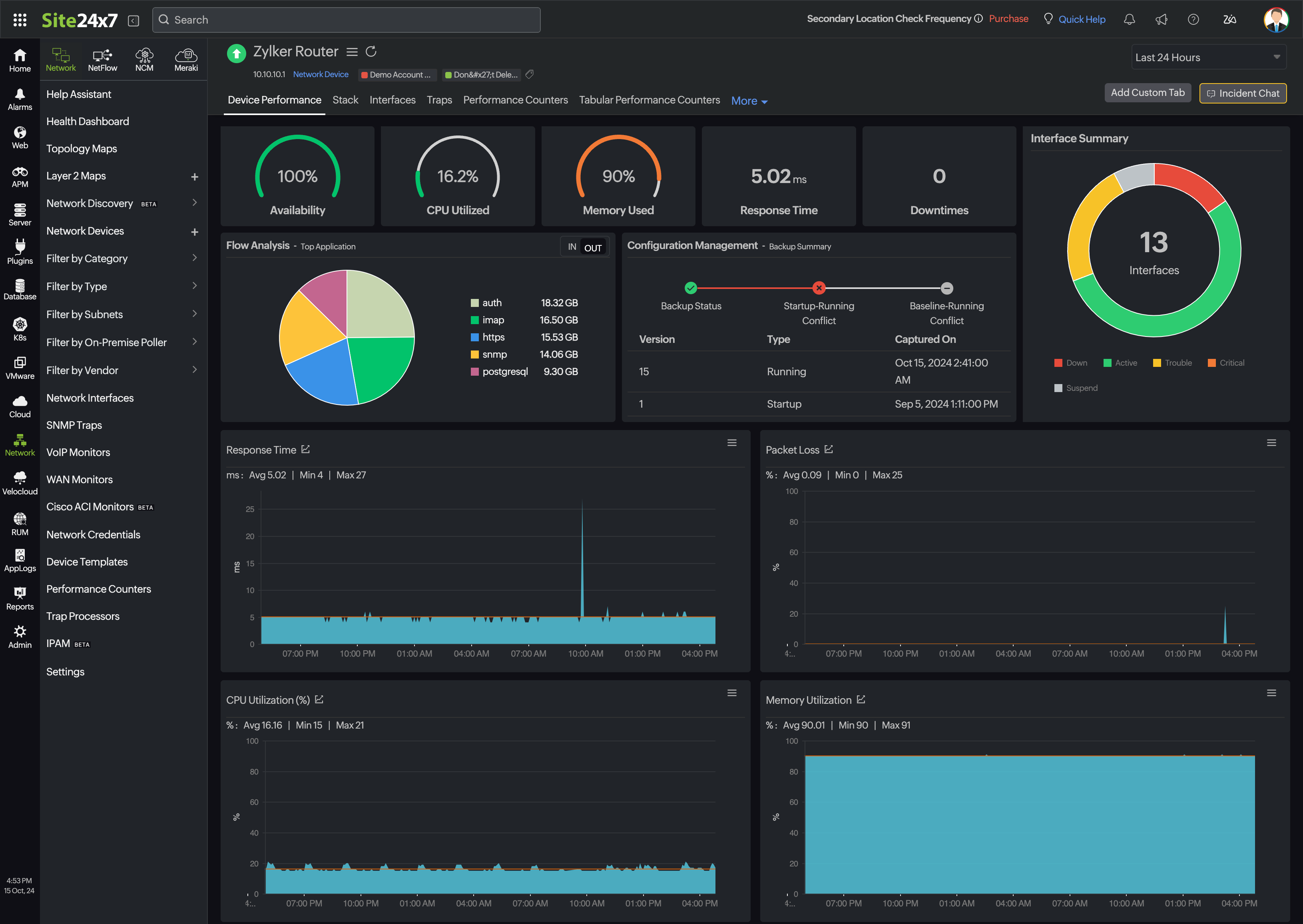
Site24x7, part of ManageEngine and Zoho, is a cloud-based platform that tracks more than 100 health and performance metrics across Windows and Linux systems in physical, virtual, cloud, and hybrid environments. It supports a lightweight agent for deep host metrics and agentless collection over SNMP and WMI for devices where agents are not practical.
Beyond servers, the platform covers website and synthetic monitoring, real user monitoring, log management, application performance monitoring, network monitoring, and cloud platforms including AWS, Azure, GCP, and OCI. Monitoring runs from data centers in the United States, United Kingdom, Canada, Europe, India, Australia, China, Japan, and Saudi Arabia.
Key features include:
- Server metric coverage: CPU utilization and load average, memory usage and swap, disk space, IOPS and latency, network throughput and errors, and running processes and services.
- Process and service tracking: Top process charts identify resource-heavy processes, and latency, thread count, disk I/O, and handle count are tracked per process.
- IT automation and auto-heal: Automation profiles carry out remediation actions when alerts fire, without manual intervention.
- Root cause analysis reports: RCA reports cover server crashes, downtime, and connectivity issues to trace the origin of an incident.
- Anomaly detection and forecasting: Zia-based predictive analysis flags anomalies before they affect performance and forecasts resource demand for capacity planning.
- Plugin integrations: More than 100 ready-to-install integrations, including MySQL, Apache, and Nagios, plus custom plugins written in Python, Shell, PowerShell, Batch, or VB.
- Virtualization and infrastructure discovery: Discovery and monitoring of VMware ESX/ESXi hosts, datastores, resource pools, Nutanix environments, Docker hosts, Kubernetes clusters, and network devices.
- Resource change notifications: Alerts on modifications to URLs, ports, NTP, files, directories, and logs on monitored servers.
Limitations (as reported by users on G2):
- Pricing structure: Reviewers describe pricing across the various monitor types and thresholds as complicated and potentially expensive.
- Navigation and interface: Advanced features can be hard to locate, and deeper configuration pages are described as cluttered.
- Alert configuration: The alerting system can be overwhelming until it has been tuned properly for the environment.
- Reporting flexibility: Dashboard and report customization is described as limited for advanced operational and management reporting.

Source: Site24x7
Open-Source Monitoring Platforms
5. Zabbix

Best for: Free, full-featured monitoring of servers, networks, and clouds
Strengths: Agent and agentless collection, templates, proxies for scale
Things to consider: Complex initial setup, and large estates need tuning
Zabbix is an open-source monitoring platform released under AGPLv3 with no licensing costs. It collects metrics from network devices, cloud services, containers, virtual machines, operating systems, log files, databases, applications, services, IoT sensors, web pages, HTTP endpoints, and external APIs.
Data is collected through the Zabbix agent or agentlessly using SNMP, IPMI, SSH, Telnet, ODBC, ICMP, TCP, Modbus, MQTT, and Prometheus endpoints. The minimum polling interval is one second, and values can be normalized with JSONPath, XPath, regular expressions, or JavaScript before they are stored.
Key features include:
- Flexible metric collection: Push and pull collection, interval scheduling and overrides, throttling for high-frequency data, and support for numeric, text, binary, and structured JSON, XML, and CSV formats.
- Problem detection: Threshold definitions built from statistical functions over history data, plus baseline anomaly detection, trend prediction, flapping protection, and classification of events as cause or symptom.
- Alerting and escalation: Notifications through email, SMS, webhooks, and platforms such as Slack, Teams, PagerDuty, and Opsgenie, with multi-step escalation paths and remote remediation scripts.
- Discovery and templates: Network discovery scans IP ranges for services, resource discovery creates items, triggers, and graphs automatically, and out-of-the-box templates cover common vendors and systems.
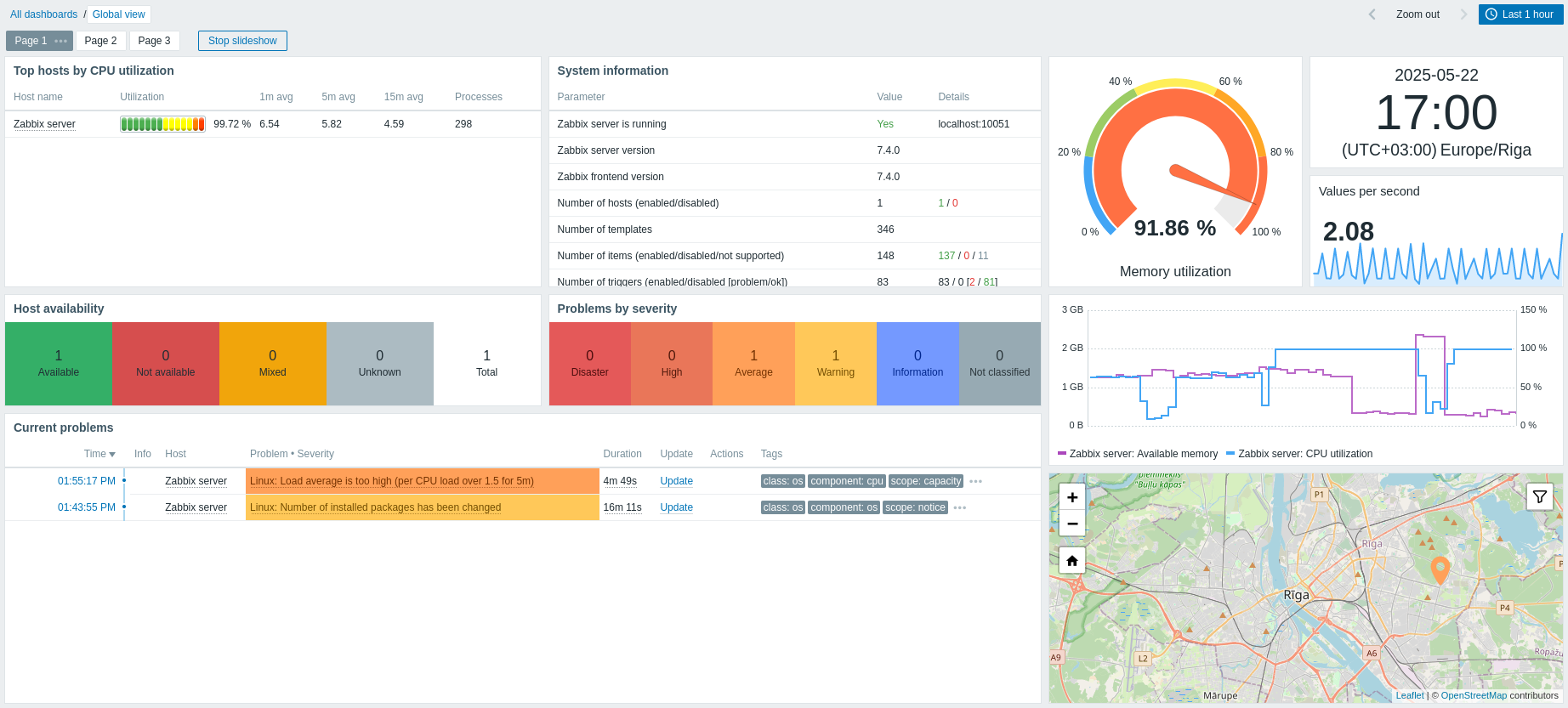
- Visualization and reporting: Widget-based dashboards, custom and aggregate graphs, infrastructure maps with submaps, geo-maps, and scheduled PDF reports.
- Distributed monitoring and high availability: Zabbix proxies collect data behind firewalls and at remote sites, proxy groups balance load with automatic failover, and a secondary server prevents data loss.
- Business service and SLA monitoring: Service trees calculate availability and SLA levels, support impact simulation, and correlate problems for root cause analysis.
- Security controls: TLS encryption between components, LDAP and SAML authentication, multi-factor authentication, granular user roles, audit logging, and HashiCorp or CyberArk vault integration.
Limitations (as reported by users on G2):
- Initial configuration: Setting up hosts and triggers is described as complex for users who are new to the platform.
- Interface: Reviewers describe the interface as dated and often add Grafana for visualization and dashboards.
- Tuning at scale: Managing alerts in large environments can require additional tuning and database optimization.
- Agent connectivity: Some reviewers report intermittent issues with the server connecting to agents.

Source: Zabbix
6. Prometheus

Best for: Metrics and alerting for cloud native systems and services
Strengths: Dimensional data model, PromQL, service discovery, exporters
Things to consider: PromQL is hard to learn, and visualization needs Grafana
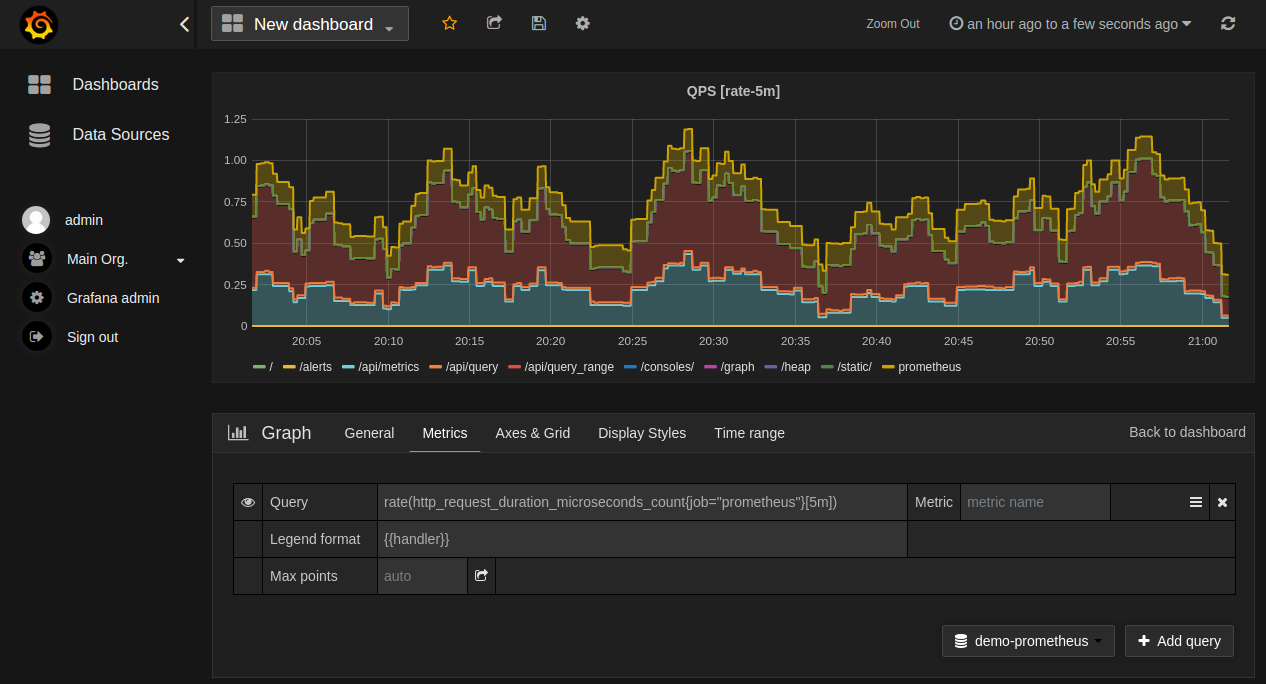
Prometheus is an open-source monitoring system and time-series database released under the Apache 2 License. It models time series in a dimensional data model, where each series is identified by a metric name and a set of key-value pairs, then stores those series for querying, alerting, and dashboarding.
It was the second project to graduate from the Cloud Native Computing Foundation after Kubernetes, and it integrates with Kubernetes and other cloud and container managers to discover and monitor services continuously. Servers operate independently and rely only on local storage, and the statically linked Go binaries deploy across a range of environments.
Key features include:
- Dimensional data model: Time series are identified by a metric name plus key-value label pairs, which supports filtering and aggregation across many dimensions.
- PromQL query language: Queries, correlates, and transforms time-series data for visualizations, alerting rules, and other use cases.
- Alerting with Alertmanager: Alerting rules are written in PromQL and make use of the dimensional data model, while a separate Alertmanager component handles notifications and silencing.
- Service discovery: Integration with Kubernetes and other cloud and container managers finds and monitors targets as services are created and removed.
- Instrumentation libraries: Official and community-contributed libraries cover most major programming languages for instrumenting applications directly.
- Integrations and exporters: Hundreds of official and community-contributed integrations extract metrics from existing systems without code changes.
- Independent operation: Each Prometheus server runs on its own with local storage and no external dependencies to maintain.
Limitations (as reported by users on G2):
- PromQL learning curve: Reviewers repeatedly cite the query language as difficult to learn, particularly when building advanced queries and dashboards.
- Visualization: The built-in interface and graphs are described as basic and outdated, and most teams add Grafana to interpret the data.
- Long-term storage and scaling: Retaining data over long periods and scaling out require extra planning or third-party components.
- Resource consumption: Memory usage is described as high, and performance can degrade with metric data that has many dimensions in very large environments.
- Setup and documentation: Initial configuration takes time because little works out of the box, and reviewers describe documentation on performance tuning as insufficient.

Source: Prometheus
7. Icinga

Best for: Check-based monitoring with a modern web interface
Strengths: Plugin directory, APIs, clustering, hybrid cloud coverage
Things to consider: Steep learning curve, and command line knowledge helps
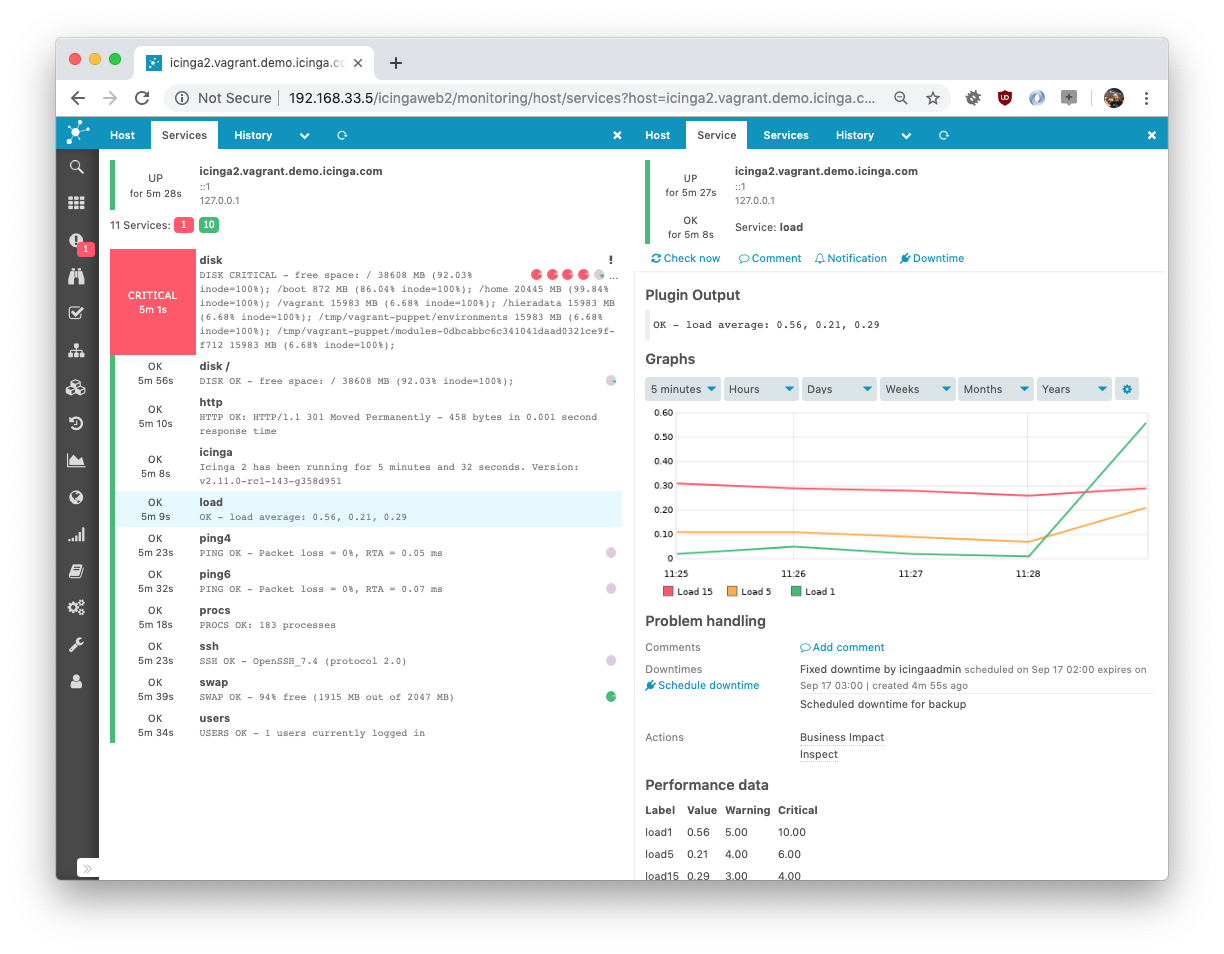
Icinga is an open-source monitoring stack that continuously checks the health and performance of networks, servers, applications, and services, then alerts teams when a problem appears. It runs primarily on Linux, with official support for Debian, Ubuntu, RHEL, SLES, and Amazon Linux, and its modular architecture allows monitoring to scale from a single instance to large deployments.
The software is free to use, though official packages for enterprise Linux distributions require a repository subscription, and enterprise support plans with SLAs are available separately. Icinga provides migration paths from Nagios-based setups, where existing configurations can often be reused or adapted rather than rebuilt.
Key features include:
- Infrastructure monitoring in one interface: Networks, servers, cloud resources, and containers are monitored in real time from a single view, with dashboards showing comprehensive metrics.
- Monitoring plugins: A monitoring check plugin directory supplies checks for hosts, applications, and network devices, and the plugin model allows checks to be added as needed.
- Notifications and filtering: Alerts are raised for critical issues, with advanced filtering used to cut down notification noise.
- Clustering and high availability: Distributed monitoring scales to thousands of hosts, with clustering that removes a single point of failure.
- APIs and automation: APIs and automation support integration with existing workflows, alongside configuration tooling such as Ansible, Puppet, and Terraform.
- Metrics, logs, and OpenTelemetry export: Integrations with Elasticsearch, Graylog, Graphite, InfluxDB, and Grafana add storage and trend analysis, and native OpenTelemetry export connects Prometheus, VictoriaMetrics, and other OTEL-compatible backends.
- Cloud and hybrid monitoring: Monitoring covers private, public, and hybrid environments, including AWS, Azure, and Kubernetes clusters.
- Reporting and access controls: Business reporting, a teamwork manager for shared workflows, accessibility features, and ITSM and incident response integrations with PagerDuty, Jira, and similar platforms.
Limitations (as reported by users on G2):
- Interface: Reviewers ask for improvements to the web interface and how monitoring data is presented.
- Command line dependency: Faster installation and configuration are described as requiring comfort with the command line.
- Documentation: Reviewers note that documentation could go further in helping resolve problems quickly.
- Learning curve: The breadth of features and the layered templating model make the platform harder for newcomers, since objects such as notifications and users are built through chained templates.
- Setup complexity: Installation effort varies by operating system, and some reviewers report incomplete documentation for less common distributions.

Source: Icinga
8. Checkmk

Best for: Discovery-driven monitoring across hybrid infrastructure
Strengths: Service auto-discovery, 2,000+ integrations, distributed sites
Things to consider: Advanced configuration and custom checks take learning
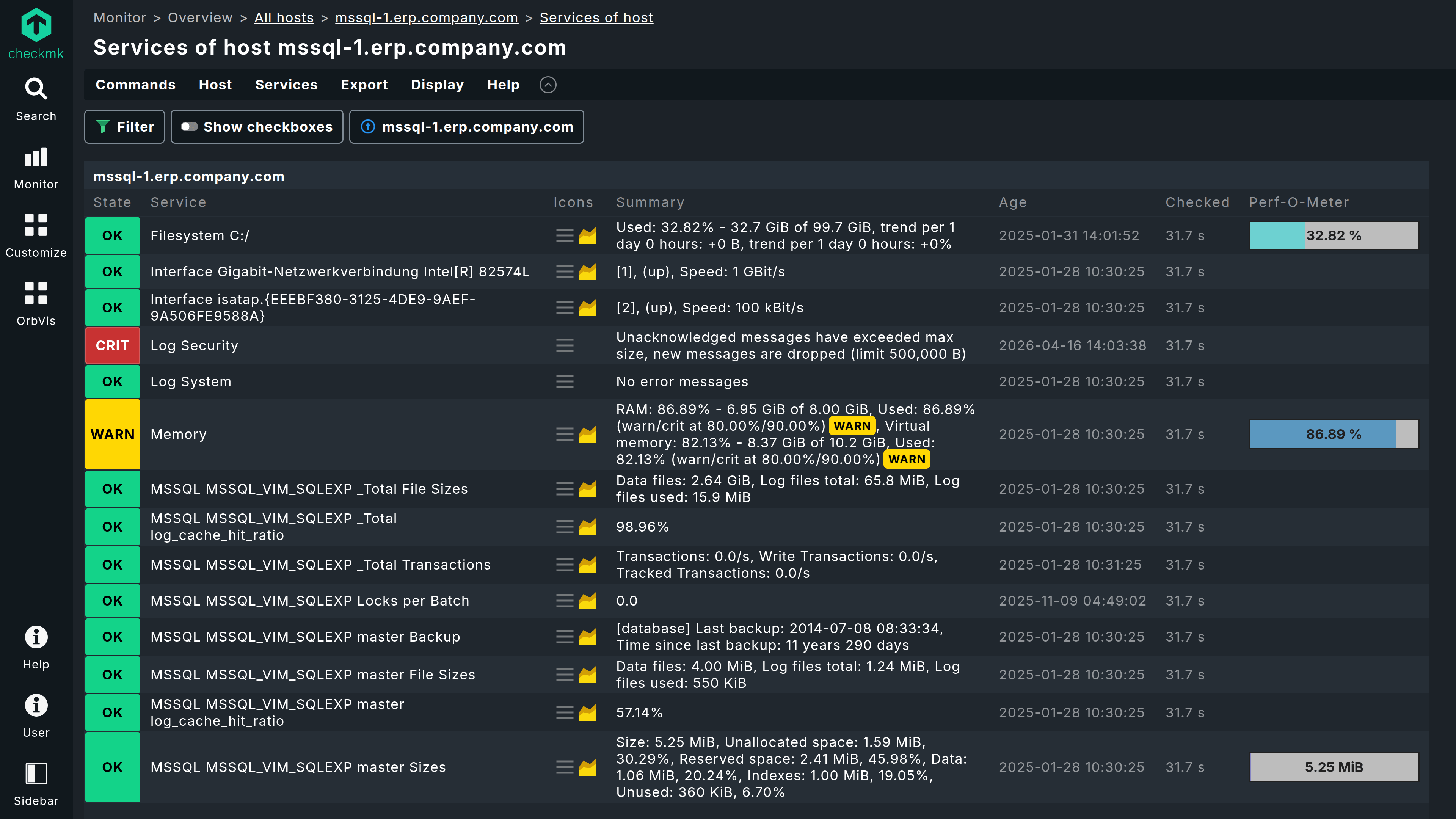
Checkmk is a monitoring and observability platform available as a free open-source Community edition for small infrastructures and as commercial Cloud, Pro, and Ultimate editions. It brings infrastructure monitoring, application observability, and synthetic monitoring into one platform and can be deployed self-hosted on premises, as a virtual or physical appliance, or as a managed service.
Data collection combines standard collectors such as OpenTelemetry and Syslog, agentless methods including SNMP and vendor APIs, and lightweight agents for host-level detail, with all three approaches working together. Automated discovery finds hosts and services as they appear across servers, networks, storage, cloud workloads, containers, and applications.
Key features include:
- Automated agent rollout and host discovery: The Agent Bakery builds, customizes, and distributes agent packages centrally across thousands of hosts, and discovery detects new hosts and services the moment they appear.
- Mixed collection methods: OpenTelemetry and Syslog collectors, agentless SNMP and vendor API collection, and agents all operate within the same platform.
- Pre-configured alerts and orchestration: Intelligent threshold defaults with built-in noise reduction, native ServiceNow, Jira, and Slack routing, and automated remediation workflows triggered via API.
- Dashboards, SLA reporting, and dependency mapping: Built-in dashboards and SLA reports, with business service monitoring that maps service health to the underlying components.
- Distributed deployments: Hundreds of remote sites connect to one central instance, and each site operates independently for local resilience while reporting centrally.
- Multi-tenancy and data segregation: Data is isolated across business units, regions, or third-party clients using role-based access and enforced boundaries.
- Security and governance: Transport encryption, access controls, and agent signing are included, communication requires no open inbound ports, and fully air-gapped deployments are supported.
- Integration library and AI assistance: More than 2,000 integrations, an “Explain with AI” root cause summary inside alerts, and an MCP server that exposes live site data to AI tools with role-based access and read-only permissions.
Limitations (as reported by users on G2):
- Learning curve for advanced use: Advanced configuration options and custom check development take time for new users to work through.
- Documentation depth: Reviewers say the documentation has not kept pace with the platform’s growth into enterprise monitoring.
- Interface modernization: Parts of the interface are described as functional but in need of modernization, particularly for less technical users.
- Rules management at scale: Multi-site setups with many tags and groups accumulate large numbers of rules that become difficult to follow.
- Reporting output: Creating reports is described as cumbersome, with error messages during content creation and formatting adjustments needed for PDF output.

Source: Checkmk
Conclusion
Nagios provides a flexible approach to infrastructure monitoring through host and service checks, plugins, configurable thresholds, and alerting. However, selecting a monitoring platform should depend on the environment and operational requirements, including infrastructure scale, cloud and on-premises coverage, automation, dependency visibility, reporting, and administrative effort. Teams should also consider how easily a platform integrates with existing systems and whether it can scale without creating excessive configuration, maintenance, or alerting overhead.